agent 驱动的看板:每个工作区一块看板、每个任务一个 agent 会话,以及带护栏的人机协作流程(Backlog → To Do → In Progress → Review → Done)。
安装
# npm 包(预构建)
dsh plugin --profile web add dsh-kanban-flow
# GitHub 源码(首次需按提示配置 allowBuilds 构建授权后重试)
dsh plugin --profile web add github:thomasvvugt/dsh-kanban-flow
装任何插件都等于在你的机器上跑第三方代码,权限和你本人一样大——能读你的文件、用你的凭据、访问网络,工具审批管不到它。GitHub 来源的插件还会在安装时执行构建脚本——pnpm 默认拦截,所以安装可能停在 ERR_PNPM_GIT_DEP_PREPARE_NOT_ALLOWED 或 ERR_PNPM_IGNORED_BUILDS;dsh 会打印出需要添加的确切键名,把它加进该 profile 的 pnpm-workspace.yaml 的 allowBuilds 下,重跑一次即可装上。放行构建本身就是一次信任判断:请只安装可信来源,并尽量锁定 commit(github:owner/repo#sha)。
README
该插件的 README 只有英文版本。
Agent-driven kanban boards for DeepSeek Harness — one board per workspace, one task session per item.
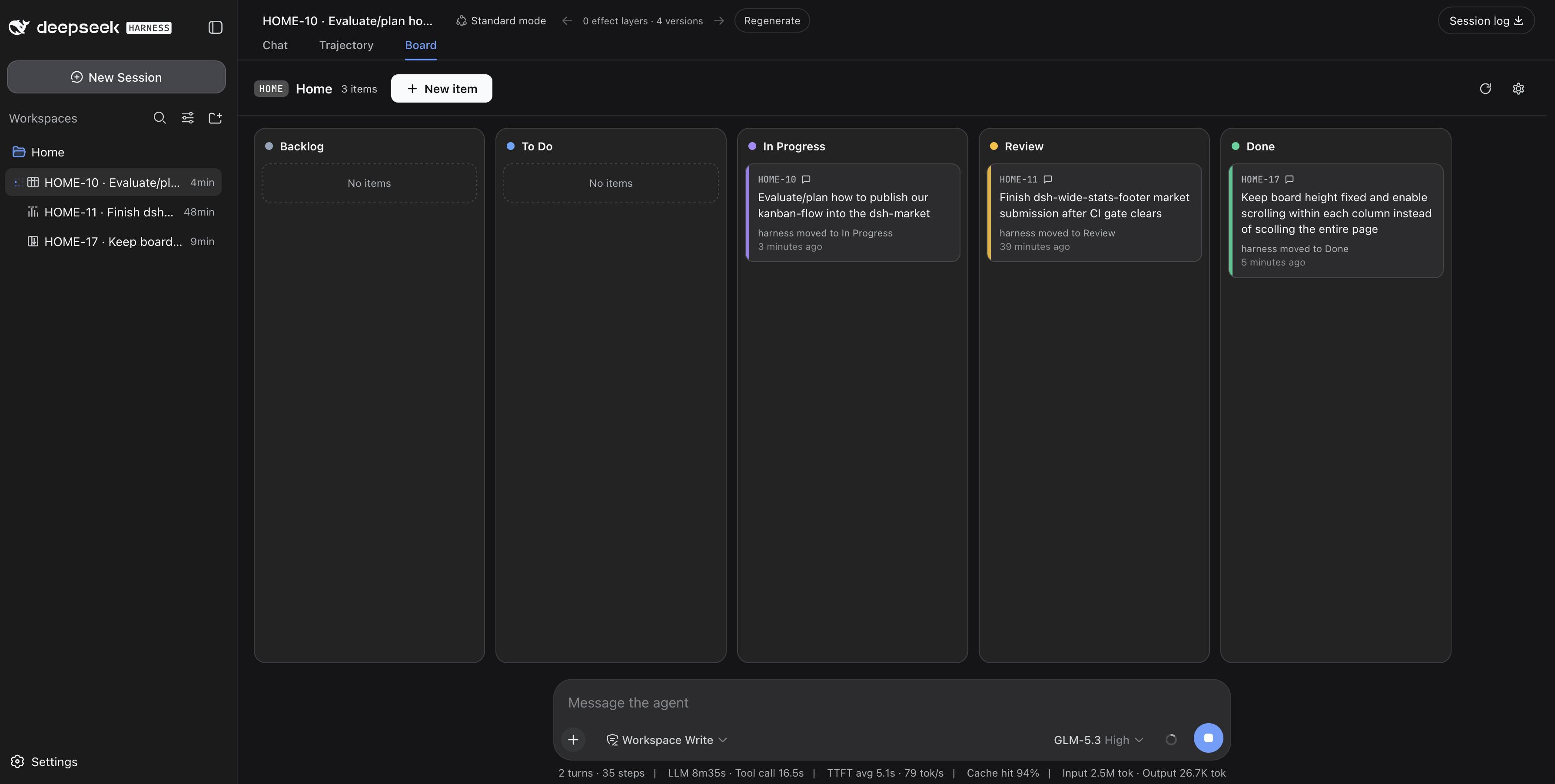

You triage. The agent picks up, works, narrates every step in its own task session, and asks for review when it needs you. The board enforces the workflow — not vibes: agents can't grab unassigned work, can't skip your review, and can't close items behind your back.
Partially based on the dsh-kanban plugin architecture, rebuilt around a multica-style human/agent workflow.
Quick start
# from npm — prebuilt, no build-approval step
dsh plugin --profile web add dsh-kanban-flow

# or straight from GitHub
dsh plugin --profile web add github:thomasvvugt/dsh-kanban-flow
Restart dsh web afterwards. Confirm with dsh --profile web --dump-config (look for the dsh-kanban-flow layer). A kanban icon appears next to every workspace in the sidebar — click it to open that workspace's board.
The workflow
Columns are fixed: Backlog → To Do → In Progress → Review → Done
| Who | Move | Meaning |
|---|---|---|
| Human | Backlog → To Do | Hand the item to the agent (the only pickup trigger) |
| Agent | To Do → In Progress | Confirm pickup, start work |
| Agent | In Progress → Review | Needs a human (state the question in the task session / conversation) |
| Agent | Review → In Progress | Resume straight after human feedback |
| Agent | Done → In Progress | Reopen when the human replies on a finished item |
| Agent | In Progress → Done | Self-evaluated completion — only when confirmation is OFF |
| Human | Review → Done / In Progress | Accept / rework |
The host plugin enforces all of this in the kanbanflow_move_item tool — agents never move items into To Do, never complete from Review, and illegal moves are rejected with an explanation.
Replying in the item's task session while it is in Review sends the agent back to work: it acknowledges, moves the item Review → In Progress and addresses the feedback in the same turn.
Highlights
Boards live where your work lives
- One board per workspace, opened in-app on the conversation's Board tab — no popups
- A kanban icon next to every workspace in the sidebar; workspace clicks open boards (toggleable back to session expansion in Settings → Plugins → Kanban Flow)
- Board views poll every 3s, so agent moves appear on the board while you watch
One agent session per item
- Pickup creates a task session named
CODE-12 · Item name— click a card to jump straight into it - Progress narration lives in that session; each card shows a compact latest-activity line ("harness moved to Done · 3 seconds ago")
- Hover a card for the agent's latest status: agents set a short status note (
kanbanflow_set_status) at the end of every turn — what's done, what's next or what they need from you. It appears in a tooltip on hover (and in the item dialog); cards without a status yet show no tooltip - Session-less workspaces aren't left out: their board pins into the current conversation's Board tab (header shows the board's code and workspace) and goes native once that workspace gets its own conversation
Yours to tune
- Board code per workspace (2–6 chars): item ids like
API-3,DKF-17; existing ids stay stable when you change it - Require confirmation to complete work (per board, gear menu): when on, the agent can never reach Done — you complete by dragging Review → Done
- Items carry id, name and description; deleting an item archives its task session
Looks at home in DSH
- Light & dark via DSH design tokens, with
light-dark()column accents: slate/blue/violet/amber/emerald - Responsive board: the five columns scale to fill the available width on desktop and stack vertically on tablet/phone (container queries, so it reacts to the board's real width — sidebars and all)
- Animated create/move transitions, drag lift with column highlight, agent-changed cards pulse — all respecting
prefers-reduced-motion - English end-to-end
Agent tools
kanbanflow_get · kanbanflow_get_item · kanbanflow_create_item · kanbanflow_update_item ·
kanbanflow_move_item · kanbanflow_delete_item · kanbanflow_set_status · kanbanflow_set_code
Storage & trust
- One JSON file per workspace:
<workspace>/.dsh-kanban-flow.json— schema-versioned, migrated automatically, corrupt files backed up before being reset. Your board data never leaves the workspace. - Ships prebuilt: no install-time scripts, no build step on install, and the only network call the client makes is to the plugin's own same-origin
/api/kanban-flowroute.
Development
npm install
npm test          # vitest unit tests (state machine, ids, links, migrations)
npm run typecheck
npm run build     # rebuild lib/client.js (committed) via esbuild
CI runs tests, typecheck and build on every push; tagging a version (v*) publishes it to npm.
Notes
- Built against DSH 0.1.1-rc.2. The sidebar icon and workspace-click behavior anchor on its sidebar markup (no per-row slot exists yet); they degrade to native behavior if the markup changes, and icons only appear in the expanded sidebar.
Credits & license
- Architecture partially based on dsh-kanban by its author — thank you.
- MIT — see LICENSE.
链接
同类插件
loopx-project/loopx#dsh-loopx-plugin★ 6233
LoopX——面向长周期 Agent 的提供商中立、本地优先状态内核与控制平面:在 DeepSeek Harness 执行层之上持久化 Goal、Todo、门禁、证据、配额、恢复与交接状态;插件负责引导安装 CLI 与技能、准入有界的同会话续跑,并为精确绑定的工作循环提供本地 GoalBar。
Q00/ouroboros#integrations/dsh-plugin★ 6196
通过 DSH MCP 客户端挂载 Ouroboros 的纯配置包,在 DSH 中提供 36 个涵盖需求访谈、Seed、执行、评估与演化流程的工具。
chuspeeism/dashi-taskboard#deepseek-harness★ 3329
把当前已安装并运行中的 Codex Taskboard 嵌入 DeepSeek Harness 侧边栏,并通过 Launcher 运行时描述文件连接,而不是使用固定端口。
NanmiCoder/dsh-agent-teams★ 2012
AgentTeams 多智能体团队。
EthanYoQ/AI-Novel-Writer#dsh-ai-novel-writer★ 1393
安装专用 AI 小说创作预设与工作台:提供带修订号的本地项目资产、紧凑侧边工作台,以及需要原生审批的逐文件变更。
tong-io/tongflow#dsh-tongflow★ 1042
基于 TongFlow 的“片场”插件,用于图片、配音、音乐与视频制作:agent 为每个资产生成 TongFlow 工作流文件(.tongflow.json)并通过 TongFlow 插件执行,内嵌工作流画布,按镜头/角色/take 组织项目,附漫剧模板;以 @tongflow 开头的会话进入 Studio 界面。
社区评论
评论公开保存在 GitHub Discussions。加载评论会连接 GitHub 和 Giscus;发表内容需要 GitHub 账号。