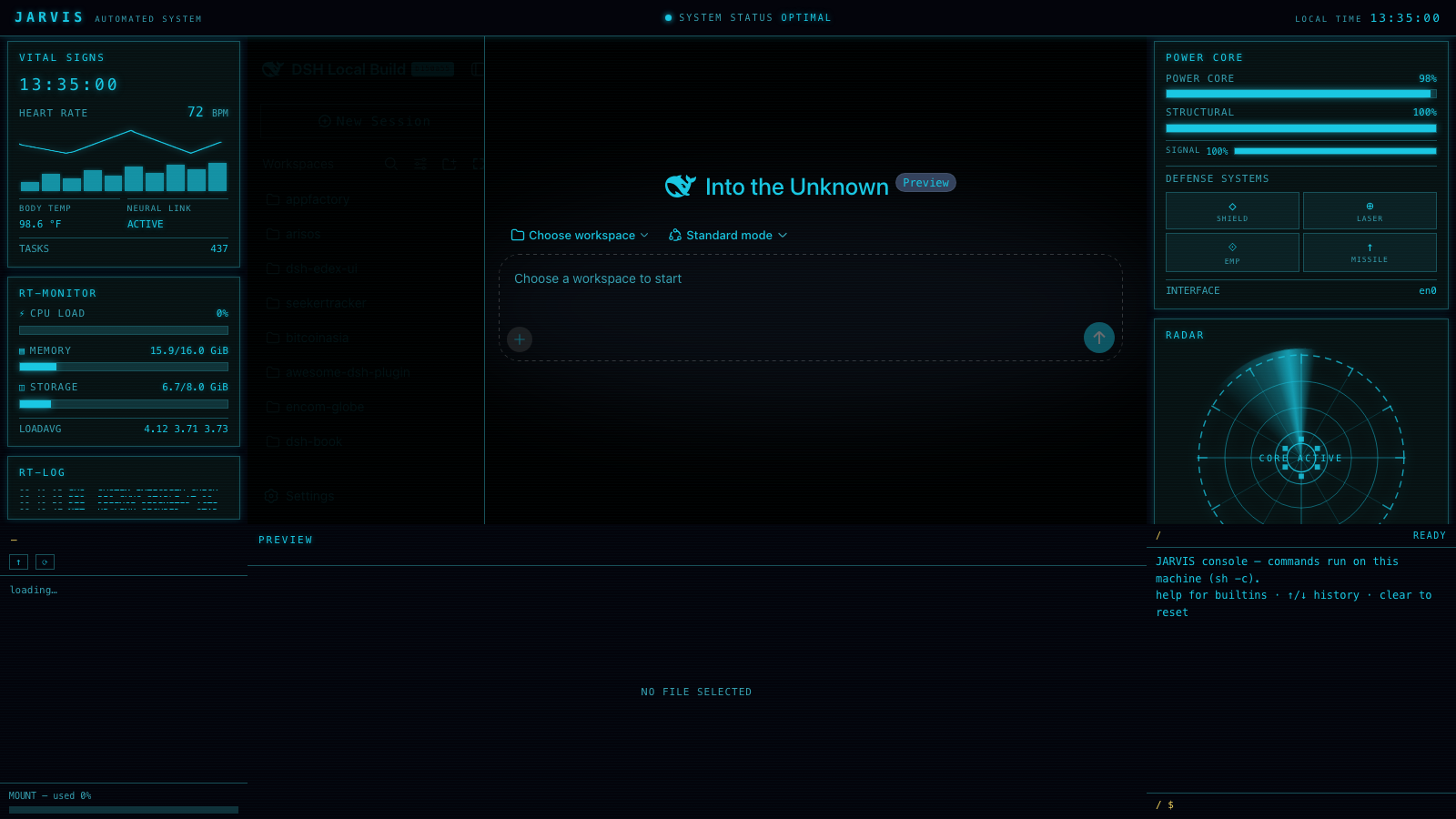
在 DSH Web 界面上叠加 JARVIS 风格科幻 HUD 外壳:电光青色 VITAL SIGNS 生命体征 / RT-MONITOR 实时监控 / RT-LOG 事件日志左栏,右侧 POWER CORE 能源核心仪表、旋转扫描的 RADAR 雷达盘与上下行流量图,左下文件系统浏览器(带文件预览),以及带 JARVIS 头部横幅、跟随当前工作区的终端风格输入框。
安装
# npm 包(预构建)
dsh plugin --profile web add @danielng23/dsh-edex-jarvis-ui
# GitHub 源码(首次需按提示配置 allowBuilds 构建授权后重试)
dsh plugin --profile web add github:ph4310822/dsh-edex-jarvis-ui#path:/packages/bundle
装任何插件都等于在你的机器上跑第三方代码,权限和你本人一样大——能读你的文件、用你的凭据、访问网络,工具审批管不到它。GitHub 来源的插件还会在安装时执行构建脚本——pnpm 默认拦截,所以安装可能停在 ERR_PNPM_GIT_DEP_PREPARE_NOT_ALLOWED 或 ERR_PNPM_IGNORED_BUILDS;dsh 会打印出需要添加的确切键名,把它加进该 profile 的 pnpm-workspace.yaml 的 allowBuilds 下,重跑一次即可装上。放行构建本身就是一次信任判断:请只安装可信来源,并尽量锁定 commit(github:owner/repo#sha)。
README
该插件的 README 只有英文版本。
DeepSeek Harness eDEX-UI shell plugin — a terminal-inspired overlay for the DSH web GUI. Adds a classic eDEX-UI layout: system telemetry left bar, world-map right bar, filesystem browser, and a terminal-styled composer input — all wrapped around the original UI.
Features
- Left bar — system overview panel: CPU, memory, swap, processes, platform info, and thermal/power state, with per-core CPU sparklines
- Right bar — network status + encom-globe world view with endpoint markers and spline links, plus a dual up/down traffic chart with grid
- Bottom-left — filesystem browser: directory listing, file preview, storage bar, with folder/file SVG icons in the theme green
- Bottom-right — file preview pane (text, code, images)
- Terminal-styled composer — flattened input capsule, green block caret, and
a
~/<workspace>path prompt at the left edge of the input area - Workspace-follow — the dir panel and prompt track the active conversation's workspace; switching sessions navigates both the filesystem browser and the prompt
- Green-on-black skin — token overrides recolour the entire original UI to terminal green, without touching the user's theme preference
Installation
From the harness checkout:
pnpm dsh plugin --profile web add @danielng23/dsh-edex-jarvis-ui
Packages
| Package | Host/Client | Description |
|---|---|---|
@danielng23/dsh-edex-jarvis-ui |
— | Installable bundle (cordis.patch.yml) |
@danielng23/dsh-jarvis-client-ui-edex |
client | The eDEX shell frame and all panels |
@danielng23/dsh-jarvis-client-ui-theme-terminal |
client | Appearance → Terminal theme row |
@danielng23/dsh-jarvis-host-system-metrics |
host | System telemetry RPC endpoints |
License
MIT
链接
同类插件
zhu1090093659/dsh-web#packages/dsh-task-board★ 8597
侧边栏多列任务看板:卡片交给真实 DSH 智能体会话执行,支持 cron 定时(Host 侧到点执行,关浏览器也生效)。
zhu1090093659/dsh-web#packages/dsh-web-all★ 8597
DSH Web UI 插件与皮肤合集:任务看板、git 图、右侧面板、远程移动端 UI、桌宠、实时 token 统计与皮肤中心。
MeteorNOX/DeepSeek-Balance-Whale-Widget★ 4424
右下角常驻的小鲸鱼挂件:余额、今日已用与每轮对话消耗(含峰谷价),余额预警与今日预算的泡泡内容都可编辑;泡泡点击序列模块化自定义,支持并列加权 A/B、随机台词与随机图片;内置 30+ 厂商模板(OpenAI / OpenRouter / Kimi / 硅基流动 / 方舟 / 智谱 / MiniMax 等),按模型查余额与订阅额度;另有任务结束音效、导入音频、自定义角色与资源管理。数据全在本机,无遥测。
ccch1mneyyy/dsh-TUI★ 4268
Claude Code 风格全屏终端 UI:像素鲸鱼顶栏、实时工作状态行、思考流式展开。
omdsh-dev/DSH-better-sidebar★ 4098
侧边栏完整工作台:内置文件渲染编辑、终端、Git 与子代理,支持三方插件注册新 Tab。
Devin-AXIS/deepseek-design#deepseek-idesign★ 1445
可视化设计工作室,支持网站、App 原型、海报、信息卡、报告和杂志的模板创建、元素编辑、选区级 AI 草稿衔接与导出。
社区评论
评论公开保存在 GitHub Discussions。加载评论会连接 GitHub 和 Giscus;发表内容需要 GitHub 账号。