实时按任务追踪 token 成本的小部件:高峰/低谷定价时段、涨价后预测成本、可排序的每任务成本表、多币种(默认 COP/USD/CNY,另有 40 余种)与汇率,以及一键流式解释高成本任务。
安装
# GitHub 源码(首次需按提示配置 allowBuilds 构建授权后重试)
dsh plugin --profile web add github:mov-eax-eax/dsh-token-anxiety
装任何插件都等于在你的机器上跑第三方代码,权限和你本人一样大——能读你的文件、用你的凭据、访问网络,工具审批管不到它。GitHub 来源的插件还会在安装时执行构建脚本——pnpm 默认拦截,所以安装可能停在 ERR_PNPM_GIT_DEP_PREPARE_NOT_ALLOWED 或 ERR_PNPM_IGNORED_BUILDS;dsh 会打印出需要添加的确切键名,把它加进该 profile 的 pnpm-workspace.yaml 的 allowBuilds 下,重跑一次即可装上。放行构建本身就是一次信任判断:请只安装可信来源,并尽量锁定 commit(github:owner/repo#sha)。
README
English | 中文
Token Anxiety 小部件实时追踪对话中每个任务的成本。它运行在聊天输入框下方的栏位中,显示 DeepSeek 的定价状态(高峰/低谷)、每个任务的 token 用量与成本,并可一键分析 token 花在了哪里。以 bundle 形式安装,不引入任何额外依赖。
兼容性: 本版本(0.1.1)面向 DeepSeek Harness ≥ 0.1.1-rc.2。会话投影使用现代 API(stateSchema + wire)注册;在更早的 harness 版本(≤ 0.1.0-rc.7)上,小部件会挂载但无数据,因为那些版本仍期望 pre-wire 的注册结构。
安装(从任意目录;路径为绝对路径):
# 从 npm(已发布包)
dsh plugin --profile web add dsh-token-anxiety

# 或从本地检出
dsh plugin --profile web add /path/to/dsh-token-anxiety
然后重启 dsh web 并刷新页面即可。
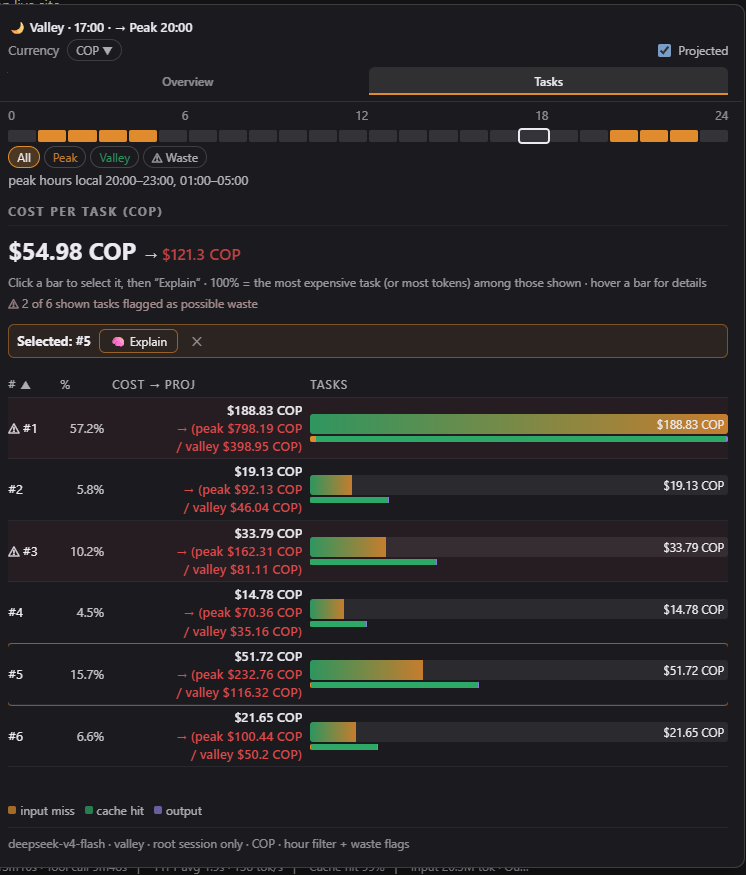
- 实时定价状态 — 按你的时区显示高峰/低谷时段,并附带本地时间
- 成本概览 — 当前成本,以及涨价后的预测值(红色显示)
- 按任务明细 — 可排序的每任务成本表与 token 用量;悬停任意一行查看详情
- 货币支持 — 默认 COP / USD / CNY,另支持 40 余种货币的区域化格式(¥、€、£、₩…)与实时汇率
- 一键解释 — 以对话语言流式生成简短的成本分析
- 深色/浅色与英文/中文 — 跟随 harness 的主题与语言设置
以可安装的 bundle 形式打包(通过 profile 组合,重启后仍然保留)。
使用
悬停或点击 composer 栏中的小部件以打开弹窗。
概览 — 以大号数字突出显示对话总成本(当前值,以及勾选「预测」后红色显示的涨价后预测值),并展示任务数、请求数与 token 数,以及定价表:每个模型的当前价与预测价,其中预测的高峰/低谷值在低于当前价时显示为绿色,高于当前价时显示为红色。
任务 — 可排序的每任务成本表(按
#或占比 %)。每行显示该任务的总成本;勾选「预测」后,成本列会以两行显示预测的高峰/低谷拆分。悬停任意一行可查看详情提示;点击条形选中任务并运行解释。货币 — 选择任一已启用货币(默认 COP / USD / CNY);打开选择器可查看汇率、添加更多货币(国旗 + 搜索)或移除货币。
解释 — 每个任务一次小型 LLM 调用;分析结果流式呈现,并使用对话语言书写(先以一次小型 LLM 调用检测该任务用户消息的 ISO 639-1 语言代码)。结果为约 60–100 词的简短报告,共四行标签 ——
Wanted:/Happened:/Avoid:/Next time:—— 以粗体强调标签的富文本渲染。
安全
完整评审见 SECURITY.md。摘要:三个 HTTP 路由仅接受 POST,限制请求体大小,校验所有输入,并应用与 harness /api 前缀相同的浏览器信任围栏(loopback/trustedHosts Host、同源 Origin、sec-fetch-site);解释路由带有防滥用限流与硬超时,模型卡死也不会阻塞路由;不会向会话日志写入任何内容;零运行时依赖。
工作原理
cordis.patch.yml向 profile 插入一行插件条目(token-anxiety)。- Node 端(
index.js)注册tokenAnxiety会话投影:对 ROOT 会话日志的纯折叠,累计每个任务的 token 用量、成本、工具信号与浪费标记。不访问网络,不调用模型。 - 同一 Node 端在 harness webserver(
ctx.webServer)上注册POST /token-anxiety/explain:小部件的「解释」按钮通过 fetch() 调用它,由 host 运行 LLM 分析。响应以 NDJSON 流式返回({"delta": …}行),小部件边生成边渲染;host 端 60s 超时会中止卡死的 LLM 流(client 端在 70s 中止并显示可见错误)。语言由一次小型 LLM 调用返回 ISO 639-1 代码判定。不会向会话日志追加任何内容,因此会话始终可加载。 POST /token-anxiety/pricing-sync(同一信任围栏)抓取官方 DeepSeek 定价页面,转为可读文本,并配合严格的 JSON schema 交给一次 LLM 调用 —— 代码中不做布局抓取。模型返回 CNY/百万 token 的当前价、高峰/低谷价、北京高峰时段与生效日期;host 校验后以固定 7.0 汇率将 CNY 换算为 USD,并写入 bundle 旁的pricing.override.json。重启后覆盖层合并到内置默认值之上(模型列表由当前定价派生,新模型会自动出现),且由定价派生的stateVersion会丢弃过期的投影缓存。- 浏览器端(
lib/client.js)是手工编写的 client bundle,通过window.__ModuleLoader__.load({ id, factory })注册 —— 无打包器、无压缩。它通过useProjection('tokenAnxiety')读取投影,并在浏览器中根据投影内置的定价配置计算高峰/低谷状态、本地时间与小时条。
安装
从 npm 安装(已发布包)
该包已发布到公共 npm registry:
npm view dsh-token-anxiety # 验证:包名、版本 0.1.x、MIT
安装到 harness profile(该命令会将其加入 profile 的 package.json 依赖及其
dsh.profile.bundles 列表):
dsh plugin --profile web add dsh-token-anxiety
或在任意 npm 项目中直接安装:
npm install dsh-token-anxiety
# 或锁定精确版本:
npm install dsh-token-anxiety@0.1.0
注意:要让
dsh web加载小部件,profile 必须依赖该包并在dsh.profile.bundles中列出它 ——dsh plugin --profile web add dsh-token-anxiety会自动完成这两步。
从本地检出安装
# 从任意目录;路径为绝对路径
dsh plugin --profile web add /path/to/dsh-token-anxiety
无论哪种方式安装后
重启 web server(dsh web 或你习惯的启动方式)。必须重启,因为 bundle 行与 client 启动图在启动时组合。
编辑后更新
bundle 已 pnpm-link 到 profile 中,因此直接编辑本目录文件即可生效于 HOST 端;client 图只在重启后才会加载变更后的 bundle。修改文件后请重启 web server。移除:
dsh plugin --profile web remove dsh-token-anxiety
配置
货币
默认为 COP / USD / CNY。可从选择器添加或移除货币(约 40 种货币目录中的任意代码);已启用列表通过 POST /token-anxiety/currencies 持久化到 pricing.override.json(重启后加载)。汇率以 USD 为基准,由定价同步刷新并缓存 24 小时。
定价
价格内置于 PRICING(index.js)作为默认值,可从官方 DeepSeek 定价页面刷新:
curl -X POST http://127.0.0.1:3080/token-anxiety/pricing-sync -H "Content-Type: application/json" -d '{}'
该路由抓取页面,让模型提取当前价与高峰/低谷价(CNY → USD 按固定 7.0 汇率;同时解析北京高峰时段与生效日期),并写入 pricing.override.json。FX 汇率(open.er-api.com,无密钥)随同步携带,按日缓存。重启后将覆盖层合并到默认值之上;由定价派生的 stateVersion 会丢弃过期的投影缓存。
语言
当 harness 语言设置为 zh 时,整个界面以中文渲染,默认货币为 CNY。跟随 harness 的 locale.preference 设置。
已知限制
- 仅 ROOT 会话任务。 投影折叠按会话同步进行,因此旧动态插件按需聚合的子智能体树无法在此折叠。子智能体对话不会出现在小部件中。(
explain_task工具本身会聚合完整的子智能体树,因此其对话上下文是完整的。) - 解释是直接 host 路由,而非智能体回合。 小部件的按钮 fetch()
/token-anxiety/explain(由 host 端在 harness webserver 上注册),host 内联运行分析 LLM 调用。分析存于小部件的组件状态,因此页面刷新后不会保留,也不属于会话日志(有意为之:它从不写入自定义会话事件,会话始终可加载)。explain_task工具保留用于对话式提问(「为什么这个任务这么贵?」)。该路由位于 harness/api前缀之外,因此自行应用相同的浏览器信任谓词(loopback 或trustedHostsHost、同源 Origin、sec-fetch-site);部署仍仅绑定 loopback。 - 定价内置且带日期。 内置
PRICING为默认值;刷新需在 host 端执行(POST /token-anxiety/pricing-sync,见配置),会写入pricing.override.json;重启后合并到默认值之上。手工编辑PRICING仍然有效;stateVersion由当前定价派生,任何变更都会丢弃持久化的投影缓存行。
文件
dsh-token-anxiety/
├── package.json            # dsh.bundle + dsh.client 清单,exports["./client"]
├── cordis.patch.yml        # 一行插件条目
├── index.js                # host 端:投影折叠 + explain_task 工具 + /token-anxiety/explain + /token-anxiety/pricing-sync + /token-anxiety/currencies 路由
├── lib/client.js           # 浏览器端:小部件(手写 bundle)
├── test/core.test.js       # 单元测试(npm test,node --test)
├── SECURITY.md             # 安全评审
├── shots/                  # UI 截图(聊天区域、概览、任务、解释 — 深色/浅色)
└── LICENSE                 # MIT
pricing.override.json是运行时状态(已 gitignore):保存同步后的定价、FX 汇率与已启用货币列表。
许可
MIT © mov-eax-eax
链接
同类插件
bowenliang123/dsh-context★ 1573
DSH 上下文洞察面板:Context 仪表盘 + /context命令 + Context 浏览器,查看 Context的分类组成、内容详情、演进趋势、压缩/注入事件、统计等一站式 Context 全生命周期管理。
Han-1413141/dsh-cost-meter★ 349
会话与当日 API 费用统计、预算图框(已用%)、官方余额、历史看板,支持峰谷计价与官方价格一键同步。
wssfk12138/dsh-damage-pulse★ 224
在 DSH Web 界面追踪 DeepSeek Token 用量、单次与会话费用及账户余额,并显示缓存感知的扣费动画。
zh667/TokenLedger★ 202
侧边栏用量面板:把 Token 归属到实际服务该请求的中转站,站点从已有的 provider 配置中读出,无需额外配置;含今日/本月/累计三窗口、按站点与模型下钻、一年活跃度热力图,以及 New API / Sub2API / DeepSeek 余额。
Ychris12138/dsh-usage-stats★ 169
多供应商用量看板:按供应商/模型统计 Token 与日期下钻,统一展示账户余额,并追踪 OpenCode Go / Z.ai 订阅额度。
PolinniZhong/dsh-personal-center★ 120
DeepSeek Harness 个人中心:跨会话用量统计、按模型成本估算、全局自定义指令、外观全局字号、数据驱动的桌面宠物(位图/矢量皮肤)与会话状态概览,纯本地离线运行。
社区评论
评论公开保存在 GitHub Discussions。加载评论会连接 GitHub 和 Giscus;发表内容需要 GitHub 账号。