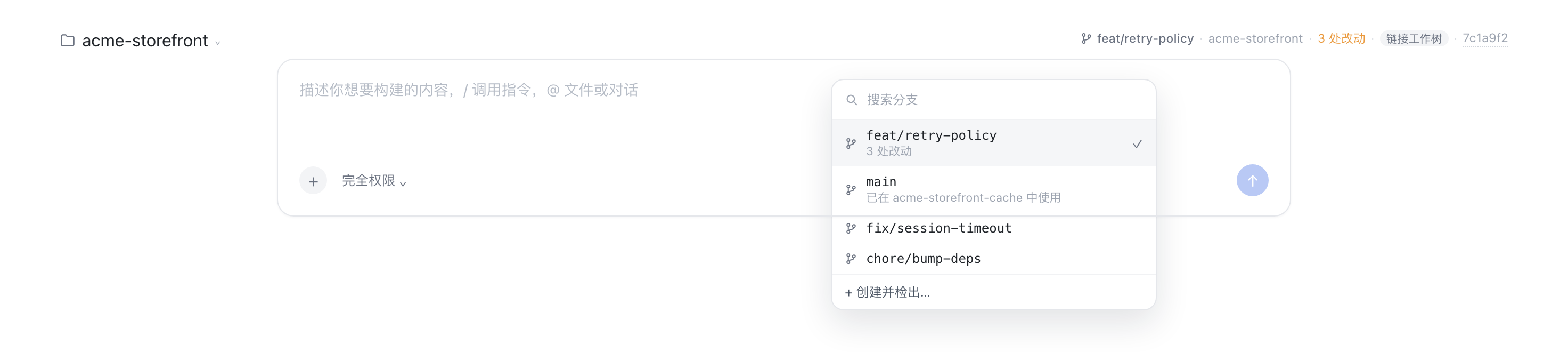
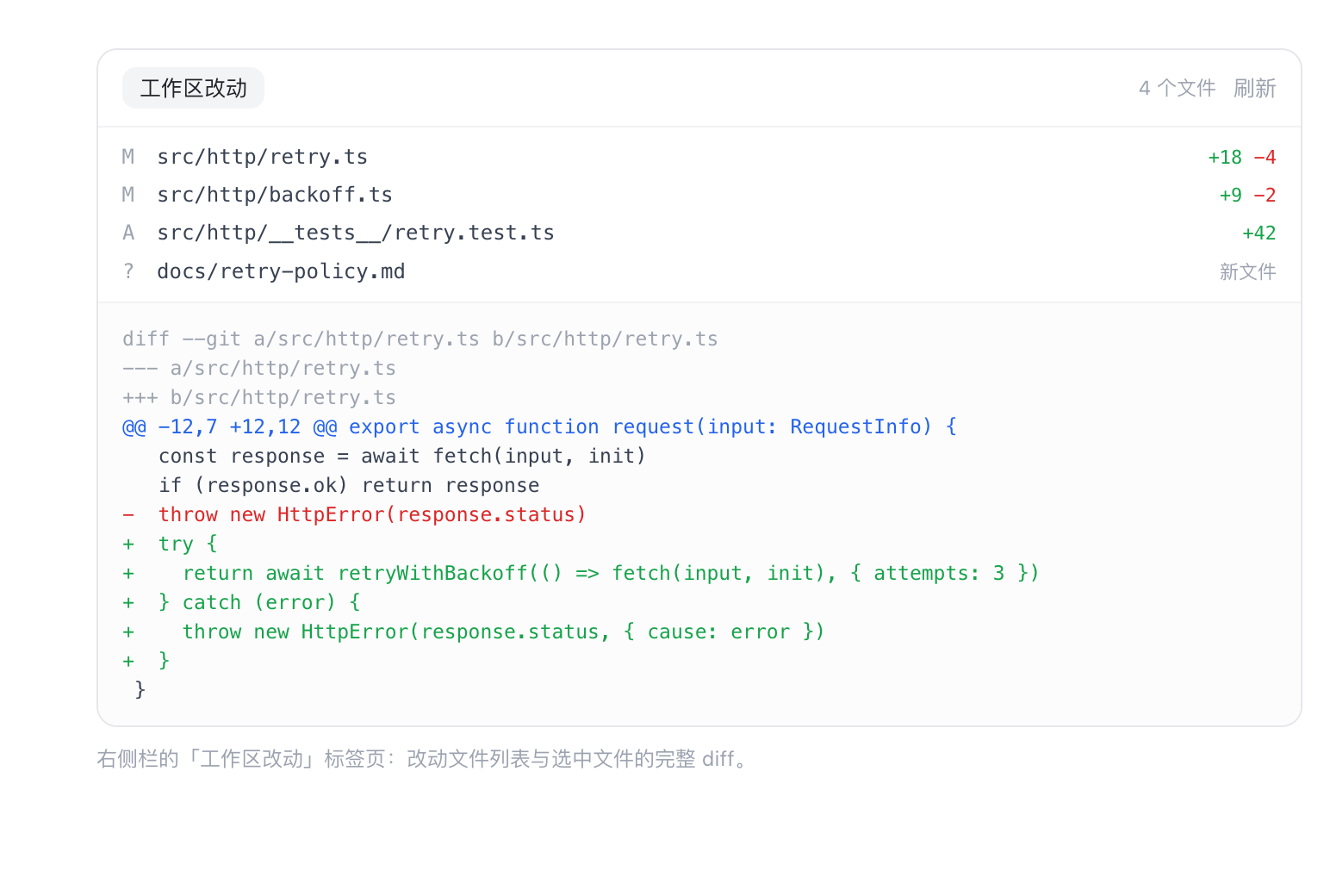
在输入框那一行显示仓库、分支、改动数与短 SHA;点分支可搜索、切换或新建分支,点改动数在右侧边栏打开逐文件 diff 面板。
安装
# GitHub 源码(首次需按提示配置 allowBuilds 构建授权后重试)
dsh plugin --profile web add github:mjnhmd/dsh-git-bar
装任何插件都等于在你的机器上跑第三方代码,权限和你本人一样大——能读你的文件、用你的凭据、访问网络,工具审批管不到它。GitHub 来源的插件还会在安装时执行构建脚本——pnpm 默认拦截,所以安装可能停在 ERR_PNPM_GIT_DEP_PREPARE_NOT_ALLOWED 或 ERR_PNPM_IGNORED_BUILDS;dsh 会打印出需要添加的确切键名,把它加进该 profile 的 pnpm-workspace.yaml 的 allowBuilds 下,重跑一次即可装上。放行构建本身就是一次信任判断:请只安装可信来源,并尽量锁定 commit(github:owner/repo#sha)。
README
该插件的 README 只有英文版本。
A DeepSeek Harness bundle that adds one ambient row above the composer showing the Session's git context:
⎇ main · dsh-git-bar · 3 处改动 · ↑2 ↓1 · a1b2c3d
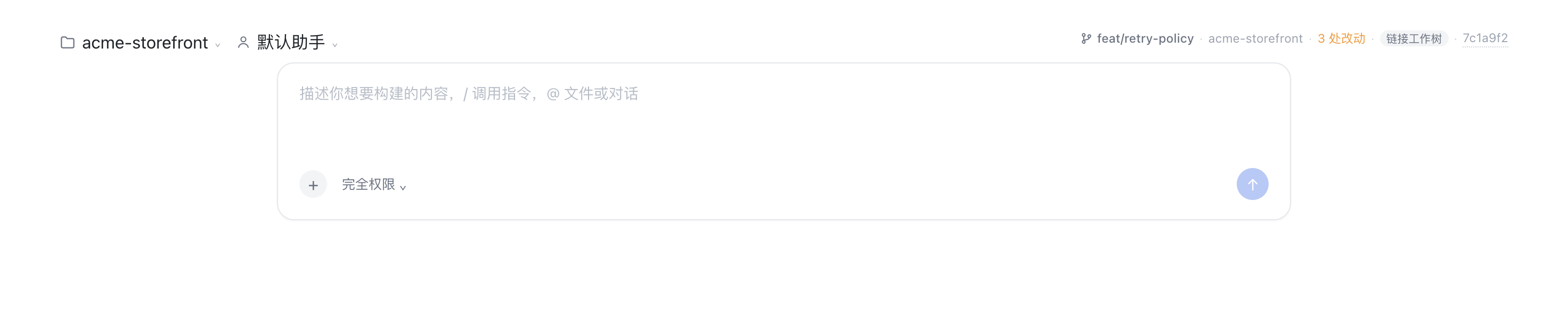
- repository name and root
- the branch the Session runs on, or
游离 HEAD/detached HEADwhen the HEAD is not on a branch - working-tree change totals (staged / unstaged / untracked in the tooltip)
- ahead/behind counts against the upstream branch
- short commit id — clickable, opening that commit on the origin remote
(GitHub, GitLab and Bitbucket commit routes are all handled) — and a
链接工作树/linked worktreemarker when the directory is a linkedgit worktree, or aN 个工作树marker when the repository has more than one - every label is plain text: select it and copy it
The row refreshes every 8 seconds, on window focus, and when the Session changes. Reading it never touches the repository; two interactions deliberately do:
- click the branch — a searchable popover lists every local branch with its upstream, ahead/behind and dirty state, marks the current one, and can check one out or create a new branch from the current HEAD;
- click the change count — opens the working tree in the right-hand Sidebar
as a
工作区改动tab: the changed files, and the unified diff of the file you pick, untracked files included (diffed against/dev/null); - click the worktree marker — lists every worktree of the repository with its
branch and change count.
在此新建会话opens a new Session in that worktree's directory (a worktree is a directory, so a Session is never moved between them), and复制路径copies it. A branch already checked out in another worktree is greyed out in the branch popover with the worktree that holds it, instead of failing with git'salready checked outafter the click. - nothing here silently scrolls away: a drag that selects text does not also open a popover.
Install
From a Git checkout (pin the commit; add &path:/plugins/dsh-git-bar when the
package is not at the repository root):
dsh plugin --profile desktop add "git+https://github.com/mjnhmd/dsh-git-bar.git#2d3e0408376127196a4c18e8b1e1c79389a166f5"
From npm, or from a local checkout during development:
dsh plugin --profile desktop add dsh-git-bar@0.1.0
dsh plugin --profile desktop add link:/absolute/path/to/plugins/dsh-git-bar
The Host half loads at startup, so restart the app after the first install; the Client half is served on the next page load.
Publish
Market index (add under 插件 → 发现 → 添加索引源): https://mjnhmd.github.io/dsh-git-bar/market/index.json
DSH ships no index of its own: a plugin market is a JSON file (format 1) you host
yourself and add under 插件 → 发现 → 添加索引源. docs/market-index.example.json
is a ready template, scripts/validate-index.mjs checks it against DSH's own
validator, and docs/PUBLISH.zh.md walks through pushing the
repository, publishing to npm, and publishing the index.
Host API
GET /dsh-git-bar/info?sessionId=<id>[&dir=<absolute path>]
- admitted through the harness browser session (
ctx.connection.requestRejection), so it is unreachable without the GUI's own credentials; - the directory comes from the Session store first;
diris only a fallback for a Session the store does not know, and must be absolute; - replies with
{ dir, repository: null | { root, name, branch, detached, sha, commitUrl, remote, dirty: { changed, staged, unstaged, untracked }, upstream, ahead, behind, worktree: { linked, mainRoot, count } } }; commitUrlis derived from theoriginremote: the scp,ssh://,git://and http(s) forms all normalize tohttps://host/owner/repo, and the commit route follows the host (GitHub/commit/, GitLab/-/commit/, Bitbucket/commits/). A local-path remote yieldsnulland the id stays plain text.
GET /dsh-git-bar/branches?sessionId=<id> — { branches: [{ name, current, upstream, ahead, behind, subject, checkedOutIn }], dirty }, where
checkedOutIn is the worktree path holding that branch (a branch can only be
checked out in one worktree at a time).
GET /dsh-git-bar/worktrees?sessionId=<id> — { root, worktrees: [{ path, name, branch, detached, sha, bare, locked, prunable, main, current, dirty }] }, each
worktree costing one status call for its own change count.
POST /dsh-git-bar/branches/checkout { sessionId, branch } — { branch, created: false }; 409 when git refuses (local changes, unknown branch).
POST /dsh-git-bar/branches/create { sessionId, name, from? } — { branch, created: true }; the name is validated with git check-ref-format --branch.
GET /dsh-git-bar/changes?sessionId=<id> — { files: [{ path, status, staged, additions, deletions }], dirty, truncated }, capped at 500 files.
GET /dsh-git-bar/diff?sessionId=<id>&path=<repo-relative>&staged=0|1 — { path, staged, diff, truncated }, capped at 200 000 characters.
Every git call uses an argument array (no shell), a 4 s timeout, and a 256 KiB buffer cap. Nothing is watched and nothing is cached.
Layout
| File | Role |
|---|---|
index.js |
Host half: the read-only JSON route over the git executable |
client.js |
Client half: the conversation.input.dock row, the branch popover, and the Sidebar tab body |
cordis.patch.yml |
Bundle patch that inserts the git-bar row |
locale/*.json |
Display metadata for Plugin Manager / Settings |
icon.svg |
Plugin icon |
docs/PUBLISH.zh.md |
How to distribute the plugin (Git / npm / a market index) |
docs/market-index.example.json |
Format-1 market index template |
scripts/validate-index.mjs |
Rejects an index the way DSH's reader would |
链接
同类插件
zhu1090093659/dsh-web#packages/dsh-git-graph★ 9321
输入框上方提供 Git 分支选择器,并把分支泳道与提交历史画成图谱,沿着时间线找到任意变更。
Akimiya-z/codex-guard#dsh★ 133
在 DeepSeek Harness 内做提交前的 Pull Request 卫生检查:扫描当前改动中的 TODO 残留、硬编码密钥与非规范提交信息。
Cerbur/clutch-dsh#clutch-dsh-worktree★ 34
为 DSH Web UI 增加按 Git Worktree 组织 Session 的视角,同时继续由 DSH 管理原始 Project 和 Session 数据。
lehhair/dsh-diff-viewer★ 26
PiUI 风格 diff 查看器,替换 write/edit 工具调用的默认 DiffBlock。
DamonKoy/dsh-web-ui#dsh-git-graph★ 25
dsh web GUI 会话头部栏的 Git 分支选择器与提交图。
PerryLink/dsh-github★ 24
官方级 GitHub CI 集成:composite action.yml、轮询 PR 评审机器人(幂等行内评论 + status-check 门禁)以及 PR/issue 工具,所有写入走人工审批门。
社区评论
评论公开保存在 GitHub Discussions。加载评论会连接 GitHub 和 Giscus;发表内容需要 GitHub 账号。