把发给模型的每张图片按单边像素上限(默认 2000 px)压缩:通过包装 attachments.readImageRequest 实现,修复 Anthropic 多图请求报错,且不改动已存储的图片。
安装
# npm 包(预构建)
dsh plugin --profile web add @lucagiftzek/dsh-request-image-cap
# GitHub 源码(首次需按提示配置 allowBuilds 构建授权后重试)
dsh plugin --profile web add github:lucagiftzek/dsh-request-image-cap
装任何插件都等于在你的机器上跑第三方代码,权限和你本人一样大——能读你的文件、用你的凭据、访问网络,工具审批管不到它。GitHub 来源的插件还会在安装时执行构建脚本——pnpm 默认拦截,所以安装可能停在 ERR_PNPM_GIT_DEP_PREPARE_NOT_ALLOWED 或 ERR_PNPM_IGNORED_BUILDS;dsh 会打印出需要添加的确切键名,把它加进该 profile 的 pnpm-workspace.yaml 的 allowBuilds 下,重跑一次即可装上。放行构建本身就是一次信任判断:请只安装可信来源,并尽量锁定 commit(github:owner/repo#sha)。
README
该插件的 README 只有英文版本。
Clamps every image sent to the model to a pixel cap, so many-image requests stop failing.
dsh plugin --profile web add @lucagiftzek/dsh-request-image-cap
# or from GitHub: dsh plugin --profile web add github:lucagiftzek/dsh-request-image-cap
# then restart dsh web
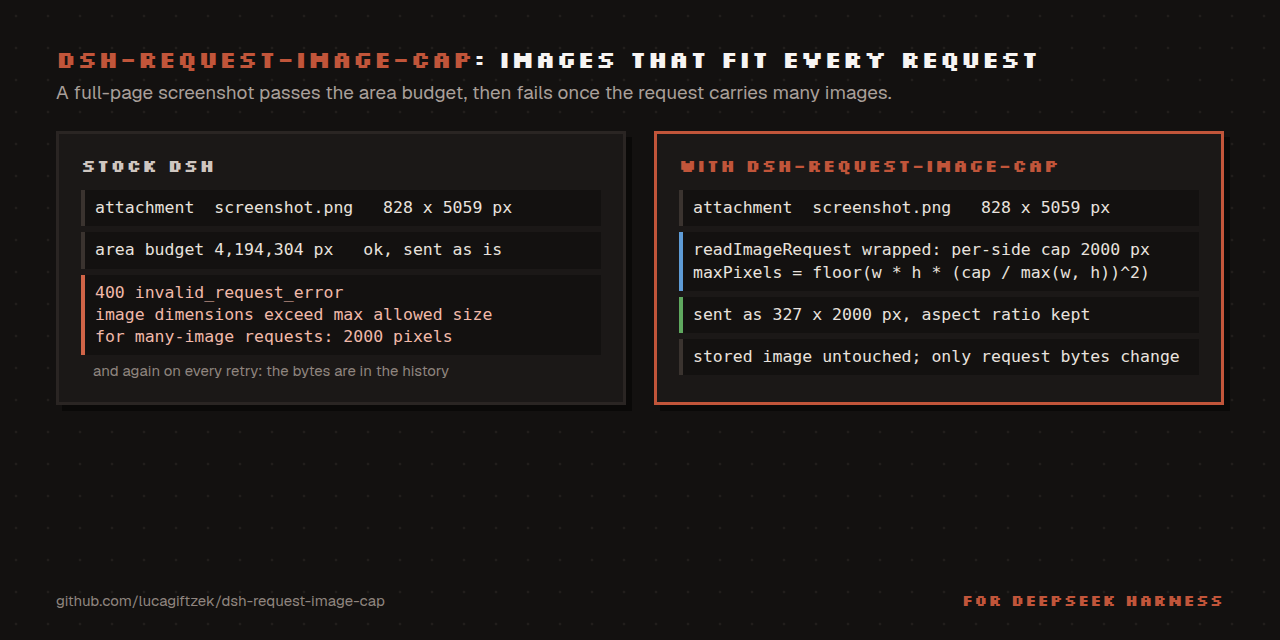
Keep every image DSH transmits inside the provider's per-side pixel limit.
Why
The Anthropic Messages API accepts 8000 px per side for an ordinary request but only 2000 px per side once the request carries many images:
400 invalid_request_error
messages.10.content.5.image.source.base64.data: At least one of the image
dimensions exceed max allowed size for many-image requests: 2000 pixels
Both DSH image gates are area gates:
| stage | knob | default |
|---|---|---|
ingest (dsh-attachment-local) |
normalizedImageMaxPixels / normalizedImageMaxDimension |
4 194 304 px² / 8192 px |
request projection (requestImageDimensions) |
llm-pi-ai.requestImagePixelBudget |
4 194 304 px² |
A full-page screenshot therefore lands in the store as e.g. 828x5059 (inside
the area budget, far outside the per-side rule) and is transmitted verbatim.
The failure is latent: the same image is fine in a short request and only kills
a long session later, then on every retry, because the bytes are already in the
history.
What it does
Wraps ctx.attachments.readImageRequest(ref, policy, signal) (the single seam
every LLM adapter uses to materialise request bytes) and converts a per-side
cap into the area budget that produces it:
maxPixels' = floor(w * h * (cap / max(w, h))^2)
requestImageDimensions scales by sqrt(maxPixels/(w*h)) and floors, so the
long edge lands at or under cap, aspect ratio preserved.
- retroactive: acts at request time, so histories that already contain oversized images become sendable again;
- non-destructive: stored bytes are untouched, only the model copy shrinks;
- never widens a route policy that is already tighter;
- fails safe: if a core upgrade renames the seam it logs a warning and stays inert rather than throwing at boot;
- free: Anthropic resizes anything above ~1.15 MP server-side anyway.
Config
- id: request-image-cap
  config:
    enabled: true
    maxDimension: 2000   # 64..8192
    verbose: false       # log every clamp
Install
Install from npm: dsh plugin --profile web add @lucagiftzek/dsh-request-image-cap, or from GitHub: dsh plugin --profile web add github:lucagiftzek/dsh-request-image-cap.
dsh plugin --profile web add @lucagiftzek/dsh-request-image-cap
# or from GitHub: dsh plugin --profile web add github:lucagiftzek/dsh-request-image-cap
The package declares dsh.bundle, so it joins dsh.profile.bundles and its own patch
inserts the entry. Override values with a - id: request-image-cap row (config: only, no
second insert) in your profile's cordis.patch.yml. It mounts at boot: restart dsh web
after installing; the log then shows request-image-cap: active, 2000px per side.
A local checkout works too: dsh plugin --profile web add link:/absolute/path/to/dsh-request-image-cap.
Requires Node 22.18 or newer; used on DSH 0.1.5 and 0.2.1 (the seam is ctx.attachments.readImageRequest).
Test
npm test # node --test test/*.test.js
The tests call the real requestImageDimensions of your installed DSH. They find it under
DSH_GLOBAL_PREFIX or the global prefix of the running node; set DSH_GLOBAL_PREFIX if
DSH lives elsewhere.
Proof on the worst object found in a real attachment store:
828x5059 (388 KB) → 327x1998 (79 KB).
Upstream
The real fix belongs in requestImageDimensions: a route-owned
maxDimension beside maxPixels. This plugin is the local stand-in.
When something goes wrong
- Ask your agent to load the
image-cap-doctorskill (copyskills/image-cap-doctorinto~/.dsh/skills/once, how). - Symptom-first guide: docs/TROUBLESHOOTING.md.
- Messages and log lines: docs/ERRORS.md.
More plugins by the same author
All of them are open source and run on DeepSeek Harness 0.2.x (several on 0.1.5 too).
| Plugin | What it does |
|---|---|
| dsh-artifacts | An Artifacts tab that lists the files an agent produced and previews them in place, plus a template library agents can use and extend |
| dsh-mail | Mail client and agent mail tools: IMAP, POP3, SMTP and OAuth2 accounts, scheduled and bulk sends with unsubscribe handling |
| dsh-note-keeper | Obsidian-compatible Markdown notes in the sidebar with search, graph, audio notes and transcription, OCR and client-side encryption |
| dsh-phone | SMS and calls (Twilio, SIP via Asterisk) with call audio through your own server, live voicemail and Telegram |
| dsh-voice | Read-aloud, dictation and language-aware speech with 23 TTS and STT providers, per-language routing and word highlighting |
| dsh-orchestrator | Agent swarm and task orchestration: an Orchestrate tab, orch_* tools, runners, provider cards and a machine API |
| dsh-workspace-rail | A workspace-first sidebar rail: pinned chats, projects as folders, live Recents, search and unread markers |
| DSH-Idle-Watchdog | Idle-chat nudges and an authenticated HTTP API that posts a prompt into any chat |
| dsh-plugin-updates | Update checker that only offers releases your running DSH core can load |
| dsh-subagent-tiering | Subagents default to a cheaper sibling of the parent model unless the agent names a route |
| dsh-fs-reobserve | Ends self-inflicted stale-file errors after an agent's own shell commands |
| dsh-request-image-cap (this one) | Clamps every image sent to the model to a pixel cap, fixing many-image request errors |
| dsh-seal | An encrypted channel in front of DSH: a Go reverse proxy plus a service worker that seal all DSH browser traffic |
Built by Luca Tzekos, who also makes Job Opportunities API: employer-direct job data with per-field provenance you can verify yourself, free to read and available as an API. If this plugin is useful to you, a star on this repo or a look at jobopportunitiesapi.org is the best thanks.
链接
同类插件
Ebony-Vinyl/dsh-our-free-model★ 55971
为 dsh 接入免费模型车道(含 DeepSeek V4.1 Flash、Kimi K3 等),无需登录、注册或填写 API Key,并提供本地 OpenAI 兼容网关、降级路由与用量看板。
dingminhua/dsh-connect-workbuddy★ 993
将本机登录的 WorkBuddy 模型(国内版与国际版)接入 DSH,每次刷新按上游目录读取每个模型的积分倍率,支持逐模型图片输入开关、带自动换号的账号池、手动每日签到,以及卡片与输入框里的只读积分胶囊读数。
Alice-Marx/dsh-model-router★ 603
为 DeepSeek Harness 规划有依赖的工作包,将其分配给已配置的模型 API 或支持的厂商 CLI,并提供费用预览。
V1ki/dsh-plugin-subscriptions★ 546
把 ChatGPT(Codex)、Claude、Grok 订阅当作 DeepSeek Harness 的 LLM 提供方:设置页登录、模型目录、用量展示,以及 image_generate、video_generate 与 x_search 工具。
Mars-Sea/dsh-commandcode-provider★ 446
非官方 Command Code 模型接入插件:注册 `commandcode` 路由,带实时模型目录与推理强度支持。
FishBottle7/opencode2dsh★ 384
将 OpenCode Zen 免费模型接入 DeepSeek Harness,无需 API Key。
社区评论
评论公开保存在 GitHub Discussions。加载评论会连接 GitHub 和 Giscus;发表内容需要 GitHub 账号。