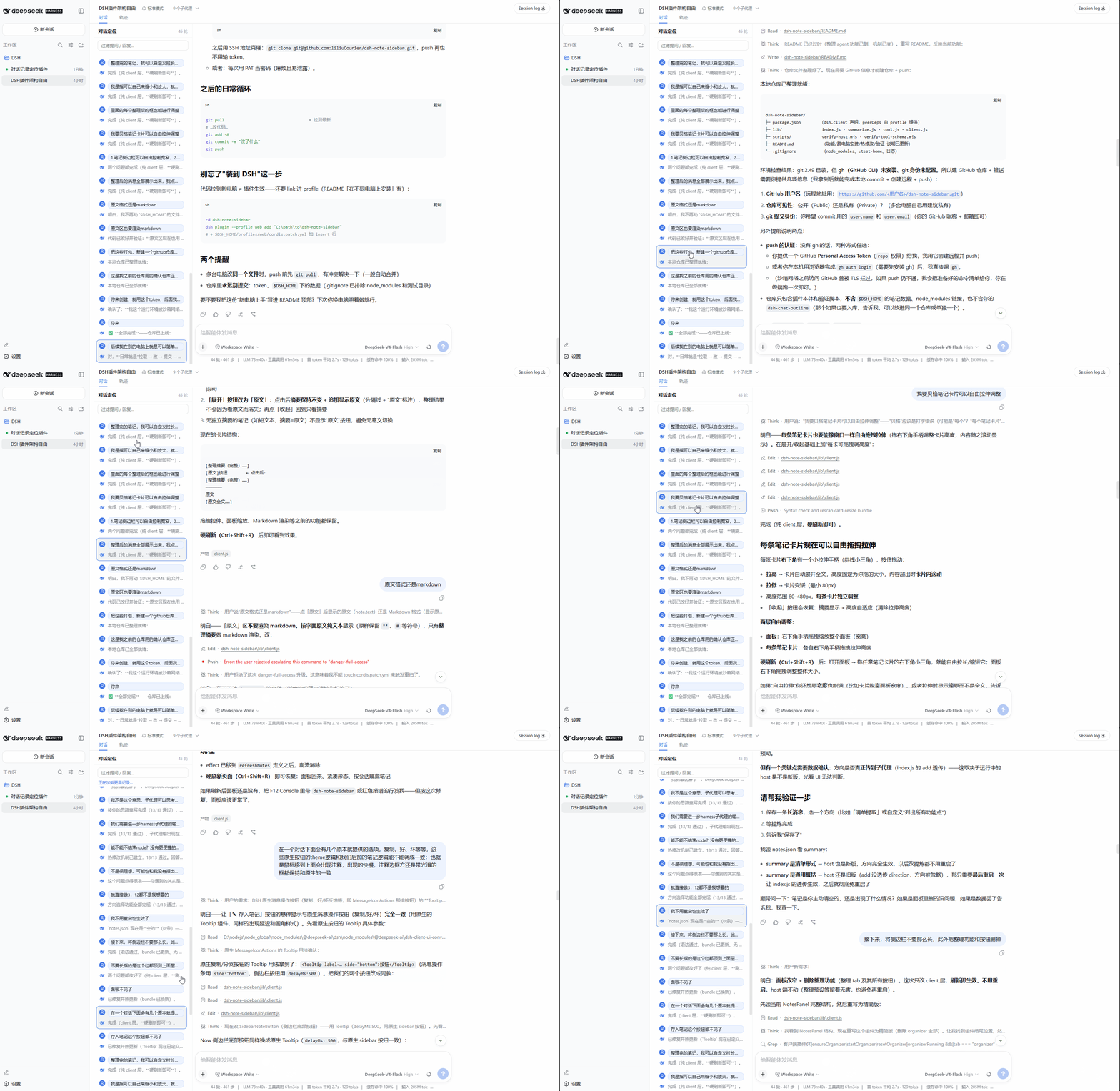
对话栏左侧常驻大纲:按轮次列出提问与最后回复,关键词过滤与一键跳转,轻便/全面两种历史模式,按住 Ctrl/Shift 单击可跳到轨迹视图同一位置。
安装
# npm 包(预构建)
dsh plugin --profile web add dsh-chat-outline
# GitHub 源码(首次需按提示配置 allowBuilds 构建授权后重试)
dsh plugin --profile web add github:liliuCourier/dsh-chat-outline
装任何插件都等于在你的机器上跑第三方代码,权限和你本人一样大——能读你的文件、用你的凭据、访问网络,工具审批管不到它。GitHub 来源的插件还会在安装时执行构建脚本——pnpm 默认拦截,所以安装可能停在 ERR_PNPM_GIT_DEP_PREPARE_NOT_ALLOWED 或 ERR_PNPM_IGNORED_BUILDS;dsh 会打印出需要添加的确切键名,把它加进该 profile 的 pnpm-workspace.yaml 的 allowBuilds 下,重跑一次即可装上。放行构建本身就是一次信任判断:请只安装可信来源,并尽量锁定 commit(github:owner/repo#sha)。
README
对话一长就没法一直往上翻了。这个插件在对话栏左侧常驻一个侧边栏式对话大纲:按轮次列出每次提问和该轮最后一条回复,点击任意一条即可跳回对应位置,按住 Ctrl/Shift 再点击则直接切到轨迹视图的同一位置。蓝框会始终标记你当前读到哪,随滚动跟随;面板可一键收起以恢复对话全宽。顶部的输入框可以按关键词过滤。它有两种模式:默认的轻便模式只反映官方已加载的窗口,零额外开销;需要完整大纲时可切换到全面模式,进入即主动加载全部历史(长会话会有明显的性能开销)。
中文文档
功能特性
- 按轮次列出每次提问与该轮最后一条回复,点击即定位
- 侧边栏式固定布局(260px),窄窗口也常驻显示,对话内容自动让位
- 头部 ▸ 一键收起/展开,收起即恢复对话全宽
- 蓝框标记当前阅读位置,随滚动跟随
- 两种模式,头部按钮切换,选择会被记住:
- 轻便模式(默认):大纲只显示官方已加载窗口的内容,零额外加载;
- 全面模式:进入即主动加载全部历史,覆盖整个会话
- 按住 Ctrl/Shift 点击条目,直接切到轨迹视图并定位到对应位置
- 支持按关键词过滤
- 跟随 DSH 明暗主题
安装
通过 npm 安装:
dsh plugin --profile web add dsh-chat-outline
或者从 GitHub 安装:
dsh plugin --profile web add github:liliuCourier/dsh-chat-outline
然后在 $DSH_HOME/profiles/web/cordis.patch.yml 中加入:
- insert:
    - id: dsh-chat-outline
      name: dsh-chat-outline
最后刷新浏览器页面即可生效。
从 0.1.6 起包内已含
dsh.bundle,通过 npm / GitHub 安装会自动激活,无需手动追加上面的 insert;手动 insert 仅对旧版本或源码目录安装适用。
使用
面板常驻在对话栏左侧,为固定宽度的侧边栏式布局(对话内容自动让位)。每条记录分「我」和「助手」两行,点击任意一行即可跳转。按住 Ctrl/Shift 再点击,会切到轨迹视图并定位到同一位置。面板头部右侧的 ▸ 可收起面板恢复对话全宽,收起后点聊天区左缘的 ☰ 重新展开。面板顶部的输入框支持按关键词过滤。
轻便模式与全面模式
面板头部右侧有两个按钮:模式按钮(轻便/全面)切换两种模式,选择会被记住;最右侧的 ▸ 按钮可收起(缩进)对话定位边栏、恢复对话全宽,收起后点聊天区左缘的 ☰ 重新展开。

- 轻便模式(默认):大纲只显示官方已加载窗口里的内容,插件不做任何额外的历史抓取,零性能开销。窗口只覆盖最近的一部分时,大纲里也只有最近的轮次;想看到更早的内容,点聊天区官方自带的「加载更早记录」按钮把窗口往前扩,大纲会跟着变全。
- 全面模式:进入会话(对话加载完成后)即主动分页加载全部历史,大纲覆盖整个会话,不用去点官方的加载按钮。
⚠️ 性能警告:全面模式会在后台逐页解析整个会话历史,长会话(尤其是带大量工具调用和流式输出的会话)会明显拖慢加载与整体响应,请按需开启。轻便模式没有这个问题。
对话与轨迹的跳转关系
对话和轨迹是同一个会话的两种视图:对话按轮次展示内容,轨迹按请求、工具调用和时间线展示执行过程。大纲面板里的每条记录都对应会话中的一个位置,两种跳转方式落点是同一个:
- 单击:在对话视图里滚动定位到对应消息;
- 按住 Ctrl 或 Shift 单击:切到轨迹视图,定位到同一位置。提问行落在轨迹中的用户消息行,回复行落在这轮最后一条回复所在行。
两个视图共用同一套事件编号,所以无论当前在哪个视图,跳转后看到的都是同一条内容。
常见问题
Windows 下 Git 报 SSL 凭据错误:
fatal: schannel: AcquireCredentialsHandle failed: SEC_E_NO_CREDENTIALS。这是 Windows Git 的 schannel 后端问题,改用 OpenSSL 后端即可:git -c http.sslBackend=openssl clone https://github.com/liliuCourier/dsh-chat-outline.git或者直接使用 npm 方式安装,不经过 Git。
安装时提示 peer dependency 警告:pnpm 报
unmet peer dependency属正常,DSH 的 web bundle 已包含这些模块,不影响使用。安装后看不到面板:先刷新浏览器页面,必要时重启
dsh web。服务端清单会即时更新,但已经打开的页面需要刷新一次才会加载插件。
兼容性
适配 DSH 0.1.0-rc.7(已在 rc.7 上验证,暂未发现问题;rc.6 同样可用)。DSH 升级后如遇异常,请更新插件。
许可证
English Documentation
Long conversations make scrolling back painful. This plugin keeps a persistent sidebar outline on the left of the chat column: every question and its final reply, listed by turn, with one-click jump to any of them — hold Ctrl/Shift while clicking to jump straight to the same spot in the Trajectory view. A blue frame always marks where you are reading and follows the scroll, and the panel can be collapsed with one click to restore full chat width. The input at the top filters by keyword. It has two modes: the default Light mode only reflects the officially loaded window with zero extra overhead; switch to Full mode for a complete outline, which actively loads the whole history on entry (noticeable overhead on long sessions).
Features
- Lists every question and its final reply by turn; click any entry to jump
- Fixed-width sidebar layout (260px) that stays visible on narrow windows; the chat content makes room for it
- Collapse/expand with the header ▸ button; collapsing restores full chat width
- A blue frame marks your current reading position and follows the scroll
- Two modes, toggled by the button in the panel header; the choice is remembered:
- Light mode (default): the outline only reflects the officially loaded window — zero extra loading;
- Full mode: actively loads the whole history on entry, covering the entire session
- Ctrl/Shift+click an entry to jump straight to that position in the Trajectory view
- Filter by keyword
- Follows the DSH light/dark theme
Installation
Via npm:
dsh plugin --profile web add dsh-chat-outline
Or from GitHub:
dsh plugin --profile web add github:liliuCourier/dsh-chat-outline
Then add the following to $DSH_HOME/profiles/web/cordis.patch.yml:
- insert:
    - id: dsh-chat-outline
      name: dsh-chat-outline
Finally, refresh the browser page.
Since 0.1.6 the package ships a
dsh.bundlemanifest, so npm / GitHub installs activate automatically — the manual insert above is only needed for older versions or source-folder installs.
Usage
The panel stays on the left of the conversation as a fixed-width sidebar (the chat content makes room for it). Each entry has a "Me" row and an "AI" row; click either to jump. Hold Ctrl/Shift and click to switch to the Trajectory view at the same position. The ▸ button at the right of the panel header collapses the panel to restore full chat width; the floating ☰ button on the left edge of the chat re-expands it. The input at the top filters the list by keyword.
Light mode and Full mode
Two buttons sit on the right of the panel header: the mode button (Light/Full) switches between the two modes and remembers your choice; the rightmost ▸ button collapses (retracts) the outline sidebar to restore full chat width — the floating ☰ on the left edge of the chat re-expands it.
- Light mode (default): the outline only shows what is inside the officially loaded window. The plugin does no extra history fetching, so there is zero performance overhead. When the window only covers the recent part of the session, the outline only lists the recent turns; to see older entries, click the official "load older records" button in the chat to extend the window — the outline follows.
- Full mode: as soon as the conversation finishes loading, the plugin actively pages through the entire history so the outline covers the whole session, no official load button needed.
⚠️ Performance warning: Full mode parses the whole session history in the background. Long sessions — especially ones with heavy tool calls and streaming output — will load and respond noticeably slower. Enable it only when you need the complete outline. Light mode has no such impact.
How chat and trajectory jumps relate
Chat and Trajectory are two views of the same session: Chat lays out the conversation by turns, while Trajectory shows the execution by requests, tool calls and a timeline. Every outline entry maps to one position in the session, and the two jump styles land on the same spot:
- Click: scroll the chat to the corresponding message.
- Ctrl/Shift+click: switch to the Trajectory view at the same position. A question entry lands on the user message row; a reply entry lands on the last assistant row of that turn.
Both views share the same event numbering, so no matter which view you jump from, you end up on the same piece of content.
Troubleshooting
Git SSL credential error on Windows:
fatal: schannel: AcquireCredentialsHandle failed: SEC_E_NO_CREDENTIALS. This is a Git-on-Windows schannel issue; switch to the OpenSSL backend:git -c http.sslBackend=openssl clone https://github.com/liliuCourier/dsh-chat-outline.gitOr simply install via npm, which does not go through Git.
Peer dependency warnings during install: pnpm may report
unmet peer dependency; these are expected and harmless — the DSH web bundle already includes those modules.Panel not visible after install: refresh the browser page first, and restart
dsh webif necessary. The server manifest updates immediately, but an already-open page needs a refresh to load the plugin.
Compatibility
Works with DSH 0.1.0-rc.7 (verified on rc.7, no issues found so far; rc.6 also works). If you run into issues after a DSH upgrade, update the plugin.
License
链接
同类插件
zhu1090093659/dsh-web#packages/dsh-task-board★ 8076
侧边栏多列任务看板:卡片交给真实 DSH 智能体会话执行,支持 cron 定时(Host 侧到点执行,关浏览器也生效)。
zhu1090093659/dsh-web#packages/dsh-web-all★ 8076
DSH Web UI 插件与皮肤合集:任务看板、git 图、右侧面板、远程移动端 UI、桌宠、实时 token 统计与皮肤中心。
omdsh-dev/DSH-better-sidebar★ 3828
侧边栏完整工作台:内置文件渲染编辑、终端、Git 与子代理,支持三方插件注册新 Tab。
ccch1mneyyy/dsh-TUI★ 3661
Claude Code 风格全屏终端 UI:像素鲸鱼顶栏、实时工作状态行、思考流式展开。
MeteorNOX/DeepSeek-Balance-Whale-Widget★ 3277
右下角常驻的小鲸鱼挂件:余额、今日已用与每轮对话消耗(含峰谷价),余额预警与今日预算的泡泡内容都可编辑;泡泡点击序列模块化自定义,支持并列加权 A/B、随机台词与随机图片;内置 30+ 厂商模板(OpenAI / OpenRouter / Kimi / 硅基流动 / 方舟 / 智谱 / MiniMax 等),按模型查余额与订阅额度;另有任务结束音效、导入音频、自定义角色与资源管理。数据全在本机,无遥测。
Devin-AXIS/deepseek-design#deepseek-idesign★ 1628
可视化设计工作室,支持网站、App 原型、海报、信息卡、报告和杂志的模板创建、元素编辑、选区级 AI 草稿衔接与导出。
社区评论
评论公开保存在 GitHub Discussions。加载评论会连接 GitHub 和 Giscus;发表内容需要 GitHub 账号。