DSH 用量监控:自动查询已配置 API Key 的供应商余额和时间窗口限制,支持输入框余量胶囊和自定义供应商。
安装
# npm 包(预构建)
dsh plugin --profile web add @lcthe/dsh-usage-monitor
# GitHub 源码(首次需按提示配置 allowBuilds 构建授权后重试)
dsh plugin --profile web add github:lcthe/dsh-usage-monitor
装任何插件都等于在你的机器上跑第三方代码,权限和你本人一样大——能读你的文件、用你的凭据、访问网络,工具审批管不到它。GitHub 来源的插件还会在安装时执行构建脚本——pnpm 默认拦截,所以安装可能停在 ERR_PNPM_GIT_DEP_PREPARE_NOT_ALLOWED 或 ERR_PNPM_IGNORED_BUILDS;dsh 会打印出需要添加的确切键名,把它加进该 profile 的 pnpm-workspace.yaml 的 allowBuilds 下,重跑一次即可装上。放行构建本身就是一次信任判断:请只安装可信来源,并尽量锁定 commit(github:owner/repo#sha)。
README
DSH Usage Monitor — View API credit balance and usage status across all configured LLM providers.
🎯 Overview
A DSH plugin that adds a Usage page to the settings UI. It automatically reads your configured API keys from the DSH credential system and queries each provider's balance API, displaying the results in a clean card-based layout.
✨ Features
- Auto-detect configured providers — reads API keys from DSH credentials, no manual input needed
- Card-based UI — DSH unified card style, responsive grid layout
- Multiple display modes — currency (¥/$), token count, time-window progress bars
- Custom providers — add and remove display-only provider cards; Base URL is required and the console URL is optional
- Built-in query overrides — edit query URL, method, authentication, and response field paths for third-party balance endpoints
- Input capsule — balance in composer toolbar, refreshes on provider switch, message send, or click
- Console links — one-click access to provider dashboards
- Filtering — filter by All / Configured / Balance Supported
- i18n — Chinese and English
Screenshots
1. Balance capsule in the composer

2. Usage overview
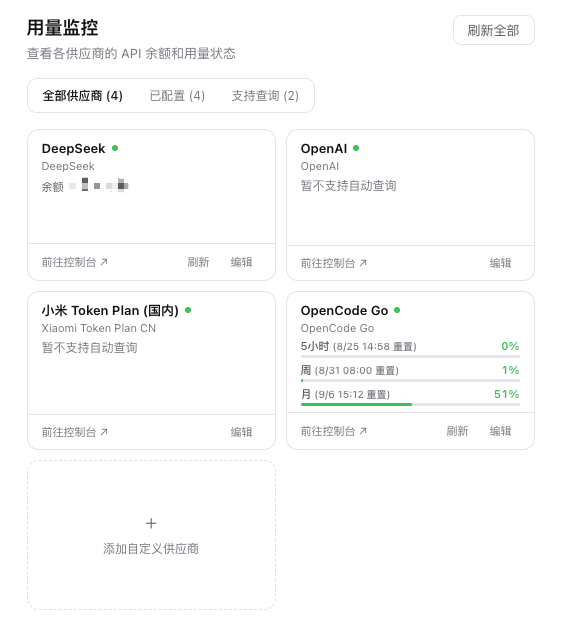
3. Query configuration editor
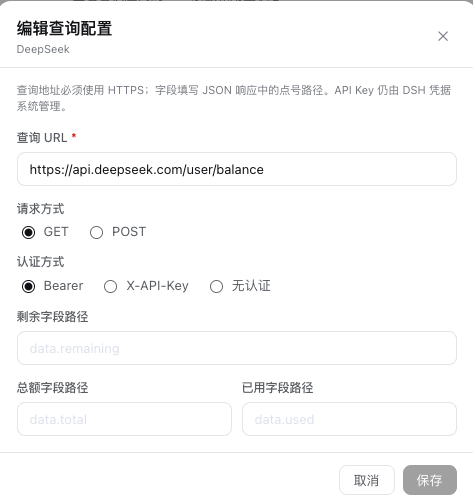
4. Custom provider form
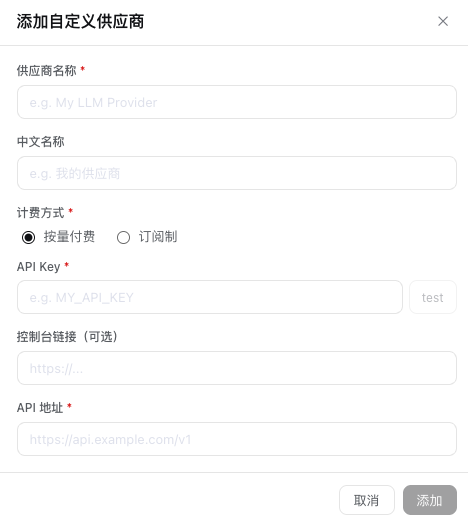
📐 Requirements
Requires a DSH deployment with a browser client, including the Desktop or Web version with Web UI.
📦 Installation
pnpm add @lcthe/dsh-usage-monitor
Add the plugin to your cordis.yml at the same include level as other bundles:
- insert:
    - id: dsh-usage-monitor
      name: '@lcthe/dsh-usage-monitor'
Start the DSH Web client:
pnpm dsh web
After DSH starts, open Settings → Usage to view your provider balances.
🔑 Provider Support
已稳定测试: DeepSeek、OpenCode Go。其他供应商的余额查询接口未经完整测试,欢迎反馈。
余额查询支持
| 供应商 | 余额接口 | 计费模式 | 显示方式 | 控制台 | 状态 |
|---|---|---|---|---|---|
| DeepSeek | GET /user/balance |
按量付费 | ¥ 余额 | platform.deepseek.com | ✅ 已验证 |
| OpenCode Go | GET /v1/usage |
订阅制 | 5h/周/月 进度条 | opencode.ai/workspace/go | ✅ 已验证 |
| Moonshot AI | GET /v1/users/me/balance |
按量付费 | ¥ 余额 | platform.moonshot.cn | ⚠️ 未测试 |
| Moonshot AI CN | GET /v1/users/me/balance |
按量付费 | ¥ 余额 | platform.moonshot.cn | ⚠️ 未测试 |
| OpenRouter | GET /api/v1/credits |
按量付费 | $ 余额 | openrouter.ai | ⚠️ 需 Management Key |
| Fireworks AI | GET /v1/accounts/-/billingUsage |
后付费 | $ 已用费用 | fireworks.ai | ⚠️ 未测试 |
| Z.AI(智谱) | GET /user/rights |
按量付费 | token 余量 | open.bigmodel.cn | ⚠️ 未测试 |
| Z.AI CN | GET /user/rights |
按量付费 | token 余量 | open.bigmodel.cn | ⚠️ 未测试 |
不支持余额查询
以下供应商暂无公开的余额查询 API,显示控制台链接供手动查看:
| 供应商 | 控制台 |
|---|---|
| OpenAI | chatgpt.com |
| Anthropic | console.anthropic.com |
| Google Gemini | aistudio.google.com |
| Groq | console.groq.com |
| Mistral | console.mistral.ai |
| xAI | console.x.ai |
| Together AI | api.together.ai |
| Cerebras | cloud.cerebras.ai |
| NVIDIA | build.nvidia.com |
| Hugging Face | huggingface.co |
| Qwen(通义千问) | dashscope.console.aliyun.com |
| Xiaomi(小米) | platform.xiaomimimo.com |
| Kimi For Coding | kimi.moonshot.cn |
| Ant Ling(蚂蚁灵) | ant-ling.com |
| OpenCode Zen | opencode.ai/workspace |
Query overrides
Built-in provider cards can be edited from the Edit action. Overrides are stored globally by the DSH host in ~/.dsh/usage-monitor/config.json and do not contain API key values. The editor supports HTTPS query URLs, GET/POST, Bearer Token, X-API-Key, no authentication, and safe dot-separated response field paths. Localhost, private-network, loopback, and cloud metadata addresses are rejected.
Issues and PRs are welcome!
📄 License
MIT
链接
同类插件
bowenliang123/dsh-context★ 1880
DSH 上下文洞察面板:Context 仪表盘 + /context命令 + Context 浏览器,查看 Context的分类组成、内容详情、演进趋势、压缩/注入事件、统计等一站式 Context 全生命周期管理。
Han-1413141/dsh-cost-meter★ 375
会话与当日 API 费用统计、预算图框(已用%)、官方余额、历史看板,支持峰谷计价与官方价格一键同步。
wssfk12138/dsh-damage-pulse★ 245
在 DSH Web 界面追踪 DeepSeek Token 用量、单次与会话费用及账户余额,并显示缓存感知的扣费动画。
zh667/TokenLedger★ 204
侧边栏用量面板:把 Token 归属到实际服务该请求的中转站,站点从已有的 provider 配置中读出,无需额外配置;含今日/本月/累计三窗口、按站点与模型下钻、一年活跃度热力图,以及 New API / Sub2API / DeepSeek 余额。
Ychris12138/dsh-usage-stats★ 170
多供应商用量看板:按供应商/模型统计 Token 与日期下钻,统一展示账户余额,并追踪 OpenCode Go / Z.ai 订阅额度。
PolinniZhong/dsh-personal-center★ 118
DeepSeek Harness 个人中心:跨会话用量统计、按模型成本估算、全局自定义指令、外观全局字号、数据驱动的桌面宠物(位图/矢量皮肤)与会话状态概览,纯本地离线运行。
社区评论
评论公开保存在 GitHub Discussions。加载评论会连接 GitHub 和 Giscus;发表内容需要 GitHub 账号。