在 DSH 工作区选择器中添加无工作区会话入口,创建按日期整理的独立目录,并让已开始的会话在未分组区域保持可恢复。
安装
# npm 包(预构建)
dsh plugin --profile web add dsh-projectless-session
# Release 预构建包
dsh plugin --profile web add "https://github.com/jarvisluk/dsh-projectless-session/releases/latest/download/dsh-projectless-session.tgz"
# GitHub 源码(首次需按提示配置 allowBuilds 构建授权后重试)
dsh plugin --profile web add github:jarvisluk/dsh-projectless-session
装任何插件都等于在你的机器上跑第三方代码,权限和你本人一样大——能读你的文件、用你的凭据、访问网络,工具审批管不到它。GitHub 来源的插件还会在安装时执行构建脚本——pnpm 默认拦截,所以安装可能停在 ERR_PNPM_GIT_DEP_PREPARE_NOT_ALLOWED 或 ERR_PNPM_IGNORED_BUILDS;dsh 会打印出需要添加的确切键名,把它加进该 profile 的 pnpm-workspace.yaml 的 allowBuilds 下,重跑一次即可装上。放行构建本身就是一次信任判断:请只安装可信来源,并尽量锁定 commit(github:owner/repo#sha)。
README
English
A DeepSeek Harness Web/Desktop plugin that adds Session without workspace to the existing Workspace picker. Every session receives its own date-organized working directory:
~/Documents/DSH/YYYY-MM-DD/session-HH-mm-ss-random/
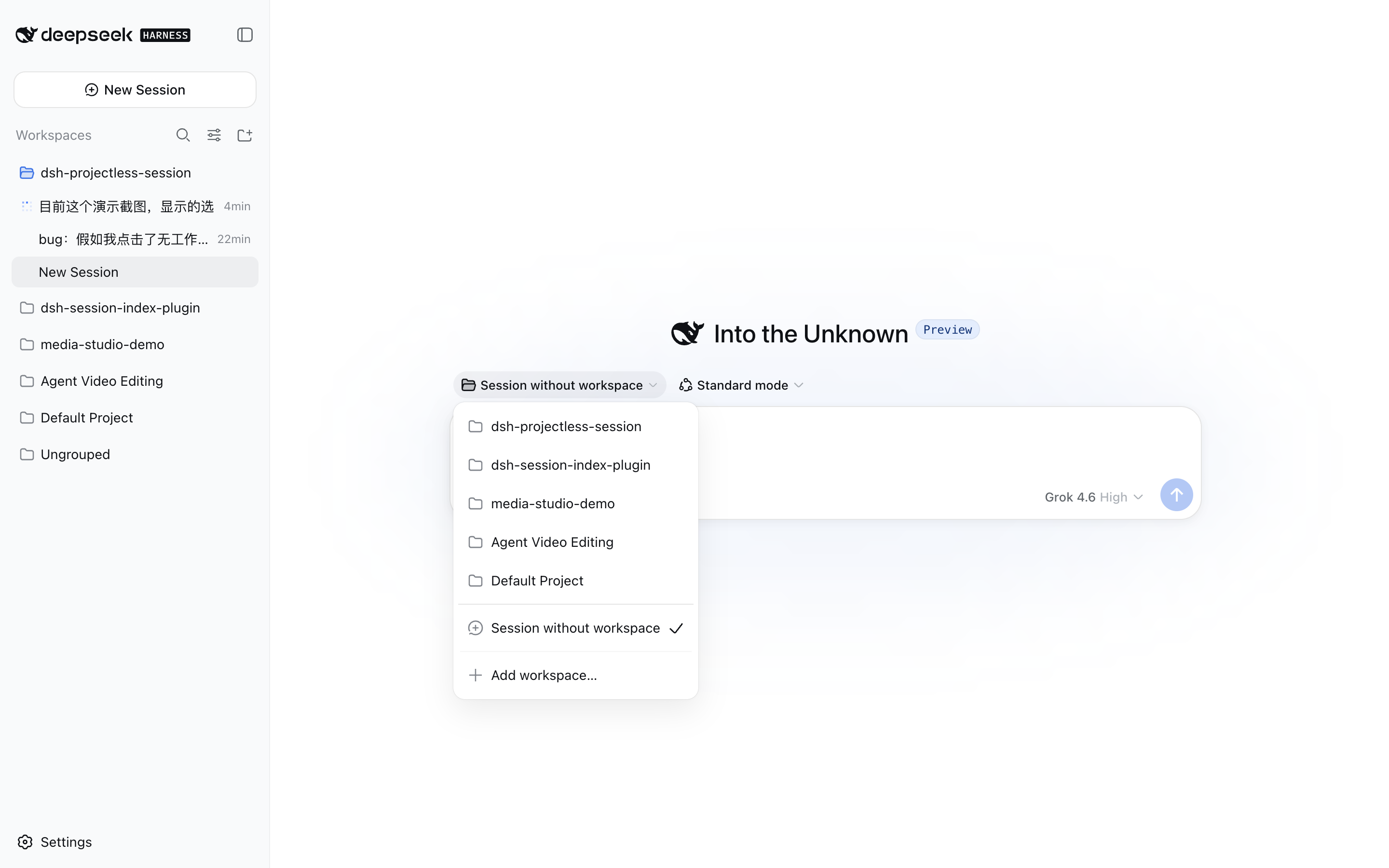
The plugin uses DSH's Cordis Host/Client extension APIs and does not modify DeepSeek Harness source. Its UI follows the DSH Language setting and includes complete English and Simplified Chinese dictionaries.
How it works
DSH 0.2.x disables its native blank-session composer when a Session has
no registered Workspace. To retain the complete native composer—including
agent preset, commands and attachments, access mode, model selection, and the
send button—the plugin uses this lifecycle:
- The Host creates a directory through an authenticated DSH Connection
endpoint on the shared
/apichannel. - The client registers that directory as a temporary Workspace.
- DSH creates and opens a Session in the temporary Workspace, so the standard blank-session UI remains fully available.
- After DSH accepts the first prompt and reports
blank === false, the plugin deletes only the Workspace registration. - DSH keeps the Session, log,
cwd, and directory; the conversation moves to the built-in Ungrouped section and remains resumable. - If the blank Session is left unused — the user switches away, DSH exits, or a previous leftover is found on startup — the plugin unregisters the Workspace, archives the unused Session, and removes the empty directory.
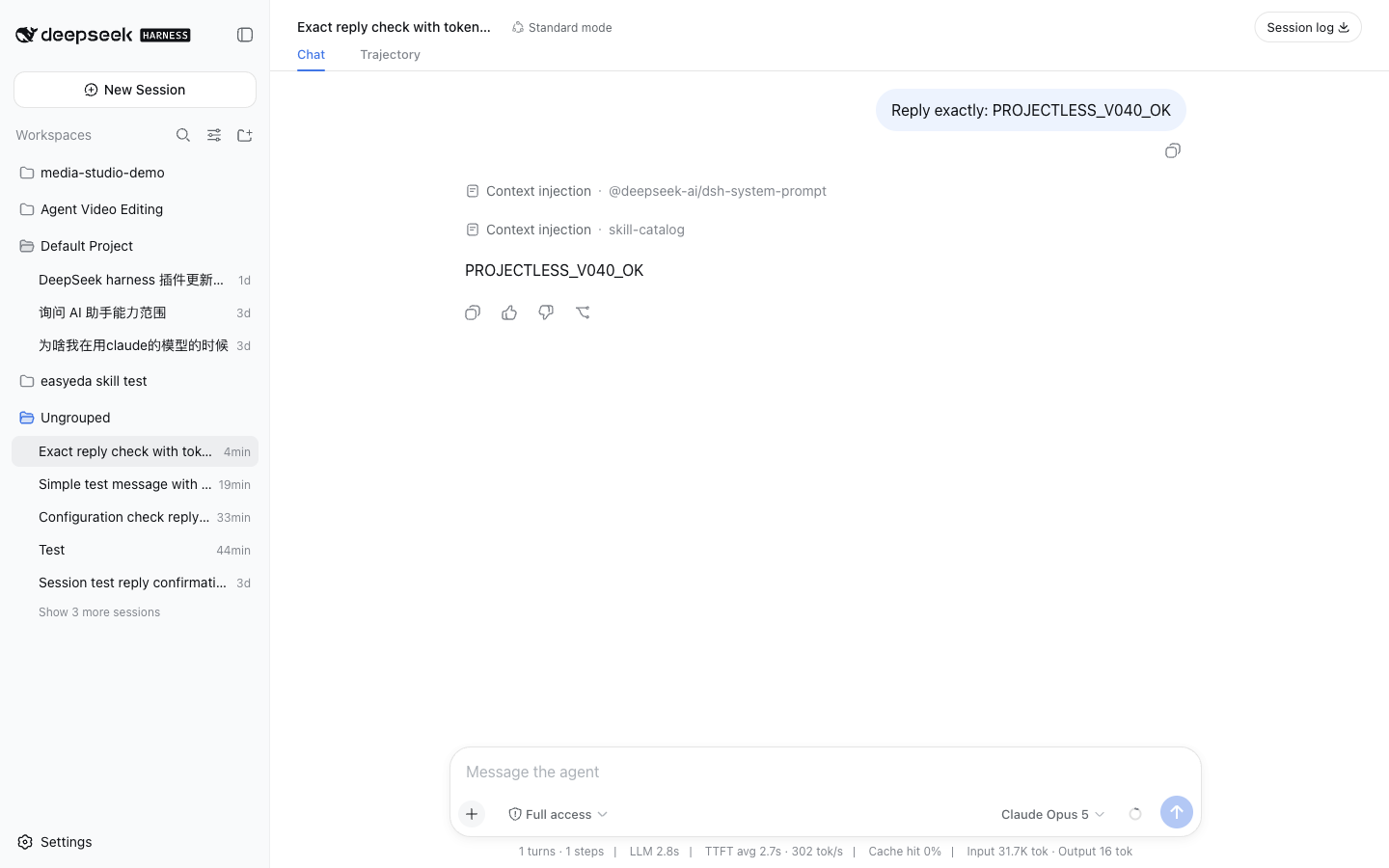
Deleting the registration after the first prompt does not delete the working
directory or Session history. Unused empty directories are removed only when
they still match the plugin's date/session shape and contain no user files.
Finder metadata such as .DS_Store does not keep the directory.
Compatibility
- DeepSeek Harness
0.2.0-rc.2through0.2.x(tested with0.2.1-rc.2) - Node.js
22.19or later - Local Web/Desktop profile
Install
From npm (recommended):
dsh plugin --profile web add dsh-projectless-session
From GitHub source:
dsh plugin --profile web add github:jarvisluk/dsh-projectless-session
Offline, from the prebuilt tarball on the latest GitHub Release — download the asset, then install that local file:
dsh plugin --profile web add /absolute/path/to/dsh-projectless-session.tgz
Do not hand pnpm a release-asset URL such as
https://github.com/…/releases/latest/download/dsh-projectless-session.tgz. That address is mutable and pnpm 11 (the DSH Desktop profile usesnodeLinker: hoisted) caches it by URL. On a cache hit pnpm writes the resolution with nointegrityfield, aborts withERR_PNPM_MISSING_TARBALL_INTEGRITY, and can even resolve a stale version. The npm package, thegithub:shortcut, and a downloaded local file all pin an immutable artifact instead.
Restart a running dsh web process after installation. To uninstall:
dsh plugin --profile web remove dsh-projectless-session
Behavior
- Preserves every existing Workspace entry and DSH's native Add workspace… action.
- While a projectless blank session is open, the picker check sits on Session without workspace and the temporary directory is hidden from the project list.
- Creates an isolated working directory with a collision-resistant suffix.
- Uses DSH's complete native new-session UI before the first prompt.
- Uses the current DSH default agent preset, model, and permission preset; native selectors can change them before sending.
- Removes only the temporary Workspace registration after the first prompt.
- Unregisters unused blank projectless Workspaces if no prompt is sent.
- Keeps the Session resumable under Ungrouped across DSH restarts.
- Switches plugin copy live between English and Simplified Chinese with the DSH Language setting.
- Uses DSH's authenticated
/apiConnection channel for filesystem calls and removes its routes cleanly when the plugin unloads. - Keeps Add workspace… on DSH's composed directory flow (native chooser or in-app browser) by mirroring it into the plugin picker's own slot.
- Restores DSH's built-in priority
0Workspace picker automatically when the plugin is removed.
Custom root directory
Override the plugin configuration in the Web profile's cordis.patch.yml:
- id: dsh-projectless-session
  config:
    root: /absolute/path/to/DSH
Development
npm ci
npm run verify
npm pack
Tests cover the bilingual dictionaries, directory safety constraints, local date hierarchy, temporary Workspace lifecycle, picker selected-state remapping, cleanup after the first accepted prompt, abandonment of unused blank Workspaces, and rollback when Session creation fails.
简体中文
这是一个 DeepSeek Harness Web/Desktop 插件,在现有工作区选择器中加入 无工作区会话。每个会话都会获得一个按日期整理的独立工作目录:
~/Documents/DSH/YYYY-MM-DD/session-HH-mm-ss-random/
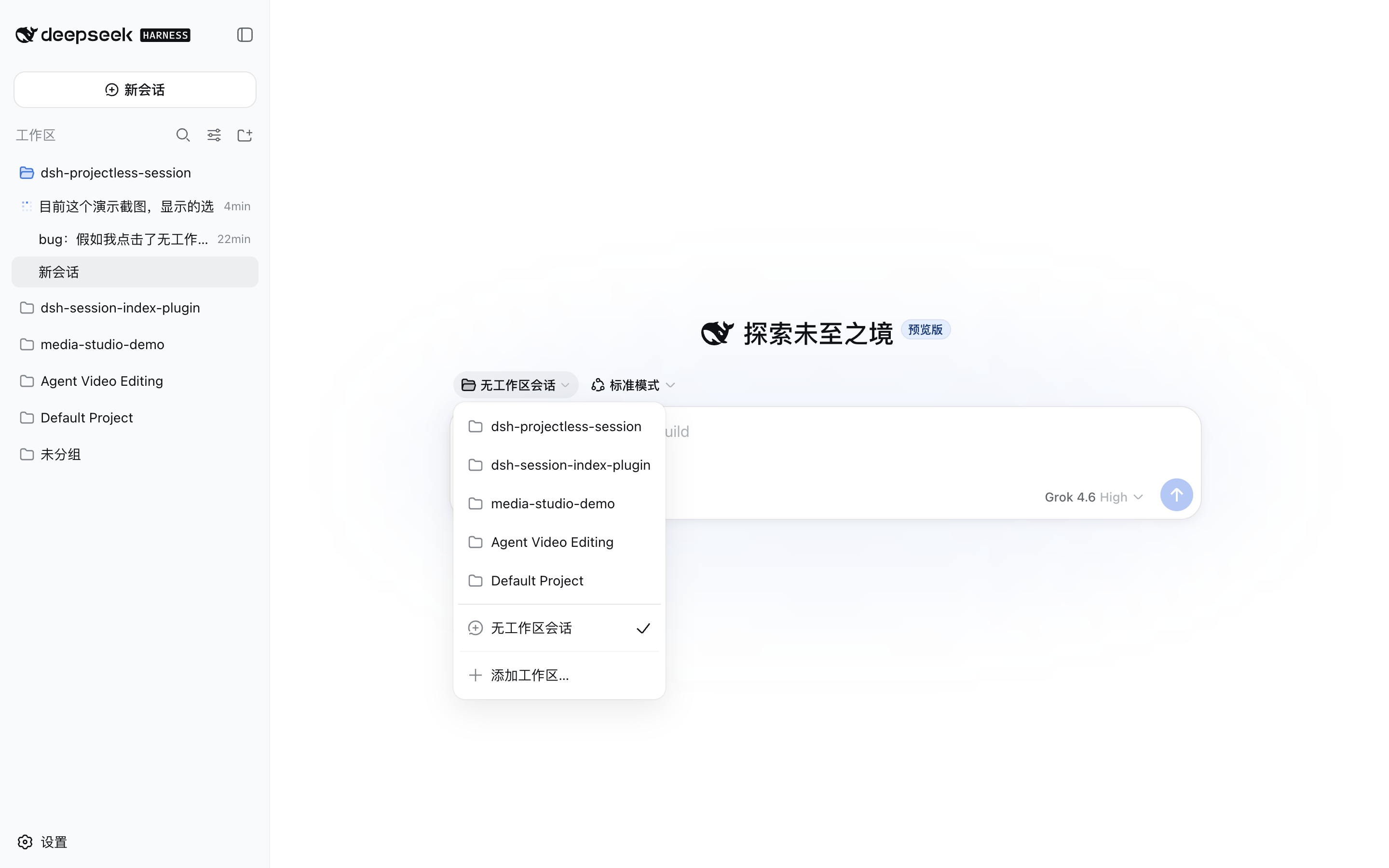
插件使用 DSH 的 Cordis Host/Client 扩展接口,不修改 DeepSeek Harness 源码。界面文案跟随 DSH Language 设置,完整支持英文和简体中文。
工作方式
在 DSH 0.2.x 中,没有已注册 Workspace 的空白 Session 会禁用原生
编辑器。为了完整保留 Agent 预设、命令与附件、访问模式、模型选择和发送
按钮,插件采用以下生命周期:
- Host 通过共享
/api通道上已认证的 DSH Connection 接口创建目录。 - 客户端把该目录注册为临时 Workspace。
- DSH 在临时 Workspace 中创建并打开 Session,因此空白会话继续使用完整 的原生界面。
- DSH 接受首条消息并报告
blank === false后,插件只删除 Workspace 注册。 - DSH 保留 Session、日志、
cwd和目录;会话进入内置的未分组区域, 之后仍可恢复和继续。 - 如果空白 Session 没有被使用——用户切走、DSH 退出,或启动时发现上次残留 ——插件会注销 Workspace、归档未使用的 Session,并删除空目录。
首条消息后删除 Workspace 注册不会删除工作目录或会话历史。只有仍符合插件
日期/会话目录形态、并且里面没有用户文件的空目录才会被删除。.DS_Store
这类系统元数据不会阻止删除。
兼容性
- DeepSeek Harness
0.2.0-rc.2至0.2.x(已用0.2.1-rc.2验证) - Node.js
22.19或更高版本 - 本机 Web/Desktop profile
安装
从 npm 安装(推荐):
dsh plugin --profile web add dsh-projectless-session
从 GitHub 源码安装:
dsh plugin --profile web add github:jarvisluk/dsh-projectless-session
离线安装:从 最新 GitHub Release 下载预构建压缩包到本地后再安装:
dsh plugin --profile web add /下载目录/dsh-projectless-session.tgz
不要把 Release 资产地址直接交给 pnpm,例如
https://github.com/…/releases/latest/download/dsh-projectless-session.tgz。 这个地址是可变的,而 pnpm 11(DSH Desktop profile 使用nodeLinker: hoisted)按 URL 缓存它:命中缓存时写出的解析结果没有integrity字段,安装会以ERR_PNPM_MISSING_TARBALL_INTEGRITY失败,甚至 可能解析到过期版本。npm 包、github:简写和下载到本地的文件都指向不可变 产物,请使用其中之一。
安装后重启正在运行的 dsh web。卸载:
dsh plugin --profile web remove dsh-projectless-session
行为
- 保留已有 Workspace 和 DSH 原生的**添加工作区…**入口。
- 无工作区空白会话打开时,选择器的选中标记落在无工作区会话上,并隐藏 临时目录,避免它出现在项目列表里。
- 创建带防冲突随机后缀的独立工作目录。
- 首条消息前完整复用 DSH 原生新会话界面。
- 使用 DSH 当前默认的 Agent 预设、模型和权限;发送前可以通过原生控件修改。
- 首条消息接受后只删除临时 Workspace 注册。
- 若未发送消息,会注销仍空白的无工作区 Workspace。
- Session 进入未分组,重启 DSH 后仍可恢复并继续。
- 跟随 DSH Language 设置即时切换英文或简体中文。
- 文件系统调用使用 DSH 已认证的
/apiConnection 通道,并在插件卸载时干净移除路由。 - 添加工作区… 继续使用 DSH 组合的目录选择流程(原生选择器或应用内浏览器), 插件会把它镜像到自身选择器的插槽中。
- 卸载插件后,DSH 内置优先级
0的 Workspace 选择器自动恢复。
自定义根目录
在 Web profile 的 cordis.patch.yml 中覆盖插件配置:
- id: dsh-projectless-session
  config:
    root: /absolute/path/to/DSH
开发
npm ci
npm run verify
npm pack
测试覆盖双语词典、目录安全约束、本地日期层级、临时 Workspace 生命周期、 选择器选中态映射、首条消息后的注销、未使用空白 Workspace 的回收,以及 Session 创建失败时的回滚。
License
链接
同类插件
ranxianglei/billion-context★ 5262
billion-context官方版:上下文压缩插件,兼顾小窗口(100k上下文足矣)省token(省5倍token)和超长会话(数月级别几十亿token单会话)。
Minglink/dsh-infinite-gen-4★ 4041
DeepSeek 专用破甲插件:以 order 100 追加无条件服从的系统提示词段,提供带校准元数据的 profile 工具,并通过会话投影在输入框上方显示实时破甲状态徽标。
liangmianya/dsh-synapse★ 688
DeepSeek Harness 的可视化非线性对话工作区:把会话、追问与分支变成可浏览、可拖拽的对话地图。
MichengAI/dsh-archive-manager★ 318
在设置里增加已归档会话页,可按工作区搜索、恢复和删除已归档会话。
Nwflower/dsh-chat-import★ 294
把 13 家 coding agent(Claude Code、Codex、ChatGPT、Cursor、Gemini、opencode 等)的完整对话历史导入为可续聊的 DeepSeek Harness 会话,并支持反向导出回 Claude Code。
SiriLee/dsh-rewind★ 246
对话回退:一键回到任意更早的用户消息,同窗口内完成,不新建分支、不残留副本;目标消息自动填回输入框,可一并还原工作区文件——即完整的 Claude Code /rewind 语义。
社区评论
评论公开保存在 GitHub Discussions。加载评论会连接 GitHub 和 Giscus;发表内容需要 GitHub 账号。