为 DeepSeek Harness 提供复古 macOS System 7 风格工作站界面,包含桌面窗口、工作区与 Agent 管理、Finder、终端、监视器、上下文工具和桌面附件。
安装
# Release 预构建包
dsh plugin --profile web add "https://github.com/hunter118/dsh-s7r/releases/download/v0.9.4/dsh-s7r-0.9.4.tgz"
# GitHub 源码(首次需按提示配置 allowBuilds 构建授权后重试)
dsh plugin --profile web add github:hunter118/dsh-s7r
装任何插件都等于在你的机器上跑第三方代码,权限和你本人一样大——能读你的文件、用你的凭据、访问网络,工具审批管不到它。GitHub 来源的插件还会在安装时执行构建脚本——pnpm 默认拦截,所以安装可能停在 ERR_PNPM_GIT_DEP_PREPARE_NOT_ALLOWED 或 ERR_PNPM_IGNORED_BUILDS;dsh 会打印出需要添加的确切键名,把它加进该 profile 的 pnpm-workspace.yaml 的 allowBuilds 下,重跑一次即可装上。放行构建本身就是一次信任判断:请只安装可信来源,并尽量锁定 commit(github:owner/repo#sha)。
README
该插件的 README 只有英文版本。

S7R is an original retro macOS/System 7-style workstation shell for the DeepSeek Harness Web UI. It turns real DSH Agents, Workspaces, files, terminals, tools, jobs, and persisted history into a coherent multi-window desktop instead of placing a visual skin over a chat page.
S7R is the desktop environment. Knowledge Desk is its Workspace, Agent, and conversation application.
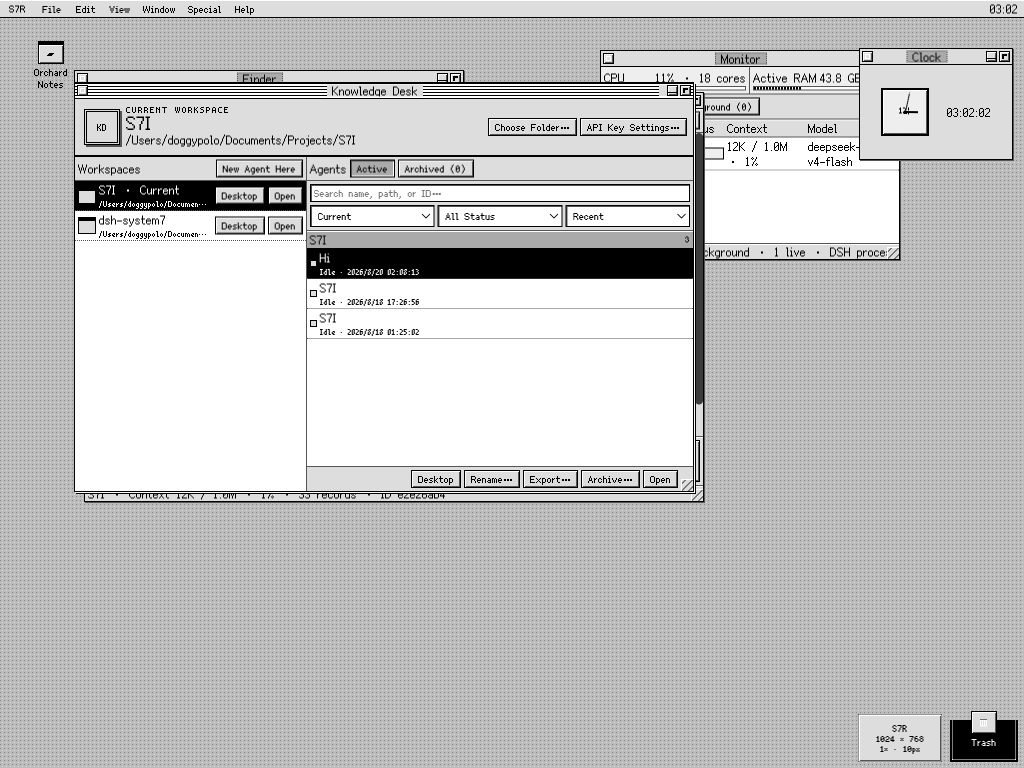
Expanded 1024 × 768 at native 1× magnification. Knowledge Desk, an active Agent, Finder, Monitor, Clock, desktop aliases, and Trash share one persistent desktop.
DSH remains the source of truth. S7R does not duplicate conversations into a private chat database, start an unrelated shell server, or expose arbitrary host paths. It adds a desktop, applications, and browser-local presentation preferences around DSH's public services.
[!IMPORTANT] S7R 0.10 targets DeepSeek Harness
0.1.7-rc.2. Older S7R 0.9.x releases are the appropriate line for older DSH installations. Read DSH compatibility before mixing release lines.
Start here
Requirements: Node.js 22.19+ or 24+, DeepSeek Harness 0.1.7-rc.2, and pnpm for profile management or source development.
Download
dsh-s7r-0.10.0.tgzandSHA256SUMSfrom the latest release.Install the plugin into the DSH Web profile:
dsh plugin --profile web add ./dsh-s7r-0.10.0.tgz
dsh --profile web --dump-config
dsh web
Open the loopback URL printed by DSH, normally
http://127.0.0.1:3080.In S7R, open S7R → Settings… to configure
DEEPSEEK_API_KEYwhen DSH does not already receive it from its launch environment.Choose File → Choose Folder…, then create an Agent in that Workspace.
For checksum verification, source installation, upgrades, removal, and the complete first-run tour, use the Getting started guide.
What S7R includes
| Area | Highlights | Documentation |
|---|---|---|
| Knowledge Desk | Explicit current Workspace; Agent search, scope and status filters; recency/name/status sorting; rename, export, archive, restore, and desktop placement. | Workspaces and Agents |
| Agent windows | Real DSH streaming and history, steering/cancellation, safe completed-output Markdown, context pressure and composition, compaction, summary handoff, and a folded full-event Timeline. | Workspaces and Agents |
| Native DSH controls | Agent Presets, provider models and reasoning effort, slash-command modes, project Skills, plugin-loader inventory, credentials, Jobs, and native archive state. | DSH integration |
| Stationery and setup | A fixed New Agent setup window for Preset/model/reasoning plus a deliberately small DSH Agent Preset Stationery Pad with optional name and opening prompt. | Workspaces and Agents |
| Files and terminal | Workspace-contained Finder, conflict-aware TextEdit, local PDF/image Preview, portable path drops, and an owner-scoped /bin/zsh -f -i line console. |
Files, Terminal, and Find |
| Global Find | Independent scopes for names, source contents, visible conversation messages, or every persisted Agent event, across one or all Workspaces/Agents. | Files, Terminal, and Find |
| Desktop | Restored windows and z-order, aliases, marquee selection, group dragging, context menus, Get Info, reversible alias-only Trash, tiling, and minimal completion notices. | Desktop and applications |
| Monitor and accessories | Agent/context state, DSH background Jobs, host CPU and active RAM, process RSS, Scrapbook, Clock, and an always-solvable Puzzle. | Desktop and applications |
| Display | Fit Browser or period-style work areas, native 10px/12px bitmap masters, exact 1×/2× magnification, monochrome/muted color, Preview filters, and pixel-processed wallpaper. | Display and wallpaper |
| Help and accessibility | Keyboard-navigable menus, S7R-owned text/context menus, optional edge-aware Balloon Help, visible focus, and no advertised browser-owned shortcuts that cannot work reliably. | Reference |
Documentation
The complete manual is split into linked guides so each workflow has one maintained home.
- Documentation index — choose a guide by task or audience.
- Getting started — install, first run, upgrade, and remove.
- Workspaces and Agents — Knowledge Desk, lifecycle, streaming, Context, Timeline, export, and Stationery.
- Files, Terminal, and Find — Finder, TextEdit, Preview, zsh, path drops, and search scopes.
- Desktop and applications — windows, aliases, menus, Trash, Monitor, Scrapbook, and desk accessories.
- Display and wallpaper — resolution, fonts, magnification, appearance, filters, and imports.
- DSH integration — Control Center, authoritative ownership, services, credentials, and compatibility boundaries.
- Reference — menu map, persistence, limits, security, and data ownership.
- Troubleshooting — command, installation, credential, Workspace, Terminal, display, and reset problems.
Technical and project documentation:
- Architecture
- Compatibility notes
- Product and design specification
- Development notes
- Changelog
- Contributing and documentation maintenance
- Security policy
Install from source
git clone https://github.com/hunter118/dsh-s7r.git
cd dsh-s7r
corepack enable
pnpm install --frozen-lockfile
pnpm check
dsh plugin --profile web add .
dsh web
pnpm check validates documentation links, performs strict host/client type checks, runs the deterministic test suite, and builds the production host/client bundles. See Contributing for the repository map, browser verification loop, and the required documentation update matrix.
Compatibility and limitations
This release targets the official DSH 0.1.7-rc.2 package graph, verified 2026-09-29. The 0.10 line uses DSH's controller, Chat projection, typed Remote, Jobs, scoped persistence, and native archive APIs; the removed dsh-client-runtime is not required.
Important boundaries:
- DSH's terminal service is line-oriented and does not publish raw browser PTY bytes or post-spawn PTY resizing.
- TextEdit is a conflict-aware plain-text/code editor, not an IDE or language server.
- Preview rasterizes PDFs but does not provide a selectable PDF text layer.
- DSH's plugin inventory is read-only; profile plugin enable/disable remains a DSH CLI operation.
- S7R replaces the root Web UI slot intentionally; it does not mix the native DSH UI into the simulated desktop.
See Compatibility notes and Troubleshooting for details.
License and provenance
S7R is MIT licensed. It is an independent project and is not affiliated with or endorsed by Apple Inc. or DeepSeek. No Apple artwork, system files, proprietary fonts, sounds, screenshots, or extracted resources are bundled.
The browser bundle includes Fusion Pixel Font faces under SIL OFL 1.1 and PDF.js under Apache-2.0. Notices and license texts are in THIRD_PARTY_NOTICES.md and THIRD_PARTY_LICENSES/.
链接
同类插件
zhu1090093659/dsh-web#packages/dsh-task-board★ 8370
侧边栏多列任务看板:卡片交给真实 DSH 智能体会话执行,支持 cron 定时(Host 侧到点执行,关浏览器也生效)。
zhu1090093659/dsh-web#packages/dsh-web-all★ 8370
DSH Web UI 插件与皮肤合集:任务看板、git 图、右侧面板、远程移动端 UI、桌宠、实时 token 统计与皮肤中心。
ccch1mneyyy/dsh-TUI★ 4036
Claude Code 风格全屏终端 UI:像素鲸鱼顶栏、实时工作状态行、思考流式展开。
MeteorNOX/DeepSeek-Balance-Whale-Widget★ 4004
右下角常驻的小鲸鱼挂件:余额、今日已用与每轮对话消耗(含峰谷价),余额预警与今日预算的泡泡内容都可编辑;泡泡点击序列模块化自定义,支持并列加权 A/B、随机台词与随机图片;内置 30+ 厂商模板(OpenAI / OpenRouter / Kimi / 硅基流动 / 方舟 / 智谱 / MiniMax 等),按模型查余额与订阅额度;另有任务结束音效、导入音频、自定义角色与资源管理。数据全在本机,无遥测。
omdsh-dev/DSH-better-sidebar★ 3992
侧边栏完整工作台:内置文件渲染编辑、终端、Git 与子代理,支持三方插件注册新 Tab。
Devin-AXIS/deepseek-design#deepseek-idesign★ 1418
可视化设计工作室,支持网站、App 原型、海报、信息卡、报告和杂志的模板创建、元素编辑、选区级 AI 草稿衔接与导出。
社区评论
评论公开保存在 GitHub Discussions。加载评论会连接 GitHub 和 Giscus;发表内容需要 GitHub 账号。