高智议会:召集 18 位历史人物组成智囊团对复杂问题进行多视角结构化辩论,附带实时 DAG 右侧面板、SQLite 历史记录持久化,支持通过 .council.yaml 配置项目级默认面板与主席。
安装
# GitHub 源码(首次需按提示配置 allowBuilds 构建授权后重试)
dsh plugin --profile web add github:fufengyuan/dsh-council
装任何插件都等于在你的机器上跑第三方代码,权限和你本人一样大——能读你的文件、用你的凭据、访问网络,工具审批管不到它。GitHub 来源的插件还会在安装时执行构建脚本——pnpm 默认拦截,所以安装可能停在 ERR_PNPM_GIT_DEP_PREPARE_NOT_ALLOWED 或 ERR_PNPM_IGNORED_BUILDS;dsh 会打印出需要添加的确切键名,把它加进该 profile 的 pnpm-workspace.yaml 的 allowBuilds 下,重跑一次即可装上。放行构建本身就是一次信任判断:请只安装可信来源,并尽量锁定 commit(github:owner/repo#sha)。
README
在 dsh(DeepSeek Harness)里召集历史人物议会,对复杂问题进行多视角结构化辩论,最终由主席综合裁决。
本项目基于 0xNyk/council-of-high-intelligence 开发,将其适配为 dsh 插件:技能层(SKILL.md + agents/)沿用原项目协议,新增了 dsh 专属的侧边栏入口、右侧 DAG 面板、SQLite 历史数据持久化与进度上报 API。
- 18 位议会成员:亚里士多德、苏格拉底、孙子、阿达、费曼、托瓦兹、芒格、卡尼曼、塔勒布、卡帕西等
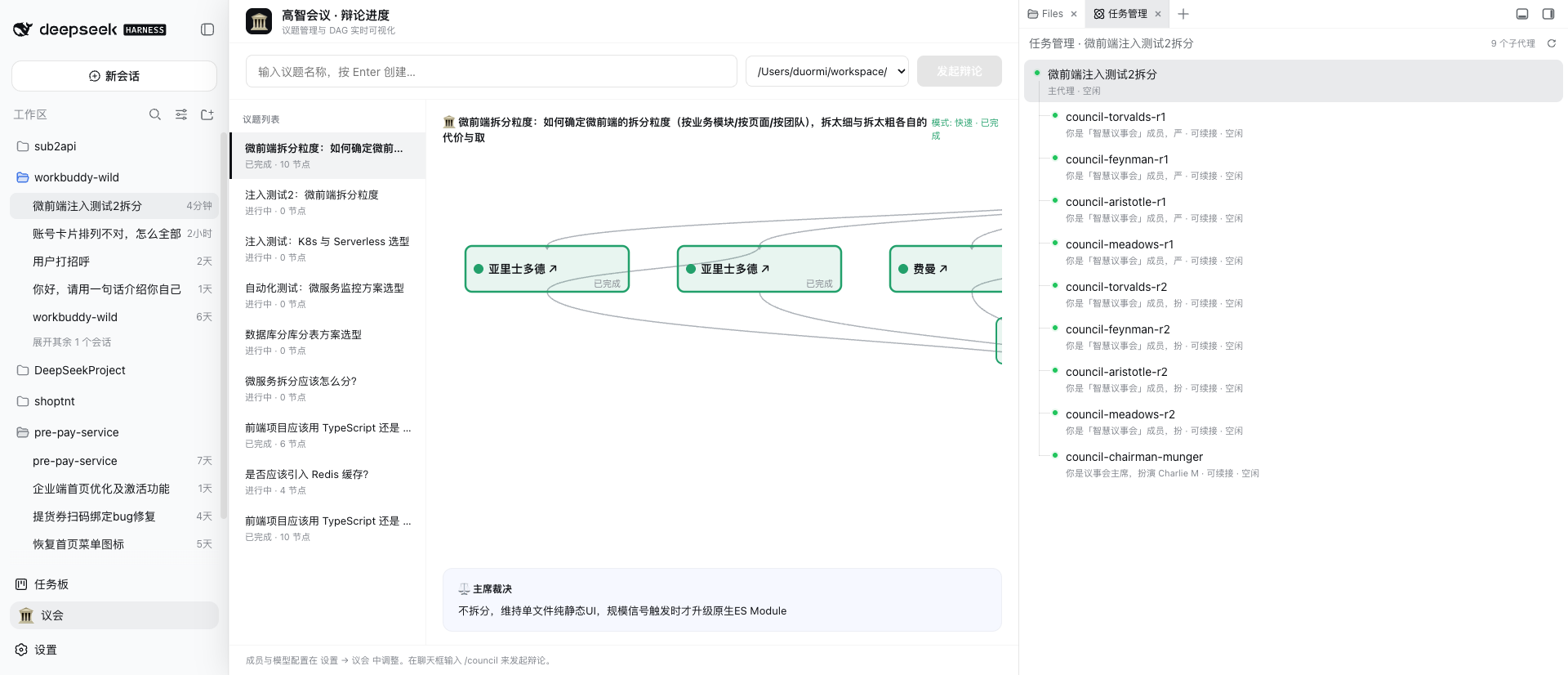
- 右侧 DAG 面板:实时可视化辩论进度(议题 → 成员 → 主席),节点可点击跳转子会话,不遮挡左侧导航栏
- 多种模式:
--quick快闪、--duo二人对辩、--triad三人组、--full全员、--members自选 - 项目覆盖:通过
./.council.yaml固定每项目的默认 panel/chairman
截图
议会面板(右侧抽屉,不遮挡左侧导航栏)
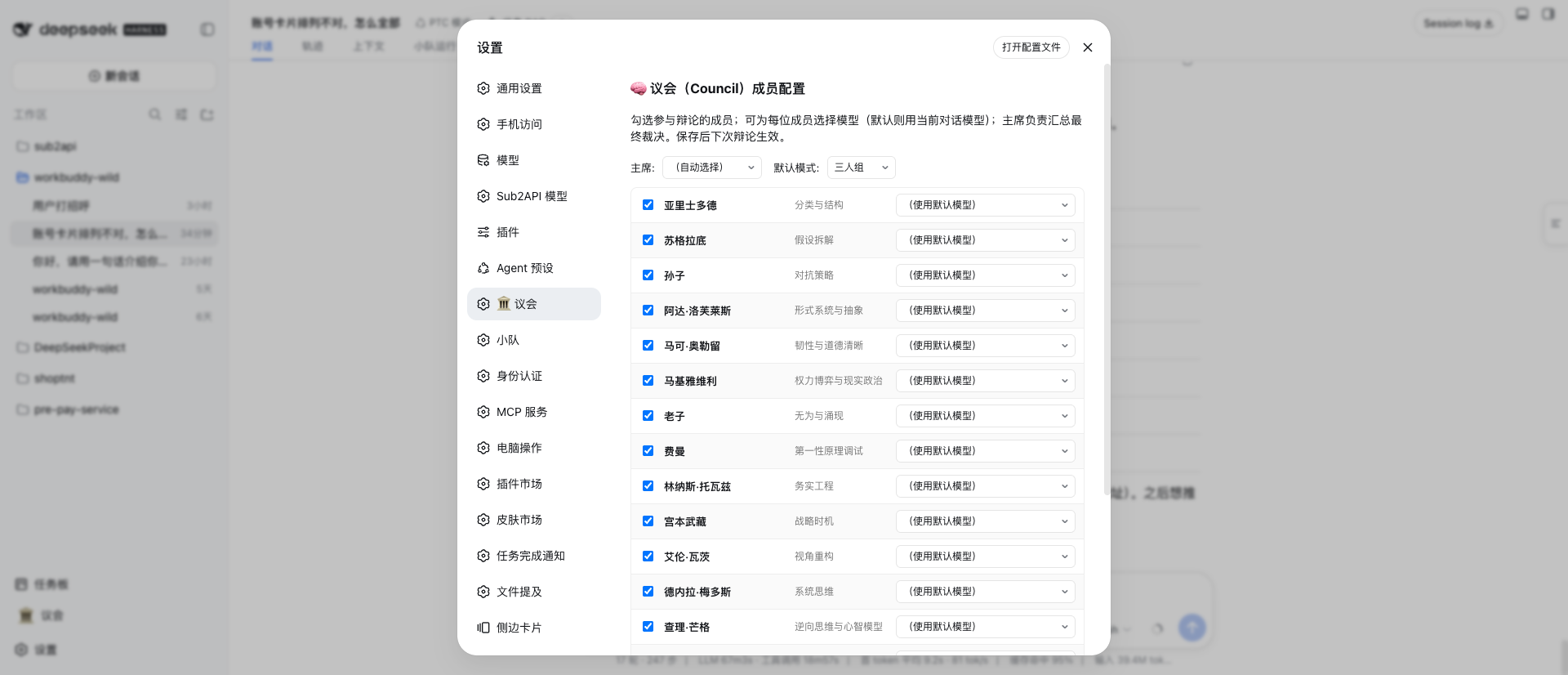
议会配置(设置 → 议会)
功能
| 功能 | 说明 |
|---|---|
/council 命令 |
启动议会辩论,自动路由 panel 与模式 |
| 侧边栏入口 | 左侧栏底部「🏛️ 议会」按钮,点击展开/收起右侧面板 |
| 右侧面板 | 议题列表 + DAG 实时进度图,支持节点点击跳转子会话 |
| 历史持久化 | SQLite 存储(~/.dsh/council/council.sqlite),重启不丢历史议题 |
| 进度上报 API | /council/api/progress/report — 协调器通过 HTTP 上报每个成员的运行状态 |
| 配置持久化 | ~/.dsh/council/config.json — 成员启用/禁用、模型映射、默认 chairman |
安装
方式一:git 依赖(发布后推荐)
# 在 profile 目录执行
cd ~/.dsh/profiles/web
pnpm add dsh-council@git+https://github.com/fufengyuan/dsh-council.git
# 或
dsh plugin --profile web add git+https://github.com/fufengyuan/dsh-council.git
方式二:本地源码(开发调试)
git clone https://github.com/fufengyuan/dsh-council.git ~/.dsh/plugin-src/dsh-council
# 然后在 profile 的 package.json dependencies 里加:
# "dsh-council": "file:../../plugin-src/dsh-council"
两种方式装完都需重启 dsh web 服务:dsh-webctl restart。
可选依赖
js-yaml 用于读取 ~/.dsh/settings.yaml 的模型列表(optionalDependencies),缺失时自动降级跳过,不影响其他功能。
使用
# 在 dsh 会话里触发
/council 一个技术决策:前端项目应该用 TypeScript 还是 JavaScript?
/council --quick 是否应该引入缓存?
/council --triad architecture 用 monorepo 还是 polyrepo?
/council --full 我们 SaaS 产品怎么定价?
/council --members socrates,feynman,ada 我们的缓存策略对吗?
/council --duo 微服务还是单体?
侧边栏点「🏛️ 议会」展开/收起右侧面板,实时查看辩论 DAG。历史议题持久化在 ~/.dsh/council/council.sqlite,重启服务不丢失。
架构
council/
├── SKILL.md              # /council 命令的协调器指令
├── agents/               # 18 位议会成员 persona(council-{name}.md)
├── configs/              # auto-route-defaults.yaml(triads/profiles/极性对)
├── dsh/index.js          # 服务端 HTTP API(run 管理 + DAG 进度 + SQLite 持久化)
├── lib/client.js         # 客户端 UI(侧边栏按钮 + 右侧抽屉面板 + DAG 渲染)
├── package.json          # 插件元数据(dsh bundle/client 声明)
└── cordis.patch.yml      # bundle patch(挂载 dsh-council 插件)
数据存储:~/.dsh/council/council.sqlite(SQLite,WAL 模式)保存 runs / nodes / edges,配置存 ~/.dsh/council/config.json。
开发
node --check lib/client.js   # 客户端语法校验
node --check dsh/index.js    # 服务端语法校验
dsh-webctl restart           # 重启后浏览器硬刷新
进度上报 API
协调器(SKILL.md 中的 Council Coordinator)通过 HTTP 上报每个成员的运行状态,DAG 面板实时更新:
# 创建 run
curl -s -X POST http://127.0.0.1:3080/council/api/progress/report \
  -H 'content-type: application/json' -d '{"problem":"...","mode":"--quick"}'
# 成员节点
curl -s -X POST http://127.0.0.1:3080/council/api/progress/report \
  -H 'content-type: application/json' -d '{"runId":"<id>","nodeId":"feynman-r1","label":"费曼 首轮盲评","status":"running"}'
# 关闭 run
curl -s -X POST http://127.0.0.1:3080/council/api/progress/report \
  -H 'content-type: application/json' -d '{"runId":"<id>","nodeId":"close","status":"done","done":true}'
License
MIT
链接
同类插件
loopx-project/loopx#dsh-loopx-plugin★ 6361
LoopX——面向长周期 Agent 的提供商中立、本地优先状态内核与控制平面:在 DeepSeek Harness 执行层之上持久化 Goal、Todo、门禁、证据、配额、恢复与交接状态;插件负责引导安装 CLI 与技能、准入有界的同会话续跑,并为精确绑定的工作循环提供本地 GoalBar。
Q00/ouroboros#integrations/dsh-plugin★ 6243
通过 DSH MCP 客户端挂载 Ouroboros 的纯配置包,在 DSH 中提供 36 个涵盖需求访谈、Seed、执行、评估与演化流程的工具。
chuspeeism/dashi-taskboard#deepseek-harness★ 3362
把当前已安装并运行中的 Codex Taskboard 嵌入 DeepSeek Harness 侧边栏,并通过 Launcher 运行时描述文件连接,而不是使用固定端口。
NanmiCoder/dsh-agent-teams★ 2245
AgentTeams 多智能体团队。
EthanYoQ/AI-Novel-Writer#dsh-ai-novel-writer★ 1623
安装专用 AI 小说创作预设与工作台:提供带修订号的本地项目资产、紧凑侧边工作台,以及需要原生审批的逐文件变更。
Miaotofu01/Study-Mate★ 1065
你的AI学习搭档:定计划、讲知识、做项目,学透一门科目。
社区评论
评论公开保存在 GitHub Discussions。加载评论会连接 GitHub 和 Giscus;发表内容需要 GitHub 账号。