第三方模型的思考档位预设:内置 16 组按「厂家 → 模型」组织的官方档位,支持自定义档位与逐模式传输值,校验后直写 llm-pi-ai 配置;支持按模型在 OpenAI Chat Completions、OpenAI Responses 与 Anthropic Messages 三种协议间切换并自动重新分组路由;输入框提供「优化提示词」按钮,用设置中指定的大模型改写当前内容。
安装
# GitHub 源码(首次需按提示配置 allowBuilds 构建授权后重试)
dsh plugin --profile web add github:ctianye/dsh_gearbox
装任何插件都等于在你的机器上跑第三方代码,权限和你本人一样大——能读你的文件、用你的凭据、访问网络,工具审批管不到它。GitHub 来源的插件还会在安装时执行构建脚本——pnpm 默认拦截,所以安装可能停在 ERR_PNPM_GIT_DEP_PREPARE_NOT_ALLOWED 或 ERR_PNPM_IGNORED_BUILDS;dsh 会打印出需要添加的确切键名,把它加进该 profile 的 pnpm-workspace.yaml 的 allowBuilds 下,重跑一次即可装上。放行构建本身就是一次信任判断:请只安装可信来源,并尽量锁定 commit(github:owner/repo#sha)。
README
English | 中文
模型变速箱:第三方模型的思考档位预设、按模型切换协议,以及输入框内的提示词优化。
DSH 接入第三方大模型时的两个堵点,一个插件解决。
| 输入条优化 | 设置 → 模型变速箱 |
|---|---|
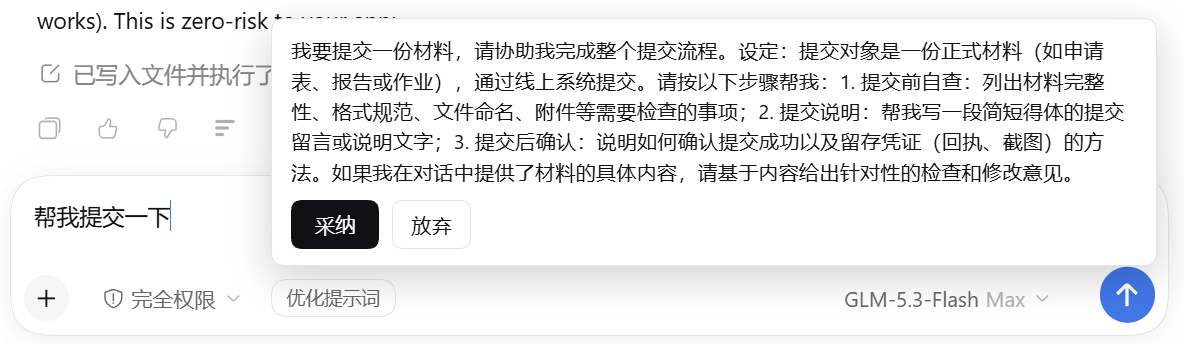 |
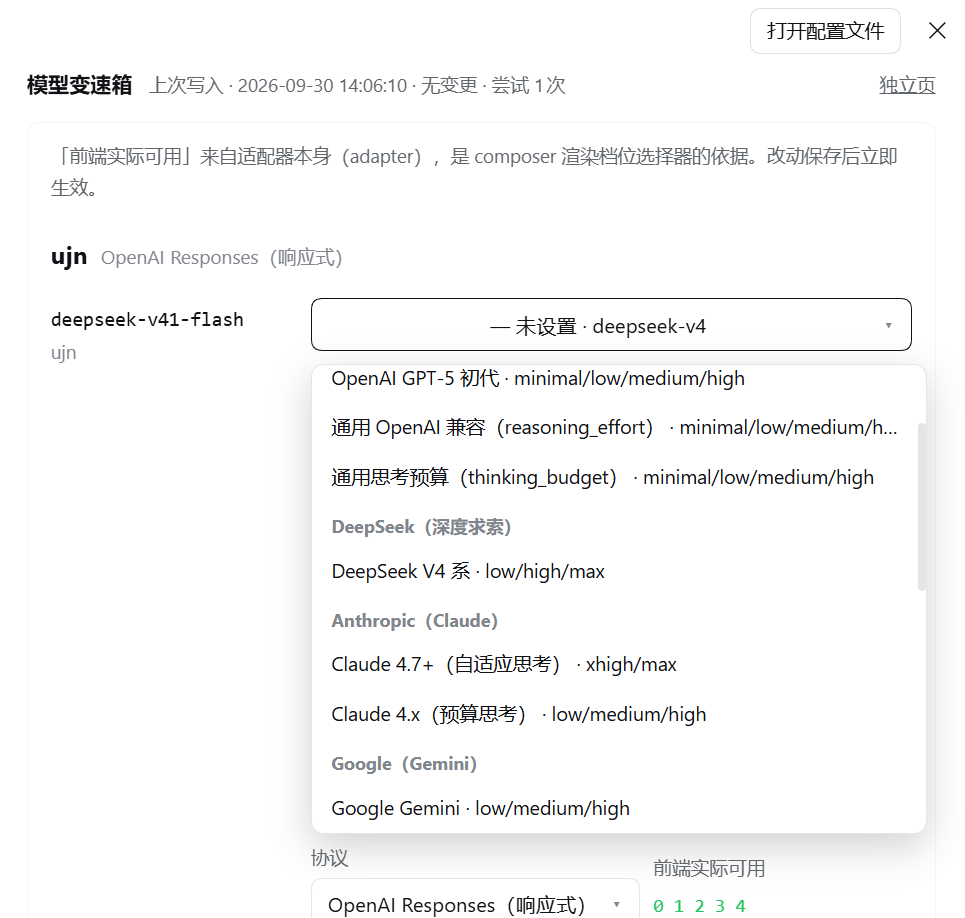 |
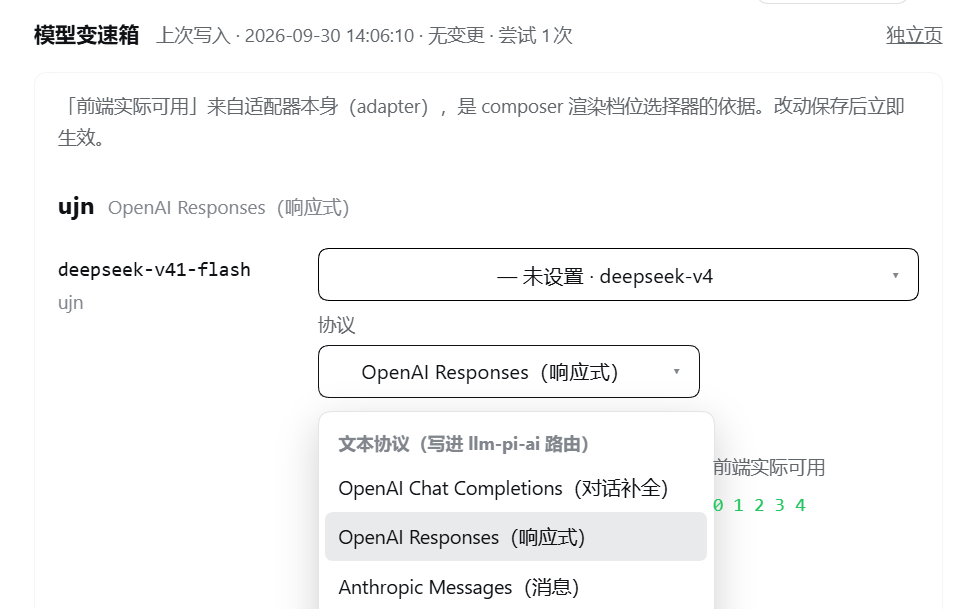 |
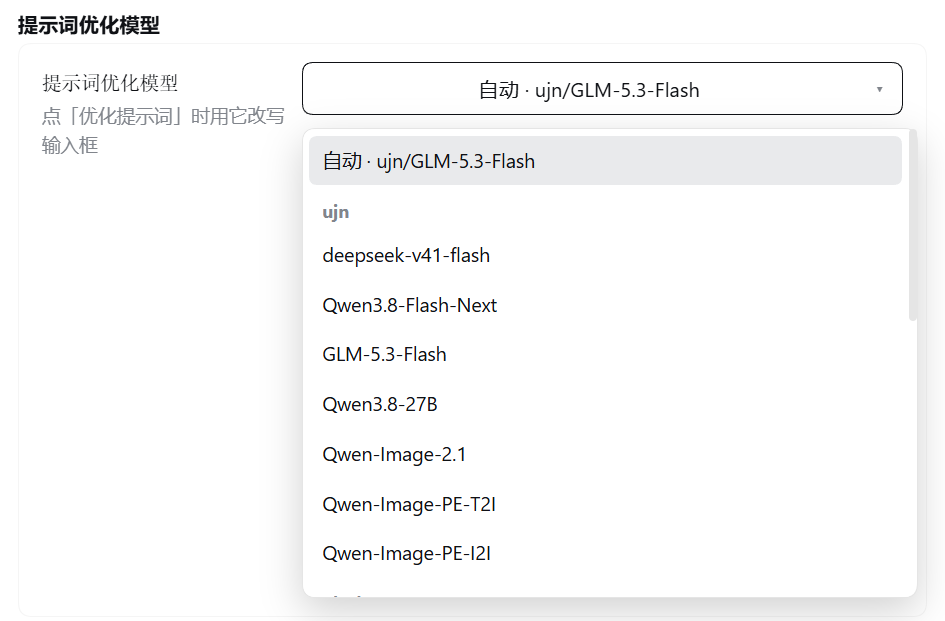 |
Effort Studio — 思考档位
问题不在 DSH 缺能力,而在配置面没把知识暴露出来:接第三方模型时选不了思考档位,是因为手写的 models[] 没声明 reasoningEfforts,适配器就按"非思考模型"处理,composer 连 Effort 行都不渲染。而每家的字段与取值又各不相同:
| 端点形态 | 实际发出的字段 | 档位 |
|---|---|---|
| OpenAI Responses | reasoning:{effort} |
none / minimal / low / medium / high / xhigh / max |
OpenAI Completions (openai) |
reasoning_effort |
同上 |
| DeepSeek | thinking:{type} + reasoning_effort |
low / high / max |
| 智谱 z.ai 官方端点 | thinking:{type} |
只有开 / 关,无级差 |
| 通义 | enable_thinking + reasoning_effort |
qwen3.8 是 low / medium / xhigh——没有 high |
| OpenRouter | reasoning:{effort} |
off → "none" |
| Anthropic 自适应 | thinking:{type:adaptive} + output_config.effort |
xhigh / max |
| Anthropic 预算 | thinking:{type:enabled, budget_tokens:N} |
token 预算 1024 / 8192 / 16384 |
本插件内置 16 组预设(全部抄自 DSH 内置 pi-ai 目录的实测映射),按模型名自动推荐,选中即用;也支持完全自定义(任意档位 → 任意线上值,如 max: "ultra")。
三条设计要点
- 协议感知。
thinkingFormat只有openai-completions收;写在openai-responses路由的模型上会被适配器直接判为非法,整次配置保存一起失败。插件按路由真实api裁剪 compat,并把裁剪结果作为"适配说明"回报,不静默丢弃。 - 空档位会被拒。非
off档位写null是非法写法("only off may leave it empty");"该端点没有这一档"的正确表达是省略该键。预设翻译层已按此处理。 - 写入前本地校验。
INVALID_CONFIG会否掉整个config,一条坏规则会连带用户其它规则一起丢。插件先把每条规则按适配器同款规则过一遍,不合法的单独拒绝并报告。
两种生效方式
- 直写(
applyMode: auto):走官方configEditor服务写进llm-pi-ai的 profile 行,配置是 volatile,写完即对下一次请求生效。写入幂等——配置重载会重新激活插件,不会反复写。 - 导出 YAML:保守派手动粘贴。
POST /gears/api/export或/gears/api/validate(干跑,不写)。
写 models[] 还是 modelOverrides 由路由形态决定,插件自动判断——两者互斥,同时出现会被适配器拒绝:
手写 models: 的路由改 models[] 条目;只靠内置目录的路由写 modelOverrides[<id>](否则会以一条残缺条目顶掉目录里的上下文窗口与模态声明)。
dsh plugin --profile <name> add dsh-gearbox
插件必须同时在 profile 的 bundle 栈里(dsh.profile.bundles)。bundle 层只在启动时组合,
所以新增插件需要重启一次;此后的配置改动都走 HMR,不用重启。
配置
设置 → 插件 → dsh-gearbox。 配置表单由本插件的 Config schema 自动渲染,预设与
thinkingFormat 是下拉选择而非自由输入——写错会在保存时被拒,而不是静默写成一条不起作用的配置。
- id: gearbox
  name: "dsh-gearbox"
  config:
    applyMode: auto
    rules:
      - route: ujn
        model: GLM-5.3-Flash
        preset: glm-gateway
      - route: ujn
        model: Qwen3.8-Flash-Next
        preset: qwen38
    image:
      providers:
        ujn:
          baseURL: https://llm.example.com/v1
          apiKeyEnv: MY_API_KEY
          style: chat
          generator: Qwen-Image-2.1
          promptEnhancer: Qwen-Image-PE-T2I
          editEnhancer: Qwen-Image-PE-I2I
          size: 1024x1024
      defaultProvider: ujn
      saveDir: .dsh-gearbox
      autoEnhance: true
| 入口 | 位置 | 说明 |
|---|---|---|
| 设置 → 模型变速箱 | DSH 设置对话框左侧导航 | 插件注册的 settings.section 分节,内嵌下面那个设置页(带主题适配)。改动客户端半后需重载窗口(Ctrl+R)或重启应用才出现 |
/gears/ui |
插件自带网页 | 同一份内容,独立打开时更宽敞 |
| 对话输入区 | 选模型后 | 档位选择器(off / low / high / …),取决于该模型是否已配档位 |
设置页是表单驱动的,不要求你懂配置文件:
- 档位:一排芯片(off / minimal / low / medium / high / xhigh / max)点选即选。
「推荐预设」下拉是快捷方式——选一个预设会把它的档位预填进芯片,再点「保存档位」生效。
非标准取值(某端点要求
high:"enabled")收在「高级」折叠里,不影响日常使用。 - 每个模型卡片上常驻显示**「前端实际可用」**的档位——那是 composer 渲染选择器的依据, 配置写进去了但这里还是"—",说明没生效。
- 所有改动保存即生效,不需要重启或重载窗口。
- 最近一次写入:时间、来源、尝试次数、错误、被拒原因、协议适配说明
插件页的「配置 模型变速箱」来自 DSH 插件管理器的 config ledger + Host 的 settings RPC, 第三方插件控制不了它是否出现。这个页面是插件自己提供的,不依赖那条链路。
| 路由 | 说明 |
|---|---|
GET /gears/ui |
设置页(HTML) |
GET /gears/api/info |
状态摘要:预设数、路由、最近一次写入结果与适配说明、enhancer 配置 |
GET /gears/api/presets |
预设库全文 |
GET /gears/api/inventory |
各路由模型 + 适配器实际对外提供的档位 |
GET /gears/api/rules |
当前生效的规则与 applyMode |
POST /gears/api/validate |
干跑:只报告会写什么、会拒什么 |
POST /gears/api/apply |
{rules} → 直写 llm-pi-ai |
POST /gears/api/export |
{rules} → 可粘贴的 YAML 片段 |
开发
node scripts/harness.mjs          # 本地验证台:mock ctx 跑通 apply / 工具 / 命令 / 路由 / 客户端半
node scripts/setup-dev-links.mjs  # 为 dev 目录接上 DSH 运行时依赖闭包(仅 linked 开发需要)
node scripts/wire-check.mjs       # 从**已写入的配置**推导线上请求体
node scripts/probe-endpoint.mjs ujn <model> high max   # 实测端点认不认 reasoning_effort
node scripts/probe-image-endpoint.mjs ujn <model>      # 实测图像端点真实返回形状
为什么需要 setup-dev-links.mjs
插件的 host 半按裸名导入 @deepseek-ai/*,DSH 把这份依赖闭包装在
<DSH_HOME>/profiles/node_modules,Node 从真实路径逐级向上找 node_modules。
已发布的插件天然满足(装在闭包下层),但跨盘 file: 链接的开发目录(D:\... → C:\...)
会断链,症状是 ERR_MODULE_NOT_FOUND: Cannot find package '@deepseek-ai/schemastery'。
该脚本在插件目录里放一组 junction 补上这一跳。仅开发需要,node_modules/ 已被忽略且不进发布包。
两个踩过的坑(写给下一位)
- client bundle 是经典 script。
dsh-app://下 ESMimport是语法错误;而且它和所有插件 拼成一段脚本,一条坏语句会掀翻整个渲染层,紧接着崩溃恢复会清掉 profile 配置。 必须用window.__ModuleLoader__.load({ id, factory })。 inject只认扁平数组。{ required, optional }这种写法在这个 cordis 版本里会被当成 要两个名叫required/optional的服务,插件永久pending,路由一个都不注册。
English
Gearbox: reasoning-effort presets for third-party models × an image-generation lane.
The plugin exists because the two blockers are knowledge problems, not capability problems.
Effort Studio
A hand-written models[] that omits reasoningEfforts makes the adapter treat the model as
non-reasoning, and the composer then renders no Effort row at all. Meanwhile every vendor spells
its gears differently — reasoning_effort for OpenAI (with xhigh only from gpt-5.2, max from
gpt-5.6), thinking:{type} for DeepSeek, an on/off switch on the z.ai endpoint, enable_thinking
for Qwen where qwen3.8 has low/medium/xhigh and no high at all.
Sixteen presets transcribed from the pi-ai catalog shipped inside DSH, auto-suggested by model id. Three things the plugin gets right that a hand-written config does not:
- Protocol awareness.
thinkingFormatis aopenai-completions-only switch. Naming it on a model whose route isopenai-responsesfails resolution and discards the entire config save. The plugin trims compat to what the route'sapiaccepts and reports each trim as an adaptation note instead of dropping it silently. - Empty gears are rejected. A valueless non-
offlevel is invalid — onlyoffmay leave it empty. "This endpoint has no such gear" is expressed by omitting the key. - Local admission before writing.
INVALID_CONFIGdenies the wholeconfig, so one bad rule would cost the user every other rule in the same write. Each rule is checked against the adapter's own rules first and refused individually.
models[] versus modelOverrides is chosen from the route's shape, because the adapter refuses
the two together: a hand-declared route edits its models entries, a catalog-backed route gets
only the changed fields in modelOverrides[<id>] (a bare models entry would shadow the catalog
entry and lose its context window and modalities).
Prompt optimization
The "Optimize" button in the composer rewrites the text you typed with a model you pick in the settings section. The instruction internalizes the behavior of LinqiuZz/Claude-prompt-skill- (MIT, 57 prompt frameworks): diagnose the input, match a framework by complexity and domain, fill in what is missing from the most reasonable interpretation — and never ask back or refuse for lack of detail, because a one-click button has no follow-up turn. Simple tasks must not get a heavyweight framework template.
Configuration
The settings form is rendered from this plugin's Config schema, with preset and
thinkingFormat as pickers rather than free text — a typo is refused at save time instead of being
written as a config that silently does nothing. See the Chinese section for a full YAML example.
Development
See the Chinese section: scripts/harness.mjs runs the plugin against a faithful mock host,
wire-check.mjs derives the request body from the written config, and the two probe-*
scripts measure what an endpoint actually honours — which is the one thing no local test can settle.
已知限制
- 协议切换只覆盖三种文本协议;
api在 llm-pi-ai 里是路由级字段,按模型切换靠自动重新分组实现 - 思考档位的写入目标是
dsh-llm-pi-ai的配置;线上字段由其适配器按路由api翻译
链接
同类插件
Ebony-Vinyl/dsh-our-free-model★ 89228
为 dsh 接入免费模型车道(含 DeepSeek V4.1 Flash、Kimi K3 等),无需登录、注册或填写 API Key,并提供本地 OpenAI 兼容网关、降级路由与用量看板。
dingminhua/dsh-connect-workbuddy★ 2083
将本机登录的 WorkBuddy 模型(国内版与国际版)接入 DSH,每次刷新按上游目录读取每个模型的积分倍率,支持逐模型图片输入开关、带自动换号的账号池、手动每日签到,以及卡片与输入框里的只读积分胶囊读数。
Alice-Marx/dsh-model-router★ 1023
为 DeepSeek Harness 规划有依赖的工作包,将其分配给已配置的模型 API 或支持的厂商 CLI,并提供费用预览。
V1ki/dsh-plugin-subscriptions★ 644
把 ChatGPT(Codex)、Claude、Grok 订阅当作 DeepSeek Harness 的 LLM 提供方:设置页登录、模型目录、用量展示,以及 image_generate、video_generate 与 x_search 工具。
XDTrees/dsh-workbuddy-xdpool★ 631
把本机 WorkBuddy 桌面 App 登录过的所有账号自动并入 DSH 模型池:多账号轮换自动容错、实时积分,模型目录按模型标注积分倍率与限时免费 / 夜间折扣。
XDTrees/dsh-xdpool★ 631
把本机 WorkBuddy 桌面 App 登录过的所有账号自动并入 DSH 模型池:多账号轮换自动容错、429 冷却、实时积分,模型目录按模型标注积分倍率与限时免费 / 夜间折扣,扫码登录 13 家厂商,聚合免费额度渠道。账号重启不丢。
社区评论
评论公开保存在 GitHub Discussions。加载评论会连接 GitHub 和 Giscus;发表内容需要 GitHub 账号。