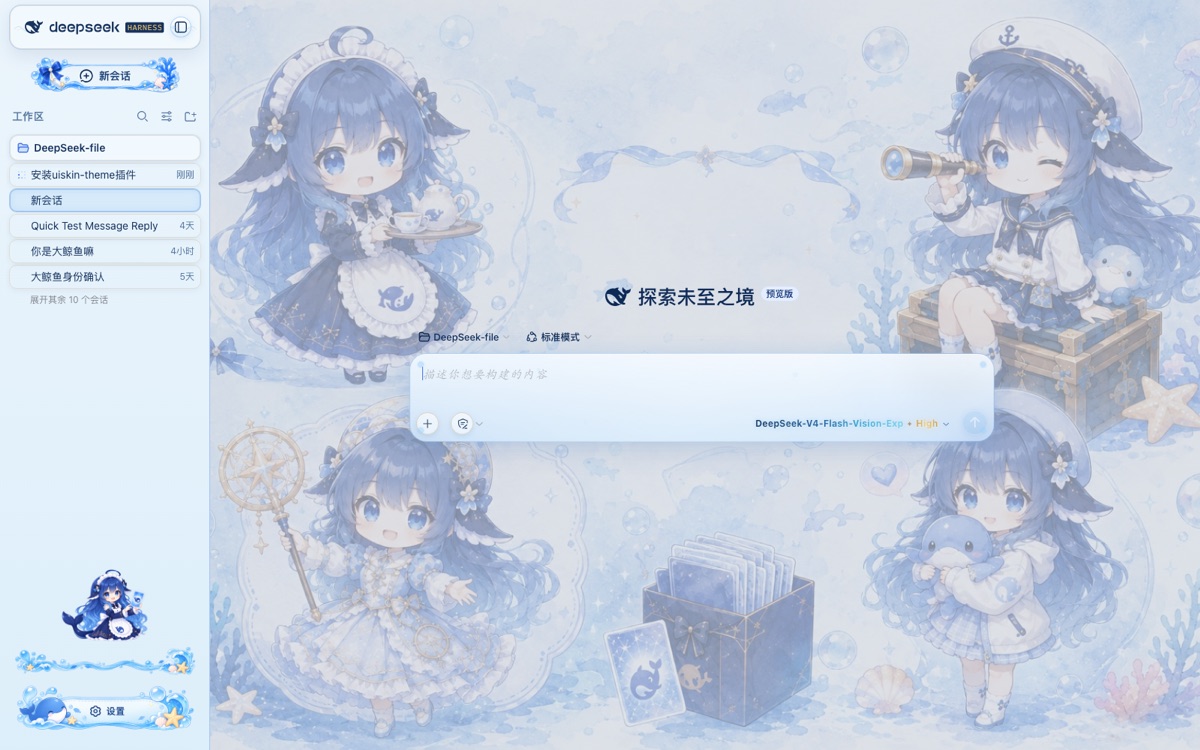
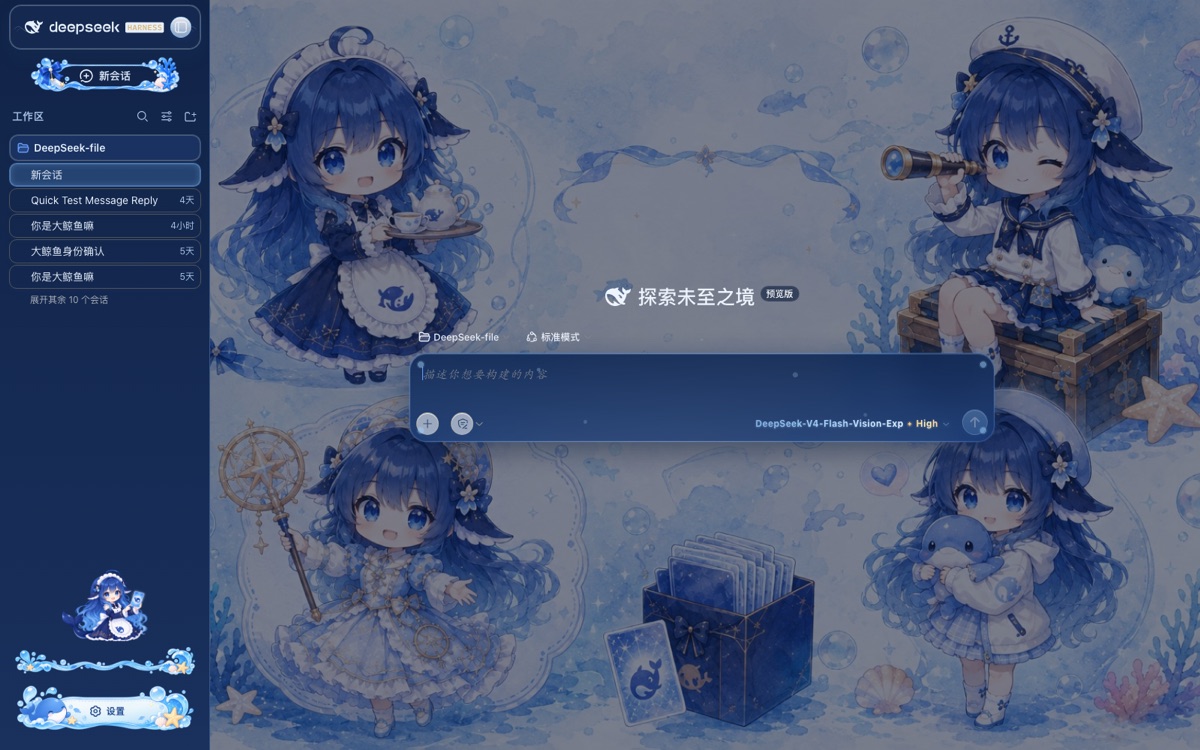
DeepSeek Harness Web 的海洋幻想玻璃皮肤:清澈海洋背景、玻璃气泡、海洋侧边栏(金色渐变「HARNESS」字标 + 底部卡通角色)、鲸鱼设置按钮、渐变模型文字。
安装
# GitHub 源码(首次需按提示配置 allowBuilds 构建授权后重试)
dsh plugin --profile web add github:chouxiaohuai/dsh-uiskin-theme
装任何插件都等于在你的机器上跑第三方代码,权限和你本人一样大——能读你的文件、用你的凭据、访问网络,工具审批管不到它。GitHub 来源的插件还会在安装时执行构建脚本——pnpm 默认拦截,所以安装可能停在 ERR_PNPM_GIT_DEP_PREPARE_NOT_ALLOWED 或 ERR_PNPM_IGNORED_BUILDS;dsh 会打印出需要添加的确切键名,把它加进该 profile 的 pnpm-workspace.yaml 的 allowBuilds 下,重跑一次即可装上。放行构建本身就是一次信任判断:请只安装可信来源,并尽量锁定 commit(github:owner/repo#sha)。
README
uiskin-theme is a static plugin bundle (profile bundle) for DeepSeek Harness Web: a crisp ocean background, glass bubbles, an ocean-styled sidebar (with a gold-gradient「HARNESS」wordmark and a bottom cartoon character), a whale settings button, gradient model text, a one-click light/dark theme toggle on the conversation header, and a purple live thinking-time counter beside 深度求索中….
uiskin-theme 是 DeepSeek Harness Web 的静态插件包(profile bundle):清澈的海洋背景、玻璃气泡、海洋侧边栏(含金色渐变「HARNESS」字标与底部卡通角色)、鲸鱼设置按钮、渐变模型文字、会话头部一键切换明/暗主题按钮,以及「深度求索中…」旁边醒目的紫色实时思考秒数。
Unlike dynamic plugins (cordis_define defined at runtime, lost on restart), this package is installed into the profile as an npm package: it loads automatically on every start, survives restarts, and needs no manual approval.
与动态插件(cordis_define 现场定义、重启即丢)不同,本包以 npm 包形式装进 profile,每次启动自动加载,重启不丢,无需人工批准。
License / 许可证 This theme is an original work and is All Rights Reserved — it is NOT open source. Without written permission from the author, you may not copy, modify, redistribute, create derivative works, or use it commercially; it may only be installed as-is and used personally.
本主题为原创作品,保留所有权利(All Rights Reserved),非开源协议。 未经作者书面许可,不得复制、修改、再分发、二次创作或用于商业用途;仅允许按原样安装与个人使用。
Installation / 安装
You need Node.js and pnpm, plus a working dsh CLI (npx @deepseek-ai/dsh also works).
需要已安装 Node.js 与 pnpm,并已能运行 dsh CLI(npx @deepseek-ai/dsh 亦可)。
# Install from GitHub (replace USERNAME with your GitHub username)
# 从 GitHub 安装(把 USERNAME 换成你的 GitHub 用户名)
dsh plugin --profile web add github:USERNAME/dsh-uiskin-theme

# Or a specific branch / commit  /  或指定分支 / 提交
dsh plugin --profile web add github:USERNAME/dsh-uiskin-theme#main
After installing, restart dsh web (or it takes effect on the next start).
装完后重启 dsh web(或下次启动时)即自动生效。
What the install does: dsh plugin runs pnpm inside ~/.dsh/profiles/web/, sees the package's dsh.bundle.patch declaration, adds it to dsh.profile.bundles, and it is loaded by boot at startup.
安装做了什么:dsh plugin 会在 ~/.dsh/profiles/web/ 里执行 pnpm 安装,识别到包的 dsh.bundle.patch 声明后把它加入 dsh.profile.bundles,启动时由 boot 加载。
Uninstall / 卸载
dsh plugin --profile web remove uiskin-theme
Repo name vs package name / 仓库名与包名 The GitHub repository is
dsh-uiskin-theme(previouslyuiskin-theme), while the installed package name isuiskin-theme(from thenamefield ofpackage.json). So install withgithub:USERNAME/dsh-uiskin-themeand uninstall withremove uiskin-theme.GitHub 仓库为
dsh-uiskin-theme(曾用名uiskin-theme),而安装后的插件包名是uiskin-theme(取自package.json的name)。因此安装用github:USERNAME/dsh-uiskin-theme,卸载用remove uiskin-theme。
How it works / 工作原理
package.json        dsh.bundle.patch → cordis.patch.yml  (registers the boot row / 注册启动行)
                    dsh.client        → declares the browser half /plugins/uiskin-theme/client.js
                                          声明浏览器半 /plugins/uiskin-theme/client.js
cordis.patch.yml    - insert: [{ id: uiskin-theme, name: uiskin-theme }]
lib/index.js        Host half: no-op (the whole skin lives in the browser half)
                    Host 半:空实现(皮肤全在浏览器侧)
lib/client.js       Browser half: injects CSS + inlined data-URI assets + slot components
                    浏览器半:注入 CSS + 内联 data URI 素材 + 槽位组件
assets/             Source images (inlined as base64 at build time; no disk reads or
                    absolute paths at runtime)
                    原始图片(构建时内联为 base64,运行时不读磁盘、无绝对路径)
Local development / rebuild / 本地开发 / 重新构建
npm install        # only what the build script needs (this package has no runtime deps)
                   # 仅安装 scripts 运行所需(本包无运行时依赖)
npm run build      # inlines assets/ into data URIs, regenerating lib/client.js
                   # 把 assets/ 内联成 data URI,重新生成 lib/client.js
To restyle the theme, edit the CSS / components in scripts/client.template.js, or replace the images under assets/ and rebuild. Remember to commit lib/client.js along with the change — someone installing from git will not (and does not need to) run the build script.
修改皮肤请编辑 scripts/client.template.js 里的 CSS / 组件,或替换 assets/ 下的图片后重新构建。改完记得把 lib/client.js 一起提交——别人从 git 安装时不会(也不需要)执行构建脚本。
Notes / 注意事项
- Assets are inlined as base64 into
lib/client.js(~1.1 MB) and loaded once, suitable for small skin images. To shrink it, compress the images underassets/first and rebuild.- 素材以 base64 内联在
lib/client.js(约 1.1 MB),加载一次即可,适合皮肤类小图片。若想更小,可先把assets/里的图压缩再构建。
- 素材以 base64 内联在
- DSH is currently a
0.1.5-rc.1pre-release; the plugin API (dsh.bundle/dsh.client/ slots / theme services) and some client class names may change between releases. When upgrading DSH, a few theme elements (bubbles, sidebar) can briefly lose styling if their CSS class hashes change — this theme tracks those renames and adds the matching selectors. If you hit compatibility issues after upgrading DSH, watch this repo's updates.- DSH 目前是
0.1.5-rc.1预发布版本,插件 API(dsh.bundle/dsh.client/ slots / theme 服务)及部分客户端类名可能随版本变化。升级 DSH 后,个别主题元素(气泡、侧栏)可能因类名 hash 变化而暂时失去样式——本主题会跟踪这些改名并补充对应选择器;如升级后遇兼容问题,关注本仓库的更新。
- DSH 目前是
- This package only depends on
@deepseek-ai/cordis(peer) andreact(peer); noallowBuildsapproval is needed to run its build scripts.- 本包只依赖
@deepseek-ai/cordis(peer)与react(peer),无需allowBuilds放行构建脚本。
- 本包只依赖
Other / 其他
- Making this takes effort, and your support is what drives us. If you like it, please give it a star; for suggestions or bugs, contact shutiaochou@gmail.com.
- 制作不易,您的支持才是我们开发的动力。如果喜欢,欢迎点一个 star;如需提建议或反馈 Bug,请联系 shutiaochou@gmail.com。
链接
同类插件
Small-tailqwq/dsh-deep-whale#maid-atelier★ 2448
DSH Web 鲸鱼娘皮肤系列(深海女仆工坊 maid-atelier)。
elysia395/dsh-wallpaper-engine★ 744
前置要求:DeepSeek Harness 0.1.5-rc.1+(DSH Desktop ≥ 2.0.7)且 dsh-better-sidebar ≥ 0.19.0,安装或更新本插件前请先更新两者。把本机 Wallpaper Engine 的 Video/Web 壁纸实时播放到聊天界面后方,Scene 壁纸由内置渲染器输出完整场景帧,支持内容分级/类型过滤、自定义壁纸上传与 iOS 液态玻璃设置窗口。
d-dev0101/open-sea-skin★ 387
实时 WebGPU 海洋皮肤,可快捷调节波浪、日光、玻璃不透明度与自动昼夜循环。
kingOfSoySauce/dsh-liang-skin★ 238
自适应推理等级滑块皮肤,将当前模型可用档位映射到 0–30 视觉强度,并同步人物、背景和界面配色。
RevolutionLA/dsh-dream-skin★ 211
一键换肤插件:8 套原创主题、背景壁纸(透明度/模糊)、强调色、主题包导入/导出+分享链接、收藏与随机,纯原生 token 系统接入。
ymh0000123/dsh-theme-endfield★ 130
《明日方舟:终末地》工业编辑风主题:奶油纸底、墨黑文字、全局直角,两套强调色配色(谷地黄信号黄 / 武陵青青碧色)可在设置切换,另有可选的等高线地形背景、ENDFIELD 水印与启动加载屏。
社区评论
评论公开保存在 GitHub Discussions。加载评论会连接 GitHub 和 Giscus;发表内容需要 GitHub 账号。