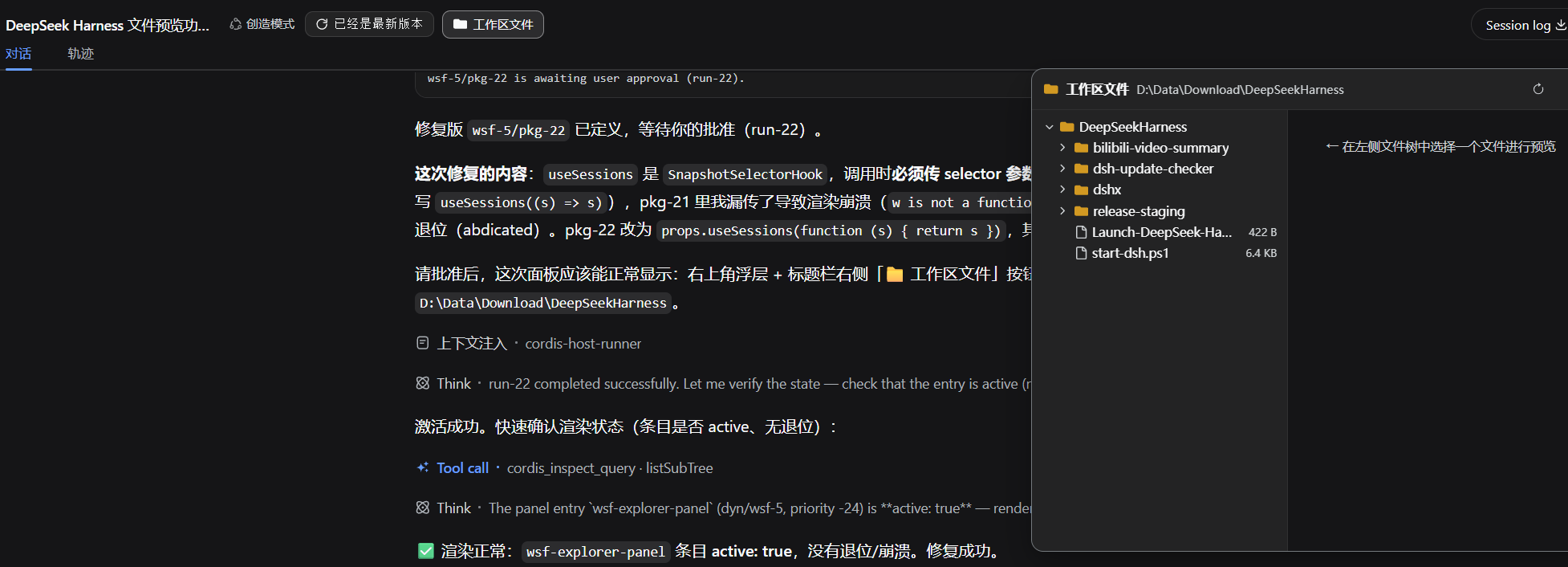
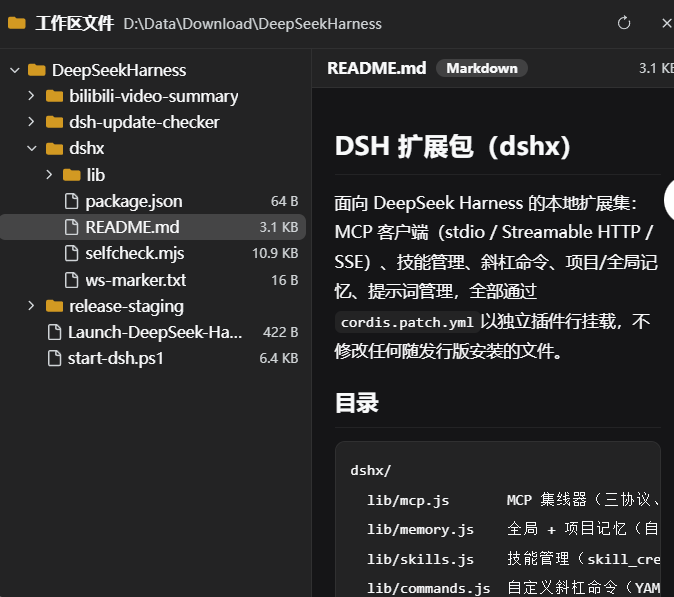
悬浮工作区文件树浏览器:带行号的代码语法高亮与 Markdown 富文本预览。
安装
# GitHub 源码(首次需按提示配置 allowBuilds 构建授权后重试)
dsh plugin --profile web add github:YZz-S/dsh-workspace-files-explorer
装任何插件都等于在你的机器上跑第三方代码,权限和你本人一样大——能读你的文件、用你的凭据、访问网络,工具审批管不到它。GitHub 来源的插件还会在安装时执行构建脚本——pnpm 默认拦截,所以安装可能停在 ERR_PNPM_GIT_DEP_PREPARE_NOT_ALLOWED 或 ERR_PNPM_IGNORED_BUILDS;dsh 会打印出需要添加的确切键名,把它加进该 profile 的 pnpm-workspace.yaml 的 allowBuilds 下,重跑一次即可装上。放行构建本身就是一次信任判断:请只安装可信来源,并尽量锁定 commit(github:owner/repo#sha)。
README
Workspace file explorer plugin for the DeepSeek Harness (dsh) Web GUI: browse the file tree of the current session's workspace (cwd) in a floating panel; click a file to preview it — code files with line numbers and syntax highlighting, Markdown files rendered as rich text.
DeepSeek Harness(dsh)Web GUI 的工作区文件浏览器插件:在浮层面板中浏览当前会话工作区(cwd)的文件树,点击文件即可预览——代码文件带行号与语法高亮,Markdown 文件渲染为富文本。
English
中文 · ← Back to DeepSeekHarnessPlugins
Features
- Floating file panel: registered on
shell.overlay, additive registration — replaces no built-in UI; docks at the top right by default - File tree: lazy-loaded expansion, directories first, hidden files (dot-prefixed) dimmed, file sizes shown, truncation notice at 500 items per directory, one-click refresh
- Code preview: line numbers + lightweight syntax highlighting (30+ languages by extension: JS/TS/Python/Go/Rust/Java/C#/PHP/Bash/SQL/JSON/YAML/CSS/HTML…), auto-adapts to light/dark themes, oversized files truncated
- Markdown preview: headings / lists / tables / quotes / links / code blocks rendered, embedded code blocks highlighted too; the whole HTML is escaped before rendering, links only allow http/https and enforce
rel="noopener noreferrer" - Panel interaction: drag the title bar to move, drag the bottom-right corner to resize (400–1400 × 280–900), close / refresh
- Session header button: a "Workspace Files" button in the title-bar action area (lit = panel open), toggles visibility on click
- Follows the session: the workspace root comes from the current session's
cwd(standarduseSessionshook); switching sessions resets the panel and loads the new workspace automatically
Installation (dsh.bundle)
This repo is also an installable dsh plugin package (package.json declares dsh.bundle + dsh.client):
dsh plugin --profile web add github:YZz-S/dsh-workspace-files-explorer
After installation, the "Workspace Files" button appears in the session title-bar action area and the floating panel takes effect automatically. The dynamic usage (cordis_define loading host.js / client.js) is kept; pick either one.
Files
| File | Description |
|---|---|
index.js |
Host half (installed form): webServer routes /api/wsf-explorer/*, read-only file browsing API |
lib/client.js |
Client half (installed form): __ModuleLoader__ browser module, calls Host routes via fetch |
cordis.patch.yml |
Bundle patch: inserts the plugin row into the dsh composition |
host.js |
Host half (dynamic form): for cordis_define, package-private RPC via harness.handle |
client.js |
Client half (dynamic form): for cordis_define, calls Host via host.call |
README.md |
This document |
LICENSE |
MIT license |
package.json |
Package metadata + dsh.bundle / dsh.client declarations |
Usage
Method 1: dynamic Cordis plugin (temporary)
Define and run in a dsh Web GUI session with the Cordis tools:
- Call
cordis_define: pastehost.jscontent ascode.hostandclient.jscontent ascode.client(plugin.kind: 'new',idPrefixof 3–6 lowercase letters) - Call
cordis_runto activate and allow authorization in the UI - The panel opens by default; the "Workspace Files" button appears on the right of the title bar to toggle visibility
Note: a dynamic plugin lives as long as the current dsh process. After restarting dsh you must define and run it again.
Method 2: installable plugin (persistent)
See "Installation (dsh.bundle)" above: dsh plugin --profile web add github:YZz-S/dsh-workspace-files-explorer — the plugin persists with the profile, no manual run needed each time.
How It Works
- Workspace root: the Client reads the current session's
cwdvia the standard hookuseSessions((s) => s)and passes it to the Host on every request; falls back tosandboxPolicy.workspaceRootwhen there is no session - Host is read-only: uses only
fs'sresolve/stat/listDir/readText/contains/processPath— no writes at all; every path must passfs.containsverification to stay inside the workspace - Preview safety: code and Markdown content are HTML-escaped before rendering; Markdown links only allow
http/httpsand enforcerel="noopener noreferrer"; raw HTML never passes through - Limits: text preview 256 KB, code rendering 2000 lines, Markdown rendering 4000 lines, directory listing 500 items — friendly notices beyond the limits
Privacy
- Only reads files and directory listings inside the current session's workspace — no external network requests, no file writes, no telemetry, no persistent storage
- Any path outside the workspace boundary is rejected (
path outside the workspace)
Known Limitations
- Binary files and text over 256 KB only show a notice, no preview
- Syntax highlighting is a built-in lightweight implementation (keywords / strings / comments / numbers), not full semantic highlighting
- The panel button is registered in the session header action area; blank new sessions (no title bar) do not show the button, but the panel still opens by default
- The dynamic plugin is process-level: after a restart you must run it again
Pre-Release Checklist
- No hard-coded keys / tokens / passwords (patterns like
api[_-]?key,secret,token,password, private-key headers scanned) - No personal information (usernames, machine paths, internal IPs, emails); workspace paths come from runtime session state, not baked into the code
- No external network requests, no telemetry, no third-party data collection
- MIT license in place, README complete
- Code uses only dsh plugin public interfaces (Services / webServer / slots / React); all side effects hang on the plugin Fiber and are cleaned up on stop
- Inputs (file names / file contents) are HTML-escaped before rendering; link protocol whitelist +
noopener— no injection surface
License
中文
English · ← 返回 DeepSeekHarnessPlugins
DeepSeek Harness(dsh)Web GUI 的工作区文件浏览器插件:在浮层面板中浏览当前会话工作区(cwd)的文件树,点击文件即可预览——代码文件带行号与语法高亮,Markdown 文件渲染为富文本。
功能
- 浮层文件面板:注册在
shell.overlay,加法式注册,不替换任何自带 UI;默认停靠右上角 - 文件树:懒加载展开、目录优先排序、隐藏文件(点开头)淡化显示、文件大小标注、单目录最多 500 项截断提示、一键刷新
- 代码预览:行号 + 轻量语法高亮(JS/TS/Python/Go/Rust/Java/C#/PHP/Bash/SQL/JSON/YAML/CSS/HTML 等 30+ 语言按扩展名识别),深浅色主题自适应,超长文件截断
- Markdown 预览:标题 / 列表 / 表格 / 引用 / 链接 / 代码块等渲染,内嵌代码块同样高亮;渲染前整体 HTML 转义,链接仅允许 http/https 且强制
rel="noopener noreferrer" - 面板交互:标题栏拖拽移动、右下角拖拽缩放(400–1400 × 280–900)、关闭 / 刷新
- 会话头部按钮:标题栏动作区显示「工作区文件」按钮(点亮 = 面板已打开),点击切换显隐
- 跟随会话:工作区根目录取自当前会话的
cwd(useSessions标准 hook),切换会话时面板自动重置并加载新工作区
安装(dsh.bundle)
本仓库同时是可安装的 dsh 插件包(package.json 声明 dsh.bundle + dsh.client):
dsh plugin --profile web add github:YZz-S/dsh-workspace-files-explorer
安装后「会话标题栏动作区」出现「工作区文件」按钮,浮层面板自动生效。
动态用法(cordis_define 加载 host.js / client.js)仍保留,两种方式二选一。
文件说明
| 文件 | 说明 |
|---|---|
index.js |
Host 半部分(安装版):webServer 路由 /api/wsf-explorer/*,只读文件浏览 API |
lib/client.js |
Client 半部分(安装版):__ModuleLoader__ 浏览器模块,fetch 调用 Host 路由 |
cordis.patch.yml |
bundle 补丁:把插件行插入 dsh 组合 |
host.js |
Host 半部分(动态版):供 cordis_define 使用,harness.handle 包私有 RPC |
client.js |
Client 半部分(动态版):供 cordis_define 使用,host.call 调用 Host |
README.md |
本说明 |
LICENSE |
MIT 许可证 |
package.json |
包元信息 + dsh.bundle / dsh.client 声明 |
使用方法
方式一:动态 Cordis 插件(临时运行)
在 dsh Web GUI 的会话中,用 Cordis 工具定义并运行:
- 调用
cordis_define:code.host粘贴host.js的内容,code.client粘贴client.js的内容(plugin.kind: 'new',idPrefix取 3–6 个小写字母) - 调用
cordis_run激活,在界面上允许授权 - 面板默认打开;标题栏右侧出现「工作区文件」按钮用于切换显隐
注意:动态插件的生命周期与当前 dsh 进程相同。重启 dsh 后需重新定义运行。
方式二:可安装插件(常驻)
见上文「安装(dsh.bundle)」:dsh plugin --profile web add github:YZz-S/dsh-workspace-files-explorer,插件随 profile 常驻,无需每次手动运行。
工作原理
- 工作区根:Client 端通过标准 hook
useSessions((s) => s)读取当前会话的cwd,随每次请求传给 Host;无会话时回退sandboxPolicy.workspaceRoot - Host 只读:仅使用
fs的resolve/stat/listDir/readText/contains/processPath,无任何写入;所有路径经fs.contains校验必须位于工作区内 - 预览安全:代码与 Markdown 内容一律先做 HTML 转义再渲染;Markdown 链接仅允许
http/https协议并强制rel="noopener noreferrer";原始 HTML 不直通 - 上限:文本预览 256KB、代码渲染 2000 行、Markdown 渲染 4000 行、目录列表 500 项,超出部分友好提示
隐私说明
- 仅读取当前会话工作区内的文件与目录列表,无外部网络请求、无文件写入、无遥测、无持久化存储
- 工作区边界外的路径一律拒绝(
路径超出工作区范围)
已知限制
- 二进制文件与超过 256KB 的文本只提示,不预览
- 语法高亮为内置轻量实现(关键字 / 字符串 / 注释 / 数字),非完整语义级高亮
- 面板按钮注册在会话头部动作区;空白新会话(无标题栏)时按钮不显示,面板仍默认打开
- 动态插件为进程级生命周期,重启后需重新运行
开源前检查
- 无硬编码密钥 / Token / 密码(已扫描
api[_-]?key、secret、token、password、私钥头等模式) - 无个人信息(用户名、机器路径、内部 IP、邮箱);工作区路径来自运行时会话状态,未写入代码
- 无外部网络请求、无遥测、无第三方数据收集
- MIT 许可证齐全,README 完整
- 代码仅使用 dsh 插件公开接口(Services / webServer / slots / React),副作用全部挂在插件 Fiber 上,停止即清理
- 输入内容(文件名 / 文件内容)均经 HTML 转义后渲染,链接协议白名单 +
noopener,无注入面
License
链接
同类插件
zhu1090093659/dsh-web#packages/dsh-task-board★ 8121
侧边栏多列任务看板:卡片交给真实 DSH 智能体会话执行,支持 cron 定时(Host 侧到点执行,关浏览器也生效)。
zhu1090093659/dsh-web#packages/dsh-web-all★ 8121
DSH Web UI 插件与皮肤合集:任务看板、git 图、右侧面板、远程移动端 UI、桌宠、实时 token 统计与皮肤中心。
omdsh-dev/DSH-better-sidebar★ 3868
侧边栏完整工作台:内置文件渲染编辑、终端、Git 与子代理,支持三方插件注册新 Tab。
ccch1mneyyy/dsh-TUI★ 3734
Claude Code 风格全屏终端 UI:像素鲸鱼顶栏、实时工作状态行、思考流式展开。
MeteorNOX/DeepSeek-Balance-Whale-Widget★ 3369
右下角常驻的小鲸鱼挂件:余额、今日已用与每轮对话消耗(含峰谷价),余额预警与今日预算的泡泡内容都可编辑;泡泡点击序列模块化自定义,支持并列加权 A/B、随机台词与随机图片;内置 30+ 厂商模板(OpenAI / OpenRouter / Kimi / 硅基流动 / 方舟 / 智谱 / MiniMax 等),按模型查余额与订阅额度;另有任务结束音效、导入音频、自定义角色与资源管理。数据全在本机,无遥测。
Devin-AXIS/deepseek-design#deepseek-idesign★ 1665
可视化设计工作室,支持网站、App 原型、海报、信息卡、报告和杂志的模板创建、元素编辑、选区级 AI 草稿衔接与导出。
社区评论
评论公开保存在 GitHub Discussions。加载评论会连接 GitHub 和 Giscus;发表内容需要 GitHub 账号。