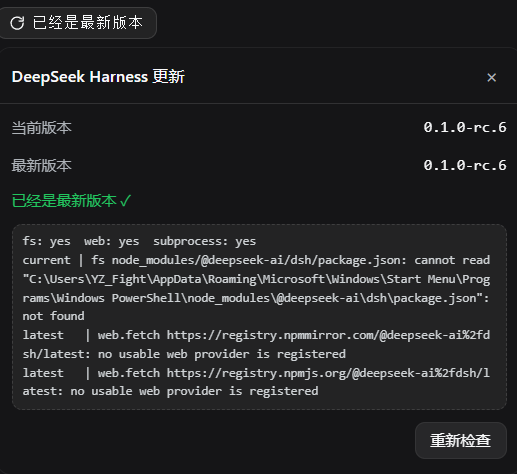
会话顶栏徽章:显示 DeepSeek Harness 当前版本,自动检查 npm 最新版本,有新版时提示升级。
安装
# GitHub 源码(首次需按提示配置 allowBuilds 构建授权后重试)
dsh plugin --profile web add github:YZz-S/dsh-update-checker
装任何插件都等于在你的机器上跑第三方代码,权限和你本人一样大——能读你的文件、用你的凭据、访问网络,工具审批管不到它。GitHub 来源的插件还会在安装时执行构建脚本——pnpm 默认拦截,所以安装可能停在 ERR_PNPM_GIT_DEP_PREPARE_NOT_ALLOWED 或 ERR_PNPM_IGNORED_BUILDS;dsh 会打印出需要添加的确切键名,把它加进该 profile 的 pnpm-workspace.yaml 的 allowBuilds 下,重跑一次即可装上。放行构建本身就是一次信任判断:请只安装可信来源,并尽量锁定 commit(github:owner/repo#sha)。
README
Update checker plugin for the DeepSeek Harness (dsh) Web GUI: shows the current version in the session top bar, auto-checks the latest version on npm and prompts you to upgrade when a new one is available.
DeepSeek Harness(dsh)Web GUI 的更新检查插件:在会话顶栏显示当前版本号,自动检查 npm 上的最新版本,有新版时提示升级。
English
中文 · ← Back to DeepSeekHarnessPlugins
Features
- Top-bar version badge: registered in the session top-bar action area (next to the title), additive registration — replaces no built-in UI
- Auto-check on page load: checks once on mount, no manual action needed
- Three badge states:
- Up to date → shows "Already up to date"
- New version available → shows "Update to vX.Y.Z" with a red dot in the top-right corner
- Check failed → badge turns red and shows "Check failed"
- Comparison panel: clicking the badge re-checks immediately and opens a panel showing current version / latest version / update status / upgrade instructions
- Step-by-step diagnostics: on failure the panel shows a diagnostics block (the concrete probe record for each step of current & latest version detection) for quick troubleshooting
Files
| File | Description |
|---|---|
index.js |
Installed Host half (dsh.bundle entry): registers the /api/dsh-update-checker/check route, reads current version + queries latest version |
lib/client.js |
Installed Client half (dsh.client module): top-bar badge & comparison panel |
cordis.patch.yml |
Bundle composition patch inserting the plugin row into the profile |
package.json |
Package metadata (declares dsh.bundle + dsh.client) |
host.js / client.js |
Dynamic cordis_define usage (mutually exclusive with the installed form) |
README.md / LICENSE |
Docs / MIT license |
Installation (dsh.bundle)
This repo is also an installable dsh plugin package (package.json declares dsh.bundle + dsh.client). After installation, restart dsh and the "top-bar version badge" takes effect automatically.
# If published as its own repository (same inclusion style as awesome-dsh-plugin, recommended):
dsh plugin --profile web add github:<your-username>/dsh-update-checker

# If installed as a subdirectory of the DeepSeekHarnessPlugins repository:
dsh plugin --profile web add github:<your-username>/DeepSeekHarnessPlugins#path:dsh-update-checker
To update an installed plugin: re-add the latest commit (or
dsh plugin --profile web update dsh-update-checker), then restart dsh.
Usage (dynamic Cordis plugin)
Define and run in a dsh Web GUI session with the Cordis tools:
- Call
cordis_define: pastehost.jscontent ascode.hostandclient.jscontent ascode.client(plugin.kind: 'new',idPrefixof 3–6 lowercase letters) - Call
cordis_runto activate and allow authorization in the UI - Refresh the page to see the badge in the session top bar
Note: a dynamic plugin lives as long as the current dsh process. After a dsh restart you must define and run it again; for persistence use the "Installation (dsh.bundle)" method above.
How it works
Current version (installed form, degraded in order):
- Reads
process.cwd()/node_modules/@deepseek-ai/dsh/package.json(npx launch scenario) - Reads common global install paths (
/usr/local/lib,/opt/homebrew/lib) - Scans the npm cache
_npxdirectory by environment variables (npm_config_cache,LOCALAPPDATA,APPDATA,HOME)
Latest version (degraded in order):
fetchqueriesregistry.npmmirror.com- On failure retries
registry.npmjs.org
Results are cached for 60 seconds; clicking "Re-check" on the badge skips the cache and forces a refresh.
Privacy
- Network requests go only to public npm registries (npmmirror.com / npmjs.org) and are only issued when a check is triggered
- No local data is collected or uploaded; locally it only reads
@deepseek-ai/dsh/package.json - No telemetry, no persistent storage, no file writes
Known Limitations
- Current-version detection depends on the install location; on failure the panel diagnostics block gives the concrete reason
- The badge lives in the session top bar; blank new sessions (no title bar) do not show it
- It checks the version of DeepSeek Harness (
@deepseek-ai/dsh) itself, not this plugin
Pre-Release Checklist
- No hard-coded keys / tokens / passwords
- No personal information (usernames, machine paths, internal IPs, emails)
- Network endpoints are only public npm registries, disclosed in this README
- MIT license in place, README complete
- No telemetry / no third-party data collection
- Code uses only dsh public interfaces; all side effects hang on the plugin Fiber and are cleaned up on stop
License
中文
English · ← 返回 DeepSeekHarnessPlugins
DeepSeek Harness(dsh)Web GUI 的更新检查插件:在会话顶栏显示当前版本号,自动检查 npm 上的最新版本,有新版时提示升级。
功能
- 顶栏版本徽章:注册在会话顶栏动作区(标题旁),加法式注册,不替换任何自带 UI
- 页面加载自动检查:挂载即检查一次,无需手动操作
- 三种徽章状态:
- 已是最新 → 显示「已经是最新版本」
- 有新版本 → 显示「更新到 vX.Y.Z」并在右上角亮红点
- 检查失败 → 徽章变红显示「检查失败」
- 对比面板:点击徽章立即重新检查并弹出面板,显示当前版本 / 最新版本 / 更新状态 / 升级指引
- 逐级诊断:检查失败时面板展示诊断块(当前版本与最新版本每一步探测的具体记录),便于快速定位
文件说明
| 文件 | 说明 |
|---|---|
index.js |
安装版 Host 半边(dsh.bundle 入口):注册 /api/dsh-update-checker/check 路由,读当前版本 + 查最新版本 |
lib/client.js |
安装版 Client 半边(dsh.client 模块):顶栏徽章与对比面板 |
cordis.patch.yml |
bundle 组合补丁,把插件行插入 profile |
package.json |
包元信息(声明 dsh.bundle + dsh.client) |
host.js / client.js |
动态 cordis_define 用法(与安装版二选一) |
README.md / LICENSE |
说明文档 / MIT 许可证 |
安装(dsh.bundle)
本仓库同时是可安装的 dsh 插件包(package.json 声明 dsh.bundle + dsh.client)。安装后重启 dsh,「顶栏版本徽章」自动生效。
# 若插件发布为独立仓库(与 awesome-dsh-plugin 收录方式一致,推荐):
dsh plugin --profile web add github:<你的用户名>/dsh-update-checker

# 若作为 DeepSeekHarnessPlugins 仓库的子目录安装:
dsh plugin --profile web add github:<你的用户名>/DeepSeekHarnessPlugins#path:dsh-update-checker
更新已安装的插件:重新 add 最新提交(或
dsh plugin --profile web update dsh-update-checker)后重启 dsh。
使用方法(动态 Cordis 插件)
在 dsh Web GUI 的会话中,用 Cordis 工具定义并运行:
- 调用
cordis_define:code.host粘贴host.js的内容,code.client粘贴client.js的内容(plugin.kind: 'new',idPrefix取 3–6 个小写字母) - 调用
cordis_run激活,在界面上允许授权 - 刷新页面即可在会话顶栏看到徽章
注意:动态插件的生命周期与当前 dsh 进程相同。重启 dsh 后需重新定义运行;如需常驻,请使用上方「安装(dsh.bundle)」方式。
工作原理
当前版本(安装版,按顺序降级):
- 读取
process.cwd()/node_modules/@deepseek-ai/dsh/package.json(npx 启动场景) - 读取常见全局安装路径(
/usr/local/lib、/opt/homebrew/lib) - 按环境变量(
npm_config_cache、LOCALAPPDATA、APPDATA、HOME)扫描 npm 缓存_npx目录
最新版本(按顺序降级):
fetch查询registry.npmmirror.com- 失败再试
registry.npmjs.org
结果带 60 秒缓存;点击徽章的「重新检查」会跳过缓存强制刷新。
隐私说明
- 网络请求仅指向公开 npm registry(npmmirror.com / npmjs.org),且仅在检查触发时发出
- 不采集、不上传任何本地数据;本地仅读取
@deepseek-ai/dsh/package.json - 无遥测、无持久化存储、无文件写入
已知限制
- 当前版本探测依赖安装位置,探测失败时面板诊断块会给出具体原因
- 徽章位于会话顶栏;空白新会话(无标题栏)不显示
- 检查的是 DeepSeek Harness(
@deepseek-ai/dsh)自身的版本,不是本插件版本
开源前检查
- 无硬编码密钥 / Token / 密码
- 无个人信息(用户名、机器路径、内部 IP、邮箱)
- 网络端点仅公开 npm registry,已在 README 披露
- MIT 许可证齐全,README 完整
- 无遥测 / 无第三方数据收集
- 代码仅使用 dsh 公开接口,副作用全部挂在插件 Fiber 上,停止即清理
License
链接
同类插件
yjh051108/dsh-routing-suite★ 7003
一个仓库三件套:DSH 插件包的运行时注入器(注入、热重载、卸载、开发侧挂区一键转正、路由自愈,外带设置页插件管理:列出、卸载、拖入文件夹内化)、任务感知的思维模式路由 agent 预设(router-standard / router-spec / router-react)、以及分级两级任务协议(commit_star / lock_stage / revise_do / edit_plan / mark_task / redteam_verdict 六个工具,任务状态落盘)。注入器实现直接在库内,安装的是它自己的行为而不是一份依赖清单。
strukto-ai/mirage#dsh★ 3666
把文件系统与 bash 提供者换成 mirage 虚拟工作区:文件工具与 shell 命令作用于挂载的资源(RAM、S3、Redis、Slack、Gmail、Notion、Postgres)而非宿主磁盘,支持按挂载点设置读/写/执行模式、按命令选择沙箱(进程内 monty、pyodide、quickjs;远程 docker、e2b、daytona),并可在虚拟终端中安装 CLI(git、gh、slack、linear、ntn、gws,或自行注册的程序树)作为命令头词。
hust-open-atom-club/oh-dsh★ 325
社区发行版:TUI、桌面端与 Web UI 统一体验,分层安装、一步到位。
weijiafu14/pi2dsh★ 206
Pi Host ABI 兼容引擎:装一次之后,npm 上的 Pi 扩展原包经 `dsh plugin add <pi-package>` 直接作为 DSH 原生插件挂载。已在官方 DSH 上端到端验证 pi-mcp-adapter(完整 MCP 管理面:OAuth、resources、prompts、MCP Apps、elicitation、sampling)、@tintinweb/pi-subagents、pi-code、pi-hermes-memory、pi-background-tasks;`pi2dsh inspect` 在安装前报告一个包的兼容情况。
lire1131/dsh-undo-savepoint★ 166
DSH 撤销/回退系统:配置变更自动存档,一键撤销/恢复/回退到任意版本,支持 WebUI 与离线 CLI/GUI 工具(DSH 启动失败也能救)。
Fishquito7/dsh-skill-mcp-panel★ 155
在 DSH Web 设置中管理技能与 MCP 服务器:技能卡片热启停、工作区作用域、分组、批量迁移与拖拽导入,以及 stdio/HTTP MCP 增删改查、连接测试、密钥脱敏,并附带统一 dsh-panel 命令行。
社区评论
评论公开保存在 GitHub Discussions。加载评论会连接 GitHub 和 Giscus;发表内容需要 GitHub 账号。