会话回合结束时播放短提示音,内置三种音色或一条自定义上传,在设置 → 插件中配置。
安装
# GitHub 源码(首次需按提示配置 allowBuilds 构建授权后重试)
dsh plugin --profile web add github:Whale-Zhang/dsh-complete-chime
装任何插件都等于在你的机器上跑第三方代码,权限和你本人一样大——能读你的文件、用你的凭据、访问网络,工具审批管不到它。GitHub 来源的插件还会在安装时执行构建脚本——pnpm 默认拦截,所以安装可能停在 ERR_PNPM_GIT_DEP_PREPARE_NOT_ALLOWED 或 ERR_PNPM_IGNORED_BUILDS;dsh 会打印出需要添加的确切键名,把它加进该 profile 的 pnpm-workspace.yaml 的 allowBuilds 下,重跑一次即可装上。放行构建本身就是一次信任判断:请只安装可信来源,并尽量锁定 commit(github:owner/repo#sha)。
README
A DeepSeek Harness (dsh) plugin that plays a short sound when a conversation turn finishes. Works in the Web UI and Desktop. Built-in tones plus one custom upload, configured in Settings → Plugins.
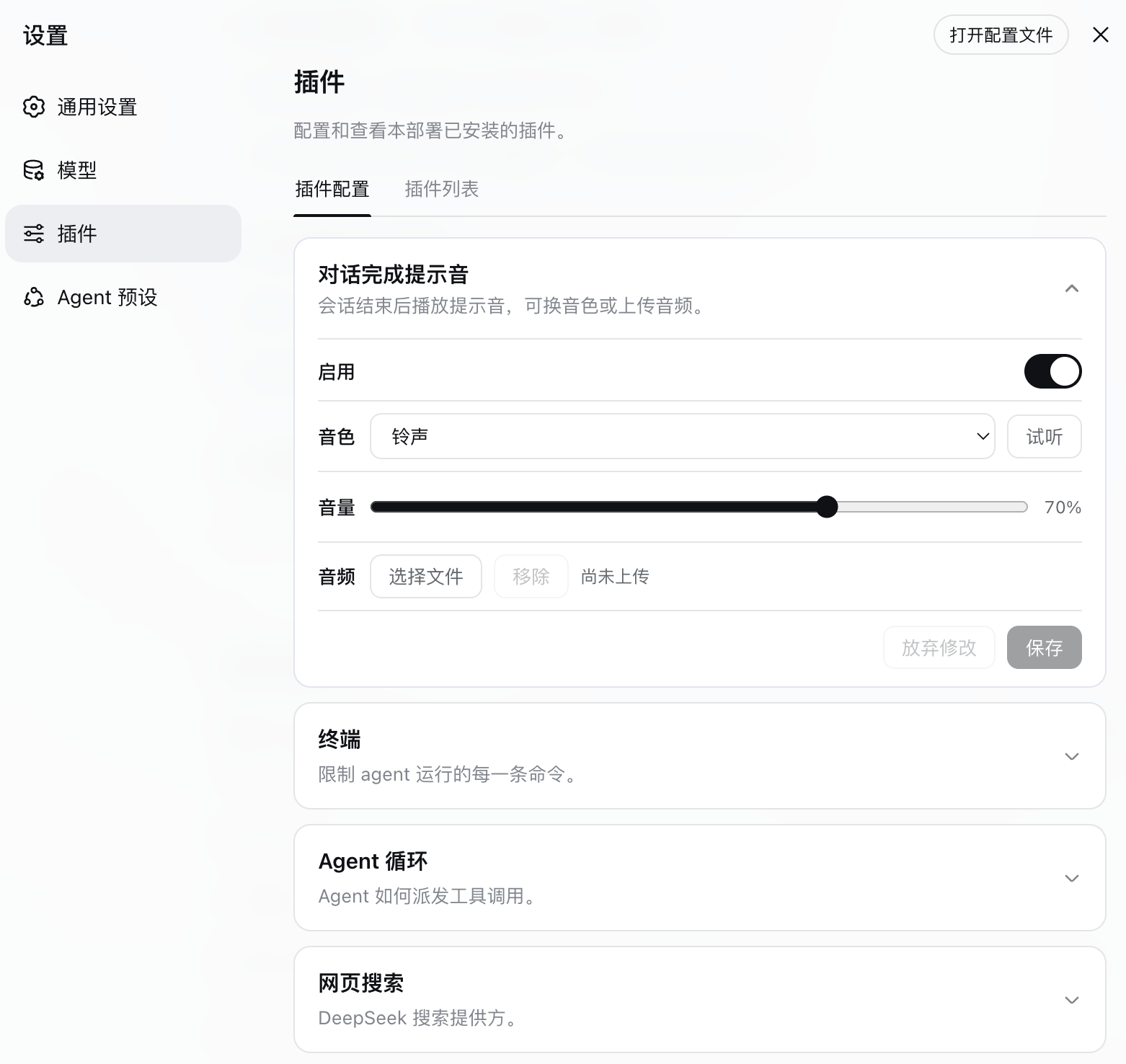
设置入口:设置 → 插件 → 插件配置。展开「对话完成提示音」即可开关、换音色、调音量、试听和上传自定义音频。
中文
会话回合真正结束后播放提示音。网页端与桌面端同一套设置。
行为
- 任一会话回合结束(不是手动停止、不是刷新回放)播一次
- 多会话并行:谁完成谁响,互不吞掉;当前正在看的会话也会响
- 子代理会话默认不响
- 内置三种短提示音:铃声 / 叮咚 / 钟声
- 可上传一条自定义音频(mp3 / wav 等,最大 2MB)
设置
打开 设置 → 插件 → 插件配置,展开「对话完成提示音」:
- 启用开关
- 音色
- 音量(滑动条)
- 试听
- 上传 / 更换 / 移除自定义音频
自定义文件存在 $DSH_HOME/complete-chime/(默认 ~/.dsh/complete-chime/),偏好写在用户设置文档的 dsh-complete-chime 命名空间。Web 与 Desktop 两个 profile 共用。
浏览器若拦截自动播放,在页面上点击一次即可解锁。切回前台时会尝试恢复 AudioContext,避免后台标签页把提示音静音后一直不响。
安装
需要已安装 DeepSeek Harness。
dsh plugin --profile web add github:Whale-Zhang/dsh-complete-chime
dsh plugin --profile desktop add github:Whale-Zhang/dsh-complete-chime
装完后重启对应 profile。用 dsh --profile web --dump-config 应能看到 dsh-complete-chime 这一行。
本地开发(拷进运行时目录后再 file: 安装):
dsh plugin --profile web add file:$HOME/.dsh/plugins/dsh-complete-chime
dsh plugin --profile desktop add file:$HOME/.dsh/plugins/dsh-complete-chime
卸载
dsh plugin --profile web remove @dsh-external/dsh-complete-chime
dsh plugin --profile desktop remove @dsh-external/dsh-complete-chime
English
Play a short cue when an agent turn finishes. Same settings on Web and Desktop.
Behavior
- Fires once when a session turn actually ends (not a user abort, not a refresh replay)
- Concurrent sessions each get their own cue; the session you are viewing also rings
- Subagent sessions stay quiet
- Three built-in synthesized tones: Chime / Ding / Bell
- Optional custom audio upload (mp3 / wav, max 2MB)
Settings
Settings → Plugins → Plugin configuration → Completion chime
Enable, sound, volume slider, preview, and custom-file upload. Chrome matches the built-in plugin cards (expand, reset, discard, save).
Custom audio lives under $DSH_HOME/complete-chime/. Preferences use the dsh-complete-chime settings namespace.
If the browser blocks autoplay, click once on the page to unlock audio. Returning to the tab resumes the audio context so later completions still ring.
Custom files must be real audio (sniffed on the host) and at most 2MB. Non-audio or oversized picks are rejected before save.
Install
Requires DeepSeek Harness.
dsh plugin --profile web add github:Whale-Zhang/dsh-complete-chime
dsh plugin --profile desktop add github:Whale-Zhang/dsh-complete-chime
Restart the profile after installing. dsh --profile web --dump-config should list dsh-complete-chime.
License
MIT
链接
同类插件
xmanrui/dsh-im★ 1710
通过二维码或机器人凭据将 IM 机器人接入 DeepSeek Harness(支持飞书、微信、钉钉、企业微信、QQ、Slack、Telegram、Discord 和 WhatsApp 共 9 种渠道)。
shaobeichen/dsh-pocket★ 1576
手机远程访问 DSH Web 界面:扫码即用局域网或公网(cloudflared 隧道)访问,实时同屏、移动端适配布局,带设置页管理。
inclusionAI/Avernet#deepseek-harness-channel-bcn★ 677
通过 WebSocket V2 将 DeepSeek Harness 接入 Avernet Bot 协作网络,支持自动注册、Agent 会话隔离、工具调用事件和多 Bot 路由工具。
omdsh-dev/dsh-notification★ 87
回合完成桌面通知,按结果分控 + 关键词过滤。
THEWOLFWALKER/dsh-notifier★ 56
DSH 通知与远程操作控制面:一个 `notify()` API 接入 28 个出站渠道,六条入站控制通道承载手机审批、提问与任务控制;提供 DSH 原生「通知与控制」UI、出站热生效、多 agent 路由,并保持零运行时依赖。
whyihaveyou/dsh-suite#plugin-notify★ 56
回合完成、错误或待审批时推送 IM webhook(飞书/企微/钉钉/Slack/Discord/自定义)与本地通知。
社区评论
评论公开保存在 GitHub Discussions。加载评论会连接 GitHub 和 Giscus;发表内容需要 GitHub 账号。