为 DeepSeek Harness 提供常驻的 Endeavour 与 Challenger 对等会话:负责规划、按序执行任务,并核验汇报的结果。
安装
# npm 包(预构建)
dsh plugin --profile web add dsh-orbital-agents
# GitHub 源码(首次需按提示配置 allowBuilds 构建授权后重试)
dsh plugin --profile web add github:Qulierm/orbital-agents
装任何插件都等于在你的机器上跑第三方代码,权限和你本人一样大——能读你的文件、用你的凭据、访问网络,工具审批管不到它。GitHub 来源的插件还会在安装时执行构建脚本——pnpm 默认拦截,所以安装可能停在 ERR_PNPM_GIT_DEP_PREPARE_NOT_ALLOWED 或 ERR_PNPM_IGNORED_BUILDS;dsh 会打印出需要添加的确切键名,把它加进该 profile 的 pnpm-workspace.yaml 的 allowBuilds 下,重跑一次即可装上。放行构建本身就是一次信任判断:请只安装可信来源,并尽量锁定 commit(github:owner/repo#sha)。
README
该插件的 README 只有英文版本。
Two coordinated DSH agents that plan and execute as one pair. Orbital Agents is the project and
repository identity; the published package is dsh-orbital-agents (the predecessor name
dsh-endeavour is superseded and deprecated on npm).
The Endeavour agent investigates, writes the plan, and verifies results. Its persistent Challenger peer is a second ordinary chat that executes the plan and reports back through a durable protocol. The pair is created once and reused for every later plan, so the two agents stay in the same orbit instead of being re-spawned per task.
- Target runtime: DeepSeek Harness v0.1.7-rc.1 (Cordis 4.0.4), the family bundled by the third-party community DSH Desktop v2.0.14. Harness 0.1.7 replaced directory agent presets with composition rows and moved session navigation to the Workspace view owner, so earlier harness releases are no longer supported. This is a community integration; it is not an official DeepSeek product.
- The global bundle only provides the durable orchestration service. The four model-facing tools are
registered by the scoped
dsh-orbital-agents/toolsrow of the Endeavour preset, so the standard preset never sees them. - User-visible task states are exactly four: waiting, running, succeeded, failed — shown as
Waiting to start,Working,Finished,Confirmed, andFaileddisplay stages. - Only Endeavour records success or failure after a quick acceptance check; the Challenger can never authorize terminal success.
Use it
- Install the package and the user presets (see below), then restart DSH Desktop so the profile
bundle row and the presets are loaded:
osascript -e 'quit app "DSH Desktop"'thenopen "/Applications/DSH Desktop.app". - Start a New Chat and pick the Endeavour preset.
- Choose the planning model with the host's native Endeavour selector; use the compact Challenger selector beside it to choose Challenger's Model and Effort independently.
- Describe the task in ordinary language and send it. This is the only step that needs provider credentials.
- Watch the plan card in the Endeavour chat: progress, the durable task states, a live timer per
running task, and the frozen duration after verification.
Open Challengeropens the paired chat that executes the tasks.
Two ordinary presets ship together: Endeavour (planner: endeavour_plan, endeavour_verify)
and Challenger (executor: challenger_start_task, challenger_report). A plan is delivered once
to the persistent Challenger session paired with its Endeavour session; the companion is never a
subagent and is reused by every later plan of that pair. If a user asks for the
Challenger directly, Endeavour uses that paired companion and starts work only
through endeavour_plan; it never spawns a native subagent to replace it.
A paired Endeavour session shows a native Challenger view tab next to Chat and Trajectory, and
the Challenger session shows the reciprocal Endeavour tab; either tab opens the other ordinary
session of the pair (see docs/architecture.md). An existing Challenger row is
never promoted by reselecting Endeavour in it; the runtime repairs its Challenger selection instead of
creating a second companion.
Install
git clone git@github.com:Qulierm/orbital-agents.git
cd orbital-agents
pnpm install --frozen-lockfile
pnpm run build
pnpm pack
node scripts/install-local.mjs --tarball ./dsh-orbital-agents-0.2.8.tgz
The installer backs up the desktop profile and any existing user preset first, installs the package
into ~/.dsh/profiles/desktop, and preserves existing plugin order. The two agent presets ship inside
the package as bundle patches (presets/endeavour.patch.yml, presets/challenger.patch.yml), so no
preset directory is written; an upgrade retires the ownership-marked directories earlier releases
installed under ~/.dsh/.agent-presets. Re-running it is
idempotent; a changed tarball at the same name/version still refreshes the installed artifact
(remove-before-add). See docs/install.md for the full lifecycle.
npm package
The same source is published to the public npm registry as
dsh-orbital-agents (MIT), so a released artifact can be
inspected or fetched by version instead of building it locally. After v0.2.8 is available on npm:
npm view dsh-orbital-agents version # latest published version
npm pack dsh-orbital-agents@0.2.8   # download the published 0.2.8 tarball
node scripts/install-local.mjs --tarball ./dsh-orbital-agents-0.2.8.tgz
npm pack writes the published tarball into the current directory, and the installer is run from a
clone of this repository with that path — the same installer documented in
docs/install.md. Installing the package as a plain library dependency is not a
supported way to load it into DSH Desktop: the plugin is mounted by the desktop profile and its
presets, which is what the installer configures.
Why two agents
Think of a rendezvous in orbit: one vehicle does the planning and holds the checklist, a second flies the burn. Neither is a passenger, and neither is a throwaway stage — they stay docked for as long as the mission lasts.
Two persistent ordinary sessions, not a subagent system. Endeavour and Challenger are two regular chats that are paired once. The Challenger has its own conversation, its own model selection, and its own history; it is provisioned through the same ordinary session path the UI uses, is never recreated per plan, and is never spawned as a subagent. What connects them is a durable protocol, not a parent process: Endeavour sends the whole plan once, the Challenger reports evidence back, and Endeavour answers with a verdict.
The split of work. Endeavour owns requirements analysis, architecture, acceptance criteria and
verification. The Challenger receives the finished plan and executes its bounded, sequential tasks,
reporting for each one a summary, the files it touched, the validation it actually ran, and — when
something goes wrong — a blocker or failure. Endeavour then accepts or rejects each item against the
criteria it wrote. A task is only Confirmed after that review; until then it stays Finished.
Because the plan constrains the execution, the Challenger's job is usually narrower than the
planner's: follow the decisions, run the checks, report honestly.
Why that can be economical. This shape lets you spend differently on the two halves. Put an expensive, strong-at-reasoning model on Endeavour, where the plan, the constraints and the acceptance checks are decided, and a faster, lower-cost model on the Challenger, where the work is already bounded by that plan and every task is verified afterwards. Depending on your provider and pricing, that division can reduce what a long run costs compared with using the strongest model for everything, and the two routes are configured independently — see Model selection. Examples people use for the two roles, purely as provider-dependent illustration and not as a claim about what this project supports or what any provider offers:
- premium planning and review routes, in the same class as Opus 5, Fable 5.1, GPT 6 Astra or GPT 5.6 Sol;
- economical execution routes, in the same class as DeepSeek 4.1 Flash or GPT 5.6 Luna.
Whatever you choose, decide it in your own provider setup: which models exist, what they cost and how they behave are properties of your deployment, not of Orbital Agents. Savings are a possible outcome of the split, not a guarantee, and quality is supported by Endeavour's acceptance criteria and its review of the Challenger's evidence — not promised by the pairing.
The panel is the protocol made visible. Directly above the composer (and as a card in the
transcript) the plan panel shows the run as it happens: how many tasks are confirmed, which task is
current, a live timer on the working row, and the frozen duration afterwards. Its rows are the durable
task states, not decoration — Waiting to start, Working, Finished (reported, awaiting review),
Confirmed (accepted after Endeavour's check) and Failed. The row colours make the stages readable
at a glance: a gray ring while waiting, a blue animated ring while working, a green check once a task
has been reported, the same check in violet once Endeavour has accepted it, and a red cross on
failure.
When the Challenger stops, the plan says so. If the paired Challenger session is no longer
running while the plan still expects execution work — the turn was stopped, it errored, or the
session went away — the row the plan is waiting on switches to Challenger stopped with a static
orange circled exclamation, on both the panel above the composer and the transcript card. It covers
stopping before the first task, in the middle of one, and between sequential tasks, and it clears by
itself as soon as the Challenger runs again. This is deliberately not a fifth durable task state:
it is live session activity read from the official session list, so nothing about the recorded plan,
its events or the protocol changes. A task that had already started keeps counting its elapsed time
while it waits to be resumed, and opening the Challenger is still a normal chat away.
Restarting Desktop
DSH Desktop serves this plugin, so quitting it also kills whatever tool call is running inside it. That makes an in-app restart asymmetric: a manual restart is always safe, while an agent-driven one must be scheduled before anything is reported.
- Manual: quit and reopen DSH Desktop yourself (
osascript -e 'quit app "DSH Desktop"', thenopen "/Applications/DSH Desktop.app"), or just use the app's own quit. Nothing else is needed. - Agent-safe scheduling: the packaged helper
node "$HOME/.dsh/profiles/desktop/node_modules/dsh-orbital-agents/scripts/schedule-desktop-restart.mjs" --delay-seconds 45validates macOS, writes its log under~/.dsh/backups/endeavour/restarts, spawns a detached worker and returns immediately with a schedule id and the log path. The worker waits, quits the app, waits for the old process to leave, reopens the bundle and recordsreadyorfailedin that log. - A restart is the last task of a plan. The executor reports
restart scheduledwith the schedule id and log path and stops; nobody claims the app came back, because the host that would observe that is the one being restarted. Read the log afterwards for the real outcome. - Never keep a call alive across the restart: no
sleep, notail, nops/lsofpolling after the quit step. DSH records such a call as interrupted with an unknown outcome and the report is lost.
The --delay-seconds floor is 30 seconds, so the report always has time to land before the worker
acts.
Model selection
The composer keeps the host's native Endeavour selector in DSH's single-occupancy model seat and adds one custom Challenger selector (endeavour-challenger-model) in the trailing-controls list beside it. The native selector is never hidden, restyled or replaced. The custom button stays labelled Challenger; its tooltip and accessible description carry the current model, effort and pending status.
- An explicit Endeavour root can use the custom selector before a Challenger peer exists. It reads the root's current selection and catalog for an inherited starting value, without writing to the root.
- A choice made before the peer is ready is saved in this desktop browser's local storage, scoped to the browser origin and exact Endeavour root session. The pending record contains only the provider, model and optional effort; it is not synchronized with the DSH host or other browser origins.
- When the validated Challenger peer becomes ready, the control applies the matching pending choice through that peer's model directory. A successful application removes only that revision; an application or storage error stays visible and retryable.
- Once paired, reads, subscriptions, catalog loads and writes use the validated Challenger directory. Choosing a model resets only Challenger's effort to the catalog default; choosing an effort preserves its model.
- The control remains enabled during plans and running turns. An applied choice affects requests assembled after application; it does not guarantee a request already begun will use the new model, or change the plan's routing or task state.
- Pending writes and cleanup require native Web Locks in a secure context; without them, operations fail closed. Reload every open DSH tab after updating so each uses the lock-enabled code. It coordinates only updated tabs on the same origin and key, not older tabs or arbitrary
localStoragewriters; see configuration.
The selector appears only for an admitted Endeavour root; Standard sessions, known subagents and Challenger-side sessions do not receive it. The model directory may need a live scope and UI binding, so the selector can retain the exact validated Challenger while it is mounted and show a local retry state if that peer is unavailable. See docs/configuration.md for the storage and application details.
Lifecycle
- Backups live in
~/.dsh/backups/endeavour/<timestamp>/(profile/,preset/,state.json). --list-backupslists them;--rollback <timestamp>restores the profile files and preset state exactly.--uninstallremoves the plugin, its bundle row, and only a preset this package owns (an existing user-authored preset is left untouched).- Conflicts: an existing non-owned preset is never overwritten; pass
--forceto replace it after the automatic backup. - Installation first runs a read-only legacy-plan preflight over the real session storage: a
NONTERMINAL
childId-only plan aborts the install (with the affected session ids and remediation) before any mutation; terminal historical plans are allowed and stay readable.
See docs/install.md for the full lifecycle and docs/architecture.md for the invariants.
Screenshots
These are real captures of a running DSH Desktop session using the plugin — not offline renders or mock-ups.
A live plan
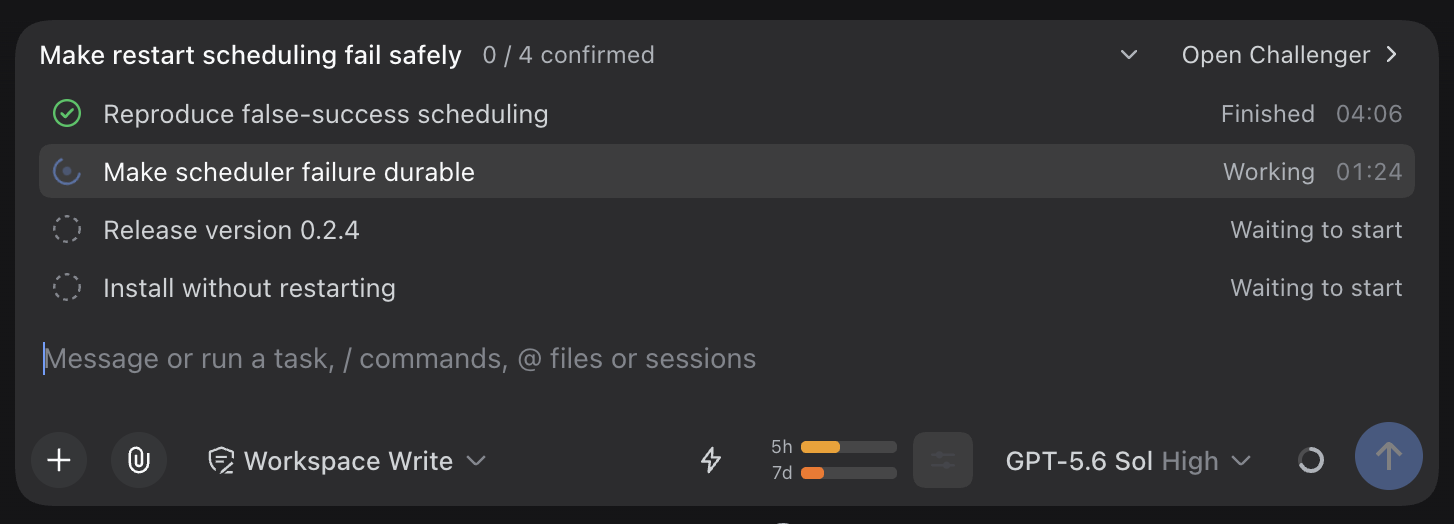
The card tracks the plan as it happens: a green check on the row the Challenger has already reported, the blue animated ring with a live timer on the row it is working on, and gray rings on the rows still waiting to start.
The Challenger Model and Effort menu
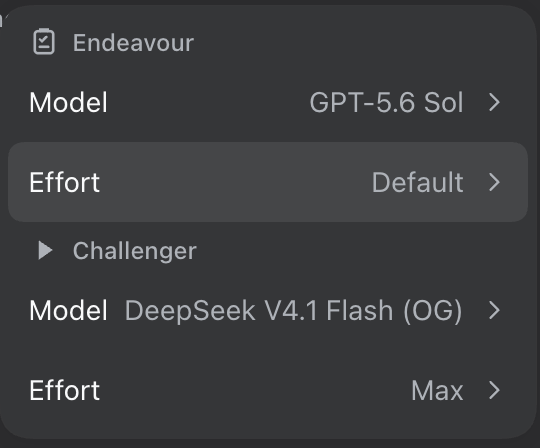
The compact menu shows the Challenger model and reasoning effort beside the composer. The selector behavior, including local pending choices and their timing limits, is described in Model selection.
The paired sessions
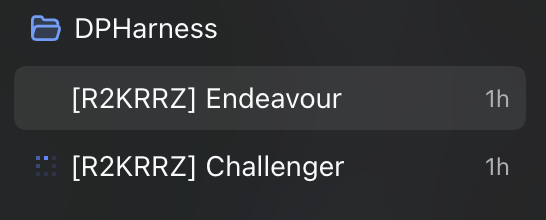
The pair lives in the workspace sidebar as two ordinary sessions, labelled with the shared pair code.
The Challenger view tab
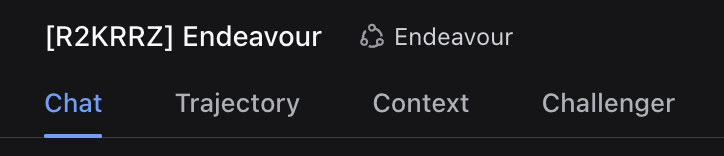
The session header carries the tab that opens the paired Challenger, so the executor's own chat is one click away.
Updating them
The plugin registry reads screenshots.json from this repository root, so the
Market card and install dialog pick these images up on the next registry build —
no pull request is needed to change them. To replace one, drop a new PNG at the
same relative path declared in screenshots.json.
scripts/screenshots/ holds an offline harness that renders the plan card and
the model control from the plugin's own components against fixture data; it
writes to scripts/screenshots/out/ by default and never touches the committed
captures above.
License
MIT — see LICENSE.
链接
同类插件
Clearailhc/clearai-dsh★ 687
以证据为准的研究用智能体预设:每一步只能靠系统核验过的观测推进,L3 以上的结论交给独立评估者,整场会话折成一份可重放的账本,并长成可浏览的领域本体。需要 DSH >=0.1.7-alpha.1。
FuRongJun-1999/dsh-memory★ 581
白箱AGI架构探索:元认知(自我认知循环)、持续学习(知识飞轮)、世界模型(条件空间+语义时空图)、自我改进(自举纪律)、零LLM白箱管线与可审计信任护栏。
kenz1117/dsh-engram★ 57
跨会话长期记忆,纯本地 SQLite:双层分库(用户级 + 按 git origin 隔离的项目级)、FTS5 + 本地向量 RRF 融合检索、强制给出充分性判定的证据门、来源审计链、SM-2 间隔重复复习、巩固蒸馏与衰减遗忘,以及九视图「记忆宫殿」侧栏面板。22 个窄参数工具,无外部服务、无 API Key、无 Docker。
MichengAI/dsh-pua★ 50
提供 /pua,在 Agent 失败后促使其换方法,并在宣称完成前核验收据;含 15 种公司风格、角色模式、全局与会话设置,以及可选验收循环(直到验收命令通过、达到迭代上限或用户取消)。
icyaaaww/dsh-soul★ 48
在本地记录重复的任务纠正与工具错误,通过显式启动的演化将经验编译为八类运行组件的改动,经过基线与候选成对验证、影子试用和回滚,并提供预算与审计账本。需要 Node.js 24+ 及兼容的 DSH 0.2.1-rc.2 起的 0.2.x 宿主。
pk14742952-AD/dsh-host-rsi★ 38
面向本地 Qwen3.8 27B/3.8 Flash 及线上 API 的反思进化插件:编码循环收敛器针对 Qwen3.8 27B/Flash 的重复验证大思考加速收敛、减少思考时间;五态交付护栏检测并纠正卡住/死循环;model-agnostic 宿主逻辑,线上 API 多数可通用;每次使用持续自进化,带反问式自检、批评升级、倒排索引记忆检索、编码循环收敛提示与五态交付护栏。
社区评论
评论公开保存在 GitHub Discussions。加载评论会连接 GitHub 和 Giscus;发表内容需要 GitHub 账号。