让 dsh web 与其他服务器随开机自动启动;只需一句提示就能搭建和管理 Gitea、Jellyfin 等服务,并统一收纳到一个 home-hosted 面板中。
安装
# npm 包(预构建)
dsh plugin --profile web add dsh-home-hosted
# GitHub 源码(首次需按提示配置 allowBuilds 构建授权后重试)
dsh plugin --profile web add github:NamesMT/dsh-home-hosted
装任何插件都等于在你的机器上跑第三方代码,权限和你本人一样大——能读你的文件、用你的凭据、访问网络,工具审批管不到它。GitHub 来源的插件还会在安装时执行构建脚本——pnpm 默认拦截,所以安装可能停在 ERR_PNPM_GIT_DEP_PREPARE_NOT_ALLOWED 或 ERR_PNPM_IGNORED_BUILDS;dsh 会打印出需要添加的确切键名,把它加进该 profile 的 pnpm-workspace.yaml 的 allowBuilds 下,重跑一次即可装上。放行构建本身就是一次信任判断:请只安装可信来源,并尽量锁定 commit(github:owner/repo#sha)。
README
该插件的 README 只有英文版本。
📌 dsh-home-hosted
Prompt your servers into existence — keep them running and manage them via dsh / home-hosted panel UI.
Your whole home stack, up after every reboot — your dsh web included.
A DeepSeek Harness plugin for
home-hosted, the panel that supervises your services.
Ask for a Gitea, a Jellyfin, an FTP server; dsh-home-hosted sets up the entries and manages them
— panel, ports, restarts and boot autostart included.
Nothing is installed or started until you say so.

🚀 Quick start · 🎛️ What the plugin does · 🤖 Agent tools · 🧩 Depth
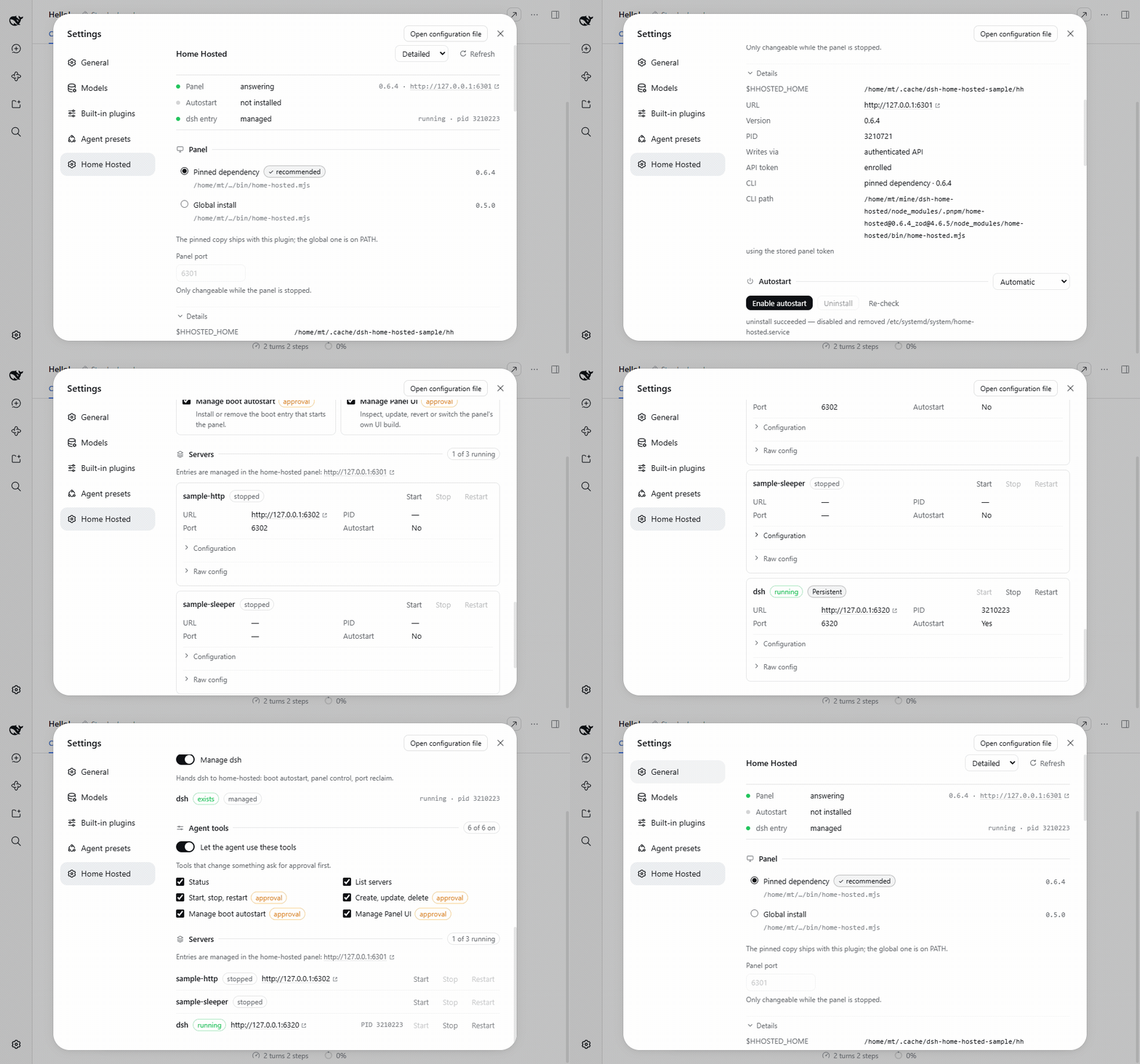
The Detailed style, then the same sections in Compact — both switchable from the page header.
🚀 Quick start
dsh plugin --profile web add dsh-home-hosted
Open Settings → Home Hosted and add your servers — or just ask the agent:
add a Gitea on 3000, and a Jellyfin on 8096
Then, optionally, turn on Manage dsh and Autostart, so the panel — and everything in it — comes back after a reboot.
🤔 Why
Ever tried setting up a media server, a Gitea and a few more yourself — then keeping them all managed?
dsh-home-hosted uses home-hosted to do it: prompt for
the servers you want, let it write and configure the entries, and manage them all from dsh or the
panel — ports, health, restarts and autostart included.
   you ──▶ "add a Gitea, a Jellyfin, a cache…"
             │
             ▼
   dsh-home-hosted ──▶ home-hosted panel ──▶ ┌──────────────┐
     page · agent              │             │ gitea  :3000 │
                               │             └──────────────┘
                               ├──────────▶ ┌──────────────┐
                               │             │ jellyfin     │
                               │             │ :8096        │
                               │             └──────────────┘
                               └──────────▶ ┌──────────────┐
                                             │ postgres     │
                                             │ :5432        │
                                             └──────────────┘

   ★ OS boot entry ──▶ the panel comes back, and so does everything in it
     systemd · launchd · XDG · Run key
dsh is one entry in the panel, not the whole product. The panel is the supervisor: it starts
each entry, watches it, restarts what dies and reclaims its port. Add your Gitea, your Jellyfin,
your compose stack, your database — manage them from the page, or hand the entry ids to an agent.
Managing dsh itself is the bonus: the entry that keeps your harness up is a highlight on top of
the server management, not the thing this plugin is.
🎛️ What the plugin does
| 🖥️ Servers, set up by prompt | Add, edit, start, stop and restart entries — Gitea, Jellyfin, FTP, a compose stack. Written through the panel's API, so nothing restarts behind your back. |
| 🏠 The whole home-hosted panel | Not just servers: BYOU custom UIs, workspaces, a reverse proxy with automatic HTTPS, backups (zip or AES-256), notifications, dynamic DNS, health probes, live logs and host vitals. |
| 🤖 Agent tools | On by default, session permissions still gate every write. |
| 🚀 Boot autostart | Highlight: installs, verifies and removes the OS entry, so the panel starts at boot. Opt in per machine. |
| 🧭 Token warnings that mean something | A missing or refused API token is called out on the page, with one click to mint a working one. |
| 🪟 Knows the other panels | Several panels on one machine? The agent is told which one this plugin manages, and asks before touching another. |
🤖 Agent tools
| Tool | Does |
|---|---|
home_hosted_status |
Panel, boot entry and managed-entry state |
home_hosted_workspaces_list |
Every workspace the panel serves, with counts |
home_hosted_servers_list |
Every supervised server in a workspace |
home_hosted_servers_lifecycle |
start · stop · restart |
home_hosted_servers_edit |
create · update · delete |
home_hosted_autostart_manage |
install · uninstall |
home_hosted_ui_manage |
status · update · revert · switch (official asset or local zip) |
home_hosted_panel_logs |
The panel's own console output. Needs no API token, so it works when the panel is up but not answering. |
Every server tool names its workspace, because an id is only unique inside one.
A tool that changes something asks for approval only when the session is not already Full access.
A refused token is re-enrolled on the spot and the tool retries — see automatic regeneration below.
Every tool takes an optional instance (a panel's --home or URL). Omit it for the panel this plugin manages; with several panels found the call asks which one you mean, and naming another panel asks first too — then reaches it by editing its config file, running the CLI against it, or minting a token and using its API.
🧩 Depth
| Platform | Mechanism | Starts |
|---|---|---|
| Linux | systemd-user, systemd-system, XDG autostart |
login, or boot with a system unit / loginctl enable-linger |
| macOS | launchd-agent, launchd-daemon |
login, or boot with the daemon (one-time sudo) |
| Windows | Run key, Task Scheduler | login |
When the process cannot elevate, the page prints the exact commands instead — including the
launchd-daemon that starts a Mac before login.
A boot entry runs the panel as the person who installed it: the account comes from the login that
elevated (SUDO_UID) or from the panel root's owner, not from $USER.
An entry with no account to name runs the panel as root — that is the default, and the page
says so rather than hiding it. A User= systemd cannot resolve is refused too, because it makes
the unit fail to start. Moving an install from root to a user later needs
chown -R <user> <home>.
The pinned dependency by default; the page can switch to a global install, or install the pinned
range globally for you. Boot entries run a small stable launcher the plugin writes, so a
node_modules path that moves never breaks boot.
A dsh you cloned and built yourself is supported: the managed entry starts a stable launcher that
re-finds your build at boot, so a rebuild, a moved checkout or a fresh profile does not strand it.
Falls back to whatever dsh is on PATH, and fails with the reason when it finds neither.
The Desktop client is supported, with one exception. Everything server-side works as it does in the browser: the page, the agent tools, workspaces, the panel, and boot autostart.
Manage dsh is web-only and shown disabled there, because Desktop starts its own reserved profile
in Electron — it is never one of the panel's server entries. (dsh --profile desktop is refused by
the CLI, so a row for it could only crash-loop.) Server entries of every other kind are unaffected.
Topic docs, one per area — written for whoever has to touch it next:
Boot autostart · the panel · server entries · workspaces and several panels · agent tools
One entry (dsh), one toggle: the panel keeps it alive, restarts it and reclaims its port. A
detached restart is recognised on macOS and Linux (follow); Windows cannot prove identity through
a .cmd shim, so it uses onPortConflict: kill. The plugin pins home-hosted 0.11+, so every key it
writes is one that panel parses.
Web only — see dsh Desktop above.
The plugin needs its own home-hosted API token to read and write the panel. home-hosted keeps only
the token's hash, so a token it did not mint can never be recovered — <stateDir>/panel-token is
0600, never rendered or logged, and Regenerate token enrols a new one that replaces it.
A missing or refused token is called out on the page with that button, including when the panel is not answering at all — a token problem is often why it cannot be reached. Regenerate token automatically (Agent tools section, on by default) does the same thing when a panel call is refused: the tool re-enrols and retries once instead of failing. Turn it off to be asked instead of having a working token silently replaced.
The Cordis row config is for operator overrides only:
- id: dsh-home-hosted
  name: 'dsh-home-hosted'
  config:
    stateDir: /custom/state/dir        # default: $DSH_HOME/dsh-home-hosted
    homeHostedCommand: /usr/bin/home-hosted
    defaultEntryId: dsh
Everything a person toggles lives in <stateDir>/settings.json.
Each install drives its own panel root — <stateDir>/panel, or $HHOSTED_HOME when set — and names
its own boot entry, so two dsh installs no longer share one panel. An existing ~/.home-hosted
panel is adopted as-is, and the page shows which root this install owns.
pnpm install
pnpm typecheck && pnpm test && pnpm build
Node 24+, pnpm. The same commands CI runs.
MIT · npm · releases · issues · built on home-hosted
链接
同类插件
yjh051108/dsh-routing-suite★ 7015
一个仓库三件套:DSH 插件包的运行时注入器(注入、热重载、卸载、开发侧挂区一键转正、路由自愈,外带设置页插件管理:列出、卸载、拖入文件夹内化)、任务感知的思维模式路由 agent 预设(router-standard / router-spec / router-react)、以及分级两级任务协议(commit_star / lock_stage / revise_do / edit_plan / mark_task / redteam_verdict 六个工具,任务状态落盘)。注入器实现直接在库内,安装的是它自己的行为而不是一份依赖清单。
strukto-ai/mirage#dsh★ 3783
把文件系统与 bash 提供者换成 mirage 虚拟工作区:文件工具与 shell 命令作用于挂载的资源(RAM、S3、Redis、Slack、Gmail、Notion、Postgres)而非宿主磁盘,支持按挂载点设置读/写/执行模式、按命令选择沙箱(进程内 monty、pyodide、quickjs;远程 docker、e2b、daytona),并可在虚拟终端中安装 CLI(git、gh、slack、linear、ntn、gws,或自行注册的程序树)作为命令头词。
first-fluke/oh-my-agent#dsh★ 1440
在工具执行前后以及尝试结束当前轮次时运行项目 OMA 检查。随插件安装 OMA CLI 依赖,并在首次使用时初始化未配置的项目。需要 Node.js 22+;首次初始化需要网络连接和项目目录写入权限。
MichengAI/dsh-skills-manager★ 552
在设置里管理本地 DSH 技能,并只读查看公共 Agent 技能。
hust-open-atom-club/oh-dsh★ 324
社区发行版:TUI、桌面端与 Web UI 统一体验,分层安装、一步到位。
Fishquito7/dsh-skill-mcp-panel★ 272
在 DSH Web 设置中管理技能与 MCP 服务器:技能卡片热启停、工作区作用域、分组、批量迁移与拖拽导入,以及 stdio/HTTP MCP 增删改查、连接测试、密钥脱敏,并附带统一 dsh-panel 命令行。
社区评论
评论公开保存在 GitHub Discussions。加载评论会连接 GitHub 和 Giscus;发表内容需要 GitHub 账号。