DeepSeek Harness 技能与 MCP 管理中心:浏览并启停用户/项目技能,热增删改 MCP 服务器(免重启),侧边栏实时展示各服务器状态。
安装
# npm 包(预构建)
dsh plugin --profile web add @max-null/dsh-skill-mcp-center
# GitHub 源码(首次需按提示配置 allowBuilds 构建授权后重试)
dsh plugin --profile web add github:Max-Null/dsh-skill-mcp-center
装任何插件都等于在你的机器上跑第三方代码,权限和你本人一样大——能读你的文件、用你的凭据、访问网络,工具审批管不到它。GitHub 来源的插件还会在安装时执行构建脚本——pnpm 默认拦截,所以安装可能停在 ERR_PNPM_GIT_DEP_PREPARE_NOT_ALLOWED 或 ERR_PNPM_IGNORED_BUILDS;dsh 会打印出需要添加的确切键名,把它加进该 profile 的 pnpm-workspace.yaml 的 allowBuilds 下,重跑一次即可装上。放行构建本身就是一次信任判断:请只安装可信来源,并尽量锁定 commit(github:owner/repo#sha)。
README
本插件属于 @max-null/* 插件系列——这一系列共同构成 SSID(思灵 · Seek Soul in Darkness) 桌面体验。SSID 是整合它们的盒:dsh-capture · dsh-chat-rail · dsh-chinese-thinking · dsh-draft-polish · dsh-guardian · dsh-habit · dsh-memory · dsh-node-appearance · dsh-plugin-center · dsh-quick-toolbar · dsh-skill-mcp-center · dsh-ssid-panels · dsh-ssid-zh-ui · dsh-achievements。
This plugin belongs to the @max-null/* family — a set of plugins that together form the SSID (思灵 · Seek Soul in Darkness) desktop experience.
Skill & MCP management center for DeepSeek Harness (dsh) — manage skills and MCP servers in Settings, with live MCP status in the sidebar.
Skill 与 MCP 管理中心:在设置里管理 skills 与 MCP 服务器,右侧边栏查看 MCP 实时状态。
Features / 功能
- Skill management / Skill 管理 — browse every skill grouped by source (Global / Workspace / Built-in DSH official, plus one group per plugin that ships skills), toggle model invocation via the
disable-model-invocationfrontmatter (disk-backed skills only). Covers skills shipped inside plugin packages (e.g.@max-null/dsh-skills), not just the user-level roots — the host-level skill filesystem is disabled in web-app, so a plugin's ownskills/directory would otherwise be invisible while its skills are loaded and in effect. - MCP management / MCP 管理 — add / edit / remove
mcp-clientservers, enable/disable without deleting config, all hot-applied throughctx.loader(no restart). - Live status / 实时状态 — a sidebar "MCP" tab (via
dsh-better-sidebar) showing per-server connection state; click a server row to expand its tools' names and descriptions (collapsed by default — a server can expose dozens of them). Names come fromtools.schemas(); the redundantmcp__<server>__prefix is hidden while the full name stays on hover. Polled while visible and following the session. - Skin-compatible / 皮肤兼容 — every color uses
var(--dsw-*)tokens.
截图
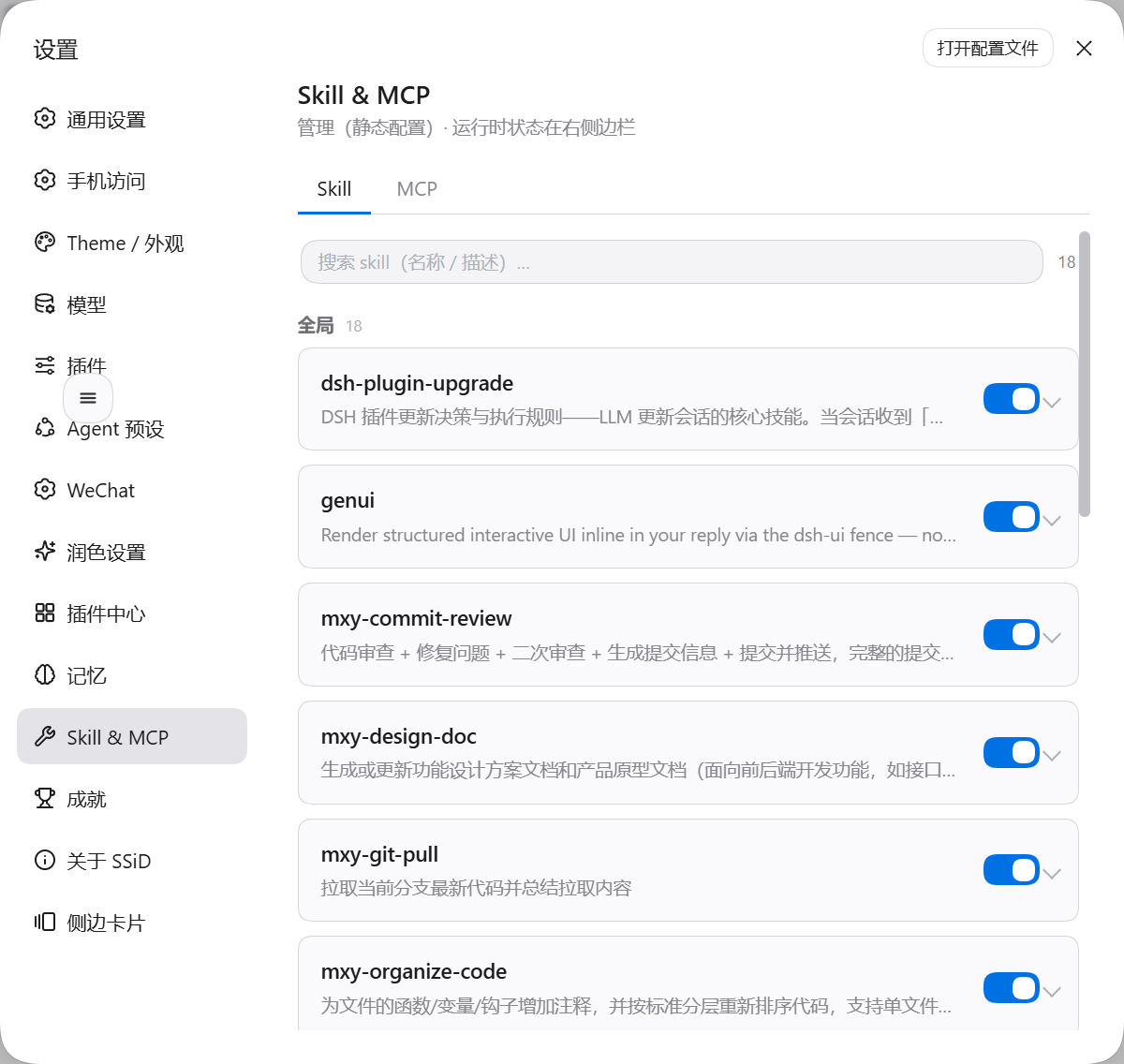
设置页:集中管理
装完后设置里多出「Skill & MCP」一项,可逐条控制各模型对 Skill/MCP 的可见性。入口: 设置 → Skill & MCP
侧栏:Skill 一览
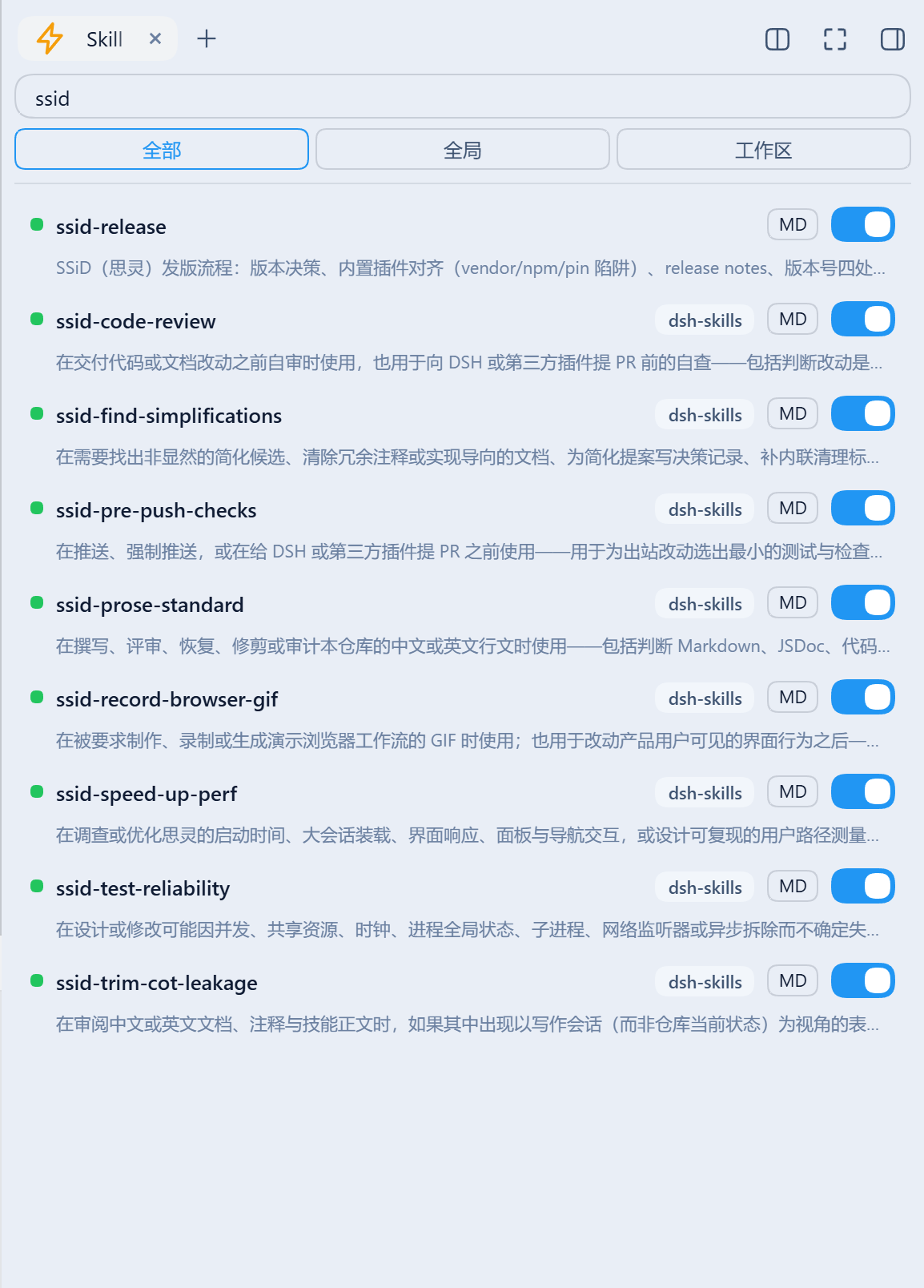
搜索 + 命名空间筛选(全部 / 全局 / 工作区),每条带开关与 MD(查看 SKILL.md)。插件包内自带的 skill 同样列出,并标出来源插件——下图里 8 个 ssid-* 来自 dsh-skills,而用户级的 ssid-release 没有来源标签,这正是两者的区别:
侧栏:MCP 状态与工具
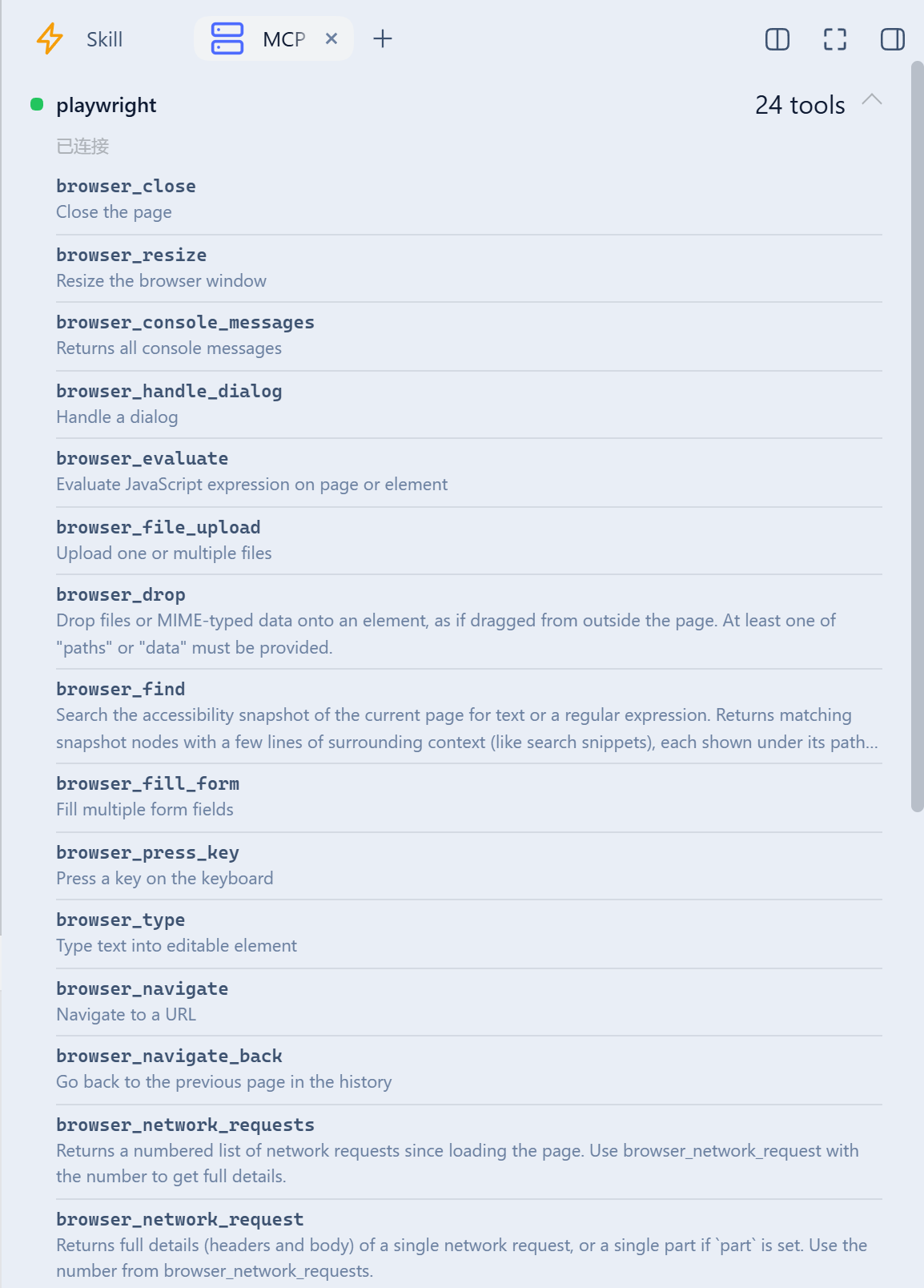
每个 mcp-client 服务器的连接状态与工具数;点服务器行展开工具清单(默认收起,避免几十个工具占满面板)。工具名取自工具表、描述取自 tools.schemas(),冗余的 mcp__<server>__ 前缀隐去(全名留在 hover):
Install / 安装
dsh plugin --profile web add github:Max-Null/dsh-skill-mcp-center
# or from npm, once published / 或通过 npm(发布后)
dsh plugin --profile web add @max-null/dsh-skill-mcp-center
Restart dsh web, then open Settings → Skill & MCP. The sidebar "MCP" tab appears only when dsh-better-sidebar is installed (optional peer).
Development / 开发
pnpm install
pnpm build   # tsc (host) + esbuild (browser bundle)
License / 许可
SSID 系列
链接
同类插件
yjh051108/dsh-routing-suite★ 6993
一个仓库三件套:DSH 插件包的运行时注入器(注入、热重载、卸载、开发侧挂区一键转正、路由自愈,外带设置页插件管理:列出、卸载、拖入文件夹内化)、任务感知的思维模式路由 agent 预设(router-standard / router-spec / router-react)、以及分级两级任务协议(commit_star / lock_stage / revise_do / edit_plan / mark_task / redteam_verdict 六个工具,任务状态落盘)。注入器实现直接在库内,安装的是它自己的行为而不是一份依赖清单。
strukto-ai/mirage#dsh★ 3672
把文件系统与 bash 提供者换成 mirage 虚拟工作区:文件工具与 shell 命令作用于挂载的资源(RAM、S3、Redis、Slack、Gmail、Notion、Postgres)而非宿主磁盘,支持按挂载点设置读/写/执行模式、按命令选择沙箱(进程内 monty、pyodide、quickjs;远程 docker、e2b、daytona),并可在虚拟终端中安装 CLI(git、gh、slack、linear、ntn、gws,或自行注册的程序树)作为命令头词。
hust-open-atom-club/oh-dsh★ 326
社区发行版:TUI、桌面端与 Web UI 统一体验,分层安装、一步到位。
weijiafu14/pi2dsh★ 210
Pi Host ABI 兼容引擎:装一次之后,npm 上的 Pi 扩展原包经 `dsh plugin add <pi-package>` 直接作为 DSH 原生插件挂载。已在官方 DSH 上端到端验证 pi-mcp-adapter(完整 MCP 管理面:OAuth、resources、prompts、MCP Apps、elicitation、sampling)、@tintinweb/pi-subagents、pi-code、pi-hermes-memory、pi-background-tasks;`pi2dsh inspect` 在安装前报告一个包的兼容情况。
lire1131/dsh-undo-savepoint★ 169
DSH 撤销/回退系统:配置变更自动存档,一键撤销/恢复/回退到任意版本,支持 WebUI 与离线 CLI/GUI 工具(DSH 启动失败也能救)。
Fishquito7/dsh-skill-mcp-panel★ 166
在 DSH Web 设置中管理技能与 MCP 服务器:技能卡片热启停、工作区作用域、分组、批量迁移与拖拽导入,以及 stdio/HTTP MCP 增删改查、连接测试、密钥脱敏,并附带统一 dsh-panel 命令行。
社区评论
评论公开保存在 GitHub Discussions。加载评论会连接 GitHub 和 Giscus;发表内容需要 GitHub 账号。