一个 DeepSeek Harness 插件,通过与用户进行项目需求访谈,生成项目时间线 / 甘特图,并导出为 Word 或 Excel 格式。
安装
# GitHub 源码(首次需按提示配置 allowBuilds 构建授权后重试)
dsh plugin --profile web add github:Luke-Yong/dsh-plugin-project-management
装任何插件都等于在你的机器上跑第三方代码,权限和你本人一样大——能读你的文件、用你的凭据、访问网络,工具审批管不到它。GitHub 来源的插件还会在安装时执行构建脚本——pnpm 默认拦截,所以安装可能停在 ERR_PNPM_GIT_DEP_PREPARE_NOT_ALLOWED 或 ERR_PNPM_IGNORED_BUILDS;dsh 会打印出需要添加的确切键名,把它加进该 profile 的 pnpm-workspace.yaml 的 allowBuilds 下,重跑一次即可装上。放行构建本身就是一次信任判断:请只安装可信来源,并尽量锁定 commit(github:owner/repo#sha)。
README
该插件的 README 只有英文版本。
A DeepSeek Harness plugin that interviews the user about a project, generates a project timeline / Gantt chart, and exports it as Word or Excel.
The agent owns the loop: it runs a structured interview (via the
project-interview skill), decomposes features into tasks, and uses five tools
to validate, schedule, adjust, persist, and export. The scheduling math is
deterministic. The project (definition + timeline) is persisted to a workspace
project file (data/project_management/project_data.json) so it survives across
sessions, and the plugin reminds the agent about an existing timeline on
session resume.
Tools
| Tool | Purpose |
|---|---|
pm_project_define |
Validate/normalize the interview result into a canonical ProjectDefinition (features, priorities, dates, milestones, agent budget per duration, constraints); persists it |
pm_timeline_generate |
Deterministic scheduler: dependency-aware, workday-aware dating (weekends + the country's public holidays via calendar.country), critical path, deadline + budget feasibility checks; persists definition + timeline |
pm_timeline_update |
Patch tasks (rename, dependencies, effort, agents, manual date pins), re-schedule, and persist |
pm_project_load |
Load the saved project (definition + timeline) from data/project_management/project_data.json — use when resuming a session |
pm_timeline_export |
Write .docx (summary, task schedule, milestones, budget) or .xlsx (Summary, Tasks, colored Gantt sheet) |
Skill
project-interview— the conversational interview protocol: features → priorities → timeline/milestones → agent budget per duration (hours / cost / agents / custom, with a period) → constraints.
Install
Build the plugin (server + browser bundle), then load it with a Cordis overlay patch:
npm install
npm run build       # tsc server → dist/, esbuild client → lib/client.js
From GitHub
The prepare script builds both halves automatically, so GitHub installs work
without committing dist//lib/ (they are gitignored). Install the plugin
into the web profile directly from GitHub:
dsh plugin --profile web add github:Luke-Yong/dsh-plugin-project-management
This forwards pnpm add github:Luke-Yong/dsh-plugin-project-management inside
the profile directory. Equivalent to installing the package into a DeepSeek
Harness checkout manually:
npm install github:Luke-Yong/dsh-plugin-project-management
./package.json is exported for tooling that needs the dsh.client manifest.
From a DeepSeek Harness checkout:
pnpm dsh web --patch /absolute/path/to/dsh-plugin-project-management/cordis.yml
The plugin package must be resolvable from the config tree's baseUrl — install
or pnpm link it into the harness checkout (it is a dependency of the cordis.yml
package, per the client-modules resolution rule).
Open http://127.0.0.1:3080 and ask, for example:
Plan a timeline for my mobile app and export it as both Word and Excel.
Web UI
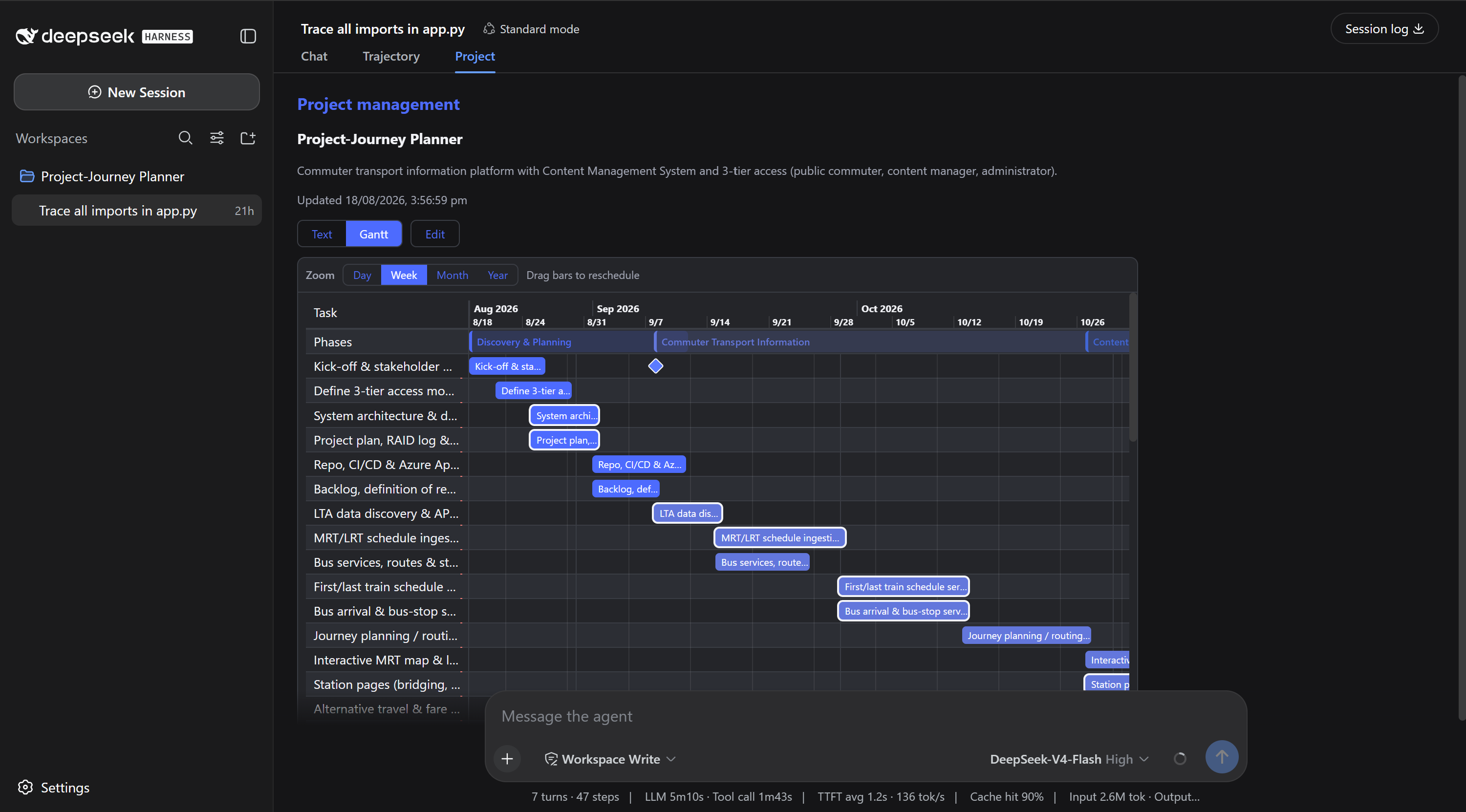
The plugin ships a browser half with two surfaces:
- A Project tab in the conversation header's view tabs (the
conversation.viewslot — the same mechanism ui-trajectory uses). Note: the view-tab ring only appears once the session is active (≥ 1 turn). - A compact project dock inside the composer stack (
conversation.input.dock) that renders even for blank sessions and auto-appears when a project exists, so project management is reachable before the tabs show.
Selecting the tab (or reading the dock) shows: project name, description, and last-updated time; timeline span, task count, and feasibility; phases, critical path, milestones, and open conflicts; the agent budget model.
The pane reads the saved project state for the current session from
/plugins/project-management/state (server resolves the session cwd — session
header → workspace registry → process cwd — and reads
data/project_management/project_data.json). No harness patch is required —
both surfaces work with the stock web app.
Flow
- The agent interviews you (features, deadline, milestones, agent budget per duration).
- It calls
pm_project_defineto lock in and persist the definition. - It decomposes features into tasks and calls
pm_timeline_generate. - It reviews feasibility with you and adjusts via
pm_timeline_update. - It exports with
pm_timeline_export(format: docx | xlsx).
Persistence & session resume
- The definition and timeline are saved to
<workspace>/data/project_management/project_data.jsonin the project-plan schema used bytemplates/gantt.html(project, tiers, phases, tasks, milestones, sprints — plus a_dshblock for plugin round-trip state). Layout follows the Project-Journey Planner example:data/project_management/project_data.jsonconsumed bytemplates/gantt.html. - On a new session in the same workspace, the plugin injects a reminder into
the model context when a timeline exists, telling the agent about the saved
plan and its conflicts; the agent then calls
pm_project_loadto continue. - Writes are atomic (temp file + rename). A legacy
.dsh-pm/project.jsonis read as a fallback for backward compatibility.
Notes / MVP limitations
- A single project per workspace.
Roadmap
- Custom Web UI Gantt view via
presentCall/presentResult. - Multi-project and live agent-budget tracking.
链接
同类插件
Tencent/WeKnora#dsh-weknora★ 31789
把 WeKnora 知识库接入 dsh 的四个只读工具:列出知识库、混合检索原文片段、按顺序还原单篇文档,以及直接取用 WeKnora 自己带引用的 RAG 或 ReAct agent 回答(含可续聊的 session id)。
superdesigndev/treg★ 4052
给 Agent 的工具目录:按「要做的事」检索约 2,600 个外部接口(SEO 与 SERP、外链、社交、人物与公司信息补全、广告库、抓取),查看参数与单次调用价格后直接调用,凭据由服务端注入。附带技能,MCP 行在未设置 TREG_TOKEN 前保持禁用。
TencentCloudBase/CloudBase-AI-Toolkit#dsh-plugin★ 1130
把腾讯云 CloudBase 后端接入 DeepSeek Harness——在对话里搭好并部署全栈应用,查询结果渲染为表格卡片(分页、排序、导出 CSV),部署后可预览真实域名,并提供 CloudBase MCP 工具集(`mcp__cloudbase__*`),登录走 device-code 流程。
gitroomhq/postiz-agent#dsh-postiz★ 499
通过 MCP 将 DeepSeek Harness 连接到 Postiz:列出已连接的社交媒体渠道、获取各平台发帖规则,并向 X、LinkedIn、Instagram、Facebook、Threads、TikTok、YouTube、Reddit、Bluesky、Mastodon、Discord、Slack、Telegram 等平台排期、存草稿或发布帖子;附带 postiz 工作流技能。
EthanYoQ/Invoice-Downloader#dsh-invoice-downloader★ 482
面向 DeepSeek Harness 的本地 IMAP 发票下载、OCR 识别、归档与 Excel 报销汇总。
anysearch-team/anysearch-dsh★ 445
基于 AnySearch 的实时网页与垂直搜索插件,为 DeepSeek Harness 提供搜索工具。
社区评论
评论公开保存在 GitHub Discussions。加载评论会连接 GitHub 和 Giscus;发表内容需要 GitHub 账号。