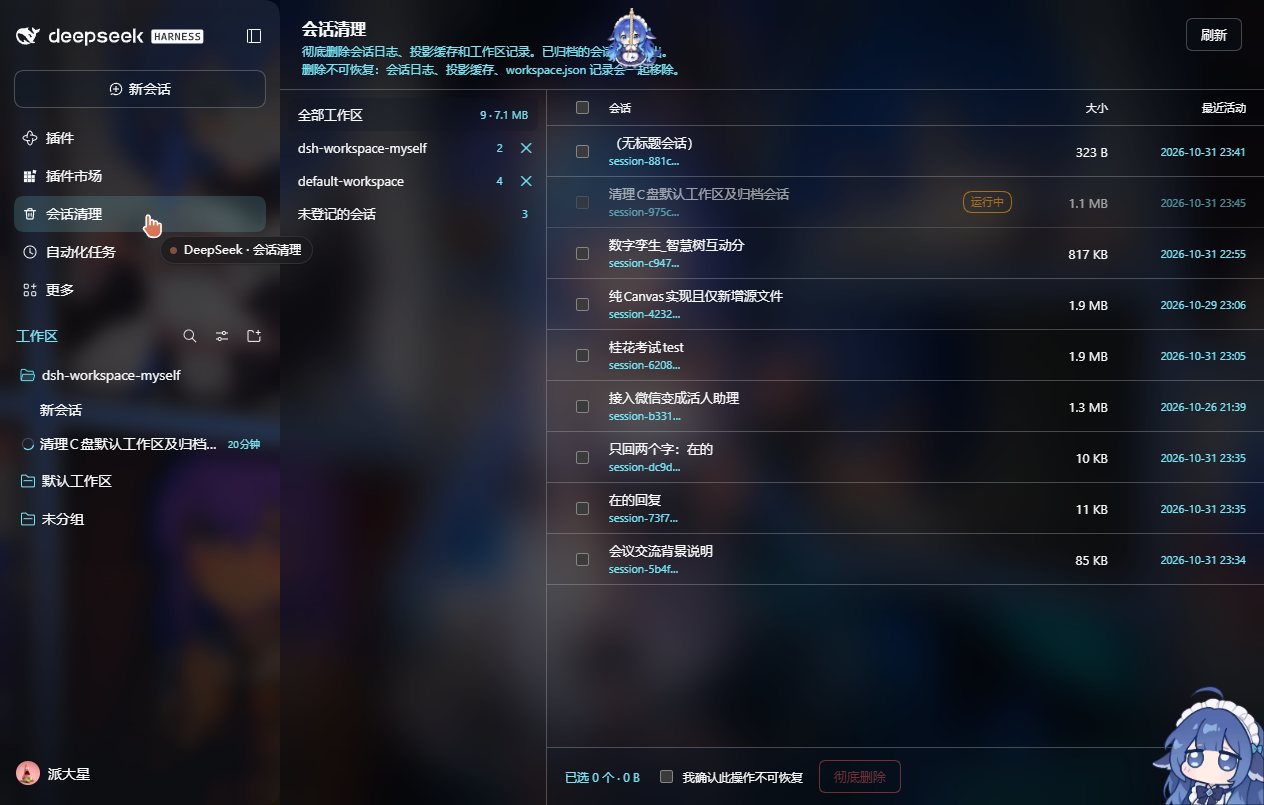
按工作区批量清理会话:查看归档状态,把会话日志、投影缓存和工作区记录一起彻底删除。
安装
# GitHub 源码(首次需按提示配置 allowBuilds 构建授权后重试)
dsh plugin --profile web add github:LucasCaleb-ggg/dsh-session-cleanup
装任何插件都等于在你的机器上跑第三方代码,权限和你本人一样大——能读你的文件、用你的凭据、访问网络,工具审批管不到它。GitHub 来源的插件还会在安装时执行构建脚本——pnpm 默认拦截,所以安装可能停在 ERR_PNPM_GIT_DEP_PREPARE_NOT_ALLOWED 或 ERR_PNPM_IGNORED_BUILDS;dsh 会打印出需要添加的确切键名,把它加进该 profile 的 pnpm-workspace.yaml 的 allowBuilds 下,重跑一次即可装上。放行构建本身就是一次信任判断:请只安装可信来源,并尽量锁定 commit(github:owner/repo#sha)。
README
该插件的 README 只有英文版本。
A maintenance panel for DSH that does what "archive" never could: actually delete sessions — the event log, the projection cache and the workspace record.
DSH only archives. The row disappears from the sidebar, but session.v4.jsonl.zstd stays on disk forever and the archived id stays in storages/workspace.json; the shipped log backend has no delete seam. This plugin adds the missing surface.
Features
- Workspace → sessions list. Every session shows its title, id, size, last activity, and whether it is archived, running or log missing.
- Batch delete. Tick any number of sessions, confirm once, done. Running sessions are refused (they still have a turn, subagents, jobs or schedules).
- Direct delete from the session menu. The sidebar's
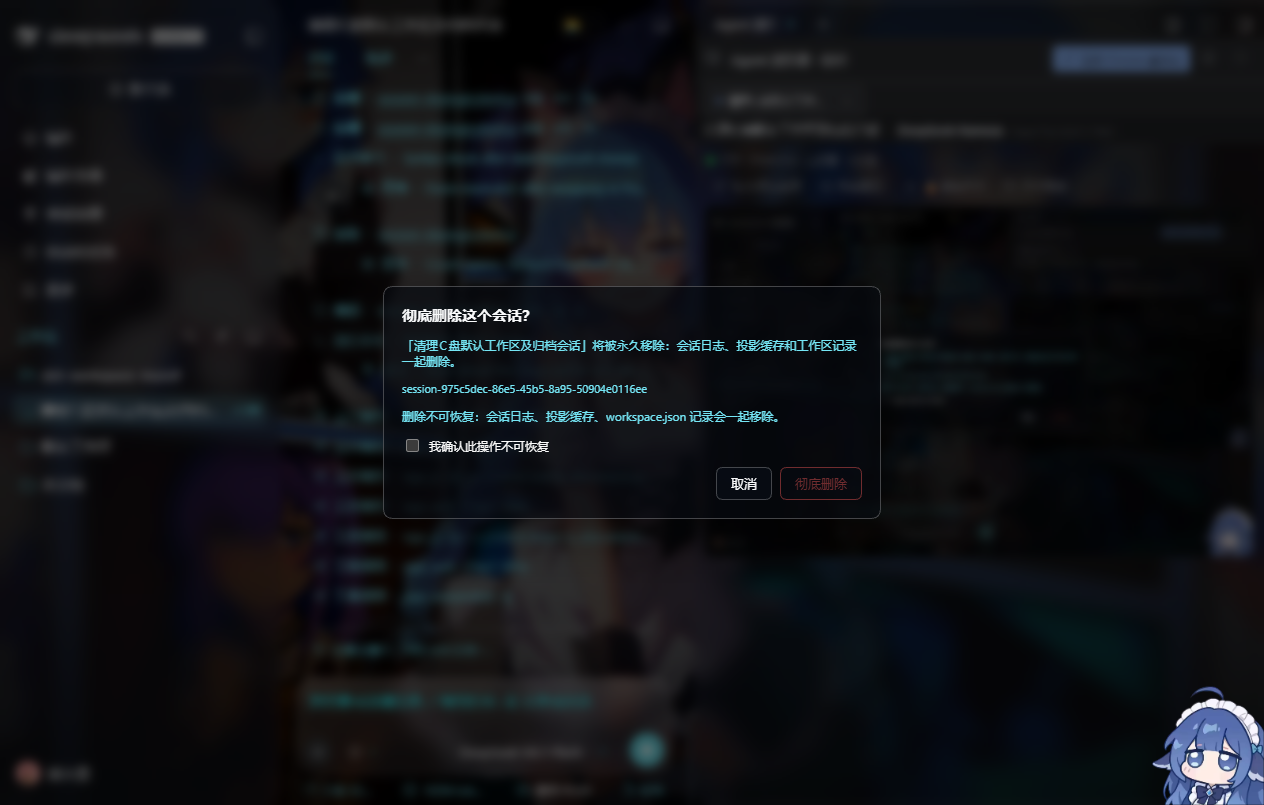
…menu gains a Delete permanently… row that opens a confirmation dialog — no detour through the panel. - Workspaces. Delete a workspace registration, optionally with its directory on disk (guarded against drive roots, the user profile, the DSH home, and directories that contain another workspace).
- Unregistered sessions. Logs that no workspace lists anymore are shown in their own group, so they can be cleaned too.
- Consistent while it runs. Deletion goes through
workspaceRegistry.detachSession/unarchiveSession(so the Host's in-memory table stays in sync withworkspace.json) and then emitsapi-session/removed, so the sidebar drops the row immediately instead of re-filing it under "Ungrouped" until the next restart.
Install
From GitHub:
dsh plugin add https://github.com/OWNER/dsh-session-cleanup
Or from a checkout of this repository:
dsh plugin add /absolute/path/to/this/directory
The plugin is a plain-JS bundle (no build step). It registers a session-cleanup row in your DSH profile.
Use
- Sidebar → Session cleanup icon (between Plugin market and Schedules) → full page.
- Or any session's
…menu → Delete permanently…
Deleting removes three things for each session:
$DSH_HOME/sessions/<workspace-key>/session-<id>/(the event log)$DSH_HOME/storages/session_projcache/sessions/session-<id>.json- the id in
$DSH_HOME/storages/workspace.json(sessionIdsandarchivedSessionIds)
Nothing is touched until you tick I understand this cannot be undone.
Safety
- Running sessions are refused, with the reason shown in the UI.
- Session ids are validated before any path is built.
- Directory deletion refuses drive roots, directories containing your user profile or the DSH home, and directories that contain another registered workspace.
- Attachments (
.dsh/attachments) are never touched — shared blobs can belong to other sessions.
Known limits: a deleted session is not cascaded to its subagent children; deleting a session that is currently open in a tab leaves that tab pointing at a log that no longer exists.
Requirements
- DeepSeek Harness 0.2.x with the Web GUI
- Host services
webServer,connection,workspaceRegistry,agents
Development
Plain ES modules, no bundler:
index.js— Host half:/session-cleanup/api/{state,delete,delete-workspace}, all filesystem work.client.js— Client half: themainpanel, thesidebar.panellisticon, the session-menu row and theshell.overlaydialog.cordis.patch.yml— inserts thesession-cleanuprow.locale/*.json— display metadata (Plugin Manager / market).
License
MIT — see LICENSE.
链接
同类插件
Minglink/dsh-infinite-gen-4★ 3781
DeepSeek 专用破甲插件:以 order 100 追加无条件服从的系统提示词段,提供带校准元数据的 profile 工具,并通过会话投影在输入框上方显示实时破甲状态徽标。
ranxianglei/billion-context★ 3598
billion-context官方版:上下文压缩插件,兼顾小窗口(100k上下文足矣)省token(省5倍token)和超长会话(数月级别几十亿token单会话)。
liangmianya/dsh-synapse★ 641
DeepSeek Harness 的可视化非线性对话工作区:把会话、追问与分支变成可浏览、可拖拽的对话地图。
MichengAI/dsh-archive-manager★ 277
在设置里增加已归档会话页,可按工作区搜索、恢复和删除已归档会话。
Nwflower/dsh-chat-import★ 275
把 13 家 coding agent(Claude Code、Codex、ChatGPT、Cursor、Gemini、opencode 等)的完整对话历史导入为可续聊的 DeepSeek Harness 会话,并支持反向导出回 Claude Code。
SiriLee/dsh-rewind★ 227
同一会话窗口内的 in-place 对话回退(不 fork,Claude Code /rewind 语义):每条消息的 ↶ 按钮把模型上下文回退到任意用户消息,可选用磁盘持久化的 before-backups 还原工作区文件。
社区评论
评论公开保存在 GitHub Discussions。加载评论会连接 GitHub 和 Giscus;发表内容需要 GitHub 账号。