仅 Windows(需桌面版 Word、完整版 MathType 7 与 Python 3.10+)。把 Word 文档中的 LaTeX 占位符转换为真正的 MathType OLE 公式(Equation.DSMT4),保留公式编号、SEQ 域与交叉引用。
安装
# GitHub 源码(首次需按提示配置 allowBuilds 构建授权后重试)
dsh plugin --profile web add github:DIPPER12138/dsh-mathtype
装任何插件都等于在你的机器上跑第三方代码,权限和你本人一样大——能读你的文件、用你的凭据、访问网络,工具审批管不到它。GitHub 来源的插件还会在安装时执行构建脚本——pnpm 默认拦截,所以安装可能停在 ERR_PNPM_GIT_DEP_PREPARE_NOT_ALLOWED 或 ERR_PNPM_IGNORED_BUILDS;dsh 会打印出需要添加的确切键名,把它加进该 profile 的 pnpm-workspace.yaml 的 allowBuilds 下,重跑一次即可装上。放行构建本身就是一次信任判断:请只安装可信来源,并尽量锁定 commit(github:owner/repo#sha)。
README
该插件的 README 只有英文版本。
A DeepSeek Harness plugin that converts LaTeX placeholders in a Word .docx
into real MathType OLE objects — ProgID="Equation.DSMT4", a CFB container
holding an Equation Native stream — through the MathType SDK. The equations
double-click into MathType like any hand-authored one. They are not Word's
built-in OMML equations and not pictures.
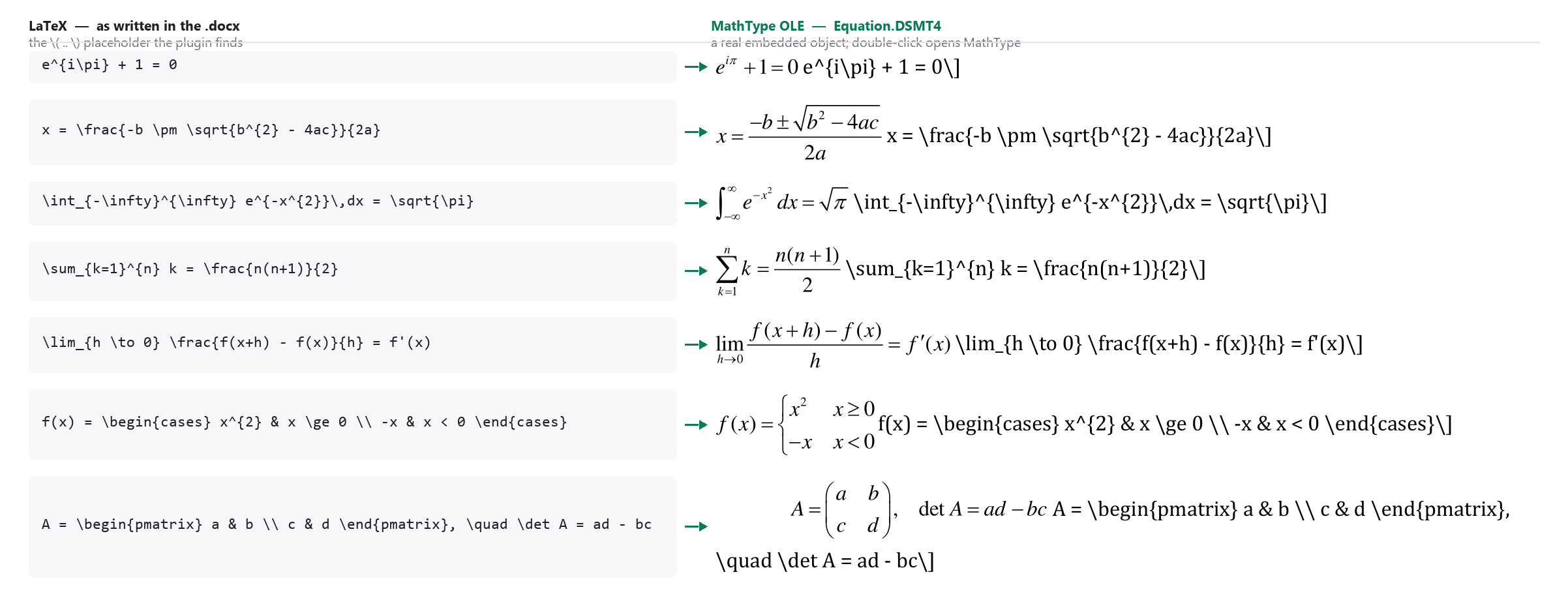
Left: the \[ ... \] LaTeX as written in the .docx. Right: what Word holds
after the run — real Equation.DSMT4 objects, rendered here by Word itself.
The examples are textbook identities, chosen to show the format change rather
than any one manuscript's content.
Because the document is edited in place through Word's own automation model,
existing equation numbers, SEQ fields, bookmarks, REF cross-references,
figures, tables and styles are never rebuilt.
What it ships
One model-invocable skill, mathtype, registered into ctx.skills when the
plugin mounts:
| Path | Role |
|---|---|
mt_env.py |
Discovers MathType, MT6.dll, Word and Python deps; smoke-tests the SDK. |
mt_sdk.py |
MT6.dll wrapper: connect, set_latex, get_text, close. |
mt_prefs.py |
Equation size via the MathType registry block, restored afterwards. |
word_session.py |
Word session that survives RPC crashes and late-binding failures. |
convert_docx.py |
The conversion. --dry-run, --overrides, --report. |
verify_docx.py |
Structural proof: ProgID, CFB, Equation Native, rels, ShapeID, bookmarks, fields. |
render_check.py |
Export PDF, render page and per-equation QA sheets. |
make_fixture.py |
Build a 6-equation test document with real SEQ fields. |
No JavaScript dependencies: the registrar uses only node:fs, node:path and
node:url, so the package installs offline.
Requirements
| Component | Requirement |
|---|---|
| OS | Windows 10/11. COM and OLE have no macOS or Linux equivalent. |
| MathType | MathType 7 desktop, full install — the fonts-only package has no System\<arch>\MT6.dll. |
| Word | Desktop Word 2016/2019/2021/365. Not a viewer, not LibreOffice. |
| Python | 3.10+, bitness matching MT6.dll (64-bit Python ↔ System\64\MT6.dll). |
| Python packages | pywin32, lxml. Optional: pymupdf + Pillow for the render check. |
python -m pip install pywin32 lxml
python -m pip install pymupdf Pillow     # optional, render check only
Nothing is hard-coded: the MathType directory, SDK DLL and preference files are resolved from the registry at run time, so a non-default install location works.
Install
# from GitHub — use the profile you actually run (`desktop` or `web`)
dsh plugin --profile desktop add github:DIPPER12138/dsh-mathtype

# or from a local checkout, for development
dsh plugin --profile desktop add /absolute/path/to/dsh-mathtype
Restart dsh afterwards. The mathtype skill then appears in the skill catalog.
If you previously copied this skill into ~/.dsh/skills/mathtype by hand, delete
that copy — otherwise the same skill is registered twice.
Verify the machine first
The plugin cannot install MathType, Word or Python for you, and it cannot install Python packages. Check the environment before converting anything:
python <skill-dir>/scripts/mt_env.py
It reports the resolved MathType directory and DLL, the Word version, dependency
status and a live MTAPIConnect result, and exits 0 only when the machine is
ready. On a new machine, prove the whole chain with the bundled fixture first
(about two minutes):
python scripts/make_fixture.py -o fixture.docx -f
python scripts/convert_docx.py fixture.docx -o fixture-out.docx --size 10.5
python scripts/verify_docx.py fixture.docx fixture-out.docx --expect 6
Use
# what would be converted? (reads the .docx package only — no Word, no COM)
python scripts/convert_docx.py manuscript.docx -o manuscript-MathType.docx --dry-run

# convert (54 equations take roughly 10-15 minutes)
python scripts/convert_docx.py manuscript.docx -o manuscript-MathType.docx \
        --size 10.5 --report conversion.json

# prove the objects are real MathType equations
python scripts/verify_docx.py manuscript.docx manuscript-MathType.docx --expect 54

# optional: PDF export plus page/equation QA sheets
python scripts/render_check.py manuscript-MathType.docx --outdir qa
Recognised placeholders, one per paragraph:
| Source | Result |
|---|---|
\[a=b\tag{7}\] |
centred MathType object, number (7) right-aligned |
\[a=b\tag{2a}\] |
number (2a); sub-lettering survives |
\[a=b\] |
centred object, no number |
$a=b$ |
inline object |
Numbers inside \tag{...} are never regenerated: an existing SEQ field,
bookmark or literal 2a is kept verbatim, so every REF still resolves.
--size sets the equation size (accepts 10.5 or "10.5 pt"); the previous
MathType setting is restored afterwards. --align none leaves paragraph layout
untouched. --overrides fixes.json replaces individual equations by label.
Limitations
- Windows only.
- It converts existing LaTeX placeholders; it does not author or validate mathematics.
- It does not convert MathType back to LaTeX in batch (the SDK wrapper exposes
get_text()for single equations). - It does not produce Word OMML — that is the other direction.
- Requires the real MathType installation; the SDK DLL is never redistributed with this plugin.
Uninstall
dsh plugin --profile desktop remove dsh-mathtype
License
MIT. See LICENSE.
MathType is a trademark of Design Science. This plugin uses the MathType SDK installed on the user's machine and ships none of it.
链接
同类插件
zhu1090093659/dsh-web#packages/dsh-skill-explorer★ 9262
技能中心:按来源分级浏览已加载的全部 skill,启用/禁用模型调用、创建新技能、删除进可恢复回收站。
QingYunA/answer-me-with-html★ 4192
把回答做成一页可视化 HTML:模型只写简短的 Markdown 草稿,随包附带的 `am` 命令行生成页面,支持流程图、时序图、树、时间线、ER 图、表格和提示框。
GanyuanRan/Aegis★ 1373
面向编码 Agent 的软件工程方法包,提供基线优先规划、系统化调试、提示词卫生、完成前验证,以及修复/退役双轨跟踪技能。
superdesigndev/superdesign-skill★ 876
在 Superdesign 画布上做 UI 与营销图的设计技能:先读代码库拿上下文、抽取现有设计系统,再通过 Superdesign CLI 生成并迭代可分支的设计稿、流程页与可复用组件。
linhay/harmony-next.skills★ 366
为 DeepSeek Harness 提供 HarmonyOS NEXT 技能包、离线 API 参考及 DevEco、HDC 与模拟器自动化指南。
dhicoc/dsh-reverse-skill★ 279
完整 reverse-skill(85 个 SKILL.md)的 DeepSeek Harness 插件:逆向工程、授权渗透测试与安全研究的技能路由包。
社区评论
评论公开保存在 GitHub Discussions。加载评论会连接 GitHub 和 Giscus;发表内容需要 GitHub 账号。