按项目调度提示词,在全新的无头 Agent 会话中执行,支持单次、固定间隔和 cron 计划,并持久化运行历史。
安装
# npm 包(预构建)
dsh plugin --profile web add @opendsh/dsh-plugin-scheduled-tasks
# GitHub 源码(首次需按提示配置 allowBuilds 构建授权后重试)
dsh plugin --profile web add github:Ceelog/dsh-plugins#path:/src/plugins/dsh-plugin-scheduled-tasks
装任何插件都等于在你的机器上跑第三方代码,权限和你本人一样大——能读你的文件、用你的凭据、访问网络,工具审批管不到它。GitHub 来源的插件还会在安装时执行构建脚本——pnpm 默认拦截,所以安装可能停在 ERR_PNPM_GIT_DEP_PREPARE_NOT_ALLOWED 或 ERR_PNPM_IGNORED_BUILDS;dsh 会打印出需要添加的确切键名,把它加进该 profile 的 pnpm-workspace.yaml 的 allowBuilds 下,重跑一次即可装上。放行构建本身就是一次信任判断:请只安装可信来源,并尽量锁定 commit(github:owner/repo#sha)。
README
该插件的 README 只有英文版本。
DSH web plugin: per-project scheduled tasks with prompts. Create a task in the sidebar (⏰ 定时任务), give it a prompt, and the plugin runs that prompt on schedule — as a fresh headless agent session in the project directory — then records the outcome as durable run history.
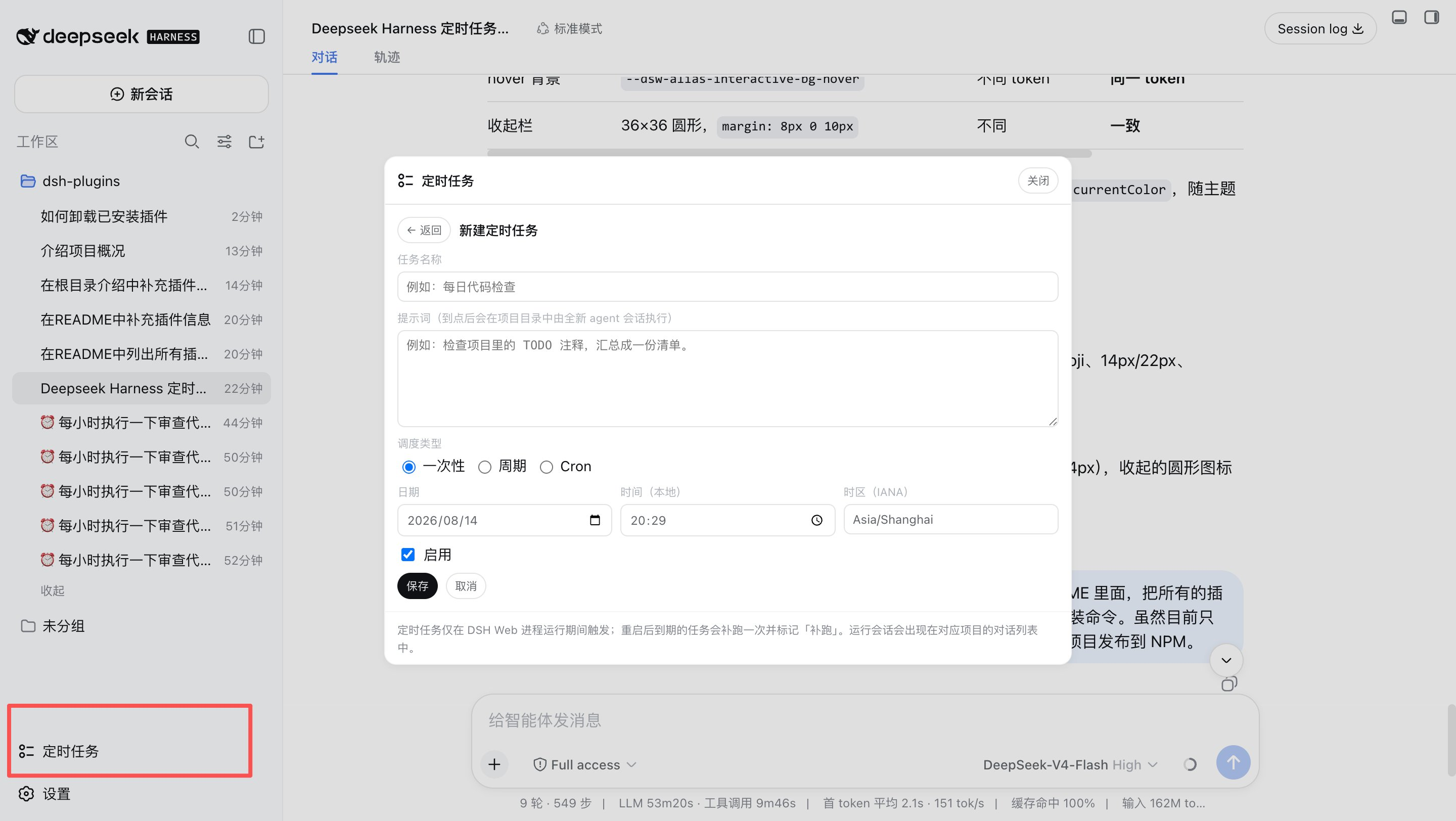
What it does
- Project-scoped tasks — each task belongs to a project directory (a DSH workspace). The panel lists tasks for the selected workspace.
- Three schedule kinds
at— run once at an absolute time (strict RFC 3339 instant, or a local date/time with an explicit IANA time zone; DST gaps are rejected, overlaps pick the earlier instant).every— run on a fixed creation-anchored interval (≥ 5 minutes); missed intervals are never replayed, only the latest due occurrence runs.cron— run on a cron calendar rule (five/six/seven-field expression, e.g.0 9 * * 1-5, evaluated in an explicit IANA time zone, DST-aware).
- Prompt execution — on schedule, a brand-new agent session is created in
the project directory with the task's prompt and driven to quiescence (the
same drive pattern as
dsh --profile headless). The run session appears in the project's conversation list with a pinned title (⏰ <task name>) and stays resumable; the final assistant text is also captured into the run record. - Per-task model override — each task may pin an explicit provider/model selection, picked from the grouped provider catalog in the panel (the same groups the DSH model selector renders, with the current default selection shown as the first option). Runs then use that model instead of the deployment default; the effective model of every run is recorded in its history. Leaving the picker empty follows the default selection.
- Run history — status (
running/completed/failed), start/finish times, output (truncated at 20 KB), error messages; newest first, capped at 20 records per task (configurable). - Manual run-now — runs a task immediately without touching its schedule.
- Lifecycle semantics
- Runs only while the DSH web process is alive. After a restart, overdue
one-shots run once and are marked
overdue; overdueeverytasks run only their latest due occurrence. - One-shot
attasks finish after their single run;everytasks stay active and advance to the next anchor-aligned target.
- Runs only while the DSH web process is alive. After a restart, overdue
one-shots run once and are marked
Architecture
A dual-face npm package installed into the web profile:
| Half | Entry | Role |
|---|---|---|
| Server | lib/index.js |
Cordis plugin: opens the scheduled_tasks storage domain (ctx.storageDomain), mounts the task store, the scheduler (bounded timers, clock-rollback-safe wakes), the headless executor, and the ctx.tasks typert service. |
| Protocol | lib/typert.js |
Host TYPERT face (tasks/* endpoints), auto-registered by dsh-typert-loader. |
| Browser | lib/client.js |
React panel mounted into the sidebar.footer.action slot; calls the host through the installed remote.tasks namespace. |
The client↔server channel is the DSH typert protocol (the same mechanism
dsh-commands uses): strict zod codecs validate every argument and result on
both sides, and no session needs to exist for the panel to work.
Install
dsh plugin --profile web add @opendsh/dsh-plugin-scheduled-tasks
Development
pnpm --dir src/plugins/dsh-plugin-scheduled-tasks typecheck   # tsc (TypeScript 7)
pnpm --dir src/plugins/dsh-plugin-scheduled-tasks test        # vitest
pnpm --dir src/plugins/dsh-plugin-scheduled-tasks build       # tsc emit + tsdown client bundle + loader wrapper
After changing sources, rebuild and re-sync the profile copy
(pnpm install inside the profile re-copies file: dependencies), then
restart dsh web — the plugin has no HMR channel.
Configuration
| Key | Default | Meaning |
|---|---|---|
maxConcurrentRuns |
2 |
Maximum concurrently running agent sessions across all tasks. |
keepRunsPerTask |
20 |
Run-history records retained per task (oldest pruned beyond the cap). |
Troubleshooting
Tool calls that fail with “Interrupted: interrupted” (underlying error
Cannot read properties of undefined (reading 'prepare')) are almost always a
duplicate @deepseek-ai/dsh-tools copy caused by declaring DSH packages in
dependencies instead of peerDependencies. See
docs/troubleshooting.md for the full write-up.
Limitations
- Schedules fire only while the web process is running (same posture as
dsh-schedule); there is no external wake-up when the process is down. - Each run consumes model tokens with the task's pinned model, or the current default model when the task pins none — the panel says so explicitly.
- Run history is refreshed by polling while the panel is open (10 s interval); push updates are deferred work.
链接
同类插件
Q00/ouroboros#integrations/dsh-plugin★ 6128
通过 DSH MCP 客户端挂载 Ouroboros 的纯配置包,在 DSH 中提供 36 个涵盖需求访谈、Seed、执行、评估与演化流程的工具。
loopx-project/loopx#dsh-loopx-plugin★ 6087
LoopX——面向长周期 Agent 的提供商中立、本地优先状态内核与控制平面:在 DeepSeek Harness 执行层之上持久化 Goal、Todo、门禁、证据、配额、恢复与交接状态;插件负责引导安装 CLI 与技能、准入有界的同会话续跑,并为精确绑定的工作循环提供本地 GoalBar。
chuspeeism/dashi-taskboard#deepseek-harness★ 3253
把当前已安装并运行中的 Codex Taskboard 嵌入 DeepSeek Harness 侧边栏,并通过 Launcher 运行时描述文件连接,而不是使用固定端口。
NanmiCoder/dsh-agent-teams★ 1839
AgentTeams 多智能体团队。
EthanYoQ/AI-Novel-Writer#dsh-ai-novel-writer★ 1181
安装专用 AI 小说创作预设与工作台:提供带修订号的本地项目资产、紧凑侧边工作台,以及需要原生审批的逐文件变更。
tong-io/tongflow#dsh-tongflow★ 1034
基于 TongFlow 的“片场”插件,用于图片、配音、音乐与视频制作:agent 为每个资产生成 TongFlow 工作流文件(.tongflow.json)并通过 TongFlow 插件执行,内嵌工作流画布,按镜头/角色/take 组织项目,附漫剧模板;以 @tongflow 开头的会话进入 Studio 界面。
社区评论
评论公开保存在 GitHub Discussions。加载评论会连接 GitHub 和 Giscus;发表内容需要 GitHub 账号。