让每条消息的操作栏(复制、点赞、点踩、分支按钮,时间,以及其他插件添加的内容)无需悬停即可常显。
安装
# npm 包(预构建)
dsh plugin --profile web add dsh-visible-action-row
# GitHub 源码(首次需按提示配置 allowBuilds 构建授权后重试)
dsh plugin --profile web add github:Bobnemimimmi/dsh-visible-action-row
装任何插件都等于在你的机器上跑第三方代码,权限和你本人一样大——能读你的文件、用你的凭据、访问网络,工具审批管不到它。GitHub 来源的插件还会在安装时执行构建脚本——pnpm 默认拦截,所以安装可能停在 ERR_PNPM_GIT_DEP_PREPARE_NOT_ALLOWED 或 ERR_PNPM_IGNORED_BUILDS;dsh 会打印出需要添加的确切键名,把它加进该 profile 的 pnpm-workspace.yaml 的 allowBuilds 下,重跑一次即可装上。放行构建本身就是一次信任判断:请只安装可信来源,并尽量锁定 commit(github:owner/repo#sha)。
README
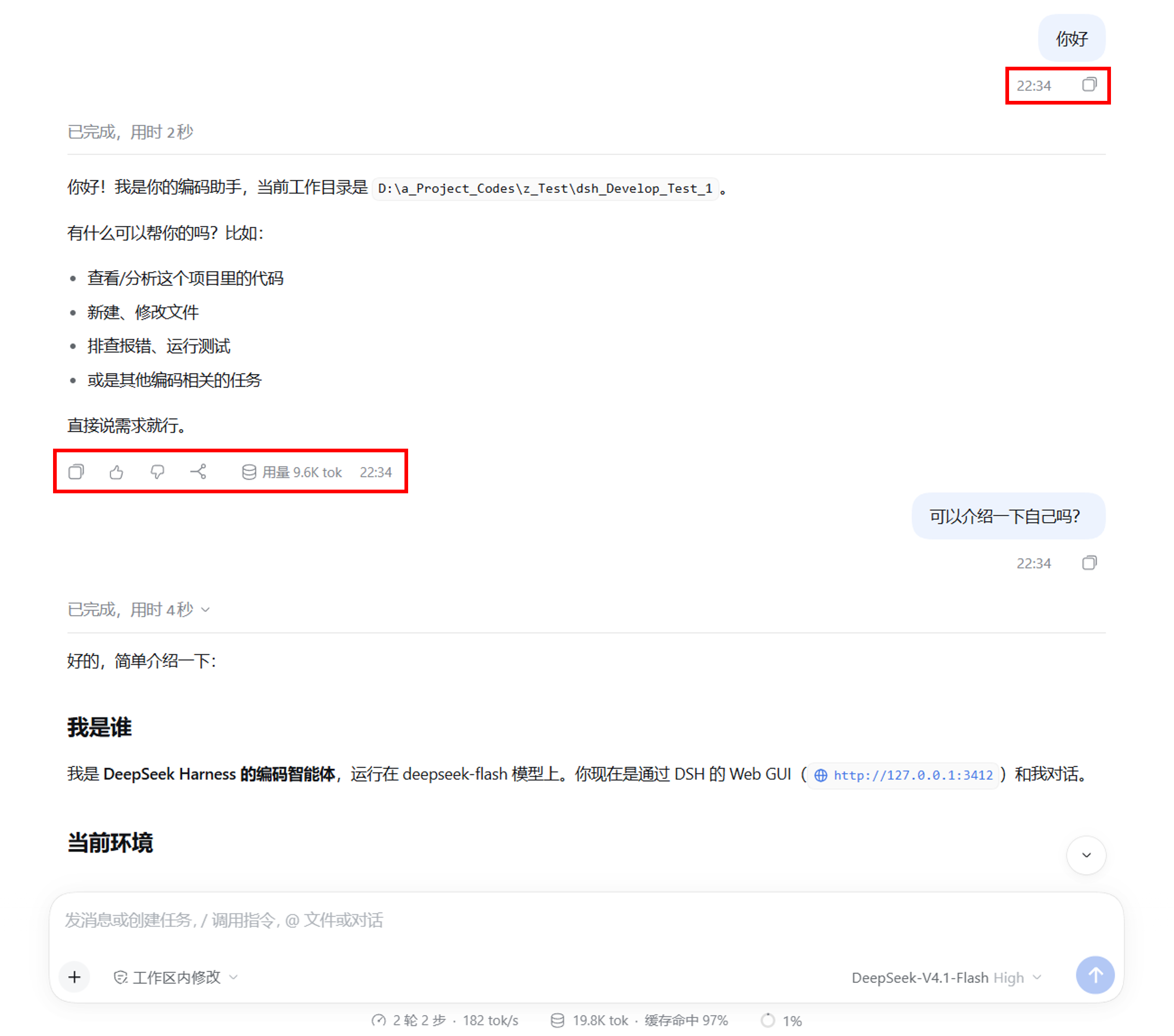
DeepSeek Harness(桌面版 / Web 版)插件:让每条消息——用户消息与 DSH 消息——气泡下方的整条操作栏无需悬停即可始终显示。
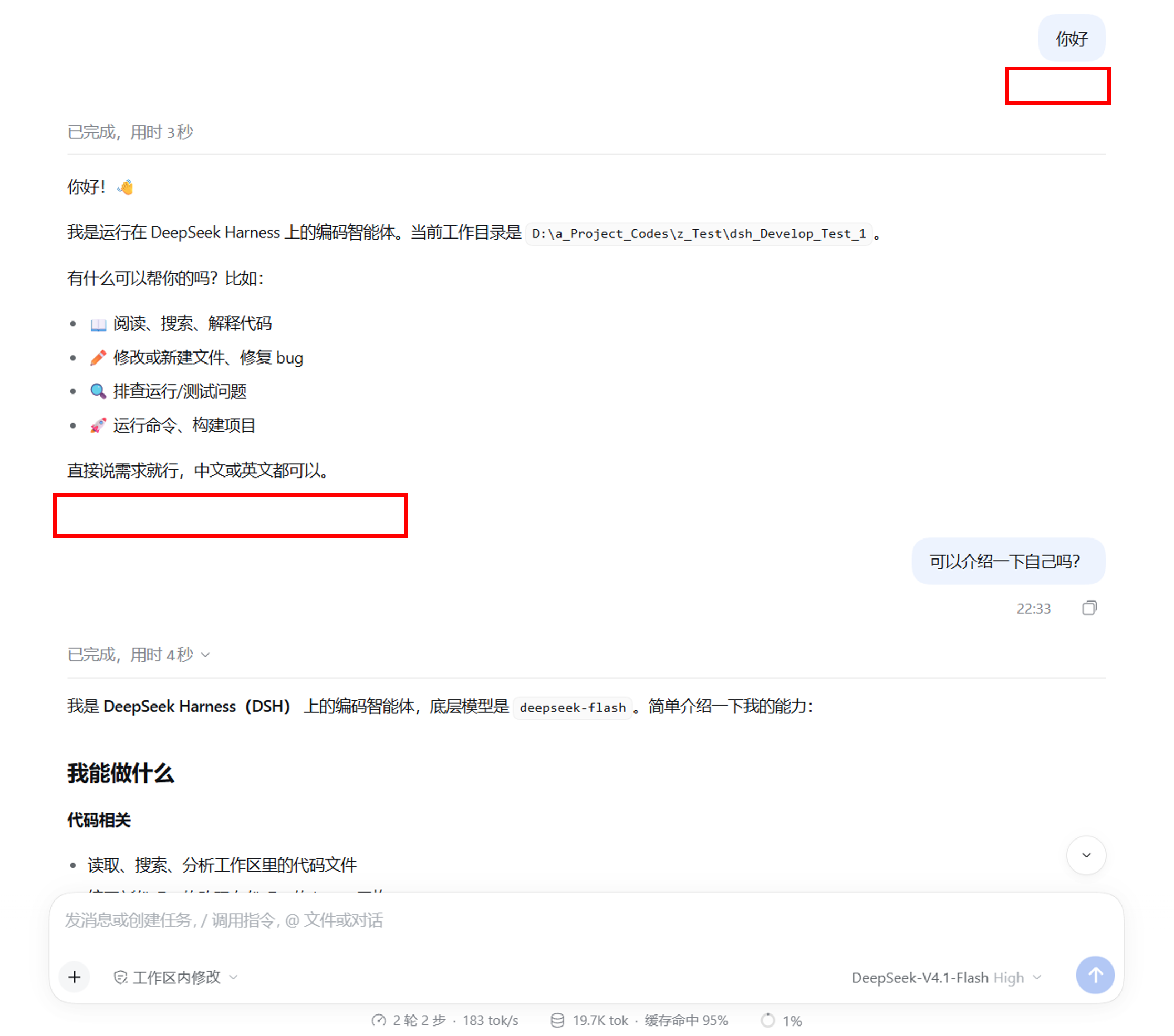
DSH 原生只在最新一轮消息上常显这条操作栏(复制 / 点赞 / 点踩 / 分支等按钮、时间,以及其他插件向该区域添加的按钮与信息),历史消息需要悬停才出现。本插件以一条 scoped CSS 可见性覆盖,让每条消息的操作栏都保持最新一轮那样的常显状态:复用原生渲染、原生位置与原生内容,不新增任何可见 UI。
- Always visible:用户与 DSH 消息的操作栏全部常显,含历史消息;悬停前后一致
- Native content:按钮、时间与第三方插件塞进该行的内容原样显示——不重新生成、不改格式
- Zero config:无设置项、无开关、无存储、无后端、无网络请求,安装即生效
- Clean uninstall:卸载后恢复原生「仅最新一轮常显」行为,不残留 DOM / CSS / 配置
- Minimal & safe:不扫描 DOM、无 MutationObserver、无轮询;仅调整
opacity,按钮行为与悬停效果不变
维护:Bobnemimimmi · 问题与反馈:GitHub Issues
Preview
安装前(Before Installation)
安装后(After Installation)
Usage
安装(Installation)
通过 DSH Desktop 安装(Install through DSH Desktop)
- 打开侧栏 插件(Plugins)页;
- 点击 添加插件(Add plugin)旁的箭头,选择 安装第三方插件(Install a third-party plugin);
- 输入
dsh-visible-action-row安装,安装完毕后点击 立即启用。
通过 npm 安装(Install through npm)
dsh plugin --profile web add dsh-visible-action-rownpm 安装拿到的是发布时构建好的成品,无需任何构建授权。
从 GitHub 安装(Install through GitHub)
会运行本包的
prepare自构建;pnpm ≥10 首次add会拒绝并要求授权,按提示把打印的allowBuilds键加入 profile 的pnpm-workspace.yaml后重跑:dsh plugin --profile web add github:Bobnemimimmi/dsh-visible-action-row本地目录 / tarball 安装(Local directory / tarball installation)
dsh plugin --profile web add ./dsh-visible-action-row或通过 Awesome DeepSeek Harness (DSH) Plugin 搜索安装(Search and install from the awesome list)
用命令行安装后,重启 DSH 即生效(桌面版重启应用;Web 版重启 dsh web)。
桌面版使用的 profile 名为
desktop:把上面命令里的--profile web换成--profile desktop。
卸载(Uninstallation)
dsh plugin --profile web remove dsh-visible-action-row
重启后恢复原生「仅最新一轮常显」行为(restart DSH to restore the native behaviour)。
从 0.1.x 迁移(Migrating from 0.1.x)
旧包 dsh-always-status-bar 只覆盖时间戳,且其锚点在 DSH 0.2.x 中已变更(因此在新版里实际为空转)。建议先移除再安装新包:
dsh plugin --profile web remove dsh-always-status-bar
dsh plugin --profile web add dsh-visible-action-row
Requirements
- DeepSeek Harness:桌面版,或
dsh web(二进制安装 / 源码启动均可) - 已验证:
- 桌面版
0.2.1-rc.5(Windows 11) - 源码启动的 Web
0.2.2-alpha.2(Windows 11) - 两者加载同一套前端产物;macOS / Linux 未单独实测,但同一份 client bundle 不含平台分支
- 桌面版
dshCLI(或按 DSH 文档以源码方式运行pnpm dsh)
若升级 DSH 后操作栏不再常显,请核对以下稳定锚点是否仍存在于 packages/client/ui-chat/src/client/chat/:
MessageIconActions.tsx→ 操作栏根节点的data-clockTurnTailNodeView.tsx→data-actions-revealChatNodeSeat.tsx→data-chat-flow-kind
License
MIT
链接
同类插件
zhu1090093659/dsh-web#packages/dsh-task-board★ 10494
侧边栏多列任务看板:卡片交给真实 DSH 智能体会话执行,支持 cron 定时(Host 侧到点执行,关浏览器也生效)。
zhu1090093659/dsh-web#packages/dsh-web-all★ 10494
DSH Web UI 插件与皮肤合集:任务看板、git 图、右侧面板、远程移动端 UI、桌宠、实时 token 统计与皮肤中心。
ccch1mneyyy/dsh-TUI★ 7881
Claude Code 风格全屏终端 UI:像素鲸鱼顶栏、实时工作状态行、思考流式展开。
MeteorNOX/DeepSeek-Balance-Whale-Widget★ 7304
右下角常驻的小鲸鱼挂件:余额、今日已用与每轮对话消耗(含峰谷价),余额预警与今日预算的泡泡内容都可编辑;泡泡点击序列模块化自定义,支持并列加权 A/B、随机台词与随机图片;内置 30+ 厂商模板(OpenAI / OpenRouter / Kimi / 硅基流动 / 方舟 / 智谱 / MiniMax 等),按模型查余额与订阅额度;另有任务结束音效、导入音频、自定义角色与资源管理。数据全在本机,无遥测。
omdsh-dev/DSH-better-sidebar★ 5213
侧边栏完整工作台:内置文件渲染编辑、终端、Git 与子代理,支持三方插件注册新 Tab。
omdsh-dev/dsh-genui★ 1014
助手回复内渲染交互式 UI 组件:布局、图表、表单、测验、mermaid、3D 场景与回传事件循环。
社区评论
评论公开保存在 GitHub Discussions。加载评论会连接 GitHub 和 Giscus;发表内容需要 GitHub 账号。