AGENTS & Skills 工作台:编辑 AGENTS.md,按 Agent Skills 规范创建 SKILL.md,管理和重命名技能文件夹,并从 Anthropic、OpenAI、Cursor、Matt Pocock 四源技能目录安装技能。
安装
# npm 包(预构建)
dsh plugin --profile web add dsh-workspace-atlas
# GitHub 源码(首次需按提示配置 allowBuilds 构建授权后重试)
dsh plugin --profile web add github:Asteroid-Code-Channel/dsh-workspace-atlas
装任何插件都等于在你的机器上跑第三方代码,权限和你本人一样大——能读你的文件、用你的凭据、访问网络,工具审批管不到它。GitHub 来源的插件还会在安装时执行构建脚本——pnpm 默认拦截,所以安装可能停在 ERR_PNPM_GIT_DEP_PREPARE_NOT_ALLOWED 或 ERR_PNPM_IGNORED_BUILDS;dsh 会打印出需要添加的确切键名,把它加进该 profile 的 pnpm-workspace.yaml 的 allowBuilds 下,重跑一次即可装上。放行构建本身就是一次信任判断:请只安装可信来源,并尽量锁定 commit(github:owner/repo#sha)。
README
该插件的 README 只有英文版本。
AGENTS & Skills Studio is a full-page panel for DeepSeek Harness / DSH NEXT. It manages both kinds of workspace instruction files:
- global and workspace-root
AGENTS.md - multiple project skills at
<workspace>/.dsh/skills/<name>/SKILL.md - the global skill directory at
$DSH_HOME/skills - local skill library, URL import, and whole-directory installs from four public catalogs
Four skill sources:
| Source | Repository |
|---|---|
| Anthropic | anthropics/skills |
| OpenAI | openai/skills |
| Cursor | cursor/plugins |
| Matt Pocock | mattpocock/skills |
It also provides list and left-to-right tree views, tree search, SKILL counts, backups, conflict detection, and path-escape protection.
This is a community plugin. It is not an official DeepSeek product.
中文简介:AGENTS & Skills 工作台是一个 DSH 全页面插件,用来管理全局与工作区根
AGENTS.md、多个.dsh/skills/<name>/SKILL.md和全局技能目录。支持列表/横向树视图、搜索定位、SKILL 数量统计、新建/编辑/删除、URL 导入、本地技能仓库,以及从 Anthropic(anthropics/skills)、OpenAI(openai/skills)、Cursor(cursor/plugins)、Matt Pocock(mattpocock/skills)四源技能目录整目录安装。包含备份、外部修改冲突检测和路径逃逸防护。
Features
- Two views, switchable at any time:
- List — flat, alphabetically sorted workspaces; each workspace shows its root
AGENTS.mdand a SKILL summary with count. - Tree — a left-to-right forest derived from workspace paths.
- List — flat, alphabetically sorted workspaces; each workspace shows its root
- Tree nodes start collapsed. Click a node to expand its children. Expand and collapse use a smooth 220 ms animation.
- Tree search initially lists matching nodes only. Selecting a result expands its ancestors and its complete subtree, then scrolls it into view.
- Every tree node has
SKILLandAGENTSbuttons:- green when content exists
- orange when it does not
SKILLalso shows a count box
SKILLopens a manager for multiple project skills:- native skills at
<workspace>/.dsh/skills/<name>/SKILL.md - legacy root
SKILL.mdkept as a separate row - create, edit, delete, import from a raw URL, save to the local library, install from the library
- native skills at
- Local skill library at
$DSH_HOME/workspace-atlas/skills. AGENTSopens the workspace rootAGENTS.mdeditor.- Global
AGENTS.mdeditor:$DSH_HOME/AGENTS.md. - Markdown text editing with LF/CRLF and UTF-8 BOM preservation.
Ctrl+S/Cmd+Ssave,Tabinserts two spaces.- Unsaved-change tracking, external-change conflict detection, reload, and delete.
- Header version button with GitHub Release checking and one-click update through DSH Plugin Manager.
- Atomic writes and automatic backups under
$DSH_HOME/agents-manager-backups/. - Global skill management at
$DSH_HOME/skills. - Chinese and English locale, DSH theme tokens, no private Harness UI imports.
Screenshots
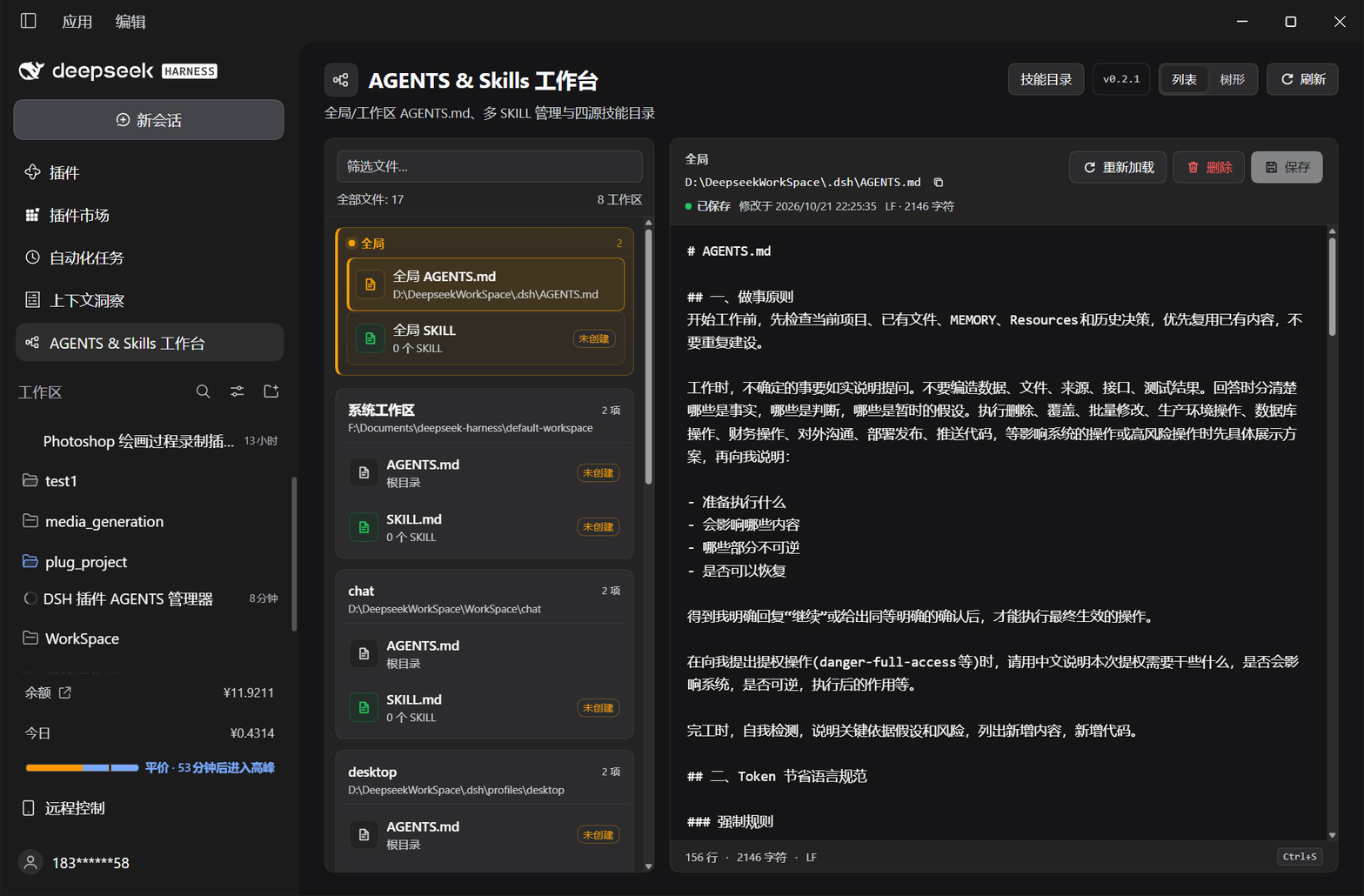
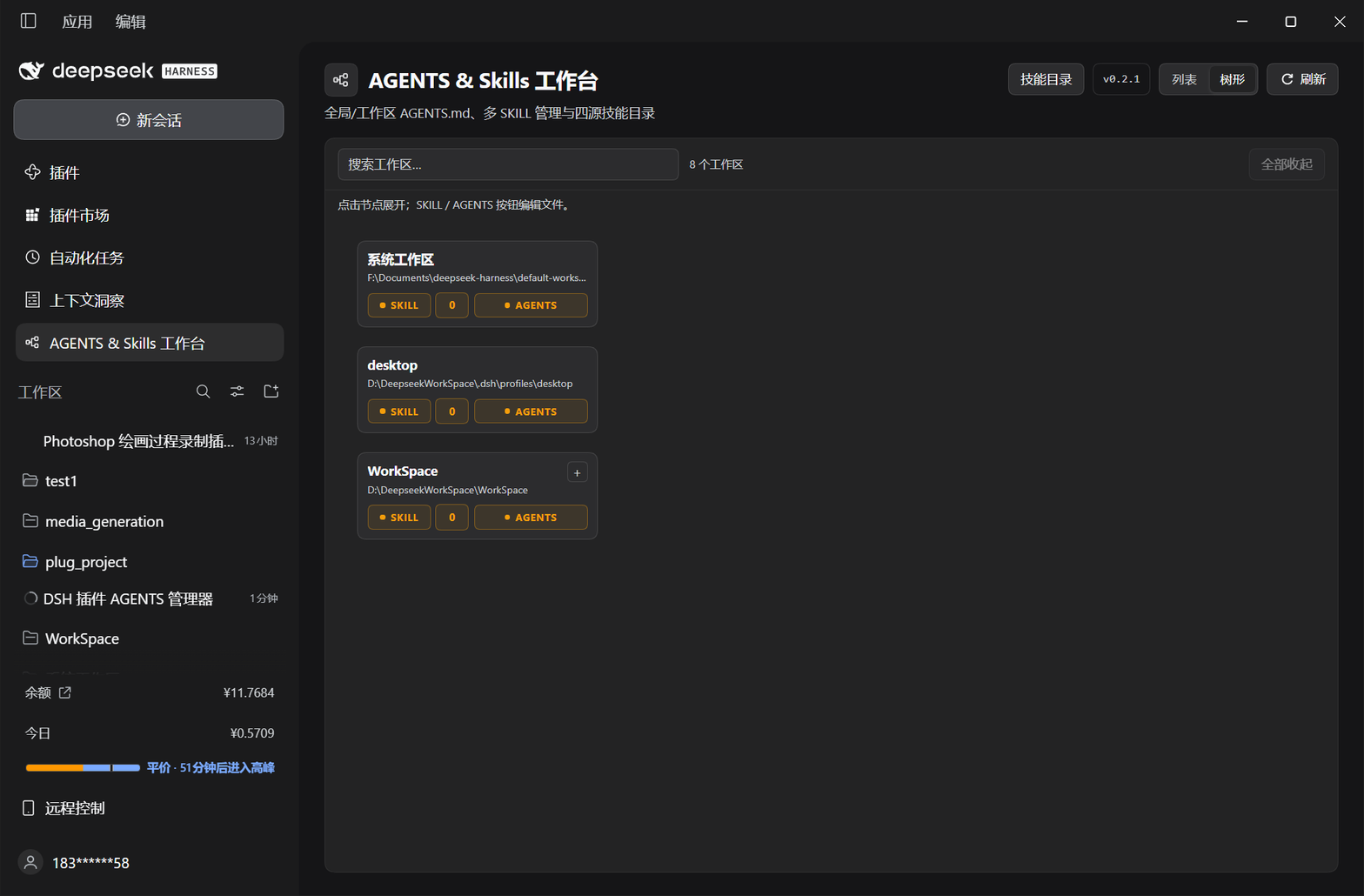
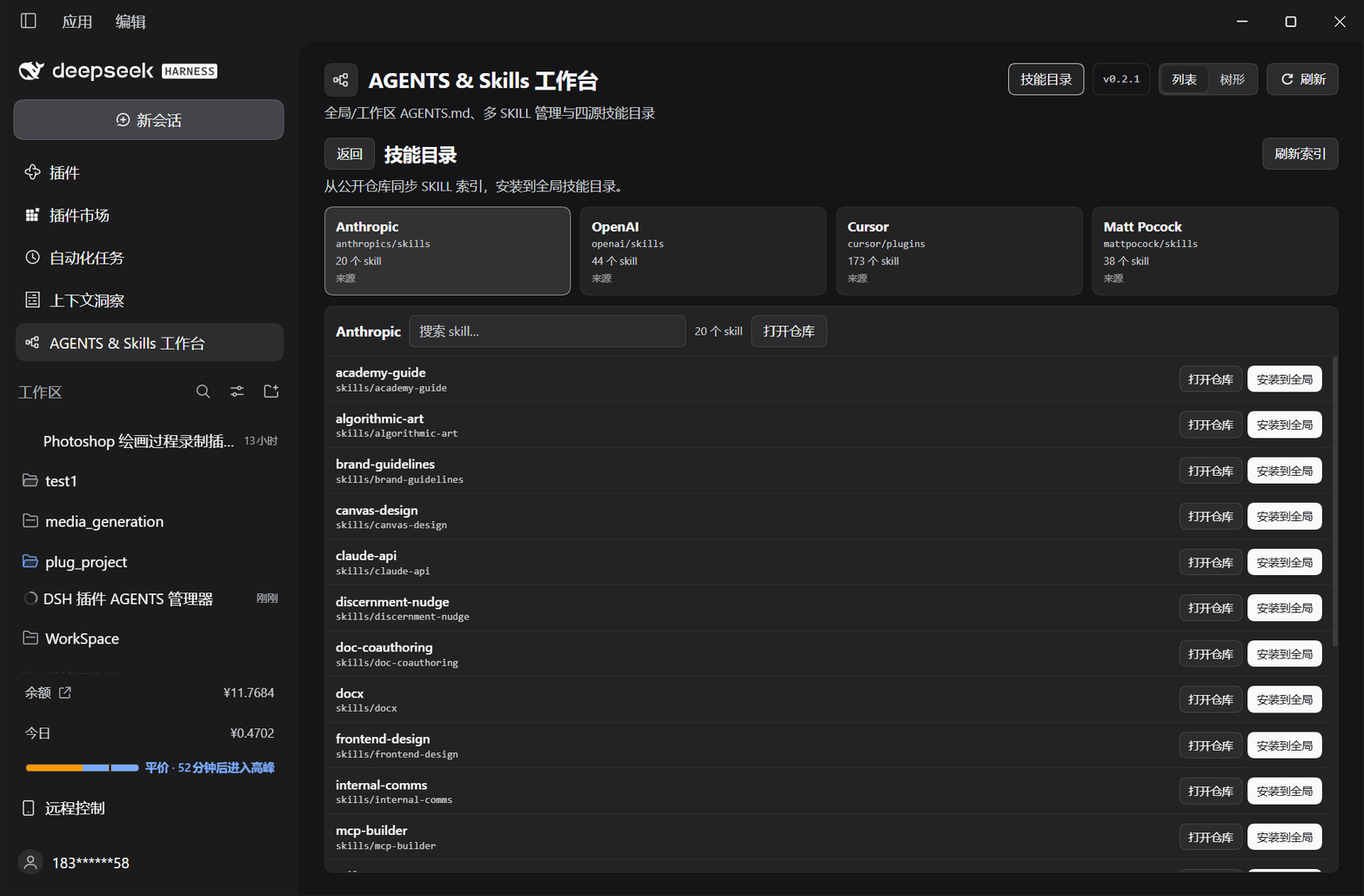
Skill catalog
The header's Skill catalog / 技能目录 button opens a separate catalog view:
- four source cards: Anthropic, OpenAI, Cursor, Matt Pocock
- the catalog syncs on open and can be refreshed manually
- selecting a card shows that repository's skills
- each row can install into the global skill directory or open the source directory on GitHub
- indexes are cached under
$DSH_HOME/workspace-atlas/catalog.json
Sources:
| Card | Repository |
|---|---|
| Anthropic | anthropics/skills |
| OpenAI | openai/skills |
| Cursor | cursor/plugins |
| Matt Pocock | mattpocock/skills |
Catalog installation downloads every file in the selected skill directory, not only SKILL.md. It installs into $DSH_HOME/skills/<name> and refuses to overwrite an existing skill.
Create and edit skills
New skills use the Agent Skills specification:
| Field | Required | Notes |
|---|---|---|
name |
yes | Lowercase letters, numbers, and single hyphens; 1-64 characters |
description |
yes | 1-1024 characters; what the skill does and when to use it |
license |
no | License name or a bundled license file |
compatibility |
no | Environment requirements; up to 500 characters |
metadata |
no | String key-value mapping |
allowed-tools |
no | Space-separated pre-approved tools |
The create form collects all six fields plus the Markdown body, then writes a canonical SKILL.md with YAML frontmatter. Existing native skills open in the same structured editor.
The edit page has a file tab for everything outside the root SKILL.md:
- create nested files and folders under the skill directory
- rename the skill parent folder; all child files move with it
- edit and save text files such as
references/guide.mdorscripts/run.py - delete files or folders
- path validation keeps every operation inside that skill directory
Legacy root SKILL.md remains a raw Markdown editor.
Install
Requirements:
- DeepSeek Harness / DSH NEXT with the Web UI and Plugin Manager
- Node.js
>=22.19.0
Clone this repository and install the directory as a bundle in the profile used by the desktop app:
git clone https://github.com/Asteroid-Code-Channel/dsh-workspace-atlas.git
In DSH, open Plugin Manager and install the cloned directory, or ask the agent:
请把 <absolute-path-to>\dsh-workspace-atlas 作为 bundle 安装到当前 profile。
Equivalent plugin_manager call:
plugin_manager
action: install_bundle
target: <absolute-path-to>\dsh-workspace-atlas
Refresh the Web UI after installation. Restart the desktop app after updating Host-side JavaScript.
For a different desktop UI, repeat the installation in that profile.
Usage
- Open the sidebar entry named AGENTS & Skills Studio / AGENTS & Skills 工作台.
- Choose List / 列表 for a flat alphabetical overview.
- Choose Tree / 树形 for the workspace forest.
- Click a node card to expand it.
- Use
SKILLto manage that workspace's native skills and legacy rootSKILL.md. - Use
AGENTSto edit the workspace rootAGENTS.md. - Use the global card in List view to edit
$DSH_HOME/AGENTS.mdor manage$DSH_HOME/skills. - Use the header's Skill catalog to sync and install public skills globally.
File rules
- Tree parent/child relationships are derived from registered workspace paths. The DSH workspace registry is never modified.
- A workspace with no registered ancestor becomes a root tree.
- Native project skills:
<workspace>/.dsh/skills/<name>/SKILL.md. SKILLalso shows a legacy root<workspace>/SKILL.mdwhen present.AGENTSedits workspace-rootAGENTS.md.- Skill deletion moves the skill directory to
$DSH_HOME/workspace-atlas/trash/. - The local skill library is
$DSH_HOME/workspace-atlas/skills/<name>/SKILL.md. - URL import downloads one
SKILL.md; it does not fetch a skill's auxiliary files. - The list shows root
AGENTS.mdand the SKILL summary only; nestedAGENTS.mdfiles are not listed.
Version updates
The header shows the installed version. Click it to check the latest GitHub Release.
The update source is resolved from, in order:
updateRepositoryin the bundle'scordis.patch.ymlrow configrepositoryinpackage.json
Use an owner/repo value. After creating the GitHub repository, add:
"repository": {
  "type": "git",
  "url": "https://github.com/Asteroid-Code-Channel/dsh-workspace-atlas.git"
}
When a newer Release exists, the dialog can call DSH Plugin Manager's installBundle with github:<owner>/<repo>#<tag>. A restart is required after a Host update. If Plugin Manager does not expose installBundle, the dialog still links to the Release page for a manual update.
Host API
The Host half registers these same-origin endpoints:
| Method | Path | Purpose |
|---|---|---|
GET |
/api/dsh-agents-manager/state |
Global file, workspaces, AGENTS/SKILL metadata, version |
POST |
/api/dsh-agents-manager/read |
Read a target |
POST |
/api/dsh-agents-manager/save |
Atomic save + backup |
POST |
/api/dsh-agents-manager/delete |
Delete + backup |
POST |
/api/dsh-agents-manager/skills/list |
List native + legacy skills |
POST |
/api/dsh-agents-manager/skills/create |
Create a native skill |
POST |
/api/dsh-agents-manager/skills/read |
Read parsed skill fields and body |
POST |
/api/dsh-agents-manager/skills/save |
Save structured fields and body |
POST |
/api/dsh-agents-manager/skills/rename |
Rename a skill parent folder |
POST |
/api/dsh-agents-manager/skills/files |
List a skill directory |
POST |
/api/dsh-agents-manager/skills/file/read |
Read a skill file |
POST |
/api/dsh-agents-manager/skills/file/save |
Save a skill file |
POST |
/api/dsh-agents-manager/skills/file/delete |
Delete a skill file or folder |
POST |
/api/dsh-agents-manager/skills/folder/create |
Create a skill folder |
POST |
/api/dsh-agents-manager/skills/import |
Import a SKILL.md from URL |
POST |
/api/dsh-agents-manager/skills/delete |
Move a native skill to trash |
GET |
/api/dsh-agents-manager/skills/library |
List local skill library |
POST |
/api/dsh-agents-manager/skills/library/save |
Copy workspace skill to library |
POST |
/api/dsh-agents-manager/skills/library/install |
Install library skill into workspace |
GET |
/api/dsh-agents-manager/catalog |
Sync GitHub skill catalog |
POST |
/api/dsh-agents-manager/catalog/install |
Install a catalog skill globally |
GET |
/api/dsh-agents-manager/update |
Check GitHub Releases |
POST |
/api/dsh-agents-manager/update/apply |
Install a validated release tag |
Targets:
{ "scope": "global" }
{ "scope": "global", "skillName": "my-skill" }
{ "scope": "workspace", "workspaceId": "…", "file": "agents" }
{ "scope": "workspace", "workspaceId": "…", "file": "skill" }
{ "scope": "workspace", "workspaceId": "…", "skillName": "my-skill" }
Mutations require a loopback Host, matching Origin, x-dsh-agents-manager: 1, and Content-Type: application/json. Workspace targets pass through realpath; .., absolute paths, symlink escapes, and filenames outside the managed set are rejected. The per-file limit is 2 MiB.
Development
node --check .\index.js
node --check .\lib\store.js
node --check .\client.js
node .\test\store.test.mjs
node .\test\http.test.mjs
node .\test\skill.test.mjs
node .\test\client.test.mjs
node .\test\update.test.mjs
node .\test\catalog.test.mjs
The tests use temporary directories inside the workspace and do not write to the real $DSH_HOME.
Known limitations
- The global/workspace
AGENTS.mdfiles affect the model only when@deepseek-ai/dsh-agent-instructions(or the active profile's equivalent loader) is enabled. In the tested desktop profile that row was disabled. - Editing files does not rewrite history already injected into an open Session.
- AGENTS & Skills Studio manages
.dsh/skillsdirectories directly and installs whole skill directories from four curated catalogs; it is not a general GitHub tree browser, dependency resolver, or enable/disable policy engine. - URL import downloads a single
SKILL.mdonly; auxiliary files must be added manually. - Legacy root
SKILL.mdremains supported for backward compatibility but is not a DSH-native project skill.
License
MIT. See LICENSE.
链接
同类插件
zhu1090093659/dsh-web#packages/dsh-task-board★ 10172
侧边栏多列任务看板:卡片交给真实 DSH 智能体会话执行,支持 cron 定时(Host 侧到点执行,关浏览器也生效)。
zhu1090093659/dsh-web#packages/dsh-web-all★ 10172
DSH Web UI 插件与皮肤合集:任务看板、git 图、右侧面板、远程移动端 UI、桌宠、实时 token 统计与皮肤中心。
ccch1mneyyy/dsh-TUI★ 7101
Claude Code 风格全屏终端 UI:像素鲸鱼顶栏、实时工作状态行、思考流式展开。
MeteorNOX/DeepSeek-Balance-Whale-Widget★ 6959
右下角常驻的小鲸鱼挂件:余额、今日已用与每轮对话消耗(含峰谷价),余额预警与今日预算的泡泡内容都可编辑;泡泡点击序列模块化自定义,支持并列加权 A/B、随机台词与随机图片;内置 30+ 厂商模板(OpenAI / OpenRouter / Kimi / 硅基流动 / 方舟 / 智谱 / MiniMax 等),按模型查余额与订阅额度;另有任务结束音效、导入音频、自定义角色与资源管理。数据全在本机,无遥测。
omdsh-dev/DSH-better-sidebar★ 4959
侧边栏完整工作台:内置文件渲染编辑、终端、Git 与子代理,支持三方插件注册新 Tab。
Devin-AXIS/deepseek-design#deepseek-idesign★ 1744
可视化设计工作室,支持网站、App 原型、海报、信息卡、报告和杂志的模板创建、元素编辑、选区级 AI 草稿衔接与导出。
社区评论
评论公开保存在 GitHub Discussions。加载评论会连接 GitHub 和 Giscus;发表内容需要 GitHub 账号。