侧边栏底部与右下角常驻胶囊实时显示 DeepSeek API 余额:状态点加金额,每 60 秒自动刷新,密钥从本机凭证库读取。
安装
# Release 预构建包
dsh plugin --profile web add "https://github.com/AKUSH99/dsh-balance-chip/releases/download/v1.0.1/dsh-balance-chip-1.0.1.tgz"
# GitHub 源码(首次需按提示配置 allowBuilds 构建授权后重试)
dsh plugin --profile web add github:AKUSH99/dsh-balance-chip
装任何插件都等于在你的机器上跑第三方代码,权限和你本人一样大——能读你的文件、用你的凭据、访问网络,工具审批管不到它。GitHub 来源的插件还会在安装时执行构建脚本——pnpm 默认拦截,所以安装可能停在 ERR_PNPM_GIT_DEP_PREPARE_NOT_ALLOWED 或 ERR_PNPM_IGNORED_BUILDS;dsh 会打印出需要添加的确切键名,把它加进该 profile 的 pnpm-workspace.yaml 的 allowBuilds 下,重跑一次即可装上。放行构建本身就是一次信任判断:请只安装可信来源,并尽量锁定 commit(github:owner/repo#sha)。
README
Show your DeepSeek API balance directly inside the DSH app, in two places:
- Bottom-right pill – always visible, non-blocking (
pointer-events: none), dot + amount, auto-refresh every 60 s - Sidebar footer – beside Settings (dot in rail mode)
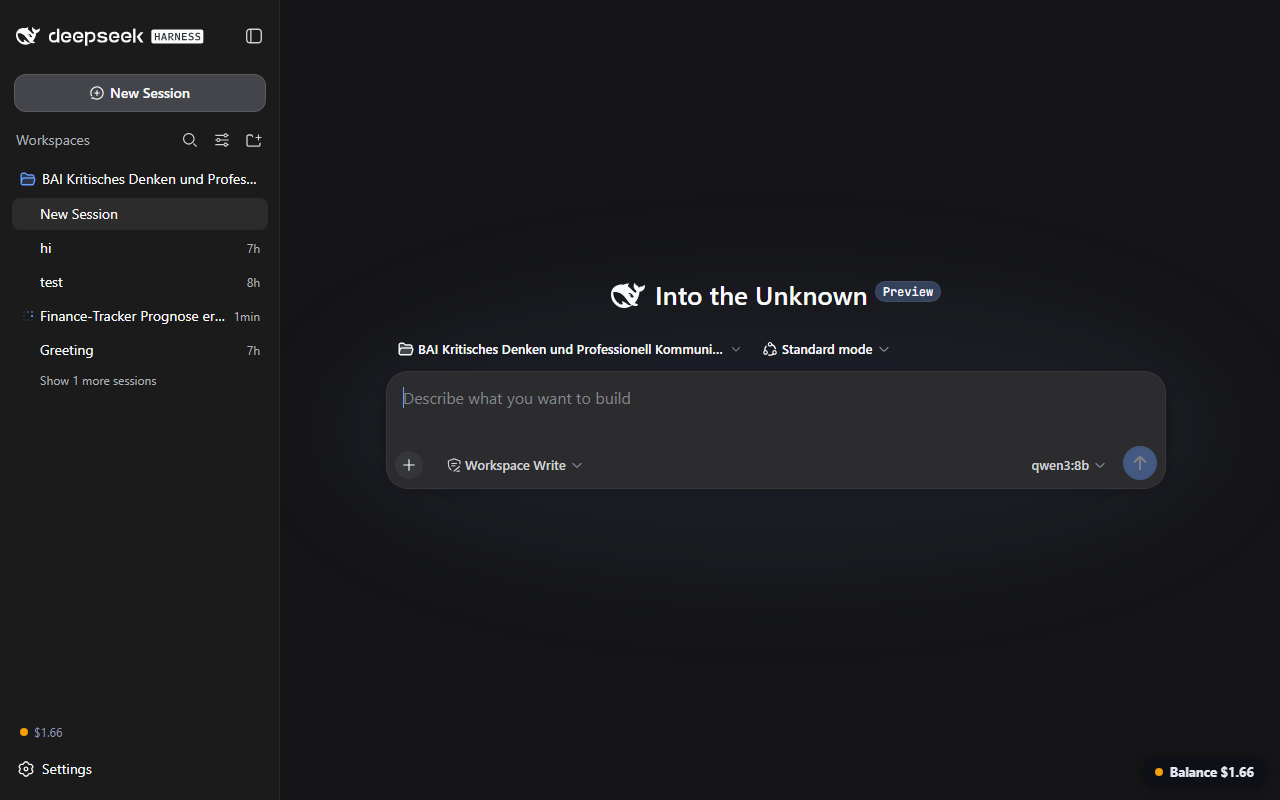
- 🟢 green ≥ $5 · 🟠 orange < $5 · 🔴 red on errors
- Tooltip shows currency and last update time
- Your API key never ships with this plugin – it is read at runtime from your local DSH credential store, and the only network call goes to the official
api.deepseek.com/user/balanceendpoint from the host side.
Prerequisites
Your DeepSeek API key must be stored in the DSH credential store under the reference DEEPSEEK_API_KEY (this is the same place the built-in DeepSeek provider uses – the web UI's Models page writes it there). If the reference is missing, the displays show Key?.
Install
dsh plugin --profile web add github:AKUSH99/dsh-balance-chip
Restart dsh web (or use the market's one-click restart). No build step, no dependencies.
Requires dsh web 0.1.0-rc.6 or newer (same base as the plugin market).
Installation alternatives
- Plugin Market: once listed, open Settings → Plugin Market in the app, search "balance", one-click install.
- Prebuilt package: the latest release ships a ready tarball – the market offers it as the faster install path without any build step.
How it works
| Part | What it does |
|---|---|
lib/index.js (host) |
Resolves the key via the credentials service, polls GET https://api.deepseek.com/user/balance every 60 s, serves the cached state at GET /dsh-balance |
client/client.js (web) |
Registers a sidebar.footer.action item and a shell.overlay pill that fetch /dsh-balance and render dot + amount |
No telemetry, no external dependencies, everything stays on your machine.
Troubleshooting
Key?in the chip/pill – noDEEPSEEK_API_KEYreference in your credential store. Store your key via the web UI's Models page (or thecredentialsservice), then reload.…while loading – the first poll hasn't finished yet; wait a few seconds.- Red dot / error – the host couldn't reach
api.deepseek.com/user/balance; check your network and key validity.
中文说明
在 DSH 应用内实时显示 DeepSeek API 余额:右下角常驻胶囊(不阻挡点击)+ 侧边栏底部状态点,每 60 秒自动刷新。余额低于 5 美元显示橙色,出错显示红色,悬停可见币种与更新时间。API Key 绝不内置:运行时从本机 DSH 凭证库读取,仅向官方余额接口发起请求。使用前请确认凭证库中存在 DEEPSEEK_API_KEY 引用(与内置 DeepSeek 提供方相同,网页端模型页面会写入)。
FAQ
Why two displays? The sidebar chip is subtle and always in reach; the bottom-right pill gives an at-a-glance status without blocking clicks (pointer-events: none).
How fresh is the value? The host polls the official balance endpoint every 60 seconds; both displays refresh from that cached state.
Does polling cost tokens? No – the balance endpoint is separate from the chat API and does not consume paid tokens.
Currency? The official API reports the account currency; the displays show it as-is.
License
MIT
链接
同类插件
bowenliang123/dsh-context★ 3190
DSH 上下文洞察面板:Context 仪表盘 + /context命令 + Context 浏览器,查看 Context的分类组成、内容详情、演进趋势、压缩/注入事件、统计等一站式 Context 全生命周期管理。
Han-1413141/dsh-cost-meter★ 489
会话与当日 API 费用统计、预算图框(已用%)、官方余额、历史看板,支持峰谷计价与官方价格一键同步。
wssfk12138/dsh-damage-pulse★ 273
在 DSH Web 界面追踪 DeepSeek Token 用量、单次与会话费用及账户余额,并显示缓存感知的扣费动画。
zh667/TokenLedger★ 199
侧边栏用量面板:把 Token 归属到实际服务该请求的中转站,站点从已有的 provider 配置中读出,无需额外配置;含今日/本月/累计三窗口、按站点与模型下钻、一年活跃度热力图,以及 New API / Sub2API / DeepSeek 余额。
Ychris12138/dsh-usage-stats★ 183
多供应商用量看板:按供应商/模型统计 Token 与日期下钻,统一展示账户余额,并追踪 OpenCode Go / Z.ai 订阅额度。
PolinniZhong/dsh-personal-center★ 112
DeepSeek Harness 个人中心:跨会话用量统计、按模型成本估算、全局自定义指令、外观全局字号、数据驱动的桌面宠物(位图/矢量皮肤)与会话状态概览,纯本地离线运行。
社区评论
评论公开保存在 GitHub Discussions。加载评论会连接 GitHub 和 Giscus;发表内容需要 GitHub 账号。