Highlight DSH Web replies while reading and save them with their user questions.
Install
# from a prebuilt release tarball
dsh plugin --profile web add "https://github.com/zzh-github/dsh-plugin-sparknote/releases/download/v0.1.3/dsh-sparknote-0.1.3.tgz"
# from GitHub (first run asks for allowBuilds approval — follow the hint, retry)
dsh plugin --profile web add github:zzh-github/dsh-plugin-sparknote
Any plugin you install runs third-party code with your own permissions — it can read your files, use your credentials, and reach the network, and tool approvals don’t sandbox it. GitHub-sourced plugins also run build scripts at install time — pnpm blocks those until you allow them, so an install can stop with ERR_PNPM_GIT_DEP_PREPARE_NOT_ALLOWED or ERR_PNPM_IGNORED_BUILDS; dsh prints the exact key to add under allowBuilds in your profile’s pnpm-workspace.yaml, and the install works on the next run. Allowing a build is a trust decision: only install sources you trust, and pin a commit (github:owner/repo#sha).
README
kind: package-bundle description: "Highlight completed DSH replies before collecting their text and annotations."
SparkNote
Compatibility: plugin
0.1.3requires DSH0.2.1-rc.2· Web.
package.jsonpinsengines.dshto this exact version. Other DSH versions, including newer releases, and Desktop installation have not been verified.
Summary
Highlight replies while reading, then collect the whole reply with all its marks. Highlights save automatically before collection. The collection keeps a copy of the reply so it remains readable after its source session is deleted. This optional bundle adds a collection to your Web profile.
Table of Contents
- Screenshots
- Use this package
- Understand the implementation
- Model Experience
- Known Limitations and Deferred Work
- Planned Features
- Community and contribution
- Dev Note
Screenshots
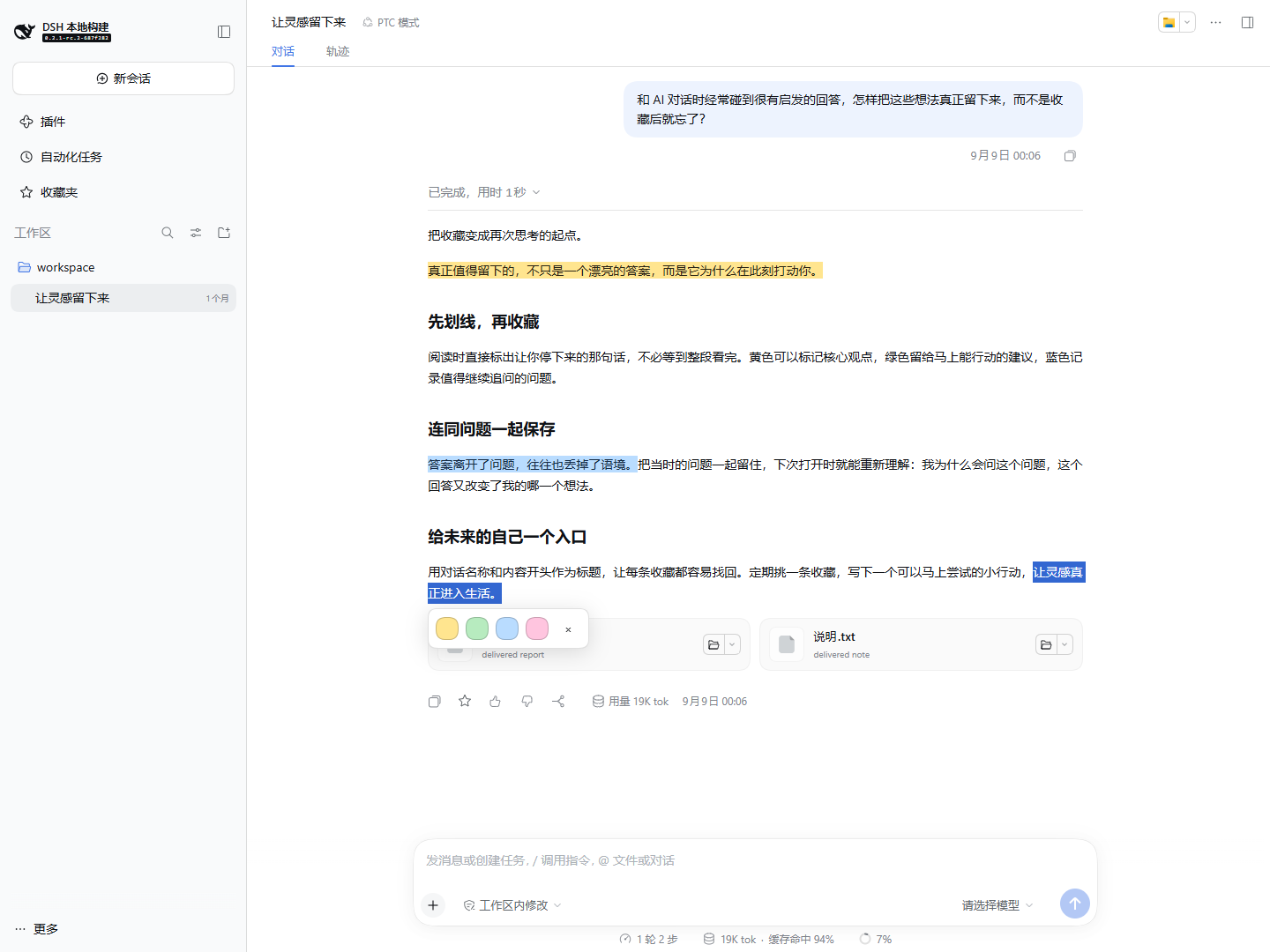
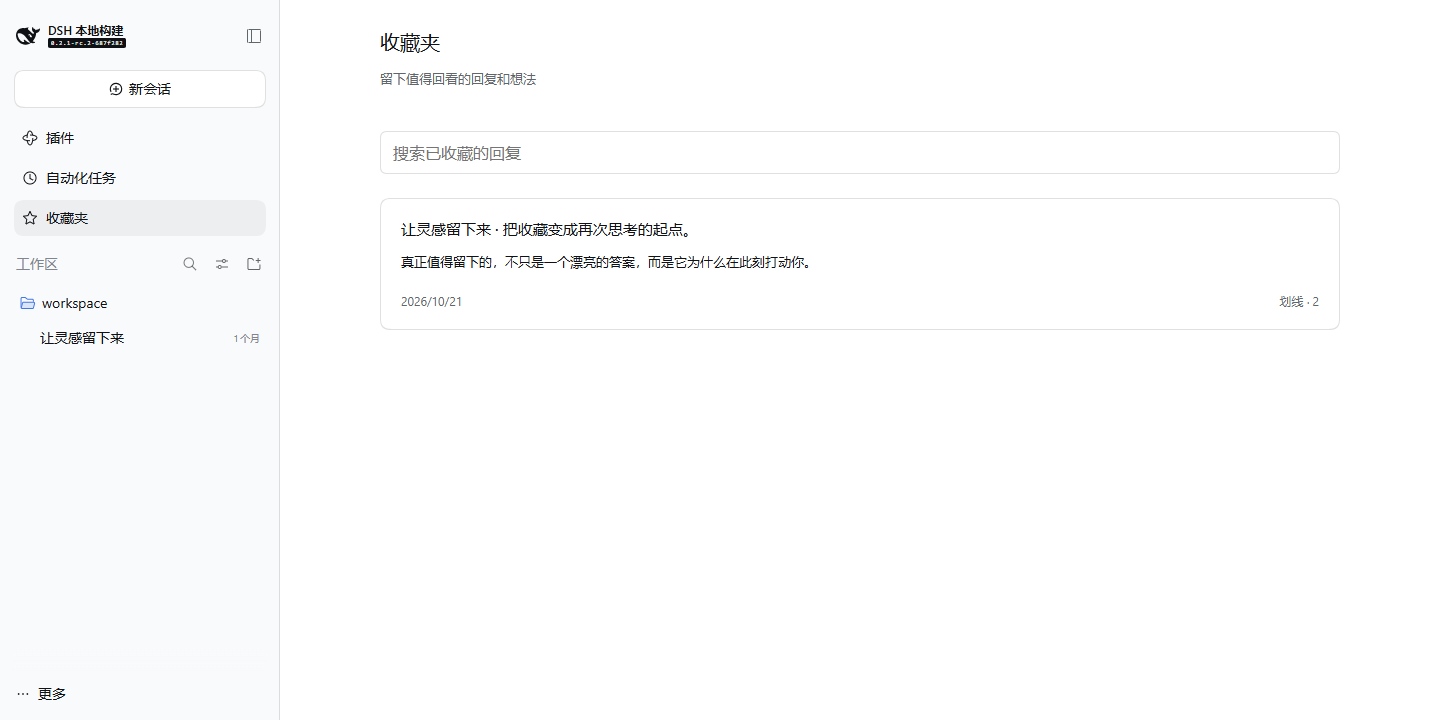
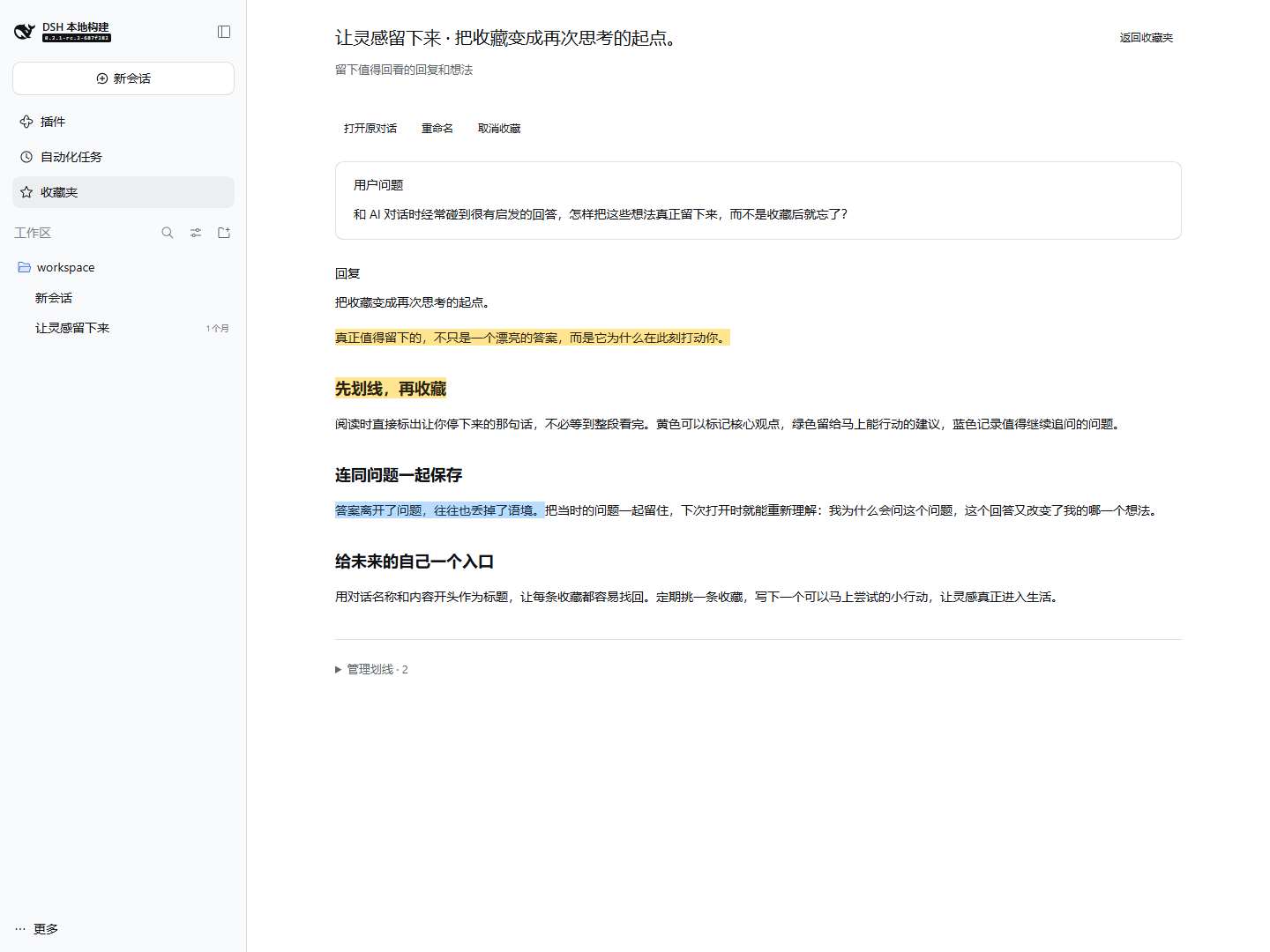
These screenshots show the Chinese UI in a local sample conversation; the plugin supports both Chinese and English.
Highlight as you read: select text and choose a color before collecting.
Browse saved replies by conversation name and reply opening.
Open a collection to read the saved user question, reply, and colored highlights together.
Use this package
Install SparkNote 0.1.3 through the Plugins page or run this command for your Web profile, then restart DSH Web:
dsh plugin --profile web add https://github.com/zzh-github/dsh-plugin-sparknote/releases/download/v0.1.3/dsh-sparknote-0.1.3.tgz
Select text in a completed reply and choose yellow, green, blue, or pink. Click an existing highlight to change or remove it. The five-point star below the reply collects its full Markdown, existing highlights, and the corresponding user question by default. The default title combines the conversation name with the opening of the reply; you can rename it afterward. Open Collection in the sidebar to search reply text, saved questions, and highlights, rename a collection, read, edit highlights, or open the source conversation. Saved replies show colored highlights directly on their original text, including selections across Markdown blocks. The Manage highlights section stays collapsed until you open it to browse quotes or use its controls. Removing a collection keeps its highlight draft.
Changes show as saved only after the Host commits them. A failed operation keeps existing data and offers Retry. Data is stored under the Harness home using the profile's configured storage provider. Unloading the bundle removes its UI without deleting its data.
For plugin development, run pnpm install, pnpm run typecheck, pnpm test, and pnpm run pack:bundle in this directory. The bundle has its own lockfile and does not modify the Harness workspace dependency graph.
This directory is an independent Git repository. Run plugin Git commands here and Harness Git commands in the DSH checkout. To prepare a keyless recorded-session check, run pnpm run prepare:smoke --dsh-root D:/00-code/DSH; omission of --dsh-root uses the sibling DSH directory. The script prints isolated test paths and does not start a server.
Understand the implementation
The profile patch mounts one Host plugin and its browser contribution. The Host validates owner-only RPC requests and serializes mutations to versioned storage records. The browser uses additive Chat, sidebar, main-panel, and overlay slots. A release-specific DOM adapter maps text selections to completed Chat nodes and paints CSS Custom Highlights without modifying React-owned content. Exact quotes and surrounding text locate highlights after layout changes, with separator-newline differences mapped back to the rendered text; ambiguous matches remain unpainted and their saved quotes remain available.
Model Experience
This bundle contributes no model tools or prompt content. Collections and annotations are private reading data and do not enter the model context.
Known Limitations and Deferred Work
The user question must be loaded in the current Chat history before you can collect its reply. Question attachments are not copied. Older collections without a saved question remain readable and show a notice. Only completed text replies with a standard action row are supported. Streaming replies, reasoning, images, freehand drawing, and cross-message selections are excluded. Text highlighting needs a current browser with CSS Custom Highlight support. The DOM adapter is pinned to the declared DSH version; Desktop installation is unverified. Other browser windows refresh their collection when focused; live multi-window updates and collection export are not included. Opening the source returns to its conversation, without paging to the exact historical message.
Planned Features
The following features are planned and are not available in the current release:
- Tags for organizing saved replies.
- Category filtering.
- Statistics by category.
- Usage reports.
- Notes on saved content and sharing.
- Integration with third-party note-taking tools.
Community and contribution
This is an independently maintained community plugin. The DSH contribution guide asks plugin authors to add the dsh-plugin GitHub repository topic so others can discover their work. Report plugin bugs and suggest improvements in this repository's Issues.
Dev Note
Version 0.1.3 uses sparknote for its internal plugin ID and storage domain. Collections saved by v0.1.2 or earlier local builds are not migrated and do not appear in this version.
Links
More in this category
zhu1090093659/dsh-web#packages/dsh-task-board★ 9262
Task board for the dsh web GUI: a sidebar multi-column kanban whose cards run in real DSH agent sessions and can also be scheduled with cron expressions, executed host-side even with the browser closed.
zhu1090093659/dsh-web#packages/dsh-web-all★ 9262
Plugin and skin collection for the DSH Web UI: task board, Git graph, right-side panel, remote mobile UI, pet, live token stats, and a skin center.
MeteorNOX/DeepSeek-Balance-Whale-Widget★ 5677
A fixed-corner whale widget for the DSH web GUI — balance, today's usage and per-turn cost with peak/off-peak pricing, editable balance-alert and daily-budget bubbles, a module-based custom bubble queue with A/B weighted choices and random lines or images, 30+ vendor templates (OpenAI, OpenRouter, Kimi, SiliconFlow, Ark, Zhipu, MiniMax and more) with per-model balance and subscription quota, plus task-end sound, imported audio, custom roles and a resource manager. Local-only, no telemetry.
ccch1mneyyy/dsh-TUI★ 5125
Claude Code-style full-screen terminal UI: pixel-whale header, live status line, and streaming thought expansion.
omdsh-dev/DSH-better-sidebar★ 4413
Full sidebar workbench with file rendering and editing, terminal, Git, and subagents; third-party plugins can register new tabs.
Devin-AXIS/deepseek-design#deepseek-idesign★ 1491
Visual design studio for websites, app prototypes, posters, cards, reports, and magazines, with templates, direct element editing, selection-aware AI draft handoff, and export.
Community comments
Comments are public GitHub Discussions. Loading them connects to GitHub and Giscus; a GitHub account is required to post.