Hides the sidebar's global panel navigation (Plugins / Market / Schedules / More) and gives the vertical space back to the session list; three modes, switchable in Settings → Sidebar.
Install
# from npm (prebuilt)
dsh plugin --profile web add dsh-sidebar-trim
# from GitHub (first run asks for allowBuilds approval — follow the hint, retry)
dsh plugin --profile web add github:zxncjxzg/dsh-sidebar-trim
Any plugin you install runs third-party code with your own permissions — it can read your files, use your credentials, and reach the network, and tool approvals don’t sandbox it. GitHub-sourced plugins also run build scripts at install time — pnpm blocks those until you allow them, so an install can stop with ERR_PNPM_GIT_DEP_PREPARE_NOT_ALLOWED or ERR_PNPM_IGNORED_BUILDS; dsh prints the exact key to add under allowBuilds in your profile’s pnpm-workspace.yaml, and the install works on the next run. Allowing a build is a trust decision: only install sources you trust, and pin a commit (github:owner/repo#sha).
README
Hides the sidebar's global panel navigation — Plugins / Market / Schedules / More — and gives the vertical space back to your session list.
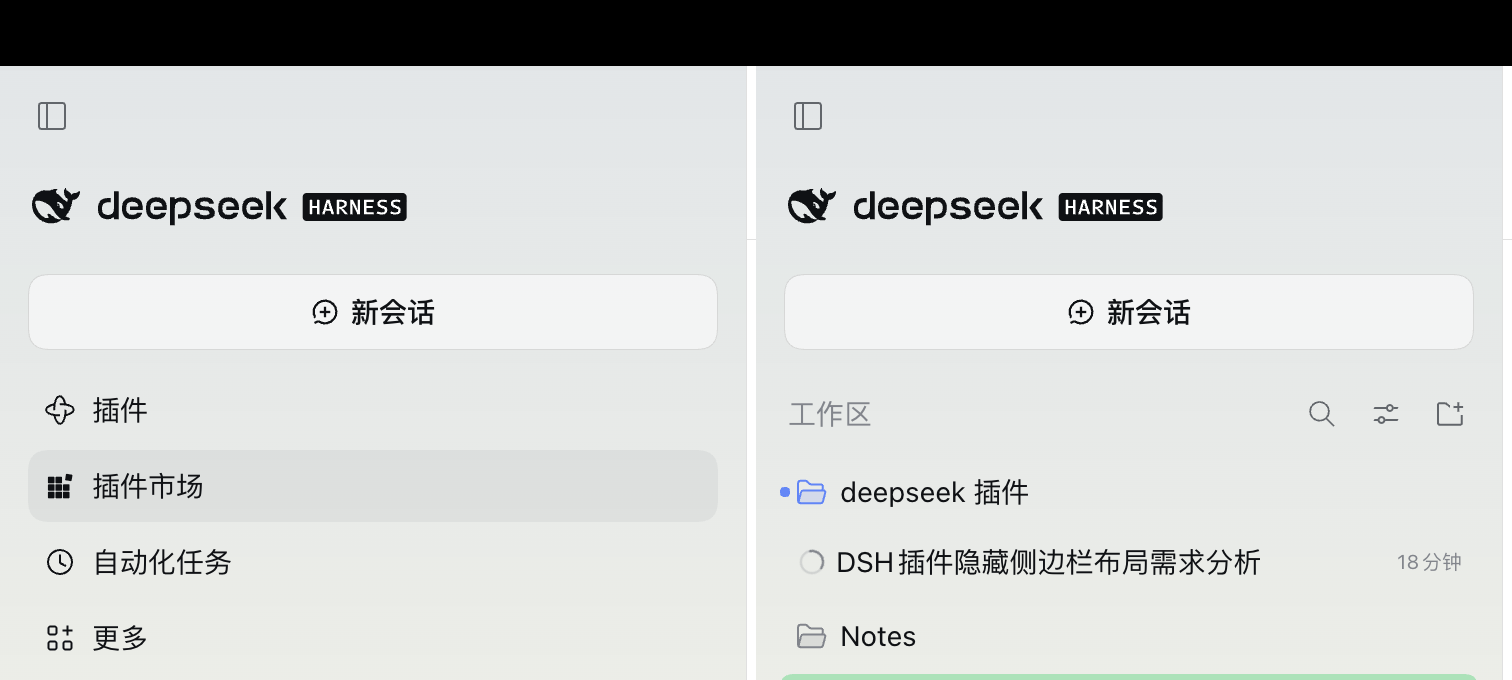
- Expanded sidebar: saves ≈158px (4 × 36px rows plus gaps and the list's bottom margin)
- Collapsed rail / phone drawer: saves ≈192px (wider gaps)
Why it exists
- On a phone the sidebar drawer is short; those four rows cost exactly the height of two or three sessions.
- The Slot API can only add entries, never hide them: once a plugin registers in
sidebar.panellistit owns a row, and the Plugins row is hard-wired to always show (id === "plugins" || !unpinned.includes(id)), so the sidebar's own pin/unpin cannot hide it either. - This plugin does exactly one thing: anchor on the slot contract — the only
navinside[data-slot="sidebar"]— and set it todisplay: none. No hashed class names, no DOM surgery, no fighting other plugins for registrations.
Install
Search dsh-sidebar-trim in the DSH plugin market, or install this directory as a local package into the current profile.
Three modes
Pick one in Settings → Sidebar; the sidebar changes as you pick — no reload, no reinstall.
| Mode | Effect |
|---|---|
| Hide all (default) | Plugins / Market / Schedules / More all collapse |
| Keep “More” | Hide the three rows, keep one More button to reach the collapsed panels |
| Hide nothing | Restore the factory sidebar, for a side-by-side look |
The choice is remembered on this host in a cookie, so it survives a restart even though the harness picks a new port each launch. Another host (a different machine, a tunnel domain), cleared site data, or a private window starts from the default.
Undo
Settings → Sidebar → Hide nothing restores the rows on the spot. To remove the plugin entirely, Settings → Plugins → turn off “Sidebar Trim” — also without a page reload.
With the navigation hidden, Market and Schedules lose their sidebar entry too; reach them from Settings → Plugins when needed.
Compatibility
- Targets DSH 0.2.x (Web and desktop share the same renderer)
- Depends on the
[data-slot="sidebar"]slot anchor and thenavsemantics of the sidebar - If a future release changes the sidebar structure, the plugin fails silently (the UI returns to normal; nothing breaks or blocks startup) and gets a patch release for the selector
License
MIT
Links
More in this category
zhu1090093659/dsh-web#packages/dsh-task-board★ 9925
Task board for the dsh web GUI: a sidebar multi-column kanban whose cards run in real DSH agent sessions and can also be scheduled with cron expressions, executed host-side even with the browser closed.
zhu1090093659/dsh-web#packages/dsh-web-all★ 9925
Plugin and skin collection for the DSH Web UI: task board, Git graph, right-side panel, remote mobile UI, pet, live token stats, and a skin center.
MeteorNOX/DeepSeek-Balance-Whale-Widget★ 6712
A fixed-corner whale widget for the DSH web GUI — balance, today's usage and per-turn cost with peak/off-peak pricing, editable balance-alert and daily-budget bubbles, a module-based custom bubble queue with A/B weighted choices and random lines or images, 30+ vendor templates (OpenAI, OpenRouter, Kimi, SiliconFlow, Ark, Zhipu, MiniMax and more) with per-model balance and subscription quota, plus task-end sound, imported audio, custom roles and a resource manager. Local-only, no telemetry.
ccch1mneyyy/dsh-TUI★ 6538
Claude Code-style full-screen terminal UI: pixel-whale header, live status line, and streaming thought expansion.
omdsh-dev/DSH-better-sidebar★ 4808
Full sidebar workbench with file rendering and editing, terminal, Git, and subagents; third-party plugins can register new tabs.
Devin-AXIS/deepseek-design#deepseek-idesign★ 1672
Visual design studio for websites, app prototypes, posters, cards, reports, and magazines, with templates, direct element editing, selection-aware AI draft handoff, and export.
Community comments
Comments are public GitHub Discussions. Loading them connects to GitHub and Giscus; a GitHub account is required to post.