Lets you choose which items appear in the DeepSeek Harness settings left nav.
Install
# from a prebuilt release tarball
dsh plugin --profile web add "https://github.com/zizhongfeiyang/dsh-settings-drawer/releases/download/v1.2.0/dsh-settings-drawer-1.2.0.tgz"
# from GitHub (first run asks for allowBuilds approval — follow the hint, retry)
dsh plugin --profile web add github:zizhongfeiyang/dsh-settings-drawer
Any plugin you install runs third-party code with your own permissions — it can read your files, use your credentials, and reach the network, and tool approvals don’t sandbox it. GitHub-sourced plugins also run build scripts at install time — pnpm blocks those until you allow them, so an install can stop with ERR_PNPM_GIT_DEP_PREPARE_NOT_ALLOWED or ERR_PNPM_IGNORED_BUILDS; dsh prints the exact key to add under allowBuilds in your profile’s pnpm-workspace.yaml, and the install works on the next run. Allowing a build is a trust decision: only install sources you trust, and pin a commit (github:owner/repo#sha).
README
A DeepSeek Harness web UI plugin that lets you choose which settings sections, plugin tabs, and plugin configuration entries appear.
Unchecking an item hides its entry immediately. Core pages (General, Models, Plugins, Agent Presets, Account) stay visible by default. Hiding an entry does not disable its plugin.
Preview
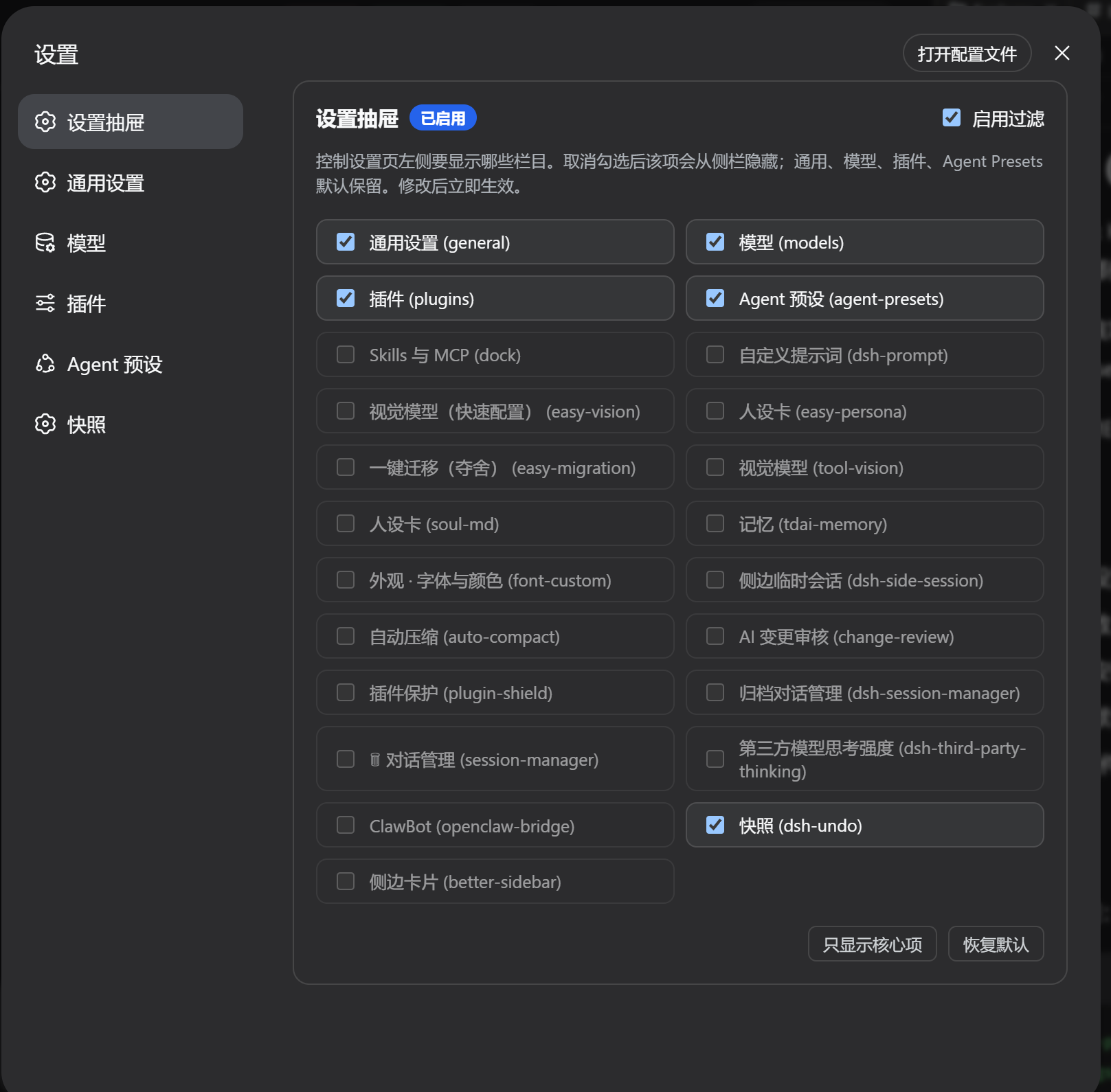
The screenshot shows 1.2.0; 1.3.0 groups the live entries by surface.
Features
- Hide or show any settings section from the left navigation.
- Changes apply immediately and persist in your browser.
- Discovers live
settings.section,settings.plugins.tab, andplugins.itemcontributions, including new DSH 0.2 plugin configuration entries. - Removed plugins no longer linger: the list only shows currently registered sections.
- Manual refresh (
⟳) re-syncs the list without deleting preferences for temporarily unloaded plugins. - Core settings pages, including Account, stay visible by default; new plugin tabs and configuration entries also start visible.
- Disabling or unloading the drawer restores the original registry and releases subscriptions.
- No dependency on generated CSS class names or DOM mutation observers.
- Pure client-side UI plugin — no extra services, no network calls.
Install
From GitHub:
dsh plugin --profile web add github:zizhongfeiyang/dsh-settings-drawer
Official DSH 0.2 Desktop uses the desktop profile. Install the bundled dsh command through the app's Manage dsh command menu, initialize Desktop by opening it once, then fully quit the app before running:
dsh plugin --profile desktop add github:zizhongfeiyang/dsh-settings-drawer
Use Desktop's bundled command for that profile; an npm-installed dsh cannot manage it. Older EAC distributions may still use web-desktop; select the profile your distribution actually runs. See the official Desktop command instructions.
From a locally packed or release tarball:
dsh plugin --profile web add ./dsh-settings-drawer-1.3.0.tgz
For Desktop tarballs, use --profile desktop with the bundled command. After installing, restart Desktop or the Web service and reload the page. When upgrading from 1.2.0, a full page reload or app restart is required to remove that version's unmanaged observer and registry wrapper.
Usage
- Open Settings.
- Open 设置抽屉 (Settings Drawer) at the top of the left nav.
- Uncheck items in 设置栏目, 插件标签, or 插件配置项. The corresponding entry disappears immediately. Groups with no registered entries are omitted.
- 只显示核心项 retains the core sections, the
allplugin tab, and the built-in Shell, Agent Loop, Subagent, and Web Search configuration entries. 恢复默认 clears saved overrides.
Configuration
| Item | Value |
|---|---|
| npm package name | dsh-settings-drawer |
| UI display name | 设置抽屉 / Settings Drawer |
| localStorage key | dsh_settings_drawer_config_v2 |
| Default visible sections | General, Models, Plugins, Agent Presets, Account, and the legacy dock / dsh-prompt entries |
| New plugin surfaces | Visible by default; independent visiblePluginTabs and visiblePluginItems maps |
1.2.0's enableDrawer and visibleCards values are retained under the same storage key. Explicit choices, including hiding a core page, are preserved. Unregistered entries disappear from the list without losing saved preferences.
Tested with
- 1.3.0: automated integration checks using the published DSH 0.2.0-rc.2 SlotRegistry/Cordis and React components, plus the published 0.1.0-rc.7 SlotCore contract.
- Historical 1.2.0 manual checks: DSH 0.1.0-rc.6 / rc.7, EAC 3.0.1 / 4.1.0, and Chrome-based Windows Web UI.
The 1.3.0 tests exercise registration, filtering, configuration migration, live updates, storage events, and unload/re-enable behavior. They do not boot a complete Desktop app or run a browser end-to-end test.
Development
npm ci --legacy-peer-deps --ignore-scripts
npm run check
npm test
npm pack
The legacy peer option is needed only for the two pinned test fixtures' different DSH peer contracts. Test dependencies are development-only and are not bundled into the installed plugin.
The package contains:
lib/index.js— host entrylib/client.js— browser clientcordis.patch.yml— bundle patchREADME.md,README.zh.md
Feedback
Found a bug or have a feature request? Open an issue and use the provided templates.
License
MIT
Links
More in this category
zhu1090093659/dsh-web#packages/dsh-task-board★ 8296
Task board for the dsh web GUI: a sidebar multi-column kanban whose cards run in real DSH agent sessions and can also be scheduled with cron expressions, executed host-side even with the browser closed.
zhu1090093659/dsh-web#packages/dsh-web-all★ 8296
Plugin and skin collection for the DSH Web UI: task board, Git graph, right-side panel, remote mobile UI, pet, live token stats, and a skin center.
omdsh-dev/DSH-better-sidebar★ 3968
Full sidebar workbench with file rendering and editing, terminal, Git, and subagents; third-party plugins can register new tabs.
ccch1mneyyy/dsh-TUI★ 3948
Claude Code-style full-screen terminal UI: pixel-whale header, live status line, and streaming thought expansion.
MeteorNOX/DeepSeek-Balance-Whale-Widget★ 3877
A fixed-corner whale widget for the DSH web GUI — balance, today's usage and per-turn cost with peak/off-peak pricing, editable balance-alert and daily-budget bubbles, a module-based custom bubble queue with A/B weighted choices and random lines or images, 30+ vendor templates (OpenAI, OpenRouter, Kimi, SiliconFlow, Ark, Zhipu, MiniMax and more) with per-model balance and subscription quota, plus task-end sound, imported audio, custom roles and a resource manager. Local-only, no telemetry.
Devin-AXIS/deepseek-design#deepseek-idesign★ 1413
Visual design studio for websites, app prototypes, posters, cards, reports, and magazines, with templates, direct element editing, selection-aware AI draft handoff, and export.
Community comments
Comments are public GitHub Discussions. Loading them connects to GitHub and Giscus; a GitHub account is required to post.