Replaces the workspace browser with book covers and conversation chapters for existing projects and sessions, with live activity, cover editing, project context menus and an original-view switch.
Install
# from a prebuilt release tarball
dsh plugin --profile web add "https://github.com/zhishengplus/dsh-project-bookshelf/releases/download/v1.1.4/dsh-project-bookshelf-1.1.4.tgz"
# from GitHub (first run asks for allowBuilds approval — follow the hint, retry)
dsh plugin --profile web add github:zhishengplus/dsh-project-bookshelf
Any plugin you install runs third-party code with your own permissions — it can read your files, use your credentials, and reach the network, and tool approvals don’t sandbox it. GitHub-sourced plugins also run build scripts at install time — pnpm blocks those until you allow them, so an install can stop with ERR_PNPM_GIT_DEP_PREPARE_NOT_ALLOWED or ERR_PNPM_IGNORED_BUILDS; dsh prints the exact key to add under allowBuilds in your profile’s pnpm-workspace.yaml, and the install works on the next run. Allowing a build is a trust decision: only install sources you trust, and pin a commit (github:owner/repo#sha).
README
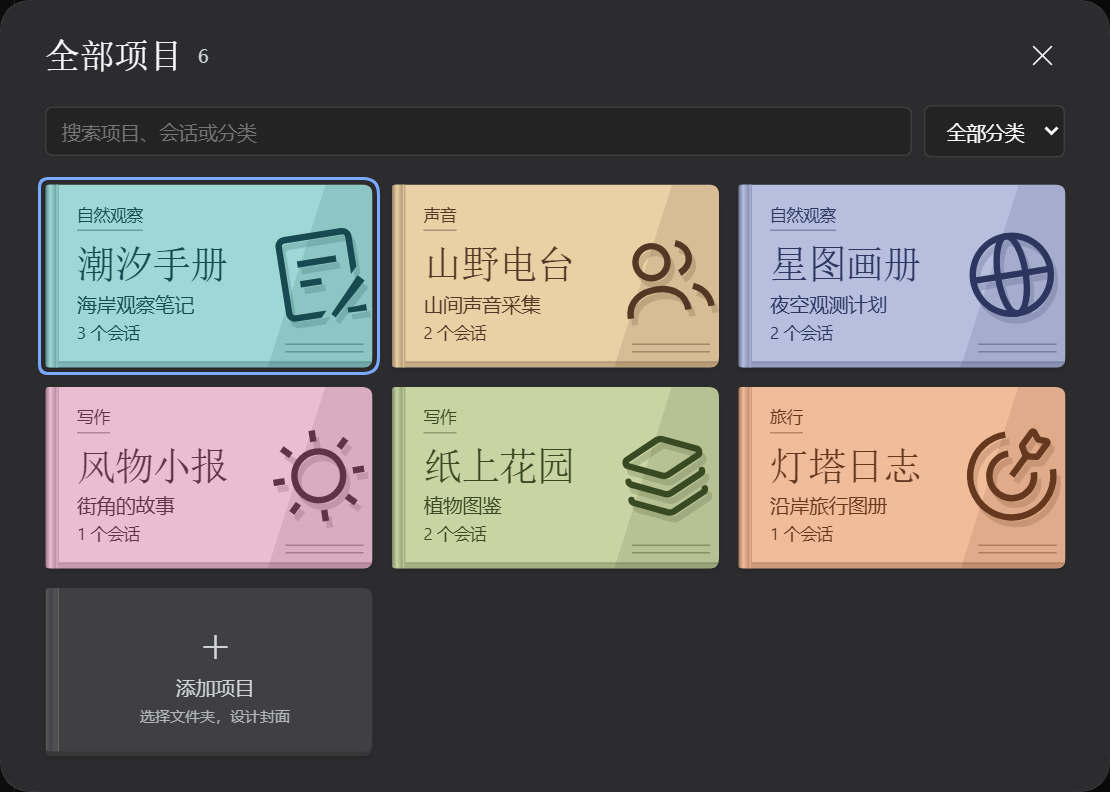
Recognize a workspace by its cover. Pick a chapter to reopen the conversation where you left off.
Install
With Open Plugin Market enabled, search for Project Bookshelf in Plugins → Discover. Alternatively, enable Custom Plugin Index under experimental plugins and add the author's index:
https://raw.githubusercontent.com/zhishengplus/dsh-project-bookshelf/main/market.json
For the Web CLI:
dsh plugin --profile web add https://github.com/zhishengplus/dsh-project-bookshelf/releases/download/v1.1.5/dsh-project-bookshelf-1.1.5.tgz
The complete release is 1.1.5. Community catalogs may take time to sync; if an older version is offered, use the author index or release tarball above.
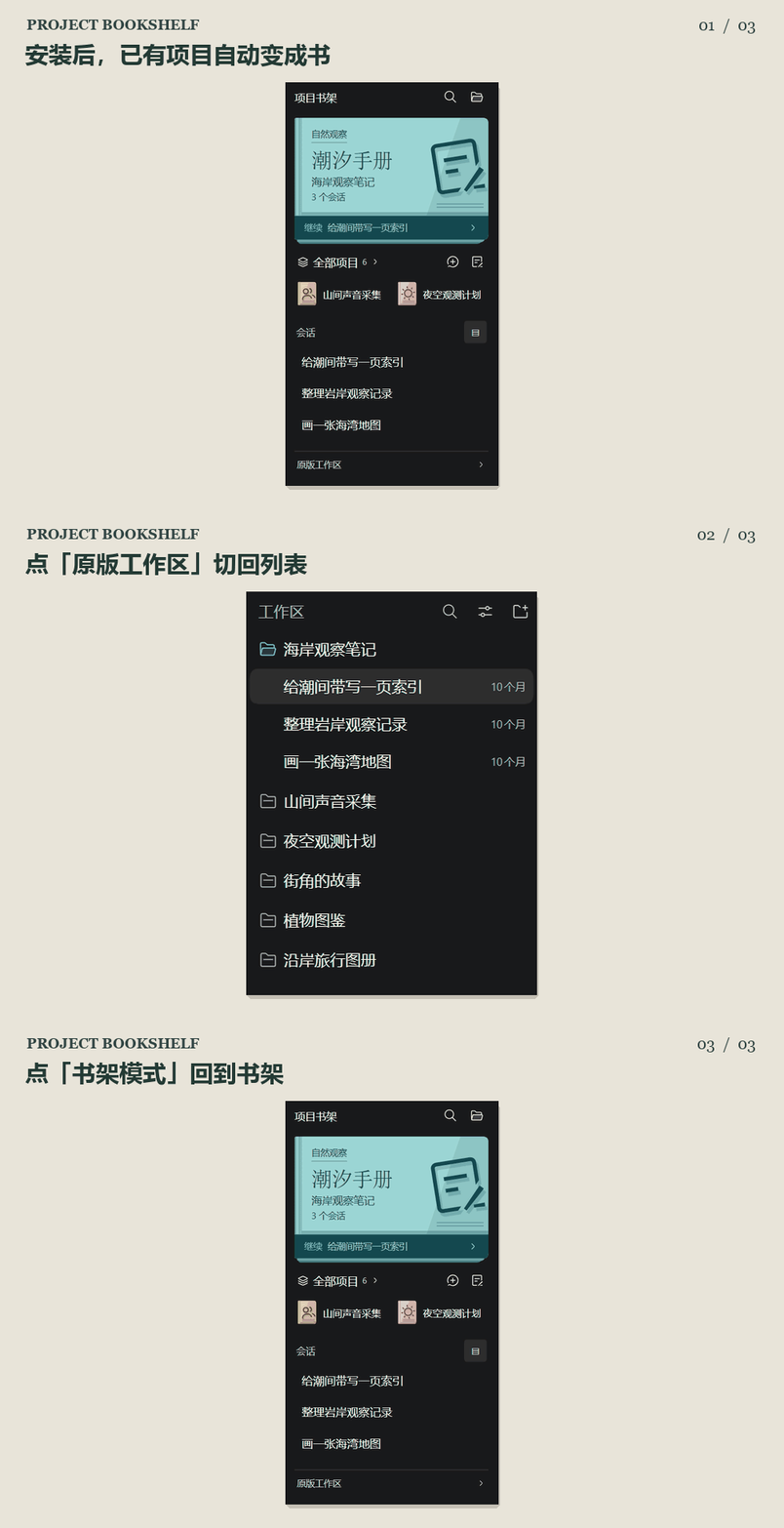
Open the first book
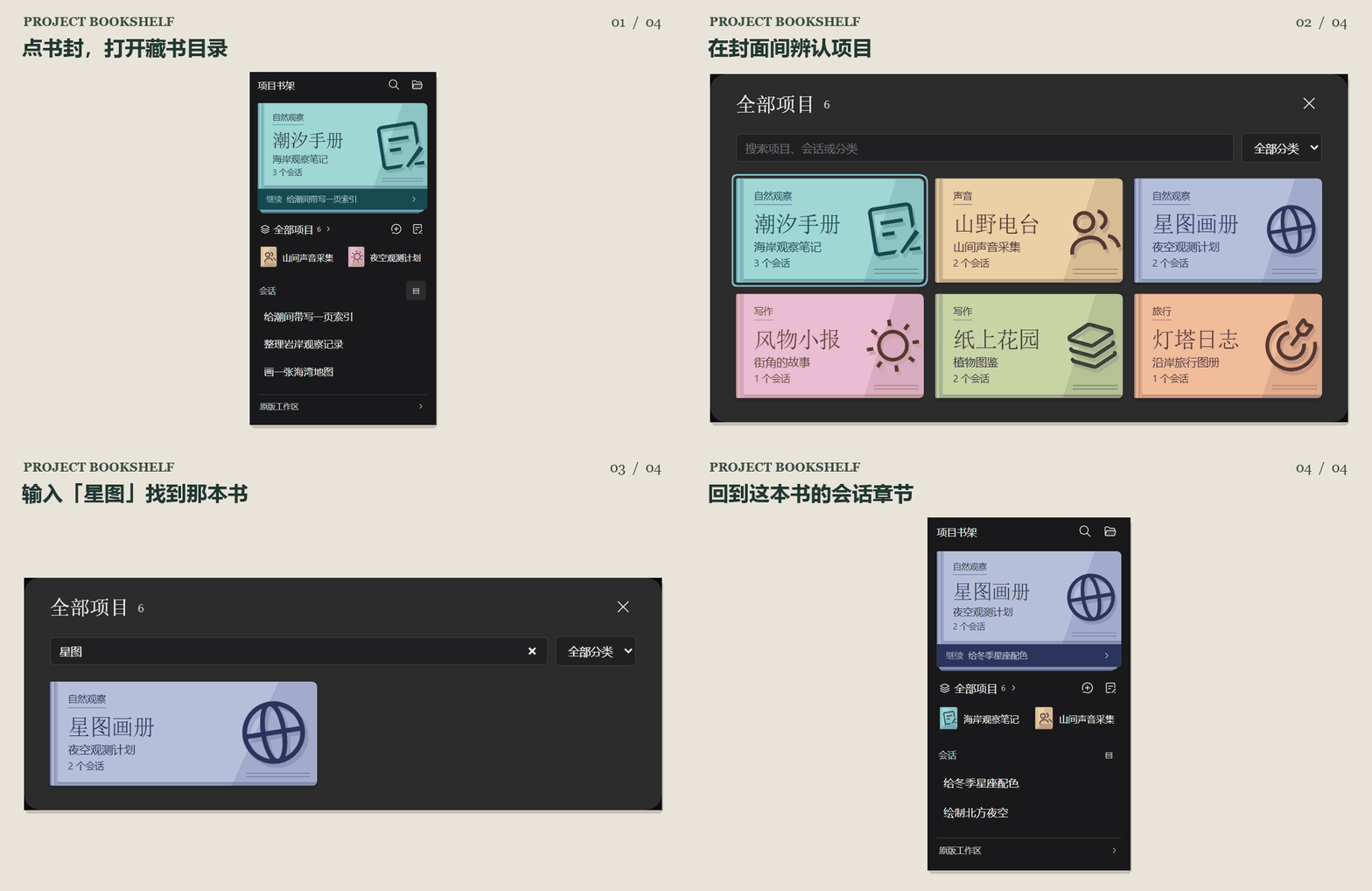
The plugin replaces the workspace browsing area with a bookshelf by default. Your existing projects become books and their conversations become chapters. Select the featured cover to search by folder, alias, category or conversation title. Pick a chapter to reopen it.
The screenshots use fictional projects. Your installed bookshelf reads the project names, conversation titles and messages from your own DSH instance.
Covers, quick switches and the collection show a live spinner and the number of working conversations. Conversation rows update too. Pending confirmations appear separately, and the spinner stops when work ends. System reduced-motion preferences are respected.
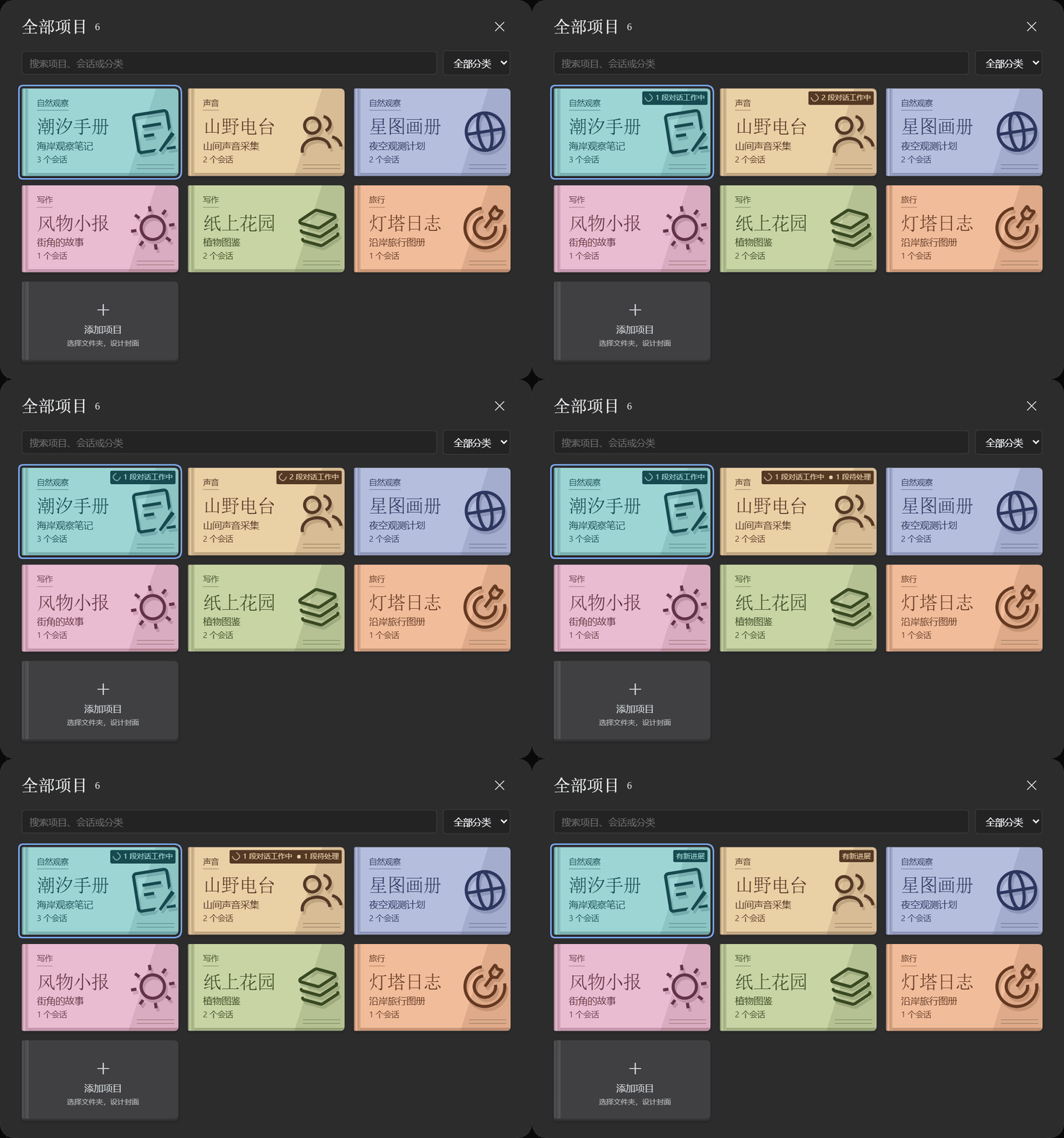
The animation simulates status changes with fictional projects. Installed copies read live DSH session status.
The gray + book at the end of the collection adds a project folder. DSH opens its system chooser on desktop or its directory browser in remote environments, then shows the cover editor. Projects added through the original workspace picker open the same editor. The collection resizes with the window and scrolls its books while keeping search and close controls visible.
Select Original workspace at the bottom to use the native list. Select Bookshelf mode beside New session to return. Both views share the same projects, conversations, pins and archives. Your view preference survives reloads.
The pencil opens a live cover proof with 12 paper colors and 12 printed motifs. The folder name stays on the cover even when you give the workspace a display alias. Press Ctrl / ⌘ + Enter to save. Cover alerts may highlight pending requests or unread completions.
Display names are saved through DSH. Cover preferences use host workspace metadata when available and client-local storage on other versions. Verified on the official DSH Web 0.2.2-rc.3 release on Windows. All public images show fictional workspaces in an isolated profile.
New session sits beside the conversation heading. The cover toolbar opens archived conversations, including ungrouped ones. Removing a project requires confirmation and keeps its folder and conversation history.
For maintainers: listing verification notes document pinned installation sources, implementation references and test scope.
Project actions, one right-click away
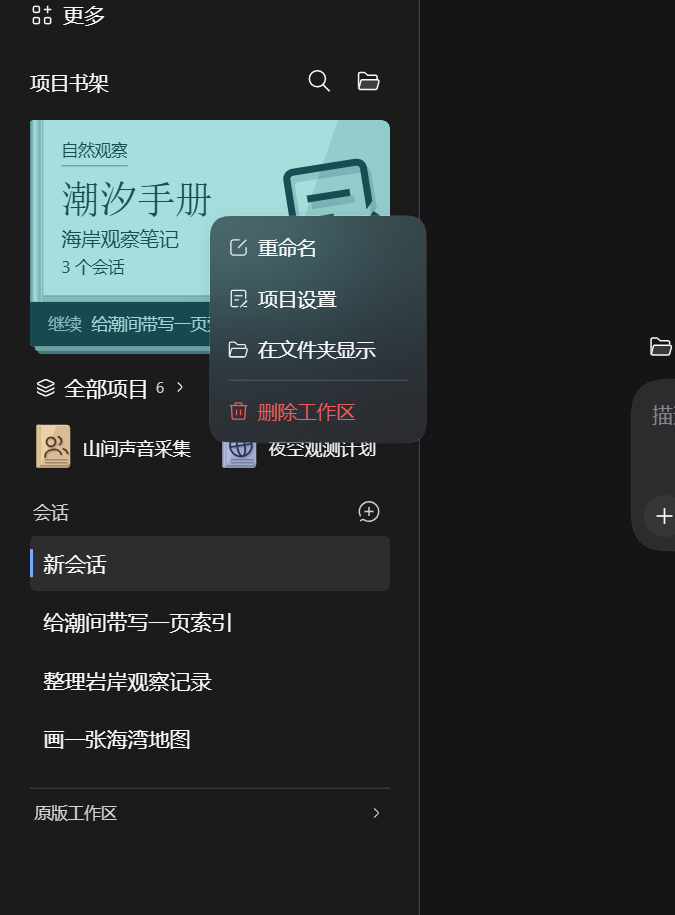
Right-click the main cover, a quick-switch book or a catalog book to rename, edit project settings, reveal its folder or remove its workspace registration. Shift+F10 opens the same menu. Removal asks for confirmation and keeps files and conversation history. Folder availability follows the DSH host.
Links
More in this category
zhu1090093659/dsh-web#packages/dsh-task-board★ 10458
Task board for the dsh web GUI: a sidebar multi-column kanban whose cards run in real DSH agent sessions and can also be scheduled with cron expressions, executed host-side even with the browser closed.
zhu1090093659/dsh-web#packages/dsh-web-all★ 10458
Plugin and skin collection for the DSH Web UI: task board, Git graph, right-side panel, remote mobile UI, pet, live token stats, and a skin center.
ccch1mneyyy/dsh-TUI★ 7797
Claude Code-style full-screen terminal UI: pixel-whale header, live status line, and streaming thought expansion.
MeteorNOX/DeepSeek-Balance-Whale-Widget★ 7271
A fixed-corner whale widget for the DSH web GUI — balance, today's usage and per-turn cost with peak/off-peak pricing, editable balance-alert and daily-budget bubbles, a module-based custom bubble queue with A/B weighted choices and random lines or images, 30+ vendor templates (OpenAI, OpenRouter, Kimi, SiliconFlow, Ark, Zhipu, MiniMax and more) with per-model balance and subscription quota, plus task-end sound, imported audio, custom roles and a resource manager. Local-only, no telemetry.
omdsh-dev/DSH-better-sidebar★ 5191
Full sidebar workbench with file rendering and editing, terminal, Git, and subagents; third-party plugins can register new tabs.
omdsh-dev/dsh-genui★ 1007
Interactive UI components rendered inline in replies: layout, charts, forms, quizzes, mermaid, 3D scenes, and an action event loop back to the model.
Community comments
Comments are public GitHub Discussions. Loading them connects to GitHub and Giscus; a GitHub account is required to post.