SSH remote execution set: give a session an ssh:// workspace and every file, command, and shell operation runs on the remote host.
Install
# from GitHub (first run asks for allowBuilds approval — follow the hint, retry)
dsh plugin --profile web add github:zhaenggg/dsh-ssh-remote
Any plugin you install runs third-party code with your own permissions — it can read your files, use your credentials, and reach the network, and tool approvals don’t sandbox it. GitHub-sourced plugins also run build scripts at install time — pnpm blocks those until you allow them, so an install can stop with ERR_PNPM_GIT_DEP_PREPARE_NOT_ALLOWED or ERR_PNPM_IGNORED_BUILDS; dsh prints the exact key to add under allowBuilds in your profile’s pnpm-workspace.yaml, and the install works on the next run. Allowing a build is a trust decision: only install sources you trust, and pin a commit (github:owner/repo#sha).
README
SSH remote execution plugin set for DeepSeek Harness (DSH): give an agent session an ssh://host[:port]/path working directory, and every capability — filesystem, subprocess, shell, search — executes on the remote host over SSH, with the same budgets, output collection, and session-log trail as local sessions.
中文说明见 README.zh.md。
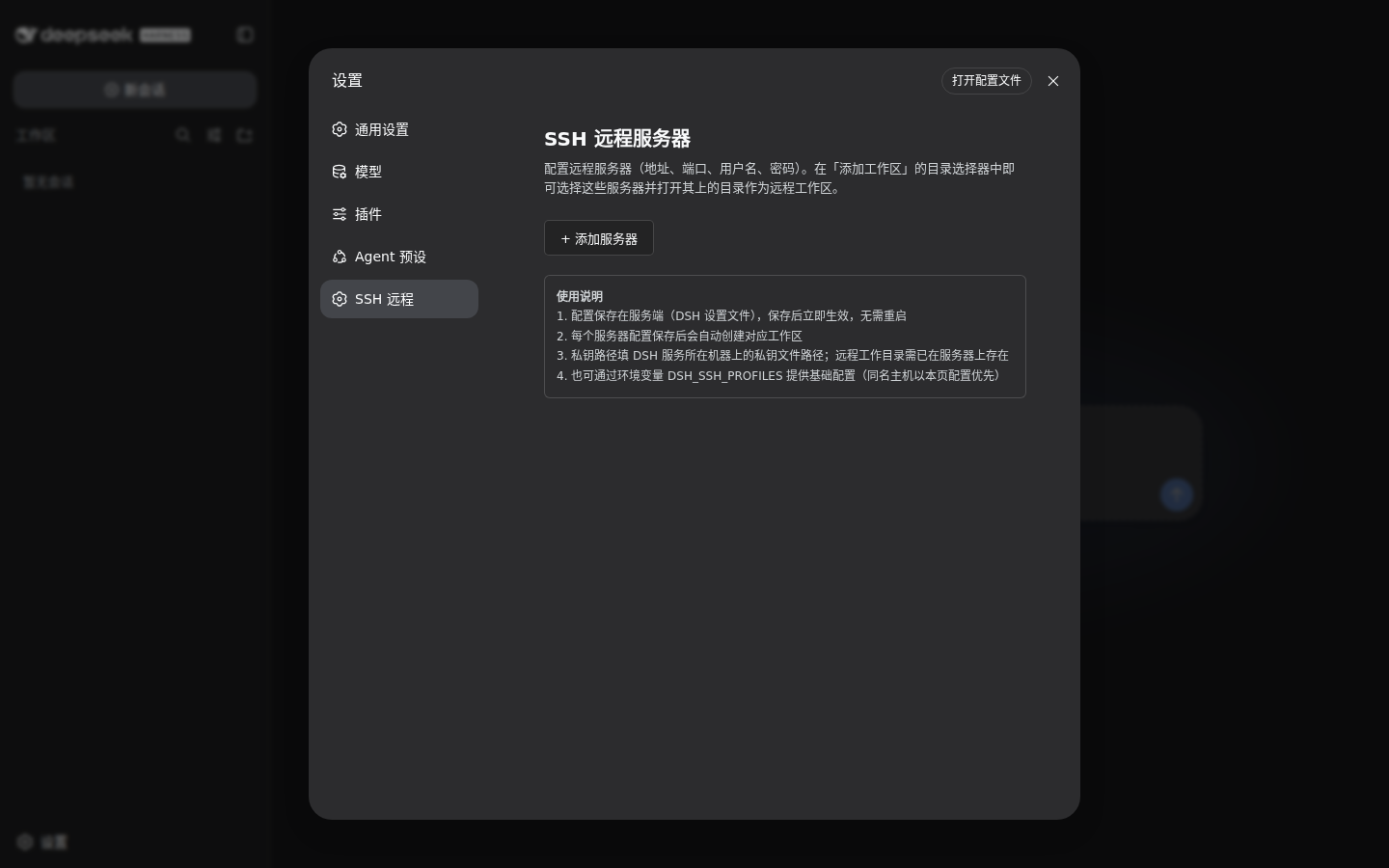
Configure SSH servers in Settings → SSH (address, port, credentials). Saved servers appear in the workspace picker.
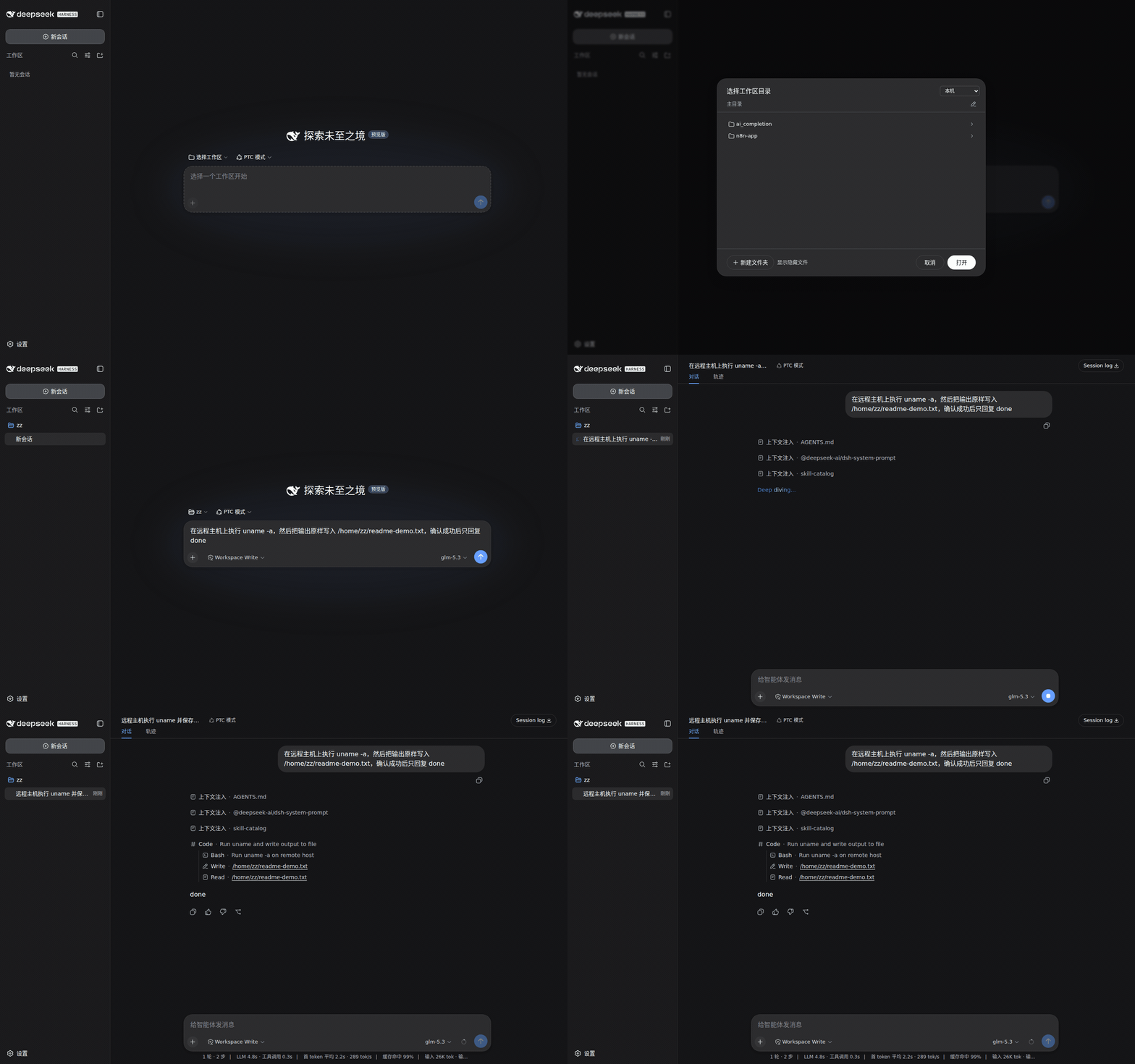
A session whose workspace is an ssh:// directory: every command and file operation runs on the remote machine.
Packages
| Package | Role |
|---|---|
@zhaeng/dsh-ssh |
Connection pool (service ctx.ssh). Profiles from DSH_SSH_PROFILES env (JSON) or the browser-side settings page. No profiles ⇒ local-only, nothing remote activates. |
@zhaeng/dsh-fs-ssh |
SFTP filesystem backend for the fs seam. |
@zhaeng/dsh-subprocess-ssh |
Remote exec backend for the subprocess seam. |
@zhaeng/dsh-fs-routing |
The composition layer: one ctx.fs / ctx.subprocess / ctx.shell routed by session cwd — local cwds keep the sandboxed local backends, ssh:// cwds run on the remote host. |
@zhaeng/dsh-client-ui-settings-ssh |
Browser-side SSH server settings page. |
plugins/ssh-selftest is a dev-only driver that runs one agent turn against an ssh:// cwd end-to-end.
Requirements
The plugin packages are published under the @zhaenggg npm scope; they depend on official @deepseek-ai/* harness packages (dsh-fs, dsh-subprocess, dsh-shell, dsh-sandbox*, cordis, …), which come from the harness install.
The plugin set builds and tests inside a deepseek-harness pnpm workspace checkout: the packages depend on workspace siblings (dsh-fs, dsh-subprocess, dsh-shell, dsh-sandbox*, …). Full ssh:// cwd support also needs the host-side integration (workspace/session/shell/sandbox seams accepting ssh:// cwds); this repository carries the plugin packages, and the host integration ships with the harness.
Compose
In your profile's cordis.patch.yml (or app composition), replace the single-backend rows with the pool plus the routing layer:
- id: fs-sandbox
  disabled: true
- id: subprocess
  disabled: true
- id: bash-sandbox
  disabled: true
- id: pwsh-sandbox
  disabled: true

- insert:
    - id: ssh
      name: '@zhaeng/dsh-ssh'
    - id: fs-routing
      name: '@zhaeng/dsh-fs-routing'
With no SSH profile configured the composition behaves exactly like the local providers it replaces.
Configure servers
DSH_SSH_PROFILES is a JSON array of profiles:
[
  {
    "host": "192.0.2.10",
    "port": 8322,
    "username": "zz",
    "password": "…",
    "cwd": "/home/zz"
  }
]
privateKeyPath / privateKey are also accepted. A session cwd of ssh://192.0.2.10:8322/home/zz routes to that host; unknown hosts fail loud (no profile for <host>), never a silent local fallback. The browser settings page writes the same profile store.
Develop
Self-contained workspace — build with one command (dependencies come from npm):
pnpm install --ignore-scripts
pnpm -r --filter './packages/*/*' run build   # tsc typecheck + tsdown bundles per package
The package tests (including the REAL-composition suite) run inside a deepseek-harness checkout, where the full workspace graph and dsh-test-sandbox resolve.
Compatibility
dsh-better-sidebar(VSCode-like sidebar: explorer / editor / terminal) works unchanged over remote workspaces: its panels consume the same routedfs/subprocessseams, so a session whose workspace is anssh://directory browses and edits remote files in the sidebar.
Known limitations
- Remote shell commands have no stdin and no PTY (
spawnTerminalrejects with an explicit error). contains()/fileUrl()are structural stubs at the routing layer.- No host-key verification: profiles trust the network path.
- On a Windows host, the routed local shell wraps only the bash sandbox (remote sessions are unaffected).
- Remote writes do not create parent directories (SFTP semantics).
License
MIT
Links
More in this category
zhu1090093659/dsh-web#packages/dsh-remote-web-ui★ 8370
Remote control of a dsh web workspace from phone or PC: QR-code pairing through a token-gated channel, SSE real-time sync, and separate mobile and full desktop GUI modes.
zhu1090093659/dsh-web#packages/dsh-ssh★ 8370
SSH ops panel for DSH: web terminal, SFTP transfer with progress, local port forwarding, and one-command cluster execution across hosts; agents share the same host config.
saya-ch/dsh-mobile★ 371
Access DeepSeek Harness from the Android app or a mobile browser with secure LAN and remote connections, persistent device pairing, and a customizable mobile interface.
ZSeven-W/dsh-ios★ 312
A live iOS Simulator or USB-connected iPhone inside the conversation: 22 agent tools for booting, building, driving the UI by accessibility identity or OCR text, list-row actions and SwiftUI preview hot reload, plus a streaming sidebar panel you can tap and drag on.
liguobao/ds-harness-remote★ 266
Multi-device remote access for DeepSeek Harness: continue an active session from your phone, tablet, browser, or another computer over an end-to-end encrypted channel (Noise IK + adaptive relay/WebRTC transport), with device authorization, ApiProxy-only remote capabilities, and read-only file preview via dsh-file-viewer — no shell, remote desktop, or write access.
wenbin-wb/dsh-bridge★ 184
Remote and mobile access for DeepSeek Harness: provides LAN QR code connection, Cloudflare/custom tunnels, WeChat, QQ, Feishu, Telegram bot integration, and security authentication.
Community comments
Comments are public GitHub Discussions. Loading them connects to GitHub and Giscus; a GitHub account is required to post.