Docked edge tab for the Web UI — hover to expand, click for details — that checks @deepseek-ai/dsh releases and updates the profile on confirmation, with backup, version and config verification, and rollback on failure; a settings section controls the tab's visibility, the scheduled-update window and its colour theme. Its HTTP routes have no DSH access check, so a web page open in your browser could call them.
Install
# from npm (prebuilt)
dsh plugin --profile web add dsh-web-updater-tab
# from GitHub (first run asks for allowBuilds approval — follow the hint, retry)
dsh plugin --profile web add github:z460440448/dsh-web-updater-tab
Any plugin you install runs third-party code with your own permissions — it can read your files, use your credentials, and reach the network, and tool approvals don’t sandbox it. GitHub-sourced plugins also run build scripts at install time — pnpm blocks those until you allow them, so an install can stop with ERR_PNPM_GIT_DEP_PREPARE_NOT_ALLOWED or ERR_PNPM_IGNORED_BUILDS; dsh prints the exact key to add under allowBuilds in your profile’s pnpm-workspace.yaml, and the install works on the next run. Allowing a build is a trust decision: only install sources you trust, and pin a commit (github:owner/repo#sha).
README
This plugin publishes its README in Chinese only.
A DSH Web plugin that puts an update badge in the page: a vertical tab docked to the left or right edge of the window. Hover it to expand, click it for details, and install a new @deepseek-ai/dsh release without opening a terminal.
DSH Web has no self-update. The version it runs is the @deepseek-ai/dsh pinned in ~/.dsh/profiles/<profile>/package.json, and the plugin market only updates plugins. This plugin fills that gap: it reads the registry, compares against the version actually running, and drives the same install path a manual upgrade would — with a backup, a verification step, and an automatic rollback.
Screenshots
| Collapsed (edge tab) | Hover (expanded) |
|---|---|
 |
 |
| Details panel | Hidden mode (toast explains how to restore) |
|---|---|
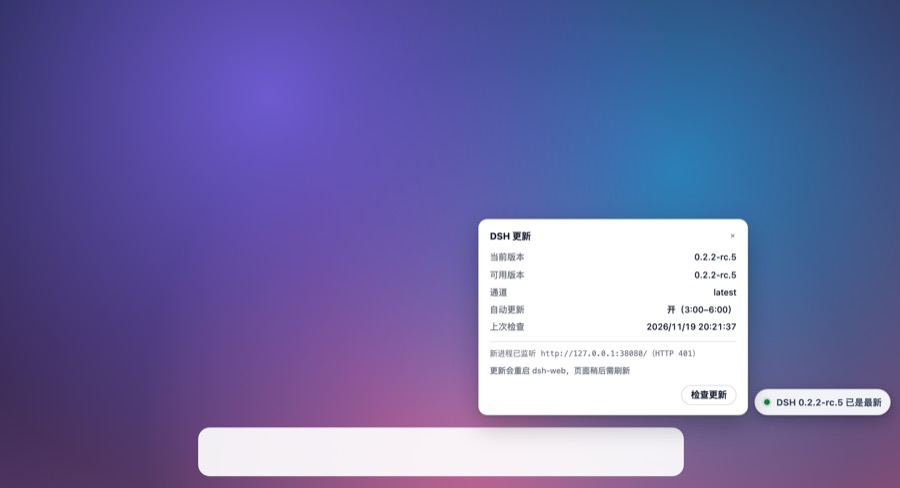 |
 |
Install
# from GitHub
dsh plugin --profile web add github:z460440448/dsh-web-updater-tab
# or from npm (prebuilt, no build-approval step)
dsh plugin --profile web add dsh-web-updater-tab

dsh web          # restart the profile so the plugin mounts
Also on npm: dsh-web-updater-tab.
The plugin appears as a tab on the right edge of the page. It also registers a section in Settings → DSH 更新.
Requirements: DSH Web 0.2.x (tested on 0.2.2-rc.5). The plugin runs inside the host, so it uses the host's Node.
What it does
- Checks the npm registry for
@deepseek-ai/dsh(latest,next,alpha), compares it with the installed version, and shows the result on the tab. - Updates on click, in two steps: the button turns into a confirmation, the second click starts the upgrade. The updater then:
- backs up
package.json,pnpm-lock.yaml,pnpm-workspace.yaml,cordis.patch.yml, - adds the new version to
allowBuilds(pnpm keys those byname@version), - runs
pnpm add @deepseek-ai/dsh@<target> --save-exact, - checks
dsh --versionanddsh --profile <name> --dump-config, - stops the old process, starts the new one, and waits for an HTTP answer,
- on any failure: restores the backup, reinstalls, and starts the old version again.
- backs up
- Schedules automatic updates — see below. The page alone only reminds; the scheduled task is what installs while you are away.
- Keeps you informed through the tab:
可用新版本(amber),正在更新(blue pulse),已更新,正在刷新,更新超时(red) with a refresh action. After a successful update the page reloads itself (it waits if you are typing). - Collapses out of the way: the tab snaps to the nearer side, drags vertically, remembers
{side, y}, and hides completely on request — restore it by hovering the screen edge or by opening the page with?dshUpdater=show.
Settings
Settings → DSH 更新:
| Control | Effect |
|---|---|
| 显示更新挂件 / Show badge | hides the tab entirely (same as the panel's “隐藏挂件”) |
| 自动更新 / Auto-update | writes autoApply to the updater config; the scheduled task follows it |
| 自动更新时段 / Window | two hour pickers, cross-midnight allowed (e.g. 22 → 6) |
| 挂件样式 / Style | follow system, light, dark, amber — applies to the tab and the panel |
Automatic updates
The scheduled half lives in a small CLI that ships with the plugin (bin/dsh-web-update.mjs). Register it as a user-level timer once:
node ~/.dsh/profiles/web/node_modules/dsh-web-updater-tab/bin/dsh-web-update.mjs install
That installs a launchd agent (com.dsh.web-update) which checks every 6 hours, and inside the configured window — and only when no session has written in the last 15 minutes — applies the update. Without this step the plugin still checks and updates on click; it just won't run while you are away.
Useful commands:
dsh-web-update check            # what would it do
dsh-web-update apply --yes      # update now (restarts dsh-web)
dsh-web-update status           # config + last result
dsh-web-update rollback --yes   # restore the latest backup
dsh-web-update restart --yes    # restart only, no version change
Config: ~/.dsh/web-update/config.json; state and logs: ~/.dsh/web-update/.
Notes and limits
- Only the profile's own
@deepseek-ai/dshis updated (which bringsdsh-base,dsh-web-appand the bundled tools with it). Other plugins keep their own update path. - Plugins whose peer range excludes the new release are skipped by DSH itself; the boot log names them.
- The hidden state is stored per browser (
localStorage), not per profile. - Automatic updates restart
dsh-web. A process started by this plugin is not registered with the Desktop Pet launcher, which may show the harness as stopped until its next action.
中文简介
DSH Web 本身没有自更新:它跑的是 profile 里 pin 的 @deepseek-ai/dsh,而插件市场只更新插件。这个插件在页面右侧放一个竖直标签,悬停展开、点击查看详情,可以一键把 harness 升到 registry 上的新版本(带备份、校验与失败回滚),也可以在设置里配置自动更新的时段与挂件配色。定时自动更新由随包附带的 CLI 注册的 launchd 任务执行;不注册也能手动更新。
License
MIT
Links
More in this category
zhu1090093659/dsh-web#packages/dsh-task-board★ 10562
Task board for the dsh web GUI: a sidebar multi-column kanban whose cards run in real DSH agent sessions and can also be scheduled with cron expressions, executed host-side even with the browser closed.
zhu1090093659/dsh-web#packages/dsh-web-all★ 10562
Plugin and skin collection for the DSH Web UI: task board, Git graph, right-side panel, remote mobile UI, pet, live token stats, and a skin center.
ccch1mneyyy/dsh-TUI★ 8043
Claude Code-style full-screen terminal UI: pixel-whale header, live status line, and streaming thought expansion.
MeteorNOX/DeepSeek-Balance-Whale-Widget★ 7387
A fixed-corner whale widget for the DSH web GUI — balance, today's usage and per-turn cost with peak/off-peak pricing, editable balance-alert and daily-budget bubbles, a module-based custom bubble queue with A/B weighted choices and random lines or images, 30+ vendor templates (OpenAI, OpenRouter, Kimi, SiliconFlow, Ark, Zhipu, MiniMax and more) with per-model balance and subscription quota, plus task-end sound, imported audio, custom roles and a resource manager. Local-only, no telemetry.
omdsh-dev/DSH-better-sidebar★ 5269
Full sidebar workbench with file rendering and editing, terminal, Git, and subagents; third-party plugins can register new tabs.
omdsh-dev/dsh-genui★ 1040
Interactive UI components rendered inline in replies: layout, charts, forms, quizzes, mermaid, 3D scenes, and an action event loop back to the model.
Community comments
Comments are public GitHub Discussions. Loading them connects to GitHub and Giscus; a GitHub account is required to post.