A port of the T3 Code model picker into the composer: a provider rail, search results grouped under provider headings, favorites kept in the browser, unavailable-provider badges, and Cmd/Ctrl+1..9 jump shortcuts for the first nine rows of the visible list.
Install
# from npm (prebuilt)
dsh plugin --profile web add dsh-t3-model-picker
# from a prebuilt release tarball
dsh plugin --profile web add "https://github.com/yusufameri/dsh-t3-model-picker/releases/latest/download/dsh-t3-model-picker.tgz"
# from GitHub (first run asks for allowBuilds approval — follow the hint, retry)
dsh plugin --profile web add github:yusufameri/dsh-t3-model-picker
Any plugin you install runs third-party code with your own permissions — it can read your files, use your credentials, and reach the network, and tool approvals don’t sandbox it. GitHub-sourced plugins also run build scripts at install time — pnpm blocks those until you allow them, so an install can stop with ERR_PNPM_GIT_DEP_PREPARE_NOT_ALLOWED or ERR_PNPM_IGNORED_BUILDS; dsh prints the exact key to add under allowBuilds in your profile’s pnpm-workspace.yaml, and the install works on the next run. Allowing a build is a trust decision: only install sources you trust, and pin a commit (github:owner/repo#sha).
README
A model picker for the DeepSeek Harness composer, ported from T3 Code's model selector.
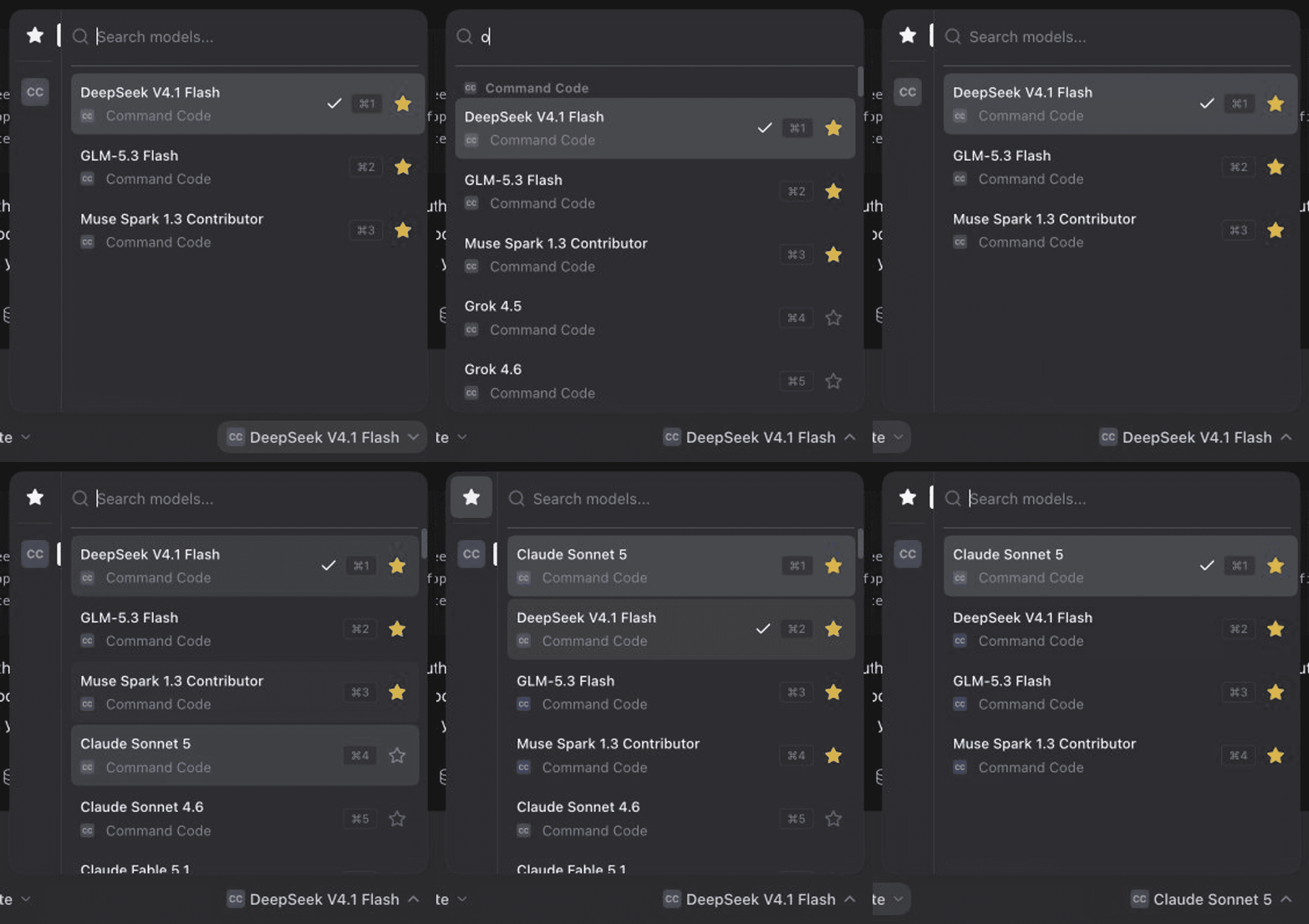
Open the picker with Cmd/Ctrl+Shift+M, search across every provider,
star what you use, and reach the first nine rows with
Cmd/Ctrl+1…9.
Credit
The selector this plugin implements is T3 Code's ProviderModelPicker. The
provider rail, the borderless search field, the row layout with a provider
footer, the favorites model, the tiered search ranking, and the Cmd+1…9
jump chords are all theirs. T3 Code is
open source under MIT;
this port keeps the same behaviour and swaps the data underneath for DeepSeek
Harness's model directory. Please support the original project.
Features
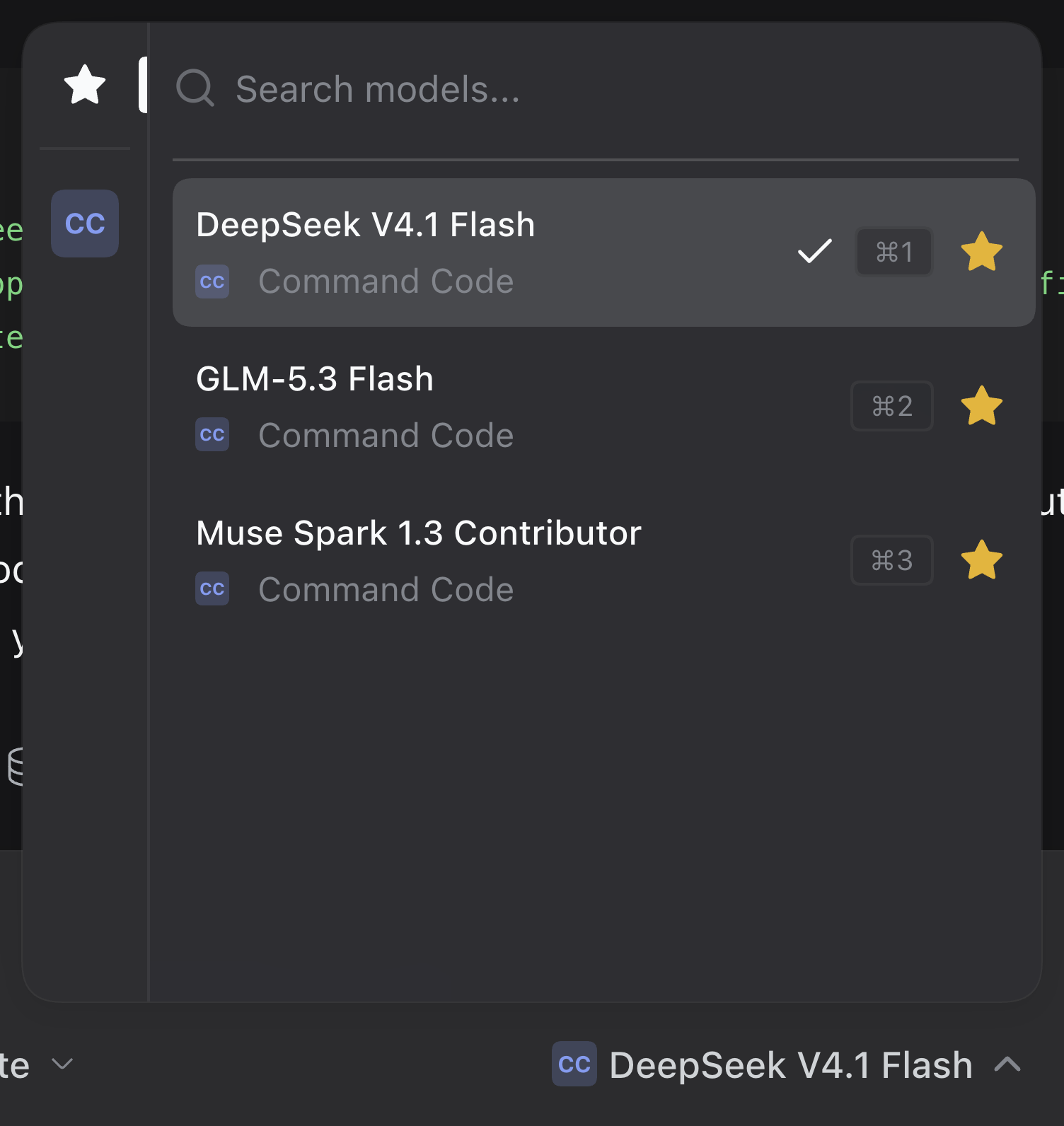
- Provider rail. A 44px column with
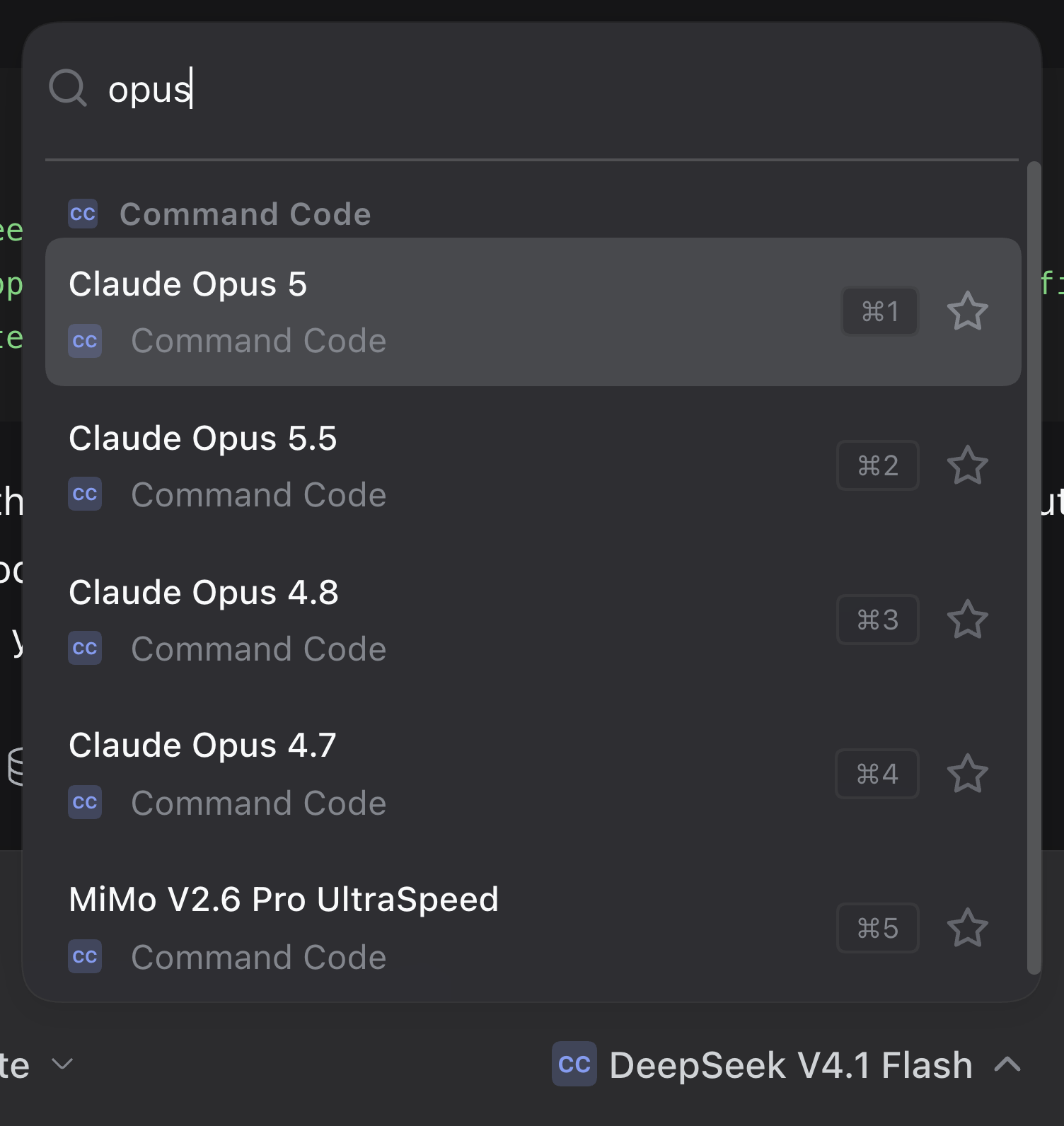
Favoritesfirst and one tile per advertised provider. The active entry carries a primary-colored indicator. - Search. The field takes focus when the picker opens. Matching uses tiered scoring over the model name, its description, the provider id and the provider name, including subsequence matching for queries of three characters or more, with a small boost for favorites. Results are grouped under provider headings.
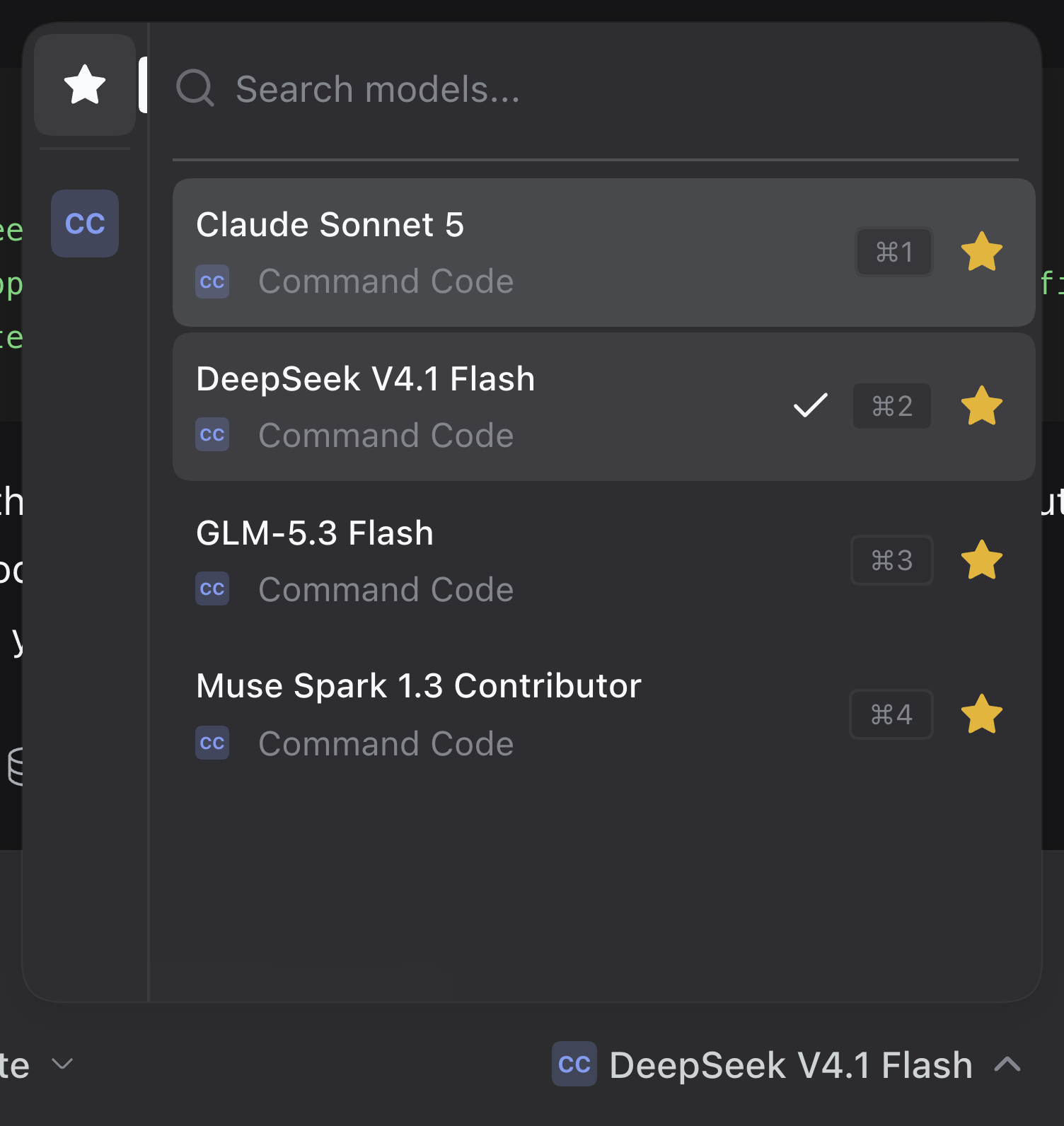
- Favorites. A star on every row, stored in the browser under
dsh.t3-model-picker.favorites.v1as[{ provider, model }]. The Favorites rail entry lists them grouped by provider. - Jump shortcuts.
Cmd+1…9on macOS,Ctrl+1…9elsewhere, select the first nine rows of the visible list; each of those rows shows its chord in akbdchip. The listener is live only while the card is open. - Toggle shortcut.
Cmd+Shift+Mon macOS,Ctrl+Shift+Melsewhere, opens the card when it is closed and closes it when it is open, from anywhere in the window including the composer editor. The trigger's tooltip carries the chord. On a locked session the chord is inert, as the trigger is. The shift leaves the bareCmd+Mtext binding alone. - Unavailable models. Providers the host does not report as routable are marked on their rows, on the rail tile's tooltip, and on the trigger.
- Reasoning effort. A footer row opens the effort levels the current model advertises. It is hidden when the model exposes none.
Install
From this repository:
dsh plugin --profile web add github:yusufameri/dsh-t3-model-picker
Or from the release tarball, which needs no build step:
dsh plugin --profile web add https://github.com/yusufameri/dsh-t3-model-picker/releases/latest/download/dsh-t3-model-picker.tgz
Once the package is on npm, the registry form is one word shorter:
dsh plugin --profile web add dsh-t3-model-picker
Any of them reconciles the profile's bundle list, so the next boot merges the plugin's patch and loads its client half. Removing the bundle restores the shipped model selector with no residue.
Screenshots
| Picker open on Favorites | Grouped search results | Favorites after starring |
|---|---|---|
 |
 |
 |
How it works
The composer's conversation.input.model seat is a single slot. Two
occupants can coexist there at different priorities, and the lowest live
priority renders, so this plugin registers at -1 and the shipped
ModelSelect at its default 0 stops rendering.
Both read the same per-session model directory (ctx.modelDirectories), which
is also what the /model command popup uses. A model chosen here is what those
surfaces show next, and a selection made there is what this picker highlights.
| File | Role |
|---|---|
package.json |
Bundle manifest: dsh.bundle.patch plus the dsh.client web half |
cordis.patch.yml |
One insert row mounting the bundle |
index.js |
Host half — empty; the feature is entirely browser-side |
client.js |
Client half: the picker, its styles, favorites and shortcuts |
Differences from T3 Code
Four deliberate departures, all recorded in client.js:
- Search results are grouped under provider headings. T3 renders one flat ranked list with the provider named on each row.
- A footer row keeps the reasoning-effort selector reachable. T3 keeps effort in a sibling control, while in DeepSeek Harness this seat is the composer's only effort control.
- The row of the model in use carries a check mark. This seat is single-select and the trigger is not always in view.
Cmd/Ctrl+Shift+Mopens and closes the card. T3 leaves opening to the trigger alone, so a chord bound to the trigger would mean holdingCmdand reaching for the mouse.
Known limits
- The picker needs a session-scoped model directory. Addressed subagent sessions expose none, so the seat stays absent there and the chord has nothing to open.
- Jump chords stay open-only, as in T3.
Cmd/Ctrl+Shift+Mis the one chord that works with the card closed. - The effort footer only ever shows models whose provider advertises reasoning metadata.
Development
No build step: client.js is plain JavaScript in the format the client module
loader takes. Edit it and reload the page.
scripts/verify-shortcuts.mjs checks the chords against the real component. It
mounts client.js in a jsdom page with React and dispatches real key events at
the window, so a chord change is verified without the desktop app. The plugin
has no dependencies, so the harness brings its own:
npm install --no-save react react-dom jsdom
node scripts/verify-shortcuts.mjs
scripts/ also holds the recording tooling used for the assets above. It drives
the running DeepSeek Harness page over the Chrome DevTools Protocol, so no
browser download is needed:
node scripts/record.mjs <run-dir>                       # frames + stills + timeline
node scripts/encode-gif.mjs <run-dir> <out.gif> --fps 12 --speed 1.8 --start 1.14
record.mjs expects the page to show a session whose composer carries the
picker, and it restores the browser's favorites when it finishes. The encoder
crops, resizes, and assembles the GIF with sharp; it needs no ffmpeg.
Releasing
RELEASING.md covers the npm token setup, the tag-driven release workflow, and the manual publish fallback.
License
MIT. The interface this plugin reproduces comes from T3 Code, MIT licensed, by its authors.
Links
More in this category
zhu1090093659/dsh-web#packages/dsh-task-board★ 10247
Task board for the dsh web GUI: a sidebar multi-column kanban whose cards run in real DSH agent sessions and can also be scheduled with cron expressions, executed host-side even with the browser closed.
zhu1090093659/dsh-web#packages/dsh-web-all★ 10247
Plugin and skin collection for the DSH Web UI: task board, Git graph, right-side panel, remote mobile UI, pet, live token stats, and a skin center.
ccch1mneyyy/dsh-TUI★ 7252
Claude Code-style full-screen terminal UI: pixel-whale header, live status line, and streaming thought expansion.
MeteorNOX/DeepSeek-Balance-Whale-Widget★ 7046
A fixed-corner whale widget for the DSH web GUI — balance, today's usage and per-turn cost with peak/off-peak pricing, editable balance-alert and daily-budget bubbles, a module-based custom bubble queue with A/B weighted choices and random lines or images, 30+ vendor templates (OpenAI, OpenRouter, Kimi, SiliconFlow, Ark, Zhipu, MiniMax and more) with per-model balance and subscription quota, plus task-end sound, imported audio, custom roles and a resource manager. Local-only, no telemetry.
omdsh-dev/DSH-better-sidebar★ 5011
Full sidebar workbench with file rendering and editing, terminal, Git, and subagents; third-party plugins can register new tabs.
Devin-AXIS/deepseek-design#deepseek-idesign★ 1778
Visual design studio for websites, app prototypes, posters, cards, reports, and magazines, with templates, direct element editing, selection-aware AI draft handoff, and export.
Community comments
Comments are public GitHub Discussions. Loading them connects to GitHub and Giscus; a GitHub account is required to post.