A floating whale-girl pet in the DSH web GUI: every hour it takes one article from a bundled 33-essay corpus of Mao Zedong's selected works and puts a cited line with its source link, one of six business angles (customer, project, organisation, cash flow, decision, self-discipline) and a one-line nudge for a founder into a bubble capped at 200 characters. Ships the maoxuan-pet preset and a maoxuan-vademecum skill over the same corpus, four poses, quiet hours and a daily cap.
Install
# from npm (prebuilt)
dsh plugin --profile web add dsh-plugin-maoxuan-pet
# from GitHub (first run asks for allowBuilds approval — follow the hint, retry)
dsh plugin --profile web add github:yuna78/dsh-maoxuan-pet
Any plugin you install runs third-party code with your own permissions — it can read your files, use your credentials, and reach the network, and tool approvals don’t sandbox it. GitHub-sourced plugins also run build scripts at install time — pnpm blocks those until you allow them, so an install can stop with ERR_PNPM_GIT_DEP_PREPARE_NOT_ALLOWED or ERR_PNPM_IGNORED_BUILDS; dsh prints the exact key to add under allowBuilds in your profile’s pnpm-workspace.yaml, and the install works on the next run. Allowing a build is a trust decision: only install sources you trust, and pin a commit (github:owner/repo#sha).
README
A red-book speech bubble plus four sprite frames: every card = a cited line from a Mao essay (with source date) + one line of pressure for you + one rule you can verify today, capped at 200 characters in total.
Install
dsh plugin --profile web add dsh-plugin-maoxuan-pet
# then restart dsh web (Ctrl+C, then `dsh web` again) and reload the page
Requirements: DSH >=0.2.1-rc.2 <0.3.0, Node ^22.19.0 || >=24.0.0. Web shell only.
Source install / uninstall / troubleshooting: docs/INSTALL.md.
Stand on the real desktop (macOS, optional)
The web pet lives inside the DSH window and disappears when it is minimized — a hard browser
sandbox boundary. desktop/ ships a standalone-process pet shell (pure Swift + system
WebKit, ~450 lines, zero dependencies): transparent, always-on-top, visible on all Spaces.
Minimize DSH or close the window entirely — she stays. The plugin still owns the brain (the
hourly essay reading); the shell only relocates the display.
npm run pet:build   # swiftc build, a few seconds
npm run pet         # she stands at the bottom-right of your screen
Click to open the red-book card, drag to move (position is remembered), right-click for reset/quit. See desktop/README.md for details.
Screenshot
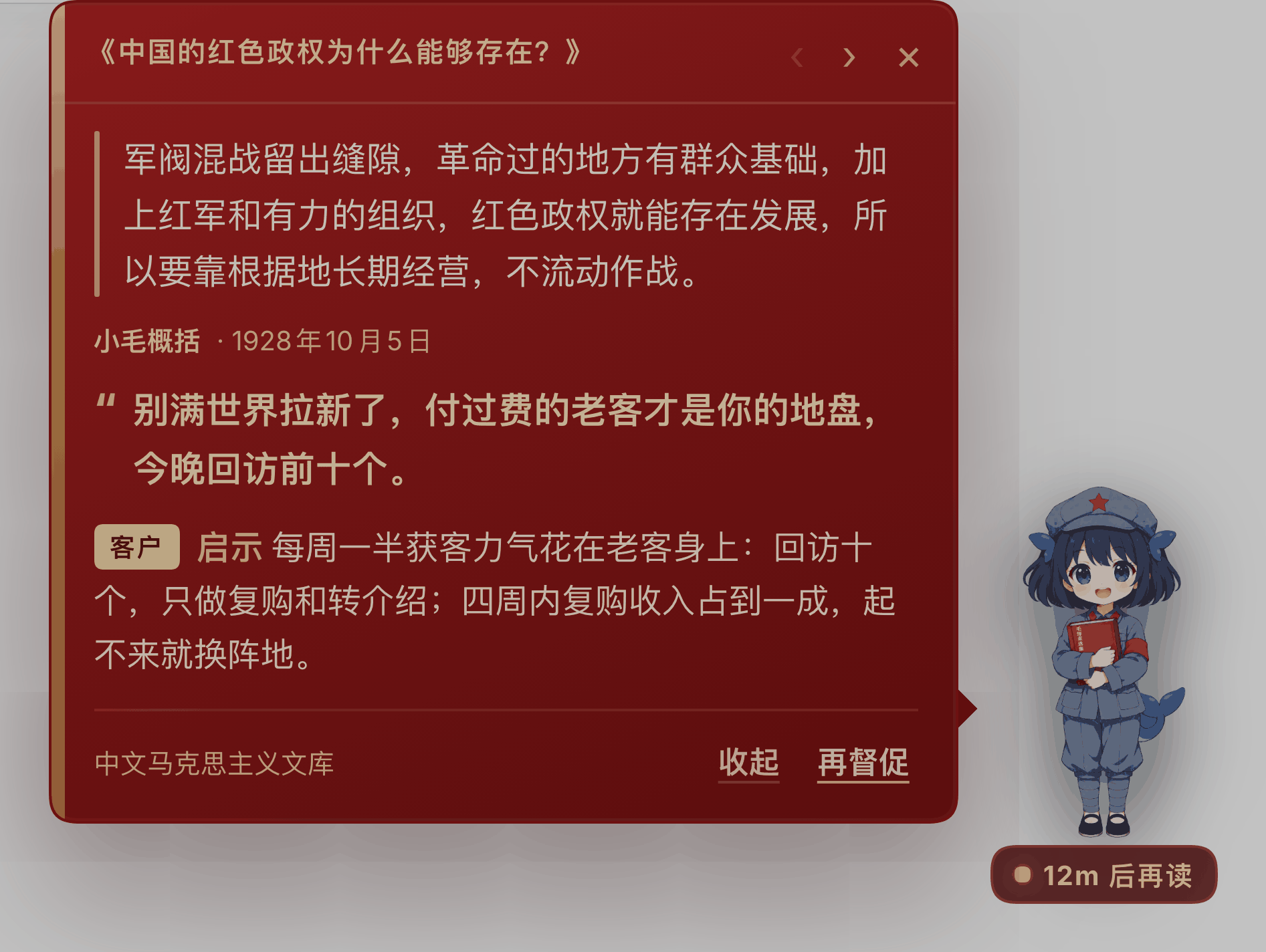
The bubble hangs to the left of the pet, so the pet never moves. Opening the card marks it
read (the unread badge disappears); ‹ › walks back through history; 收起 / 再督促 are
text-only buttons. New bubbles pop up on the hour.
Xiao Mao
| standing | talking | blinking | reading |
|---|---|---|---|
 |
 |
 |
 |
The four frames share one canvas and one foot line, so switching never makes her jump. A fan-made character; not affiliated with DeepSeek.
What it does
| Ability | Behaviour |
|---|---|
| One essay an hour | 33 bundled public-domain essays of Mao Zedong, rotated so she doesn't reread the last one; templates rotate between quote / excerpt / summary |
| Never invents a quote | quote / excerpt must match the corpus verbatim, otherwise she falls back to summary; if the model retells the original, the whole card is dropped |
| Six angles | customers / projects / organisation / cash flow / decisions / self-discipline — one per card, with a hard rule and a way to verify it |
| You can ask back | ships the maoxuan-pet ("Selected Works startup advisor") preset and the maoxuan-vademecum skill; start a new session and ask "given Mao, what should I do next?" |
| Doesn't nag | quiet hours (02:00–08:00 by default), daily cap (24), remembered position, unread badge clears only when read, ‹ › history |
| Degrades gracefully | no credentials / timeout / non-JSON → a local excerpt labelled 「离线摘录」, never passed off as model output |
Config
- id: dsh-maoxuan-pet
  config:
    enabled: true
    everySeconds: 3600      # hourly
    firstDelaySeconds: 90
    quietHours: [2, 8]      # no pings between 02:00 and 08:00 local time
    dailyLimit: 24
    maxBubbles: 40
    headless: true          # false = only local excerpts, zero model calls
    dshBin: dsh
    profile: headless       # since v0.2.3 the host GUI's model config is
                            # bridged in automatically (official/relay, no setup)
    timeoutMs: 180000
    businessContext: "40, indie developer, small-tool SaaS"
Corpus
- 33 essays, all
verified: true, covering volumes I–V; - texts come from the Chinese Marxist Internet Archive, bundled for personal study only;
- refresh / extend:
npm run corpus; - licensing and redistribution limits: NOTICE and corpus/README.md.
Known limitations
- web pet only (
dsh.client.platform: web) — no pet in the terminal / TUI; on macOS use the desktop shell above to leave the window; - the desktop shell is macOS-only (system WebKit); Windows / Linux need a Tauri 2 / Electron
shell —
pet.htmlcan be reused as-is; - the timer only runs while this
dsh webprocess is alive; a stopped process does not catch up, and on restartnextRunAtdecides whether to run once more; - each headless generation is a fresh session (no shared context): stable, but she "doesn't remember what she said yesterday" — hence the last 6 nudges are passed into the prompt to avoid repeats.
License and third-party content
- Code: MIT — see LICENSE.
- Bundled corpus (
corpus/, 33 essays): not MIT. Texts come from the Chinese Marxist Internet Archive and are bundled for personal study only. See NOTICE. Deletecorpus/articles/to drop it; quote/excerpt templates then degrade safely to summary. - Sprites and icon (
assets/): a fan-made "whale girl" character — not affiliated with DeepSeek. See assets/PROVENANCE.md.
This plugin is a reading/nudging tool that treats the essays as a source of product and entrepreneurship method. It is not affiliated with DeepSeek or any publisher, and it is not political advocacy.
Package dsh-plugin-maoxuan-pet · 中文 · technical details in docs/: API-CONTRACT.md · CONTENT-FRAMEWORK.md · verify/README.md

Links
More in this category
zhu1090093659/dsh-web#packages/dsh-task-board★ 9925
Task board for the dsh web GUI: a sidebar multi-column kanban whose cards run in real DSH agent sessions and can also be scheduled with cron expressions, executed host-side even with the browser closed.
zhu1090093659/dsh-web#packages/dsh-web-all★ 9925
Plugin and skin collection for the DSH Web UI: task board, Git graph, right-side panel, remote mobile UI, pet, live token stats, and a skin center.
MeteorNOX/DeepSeek-Balance-Whale-Widget★ 6712
A fixed-corner whale widget for the DSH web GUI — balance, today's usage and per-turn cost with peak/off-peak pricing, editable balance-alert and daily-budget bubbles, a module-based custom bubble queue with A/B weighted choices and random lines or images, 30+ vendor templates (OpenAI, OpenRouter, Kimi, SiliconFlow, Ark, Zhipu, MiniMax and more) with per-model balance and subscription quota, plus task-end sound, imported audio, custom roles and a resource manager. Local-only, no telemetry.
ccch1mneyyy/dsh-TUI★ 6538
Claude Code-style full-screen terminal UI: pixel-whale header, live status line, and streaming thought expansion.
omdsh-dev/DSH-better-sidebar★ 4808
Full sidebar workbench with file rendering and editing, terminal, Git, and subagents; third-party plugins can register new tabs.
Devin-AXIS/deepseek-design#deepseek-idesign★ 1672
Visual design studio for websites, app prototypes, posters, cards, reports, and magazines, with templates, direct element editing, selection-aware AI draft handoff, and export.
Community comments
Comments are public GitHub Discussions. Loading them connects to GitHub and Giscus; a GitHub account is required to post.