Split-screen panel for the Web UI: draggable panes, each rendering one Session's real conversation, with unread dots and a layout saved per browser.
Install
# from GitHub (first run asks for allowBuilds approval — follow the hint, retry)
dsh plugin --profile web add github:yuloop/dsh-web-split
Any plugin you install runs third-party code with your own permissions — it can read your files, use your credentials, and reach the network, and tool approvals don’t sandbox it. GitHub-sourced plugins also run build scripts at install time — pnpm blocks those until you allow them, so an install can stop with ERR_PNPM_GIT_DEP_PREPARE_NOT_ALLOWED or ERR_PNPM_IGNORED_BUILDS; dsh prints the exact key to add under allowBuilds in your profile’s pnpm-workspace.yaml, and the install works on the next run. Allowing a build is a trust decision: only install sources you trust, and pin a commit (github:owner/repo#sha).
README
中文 | English
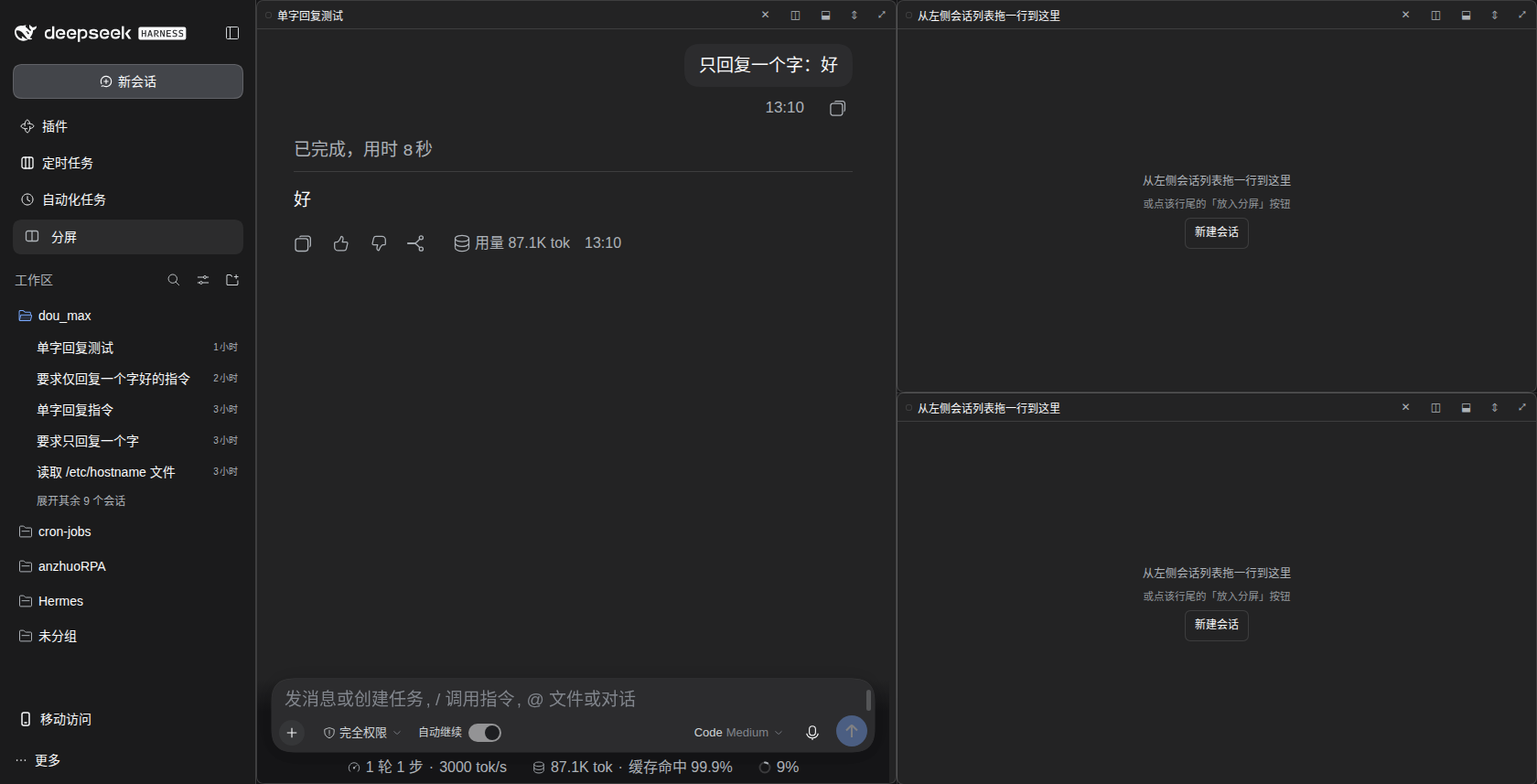
Free split screen for DeepSeek Harness Web. Open a split view beside your normal work and keep two, three or four Sessions visible at once — each pane renders that Session's real conversation, input box included.
Features
- Sidebar entry — a
分屏 / Splitbutton in the sidebar opens the split view as a main panel. - Free layout — split right or down, drag a pane onto another to swap them, drag onto a pane's edge to move it there, drag the divider to resize, double-click the divider to flip the orientation and reset to 50/50.
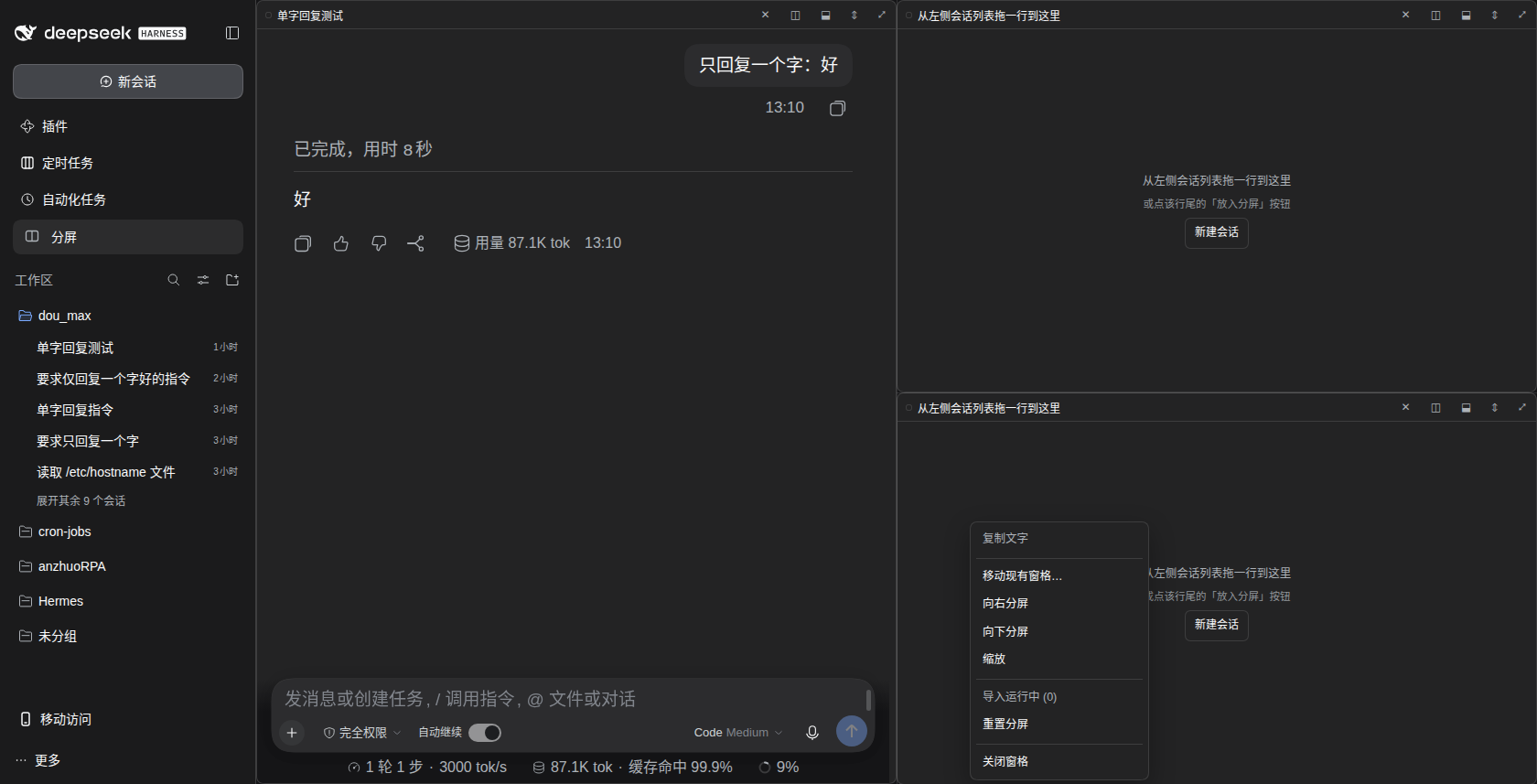
- Fill panes from anywhere — drag a Session row from the sidebar into a pane, or use the row's own "放入分屏窗格 / Load into split pane" action, or the pane's context menu.
- Real conversations — every pane mounts the official
conversation.contentslot for its Session, so streaming, tools, attachments and the composer all behave exactly as they do in the normal view. - Unread dots — the sidebar's unread indicator is mirrored onto the pane title, so you can see which pane is talking.
- Import running Sessions — one menu action arranges every running Session into panes (up to the pane cap) without closing anything. Sessions from a scheduler workspace are skipped (last cwd segment
cron-jobs; seeSCHEDULED_WORKSPACEinclient.js). - Persisted layout — the whole tree (panes, ratios, assignment) is kept in
localStorageand restored on reload. - Bilingual UI — Chinese and English strings ship with the plugin.
- No host-side behaviour — the host half only announces the client bundle; nothing in the Session domain is touched.
Install
The plugin is a bundle with a loader patch (cordis.patch.yml); install it like any other DSH plugin:
# straight from GitHub
dsh plugin --profile web add github:yuloop/dsh-web-split

# or from a local checkout
dsh plugin --profile web add /path/to/dsh-web-split
Restart DSH after installing, then reload the page. The sidebar shows the 分屏 entry.
cordis.patch.ymlnames the package (dsh-web-split). If you vendor the files into a local plugin directory instead, point its patch entry at the absolute path ofindex.js— that is how it runs on the machine it was developed on.
Known limitation
Clicking a file link or an image inside a pane shows an error dialog:
无法打开文件 / sidebarRight: no session surface is mounted
Reason: file links open the right sidebar through sidebarRight.require(), which only works for the Session that the shell currently has on screen. A global main panel carries no Session context, so the call throws. Panes still render and scroll their content; only the file/image preview is affected — open the file from the normal conversation view instead (click the Session in the sidebar, then use the link there).
This limitation is why the panel-based design is the stable release: a floating variant that keeps the conversation column active is developed separately and is not part of this release (it changes where the grid lives and needs the shell's shell.overlay seam).
Requirements
- DeepSeek Harness Web with the official UI packages (
dsh-client-ui-layout,-session,-conversation,dsh-client-locale,dsh-api-session-controller). - Developed against DSH
0.1.1-rc.2.
Layout
client.js          the whole web half (panel, pane tree, drag & drop, i18n, CSS)
index.js           host half: announces the bundle, registers nothing else
cordis.patch.yml   loader patch fragment ("insert id: web-split")
package.json       manifest, including the dsh.client declaration
docs/DEVLOG.md     development log, day by day (Chinese, local notes)
License
MIT — see LICENSE.
Screenshots
|
 |
Links
More in this category
zhu1090093659/dsh-web#packages/dsh-task-board★ 9262
Task board for the dsh web GUI: a sidebar multi-column kanban whose cards run in real DSH agent sessions and can also be scheduled with cron expressions, executed host-side even with the browser closed.
zhu1090093659/dsh-web#packages/dsh-web-all★ 9262
Plugin and skin collection for the DSH Web UI: task board, Git graph, right-side panel, remote mobile UI, pet, live token stats, and a skin center.
MeteorNOX/DeepSeek-Balance-Whale-Widget★ 5677
A fixed-corner whale widget for the DSH web GUI — balance, today's usage and per-turn cost with peak/off-peak pricing, editable balance-alert and daily-budget bubbles, a module-based custom bubble queue with A/B weighted choices and random lines or images, 30+ vendor templates (OpenAI, OpenRouter, Kimi, SiliconFlow, Ark, Zhipu, MiniMax and more) with per-model balance and subscription quota, plus task-end sound, imported audio, custom roles and a resource manager. Local-only, no telemetry.
ccch1mneyyy/dsh-TUI★ 5125
Claude Code-style full-screen terminal UI: pixel-whale header, live status line, and streaming thought expansion.
omdsh-dev/DSH-better-sidebar★ 4413
Full sidebar workbench with file rendering and editing, terminal, Git, and subagents; third-party plugins can register new tabs.
Devin-AXIS/deepseek-design#deepseek-idesign★ 1491
Visual design studio for websites, app prototypes, posters, cards, reports, and magazines, with templates, direct element editing, selection-aware AI draft handoff, and export.
Community comments
Comments are public GitHub Discussions. Loading them connects to GitHub and Giscus; a GitHub account is required to post.