System-audio visualizer for the turn navigator rail: the rail reacts in real time to whatever the default playback device is rendering, with four motion modes (spectrum, pulse, sway, travelling wave), a 16-band logarithmic spectrum from a 2048-point FFT on the host, and live sensitivity, strength, bass-punch and wave-speed controls. Audio is captured host-side through WASAPI loopback, so there is no permission prompt, no microphone and no screen capture. The browser half adds one attribute, one stylesheet, some CSS variables and a sidebar control row, and never patches the official component; switching it off removes the attribute, the stylesheet and the variables, returning the rail to its default styling. Windows only.
Install
# from GitHub (first run asks for allowBuilds approval — follow the hint, retry)
dsh plugin --profile web add github:yuanyiHY/dsh-rail-equalizer
Any plugin you install runs third-party code with your own permissions — it can read your files, use your credentials, and reach the network, and tool approvals don’t sandbox it. GitHub-sourced plugins also run build scripts at install time — pnpm blocks those until you allow them, so an install can stop with ERR_PNPM_GIT_DEP_PREPARE_NOT_ALLOWED or ERR_PNPM_IGNORED_BUILDS; dsh prints the exact key to add under allowBuilds in your profile’s pnpm-workspace.yaml, and the install works on the next run. Allowing a build is a trust decision: only install sources you trust, and pin a commit (github:owner/repo#sha).
README
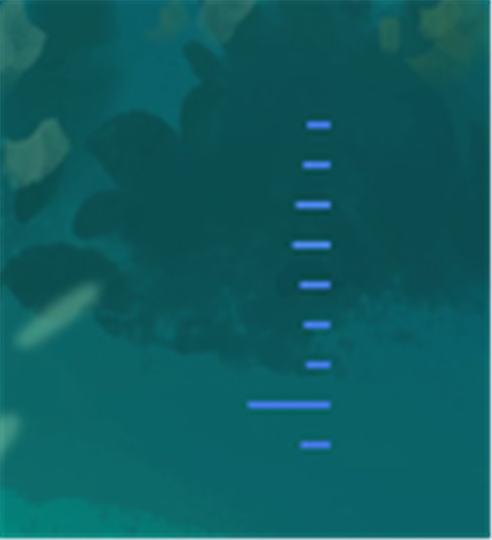
Make DSH's turn navigator rail — the tick strip on the right side of the chat — move to whatever your computer is currently playing.
Music, video, games: if the sound comes out of the default playback device, the rail reacts to it. No permission prompt, no popup, no microphone, no screen recording — and it still works with headphones on.
Windows only — the capture layer is WASAPI. 中文说明见 README.md.
How it gets the audio
This is the only heavy part of the plugin, and it is worth explaining.
The browser's getDisplayMedia cannot be "authorized once". That is a deliberate Chrome/Edge security decision: every call has to pick a share target again, the grant is never persisted, and no API gets around it. Capturing the microphone, on the other hand, is completely useless when you are wearing headphones.
So this plugin uses host-side WASAPI loopback instead: the DSH host process (Node) calls Windows Core Audio COM interfaces directly through koffi and reads the PCM that the default render device is already mixing.
IMMDeviceEnumerator.GetDefaultAudioEndpoint(eRender)
  → IMMDevice.Activate(IAudioClient)
  → IAudioClient.Initialize(AUDCLNT_STREAMFLAGS_LOOPBACK)
  → IAudioClient.GetService(IAudioCaptureClient)
  → poll GetBuffer / ReleaseBuffer
This is the same mechanism OBS uses to capture desktop audio. It is not "recording" — it reads the buffer the system mixer has already handed to the sound card, therefore:
- there is no permission concept to ask anyone for
- headphones / speakers / HDMI / virtual devices all resolve to the default render device (switch the output in Windows and this follows)
- read-only: it never writes, never changes volume, never disturbs whatever is playing
- audio is reduced to levels in memory only — it never leaves the machine and is never written to disk
koffi ships prebuilt binaries through optionalDependencies (@koromix/koffi-win32-x64), so it works on install with no Visual Studio, no node-gyp, and no toolchain. (koffi's own install script is not required at runtime — the native binary resolves from the optional platform package either way.)
How it avoids touching the official component
The rail is rendered by @deepseek-ai/dsh-client-ui-chat. This plugin does not patch it, fork it, or replace any of its code or components.
The browser half does exactly four things:
| What | Detail |
|---|---|
| Tag it | add a data-dsh-eq attribute to the rail's <nav> |
| Inject one stylesheet | a single <style> tag; everything is a CSS override (both known rail builds are covered) |
| Write some variables | --dsh-eq-* custom properties on document.documentElement |
| Draw one control row | pure DOM (insertBefore) for the sidebar row; the expanded settings panel uses the official shell.overlay slot |
Why this cannot break anything:
- The animation only ever applies to the visible bar, and only stacks
scale/filter/box-shadowon it. Official builds draw the bar differently, and both are covered:- Newer build: the bar is a real
<span class="…_tick">whose size and opacity come from React inline styles. Inline styles win on specificity, so the four obvious properties must not be touched — the plugin stacks the standalonescaleproperty instead.scaleandtransformdo not override each other (the final matrix is translate × rotate × scale × transform), so the element's inline geometry and its four visual states are left pixel-identical. - Older build: the bar is a
button::beforepseudo-element, wheretransform: … scaleX() scaleY()is stacked. Each selector only matches its own build, so they never interfere.
- Newer build: the bar is a real
- Either way it never touches
width/height/opacity/background-color— none of the official four states (current / hover / not-yet-loaded / generating) changes size or color. - Deformation starts at 1 (identity at rest) and
filterstarts atbrightness(1), with nobox-shadowwhen there is no glow — when the level is silent, the visual result is the untouched original. Neither pseudo-elements norscaleparticipate in layout or show up ingetBoundingClientRect(), so rail scrolling, coordinate mapping and click-to-jump are geometrically unaffected. - Only
filter: brightness()andbox-shadoware stacked;background/colorare left alone, so theme tokens still apply. - The turn currently generating carries
aria-busy="true", and the stylesheet explicitly excludes it from the wave animation — its own "breathing" indicator is not overridden at all. - Per-tick wave phase is static CSS generated with
nth-child(set on the row container and inherited downward). Nothing is ever written into the DOM, so there is no fight with React's rendering. - Turning it off removes the attribute, the stylesheet and the variables — all three. After that the rail looks exactly like a rail that never met this plugin.
Install
Windows only. The capture layer needs WASAPI, and package.json declares os: ["win32"], so on macOS / Linux the package manager refuses the install outright rather than letting it crash later.
dsh plugin --profile desktop add github:yuanyiHY/dsh-rail-equalizer
Then restart DSH Desktop — the host process has to reload the bundle to register the routes.
From source / local directory (edits take effect immediately)
git clone https://github.com/yuanyiHY/dsh-rail-equalizer
dsh plugin --profile desktop add link:<absolute path you cloned to>
⚠️ The install path must not contain spaces —
dsh pluginforwards arguments to pnpm, which shreds a spaced path into several package names. Keep local development in something like~/.dsh/local-plugins/.
No build toolchain needed.
kofficarries aninstallscript, but its native binary is packaged inside an optional dependency (@koromix/koffi-win32-x64) and loads fine even when that script never runs. If pnpm asks you to approve build scripts, skipping it does not affect this plugin.
Uninstall
dsh plugin --profile desktop remove dsh-rail-equalizer
After a restart the host-side capture and routes are gone entirely, and with the plugin no longer loaded the browser side injects nothing. You can also just flip the switch in the sidebar row — same result, effective immediately.
Usage
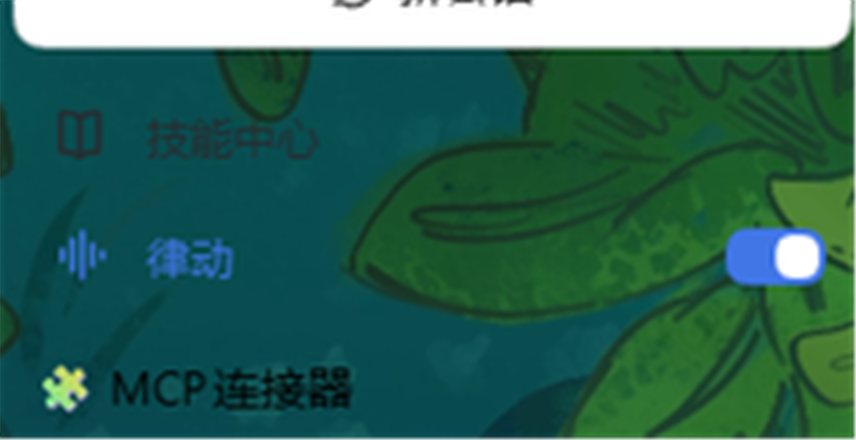
A row appears in the sidebar, directly above the official workspaces section:
┌──────────────────────┐
│ ♪  律动        [ ⬤ ] │   ← click the row (outside the switch) to open/close settings
└──────────────────────┘      click the switch on the right to toggle it directly
The row is inserted into the sidebar's document flow (insertBefore the [class*="_regionArea"] element), the same approach other sidebar plugins such as the skill explorer use, with self-healing: if a React re-render displaces it, it is put back.
Why not register it in an official slot? The only suitable sidebar position,
sidebar.workspaces, iskind: "single"— registering into it would replace the official workspaces section. The other sidebar slots (sidebar.settings/sidebar.brand.*) are single as well. Hence DOM insertion, which is what other sidebar plugins do too.
Why not a
position: fixedoverlay? Tried it — it covered other plugins inserted in the same area (that is how the skill explorer row got hidden). In the document flow each row has its own place and nothing overlaps.
There is no separate gear button either, so it cannot be confused with DSH's own settings gear. The settings panel only exists while expanded, anchored to the right of that row (--dsh-eq-pill-x/y are measured and written by JS).
Inside the panel:
| Item | Description |
|---|---|
| Master switch | turning it off restores the rail completely (the stylesheet is removed, not "zeroed") |
| Motion mode | one of four, applied immediately — see below |
| Wave | only meaningful in "wave" mode: off means the wave does not travel and ticks rise and fall in place |
| Speed | wave period, 0.46×–2.4× (slider value 2600–500 ms) |
| Sensitivity | 0.4–3.0. Raise it when system volume or the music itself is quiet |
| Strength | 0.2–2.0. Overall deformation amplitude |
| Bass punch | 0–2.0. How far kicks slam the ticks vertically |
The four motion modes
Using the existing N ticks as material, four completely different motion models:
| Mode | Look | Driven by |
|---|---|---|
| Spectrum (default) | each tick's length is the frequency range it owns, low to high across the rail — like a music player's spectrum bars | --dsh-eq-v (the band assigned to that tick) |
| Pulse | all ticks in phase, the row expands and contracts together; the most "unified" | --dsh-eq-lvl + a global animation phase |
| Sway | ticks do not deform; the whole rail sways left and right | --dsh-eq-sw × level |
| Wave | ticks offset in phase, a wave travels along the rail | --dsh-eq-lvl + per-tick phase |
Spectrum is the only true spectrum mode. The host runs a 2048-point FFT with a Hann window and slices 40 Hz → 16 kHz into 16 logarithmically spaced bands (matching how hearing works); the client then spreads those 16 bands evenly across however many ticks actually exist — so 5 ticks still show the full low-to-high distribution, and 50 ticks give you a continuous spectrum.
The client hot-reloads and the host does not, so "new client / old host" is possible. With no band data available, spectrum mode automatically degrades to moving the whole row together rather than not moving at all. The
bandsAvailablefield in the self-report tells you which case you are in.
The bottom of the panel shows a live level meter and backend status (device format / connection state / error reason). Settings live in browser localStorage (key dsh-rail-eq:settings:v1).
CPU and power
- Capture is on demand: it starts when a browser connects to the SSE stream and stops 8 seconds after the last one disconnects. With no page open this plugin uses no CPU at all.
- Measured decode cost is about 2 ms of CPU per second (48 kHz stereo float32) — negligible.
- Levels are pushed at ~30 Hz over same-origin SSE; the browser side then smooths to the display refresh rate with
requestAnimationFrame. - The system's "reduce motion" preference (
prefers-reduced-motion) is respected: only a gentle brightness variation remains, with no deformation or travelling wave.
Troubleshooting
The rail does not move at all
- Click the sidebar row to open the panel and read the status at the bottom:
采集失败:...(capture failed) → see "common errors" below已连接,等待音频…(connected, waiting for audio) → the chain works, the system simply is not playing anything连接中…(connecting) → the host routes are not up; most likely DSH was not restarted当前平台不支持(仅 Windows)(unsupported platform) → expected; this implementation is Windows-only
- Confirm the sound really comes from the default render device. Some players can target a separate output device; if they bypass the default, nothing is captured.
- Confirm the rail is still on the page. The turn navigator is an official component; if it is renamed or removed upstream, this plugin silently does nothing and breaks nothing else.
- Still nothing → check the browser half's self-report. The host cannot see the DOM, so the browser half posts its own state back, readable in the
clientReportfield ofGET /rail-eq/status:railFound(was the rail found),matched(did the CSS selectors hit),mode/tickCount(current mode, how many ticks were counted),bandsAvailable(is the host sending band data),vars(how many level variables were written),tick.scale/tickRect(how far the bar was stretched),uiRendered(did the control row actually render). For "installed but no effect" problems this field usually pinpoints it immediately.
Initialize(LOOPBACK) failed 0x88890008 — this device does not support loopback (rare; some exclusive modes and virtual devices). Switch to another default output and retry.
不支持的混音格式 tag=... (unsupported mix format) — the device's mix format is neither IEEE float32 nor PCM16. Setting the default playback device to 16-bit/24-bit at 44100/48000 Hz usually fixes it.
Restart capture manually (after switching playback devices):
curl -X POST http://127.0.0.1:<DSH port>/rail-eq/restart
Normally unnecessary — capture retries on its own after an error.
Debug routes
| Route | Purpose |
|---|---|
GET /rail-eq/status |
full state: capturing or not, audio format, packet count, client count, current level |
GET /rail-eq/level |
emit the current level once, without starting capture |
GET /rail-eq/stream |
SSE level stream (what the browser half consumes) |
POST /rail-eq/restart |
restart capture |
POST /rail-eq/report |
browser-half self-report (for "no effect" debugging; the result shows up in /status as clientReport) |
Development
lib/
  index.js     host half: SSE routes + capture lifecycle (a Cordis plugin)
  wasapi.js    WASAPI loopback capture (Core Audio COM via koffi)
  analyzer.js  PCM → 4 time-domain levels + 16 log bands (2048-pt radix-2 FFT + Hann window, fast-attack/slow-release envelopes)
  client.js    browser half: rail binding + CSS variables + control UI
test/
  host-integration.mjs  host-side integration test (no DSH restart needed)
  band-probe.mjs        single-frequency band probe (which band does a tone land in)
  make-tone.mjs         generate a test tone
The host half is plain ESM and the browser half is a static window.__ModuleLoader__.load({ id, factory }) bundle — neither needs a build step. Edit lib/*.js and restart DSH.
Running the tests (most meaningful while something is playing):
node test/make-tone.mjs 30
# play test/tone.wav in another window, then:
node test/host-integration.mjs
The tests cover: route dispatch, 404s, on-demand capture (a one-shot probe must not start capture), SSE headers and streaming, status replay, level sanity, independence of the four bands, spectrum structure (the strongest band clearly above the median), automatic shutdown after disconnect, and dispose cleanup.
Two koffi gotchas
- Output parameters are not a returned array. In koffi an
_Out_parameter takes a container ([null]) that the native code writes into; the function's return value is the C return value (here an HRESULT). - COM vtables must be dereferenced by hand.
koffi.decode(obj, 'void *')gives the vtable pointer, thenkoffi.decode(vtable, index * ptrSize, 'void *')gives the method pointer, and finallykoffi.call(fn, proto, obj, ...). The first entry ofprotoisthis.
Known limitations
- Windows only. The capture layer depends on WASAPI. On macOS,
ScreenCaptureKitor a virtual audio device could do it; not implemented. - It captures the default render device. If a player targets a separate output device, nothing is captured.
- The rail is located through semantic anchors (
nav+button[class*="_mark"], preferringaria-label), so it depends on neither Chinese/English copy nor hashed class names. If the official rail's DOM changes substantially,findRail()is the single function to fix. - The DSH locale namespace is not used; UI copy is mixed Chinese and English.
License
MIT — see LICENSE.
Links
More in this category
zhu1090093659/dsh-web#packages/dsh-task-board★ 9925
Task board for the dsh web GUI: a sidebar multi-column kanban whose cards run in real DSH agent sessions and can also be scheduled with cron expressions, executed host-side even with the browser closed.
zhu1090093659/dsh-web#packages/dsh-web-all★ 9925
Plugin and skin collection for the DSH Web UI: task board, Git graph, right-side panel, remote mobile UI, pet, live token stats, and a skin center.
MeteorNOX/DeepSeek-Balance-Whale-Widget★ 6712
A fixed-corner whale widget for the DSH web GUI — balance, today's usage and per-turn cost with peak/off-peak pricing, editable balance-alert and daily-budget bubbles, a module-based custom bubble queue with A/B weighted choices and random lines or images, 30+ vendor templates (OpenAI, OpenRouter, Kimi, SiliconFlow, Ark, Zhipu, MiniMax and more) with per-model balance and subscription quota, plus task-end sound, imported audio, custom roles and a resource manager. Local-only, no telemetry.
ccch1mneyyy/dsh-TUI★ 6538
Claude Code-style full-screen terminal UI: pixel-whale header, live status line, and streaming thought expansion.
omdsh-dev/DSH-better-sidebar★ 4808
Full sidebar workbench with file rendering and editing, terminal, Git, and subagents; third-party plugins can register new tabs.
Devin-AXIS/deepseek-design#deepseek-idesign★ 1672
Visual design studio for websites, app prototypes, posters, cards, reports, and magazines, with templates, direct element editing, selection-aware AI draft handoff, and export.
Community comments
Comments are public GitHub Discussions. Loading them connects to GitHub and Giscus; a GitHub account is required to post.