Export and import DeepSeek Harness configuration across machines as same-OS .dshmig archives, with credential redaction, verification and rollback.
Install
# from a prebuilt release tarball
dsh plugin --profile web add "https://github.com/ygcdsj/dsh-home-migrate/releases/download/v0.0.9/dsh-migrate-0.0.9.tgz"
# from GitHub (first run asks for allowBuilds approval — follow the hint, retry)
dsh plugin --profile web add github:ygcdsj/dsh-home-migrate
Any plugin you install runs third-party code with your own permissions — it can read your files, use your credentials, and reach the network, and tool approvals don’t sandbox it. GitHub-sourced plugins also run build scripts at install time — pnpm blocks those until you allow them, so an install can stop with ERR_PNPM_GIT_DEP_PREPARE_NOT_ALLOWED or ERR_PNPM_IGNORED_BUILDS; dsh prints the exact key to add under allowBuilds in your profile’s pnpm-workspace.yaml, and the install works on the next run. Allowing a build is a trust decision: only install sources you trust, and pin a commit (github:owner/repo#sha).
README
experimental — DSH configuration migration: export/package → restore on another machine → verify + rollback.
Pack configuration from any DSH install, restore it into a NEW profile on the target machine, with verification at every step and automatic rollback on failure. No cloud, no history, no cross-brand imports.
Workflow
Why not just use X?
| Project | Purpose | Our boundary |
|---|---|---|
| dshmarket (dsh-market) Backup & Restore | In-market profile plugin-layer backup/restore | We don't touch the plugin market; dsh-migrate covers vendor/ link dirs, .agent-presets, settings.yaml, credential redaction — archive-format interop is a v2 goal |
| dsh-backup-sync | Local snapshots + WebDAV cross-machine sync | Backup/sync ≠ migration; we do the full "package → restore" loop |
| dsh-backup | One-command backup + rotation | Same as above |
| dsh-session-sync | Session-library git mirror | Sessions are explicitly out of MVP scope |
| dsh-movein / DSH-Portable | Claude Code → DSH import / portable builds | Reverse direction or different shape |
Features (MVP)
- Export: scans
~/.dsh(profile configs, settings.yaml,.agent-presets,vendor/link dirs); hard-excludes.credentials.yaml,.env*,.pnpm-store,sessions,storages,node_modules, …; field-level credential scanning + redaction for settings/presets, with asecretReportin the manifest - Packaging: single
.dshmig(zip) with a manifest (version, platform, file list, sha256 checksums, link mapping) - Import: preflight (same OS, dsh version) → backup target → NEW profile by default (
<name>-migrated, auto-incremented) →link:path rewrite → vendor/presets/settings restore →pnpm install→ verification chain (link resolution →dsh --dump-config) → automatic rollback on failure - Verification chain: L1 pnpm install / L2 link resolution (junction realpath) / L3
dsh --dump-config - UI: "Migration" section in Settings (export wizard + import wizard); host tools
dsh_migrate_export/dsh_migrate_importcallable by agents
Explicitly out of MVP scope (v2 or ecosystem)
Sessions/storages migration, WebDAV/Gist sync, cross-brand imports, portability, cross-OS migration, overwriting existing profiles, unattended migration, credential management (exclude + redact + re-configure guidance only).
Install
After npm release:
# inside the profile directory
dsh plugin --profile web add dsh-migrate
Local development (requires dsh-super-injector):
npm install --legacy-peer-deps --no-audit --no-fund
npm run build          # falls back to the _npx official package tree when no bash/checkout exists
# inside the injector environment:
dev_inject_plugin <this directory>
Full migration walkthrough (first-time users)
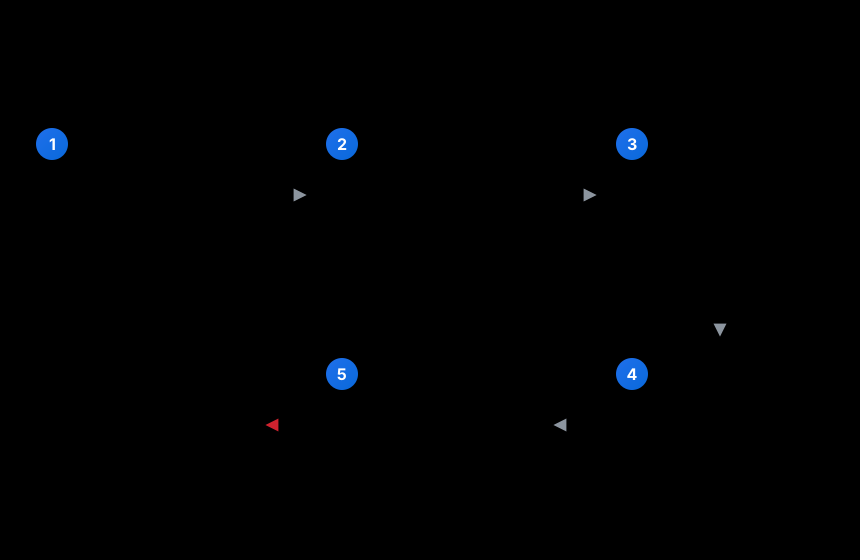
- Export on the source machine: Settings → Migration → Export → ① Preview export → ② Run export
- Get the artifact: a
.dshmigfile lands in~/dsh-migrate-exports/dsh-migrate-<profile>-<timestamp>.dshmig— a zip containing the manifest (checksums), profile configs, settings.yaml (redacted),.agent-presets, andvendor/link packages; credentials are best-effort excluded/redacted (secretReportincludes anunscannedFileslist — review it before transferring) - Transfer it: USB / cloud / scp — redaction is best-effort; rely on
secretReport - Import on the target: DSH → Settings → Migration → Import → paste the
.dshmigpath → ① Preflight (per-item ✓/✗) → confirm the step list → ② Run import - Wait for verification:
pnpm install+ verification chain run automatically (L1 install / L2 link resolution / L3dsh --dump-config); the import only finishes when all pass - Switch to it: the import creates a NEW profile (
<name>-migrated); switch the default profile manually after verification, then clean up~/.dsh/.dshmig-backup/once confirmed
Launching the migrated profile (important):
dsh webis an alias ofdsh --profile weband always boots the pristinewebprofile — the migration lives in the NEW<name>-migratedprofile, so you must name it explicitly:dsh --profile web-migrated # boot the migrated profile (GUI)Running
dsh webopens the untouched native environment, so migrated plugins/skins/settings won't show up there — that is expected, not a fault.webis a hardcoded alias in the dsh CLI (dsh web≡dsh --profile web); DSH has no default-profile mechanism and no switch command. The only way to makedsh webboot the migrated environment is to rename the profile directory: once verified, retire/move the oldwebdirectory, then rename<name>-migratedtoweb(both live under$DSH_HOME/profiles/). Until then, keep launching explicitly withdsh --profile <name>-migrated. ⚠ After renaming the directory, pnpm may fail withERR_PNPM_UNEXPECTED_VIRTUAL_STORE(virtual-store path mismatch, a known pnpm behavior) — see the FAQ for the fix.
Import never overwrites your existing profile; any failure rolls back automatically.
Usage
Settings wizards (recommended)
- Export: Settings → Migration → Preview export (file list/size/excluded/credential hits) → Run export → artifact in
~/dsh-migrate-exports/*.dshmig - Import: Settings → Migration on the target → enter the
.dshmigpath → Preflight (per-item ✓/✗) → confirm the step list → Run import → review verification results and backup dir - Switch the default profile manually after verification; clean up
.dshmig-backup/once confirmed
Host tools
dsh_migrate_export { dryRun: true } (preview) / { dryRun: false, outDir } (package); dsh_migrate_import { archive, dryRun: true } (preflight) / { archive } (import, auto-rollback on failure).
Security boundary
- Credentials are best-effort excluded/redacted, not guaranteed:
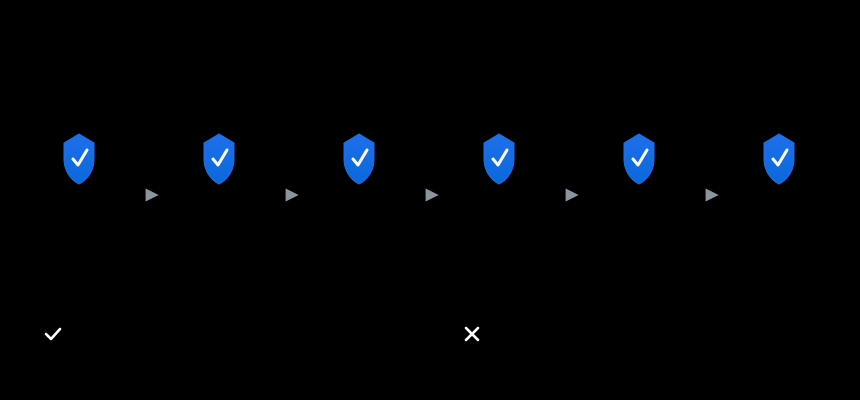
.credentials.yamland.env*are hard-excluded; suspected credential fields in settings/presets/vendor config files are redacted (<redacted>) and recorded insecretReport; an unscanned-files list (unscannedFiles) ships with the report — review it before transferring - Credentials inside vendor config files are redacted in place: the inevitable cost of not migrating credentials — if a migrated vendor package depends on a redacted value (e.g. an API token), reconfigure it on the target; the README/export report calls this out
- Importing executes code from the archive: import runs
pnpm install(default--ignore-scripts) and parses bundle plugins, and starting the profile later executes them — only import archives from sources you trust (the UI confirm dialog warns about this) - Artifacts are generated locally only; transferring them is your responsibility
link:targets are asserted inside<home>/vendor; manifest path fields (files/links/profiles) are allow-listed + landing-path asserted (anti path-traversal writes)- HTTP API is loopback-only (Host allow-list) + CSRF token + Origin same-origin +
Sec-Fetch-Sitechecks; exposing DSH web to a LAN means anyone can import arbitrary archives (an RCE surface) - A symlinked
settings.yamlis refused for overwrite (no write-through); concurrent imports use separate staging subdirs and never clean each other's
FAQ
Will import overwrite my current config? No. MVP only creates a new profile (<name>-migrated); settings.yaml is overwritten after backup (uncheck it before importing if unwanted).
Why can't I see the migrated plugins with dsh web? dsh web is a hardcoded alias of dsh --profile web and boots the pristine web profile; the migration tool never overwrites your existing profile, so everything lives in the NEW <name>-migrated profile. Boot it with dsh --profile <name>-migrated. Once verified, retire the old profile and rename <name>-migrated to web (rename the directory under $DSH_HOME/profiles/; DSH has no default-profile mechanism) so dsh web boots the migrated environment.
Cross-OS migration? MVP is same-OS only; cross-OS is rejected at preflight.
Can I import into a machine that's already been used (plugins/skins installed)? Yes. Import only creates a NEW profile (<name>-migrated) and never touches your existing profiles; settings.yaml is backed up before being overwritten (uncheck it before importing if unwanted); same-name vendor packages are skipped or verified identical, conflicts are reported only. The target-used preflight item shows a warning (⚠) describing the target state (vendor packages / non-default profiles / migration history) but does not block the import; for strict mode ("target must be pristine"), pass requireFresh: true to the host tool.
dsh plugin fails with ERR_PNPM_UNEXPECTED_VIRTUAL_STORE after renaming a profile directory? pnpm records the virtual store's absolute path in node_modules/.modules.yaml (virtualStoreDir); renaming/copying the profile directory makes that path stale and pnpm refuses any mutation — a known pnpm behavior, unrelated to this tool (dsh web still boots because runtime loading follows the links, it does not check this field). Fix: stop dsh → delete the profile's node_modules (pnpm-lock.yaml stays in the profile dir) → re-run dsh plugin --profile <name> add <pkg> (or pnpm install in that directory) to rebuild everything from the lockfile.
Will the migration archive carry dsh-migrate itself? Since 0.0.9, yes: on export the tool automatically appends itself to the archived profiles (dependencies gains dsh-migrate@^<version> and dsh.profile.bundles is extended), so the target has the migration tool right after import — no manual install needed (idempotent: skipped when the profile already declares it; the import installs it from npm, so network is required). Older versions (≤0.0.8) did not: migration only carries a profile's declared content, and a tool mounted via runtime injection (super-injector) is not a profile dependency — in that case install it on the target manually: dsh plugin --profile <name> add dsh-migrate.
What about git: dependencies (skins)? Not packaged; re-fetched by pnpm install on the target (network/credentials required; preflight warns).
Is import safe? Import executes code inside the archive (pnpm install scripts + bundle plugin parsing; starting the profile later runs the plugins), so only import archives from sources you trust. --ignore-scripts is on by default; path fields are allow-listed with landing assertions; the HTTP API is loopback-only + token-gated.
What if import fails? Config-level rollback is complete (remove created paths + restore snapshot); dependency-level is best-effort; .dshmig-backup/ preserves the scene — never silent.
Development & tests
npm test             # smoke (export → import → rewrite/restore/increment/fault injection), sandbox-safe
npm run test:install # full chain (pnpm install + dump-config, needs full permissions)
Spec and design decisions: docs/DEVELOPMENT.md (machine-verified baselines, ecosystem conventions, survey findings, risk register).
Security review & fix records: the original review report is docs/SECURITY_REVIEW.md; verification and fix evidence is in docs/VERIFICATION.md.
Roadmap (v2)
- Sessions/storages migration (dsh-session-sync git-mirror approach)
- Archive-format interop with dshmarket backups
- WebDAV/Gist sync
- Cross-OS (implementation is already cross-OS-friendly; promises stay conservative)
License
MIT © 2026 dsh-migrate contributors
Credits
- dshmarket — route/HTTP patterns, pnpm compatibility layer, backup module reference
- dsh-super-injector — plugin shape and build pipeline reference
- dsh-skin-market — pnpm failure handling reference
- dsh-backup-sync, dsh-backup, dsh-session-sync — ecosystem positioning
- DeepSeek Harness — the platform and official packages such as
@deepseek-ai/dsh-home-paths
Links
More in this category
Q00/ouroboros#integrations/dsh-plugin★ 6180
Config-only bundle that mounts Ouroboros through the DSH MCP client, exposing 36 interview, Seed, execution, evaluation, and evolution workflow tools in DSH.
loopx-project/loopx#dsh-loopx-plugin★ 6153
LoopX, a provider-neutral, local-first state kernel and control plane for long-horizon agents: keeps Goal, Todo, gate, evidence, quota, recovery, and handoff state above DeepSeek Harness, while the plugin bootstraps the CLI and skills, admits bounded same-session continuation, and adds a loopback GoalBar for the exact bound loop.
chuspeeism/dashi-taskboard#deepseek-harness★ 3283
Embeds the active installed Codex Taskboard runtime in the DeepSeek Harness sidebar, using its launcher runtime descriptor instead of a fixed port.
NanmiCoder/dsh-agent-teams★ 1923
AgentTeams multi-agent teams.
EthanYoQ/AI-Novel-Writer#dsh-ai-novel-writer★ 1302
Installs a dedicated AI novel-writing preset and workbench: revisioned local project assets, a compact side drawer, and native approval-gated single-file changes.
tong-io/tongflow#dsh-tongflow★ 1037
TongFlow film-crew studio for image, voice, music and video production: the agent writes per-asset TongFlow workflow files (.tongflow.json) that run through TongFlow plugins, with an embedded workflow canvas, a shot/character/take project layout and a manga-drama template; sessions starting with @tongflow open the Studio view.
Community comments
Comments are public GitHub Discussions. Loading them connects to GitHub and Giscus; a GitHub account is required to post.