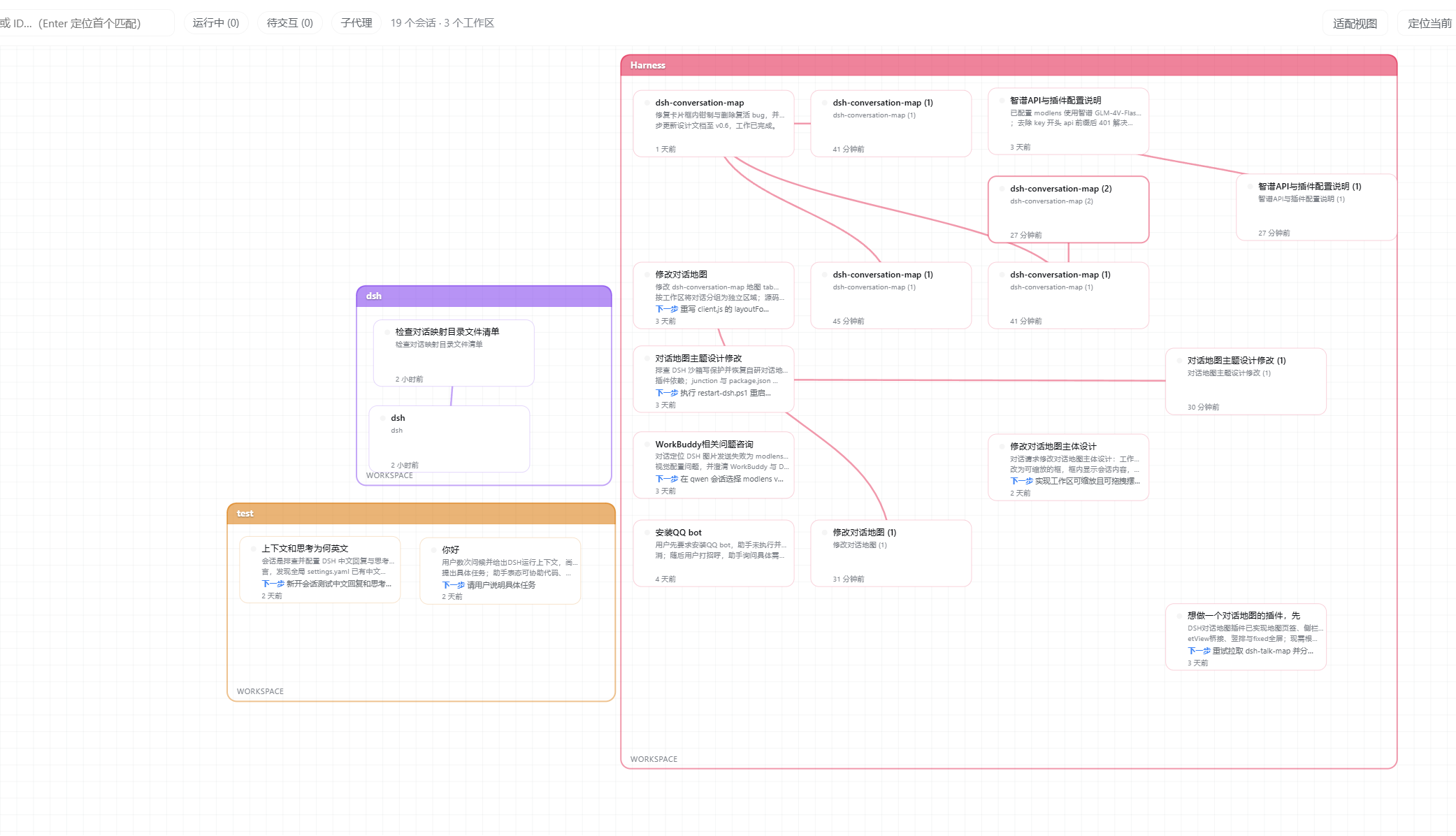
A live conversation map for DeepSeek Harness web: real-time session tree with subagent lineage, running state, and one-click navigation.
Install
# from GitHub (first run asks for allowBuilds approval — follow the hint, retry)
dsh plugin --profile web add github:xyAxzy/dsh-conversation-map
Any plugin you install runs third-party code with your own permissions — it can read your files, use your credentials, and reach the network, and tool approvals don’t sandbox it. GitHub-sourced plugins also run build scripts at install time — pnpm blocks those until you allow them, so an install can stop with ERR_PNPM_GIT_DEP_PREPARE_NOT_ALLOWED or ERR_PNPM_IGNORED_BUILDS; dsh prints the exact key to add under allowBuilds in your profile’s pnpm-workspace.yaml, and the install works on the next run. Allowing a build is a trust decision: only install sources you trust, and pin a commit (github:owner/repo#sha).
README
A live conversation map for DeepSeek Harness web: every session in the workspace as a real-time tree — subagent lineage, running state, and one-click navigation.
v0.2.0 — tree auto-layout, workspace theme colors, grid-paper canvas
Features
- Tree auto-layout: sessions are arranged by parent/child relation — parents on the left column, forked sub-sessions indented one column to the right, siblings stacked vertically. The lineage is obvious at a glance.
- Edge avoidance: connectors sample the real bezier curve; cards crossed by a line are automatically moved to the nearest free slot inside their workspace frame.
- Workspace theme colors: frame borders, session card borders (selected vs idle depth), and parent-child connectors all inherit the workspace's theme color.
- Grid-paper canvas: the background is a zoom/pan-following grid; workspaces are transparent hand-drawn-style boxes (no shadow).
- Auto-growth: when a new/forked session arrives, the workspace frame grows to fit — cards never overlap and never overflow the frame.
- Live status: running / pending / idle dots.
- One-click navigation: double-click a card to jump to that session.
- Zoomable canvas: pan / zoom / drag workspace frames, positions persisted to localStorage.
Install
dsh plugins add dsh-conversation-map
Then restart dsh web. A "对话地图" (Conversation Map) entry appears at the bottom of the left sidebar.
Usage
- Click "对话地图" in the bottom-left to open the map tab
- Double-click a session card to jump to that session
- Forking: ask the agent to spawn a subagent, or hover a message and click the branch icon — the map auto-draws the parent-child edge and tree branch
- Drag a workspace's header bar to move it; drag its corner to resize
- Click a card to view its summary / key findings / next step
Changelog
v0.2.0
- Tree auto-layout (groupTree hierarchy): parents left, children indented right, same-depth stacked, auto-avoid overlap
- Edge avoidance: bezier sampling + nearest free slot evacuation inside the frame (with frame auto-growth)
- Workspace theme color threading: borders/cards/edges inherit, selected-state depth distinction
- Card text truncated by visual width (CJK never overflows)
- Removed session-count badge, card refresh button, selected "current" badge
- Frame border color stays consistent while dragging
- Grid-paper background + transparent sketchy workspace boxes
v0.1.0
- First release: workspace-grouped real-time session tree
- Subagent lineage edges, running-state dots, double-click navigation
- Resizable / draggable workspace frames with persisted positions
License
MIT
Links
More in this category
zhu1090093659/dsh-web#packages/dsh-task-board★ 8801
Task board for the dsh web GUI: a sidebar multi-column kanban whose cards run in real DSH agent sessions and can also be scheduled with cron expressions, executed host-side even with the browser closed.
zhu1090093659/dsh-web#packages/dsh-web-all★ 8801
Plugin and skin collection for the DSH Web UI: task board, Git graph, right-side panel, remote mobile UI, pet, live token stats, and a skin center.
MeteorNOX/DeepSeek-Balance-Whale-Widget★ 4908
A fixed-corner whale widget for the DSH web GUI — balance, today's usage and per-turn cost with peak/off-peak pricing, editable balance-alert and daily-budget bubbles, a module-based custom bubble queue with A/B weighted choices and random lines or images, 30+ vendor templates (OpenAI, OpenRouter, Kimi, SiliconFlow, Ark, Zhipu, MiniMax and more) with per-model balance and subscription quota, plus task-end sound, imported audio, custom roles and a resource manager. Local-only, no telemetry.
ccch1mneyyy/dsh-TUI★ 4640
Claude Code-style full-screen terminal UI: pixel-whale header, live status line, and streaming thought expansion.
omdsh-dev/DSH-better-sidebar★ 4198
Full sidebar workbench with file rendering and editing, terminal, Git, and subagents; third-party plugins can register new tabs.
Devin-AXIS/deepseek-design#deepseek-idesign★ 1463
Visual design studio for websites, app prototypes, posters, cards, reports, and magazines, with templates, direct element editing, selection-aware AI draft handoff, and export.
Community comments
Comments are public GitHub Discussions. Loading them connects to GitHub and Giscus; a GitHub account is required to post.