One-command backup & restore of DSH user data with a visual Settings panel: scheduled auto-backup, sha256 verification, hardened restore with auto-rollback, typed sub-backups (--types skills), credential redaction into a local vault, GitHub sync for cross-machine moves, and an out-of-process rescue channel that works even when the host won't boot. /backup doctor checks and repairs corrupt session logs from a known-good backup; migrate-check statically predicts which sessions a host upgrade would break (frozen event-list rules, filename/generation mismatch, hardlink support, legacy credentials layout) and the credential sentinel preserves pre-migration copies before the host rewrites them; smart backup snapshots before host upgrades and quarantines corrupt logs before rotation. macOS/Linux/Windows.
Install
# from npm (prebuilt)
dsh plugin --profile web add @xiaoyuyu6420/dsh-backup
# from GitHub (first run asks for allowBuilds approval — follow the hint, retry)
dsh plugin --profile web add github:xiaoyuyu6420/dsh-backup
Any plugin you install runs third-party code with your own permissions — it can read your files, use your credentials, and reach the network, and tool approvals don’t sandbox it. GitHub-sourced plugins also run build scripts at install time — pnpm blocks those until you allow them, so an install can stop with ERR_PNPM_GIT_DEP_PREPARE_NOT_ALLOWED or ERR_PNPM_IGNORED_BUILDS; dsh prints the exact key to add under allowBuilds in your profile’s pnpm-workspace.yaml, and the install works on the next run. Allowing a build is a trust decision: only install sources you trust, and pin a commit (github:owner/repo#sha).
README

English | 简体中文
Your entire DeepSeek Harness (DSH) workspace lives in one folder: ~/.dsh. One failed upgrade, one accidental delete, one new laptop — without a backup, sessions, settings and skills are all gone. dsh-backup gives them back with one command.
dsh plugin --profile web add @xiaoyuyu6420/dsh-backup   # install
# restart dsh web, then type:
/backup                                                  # → a verified archive lands in ~/Desktop/dsh-backups/
Real output from a fresh v0.9.0 install:
备份完成: dsh-20260826-195150036.tar.gz
sha256: 8f9ae6322ef782d21554981cf4547220d5bb3e64d7964a883317415ad54e3cbb
轮换删除 0 份(保留 7 份)
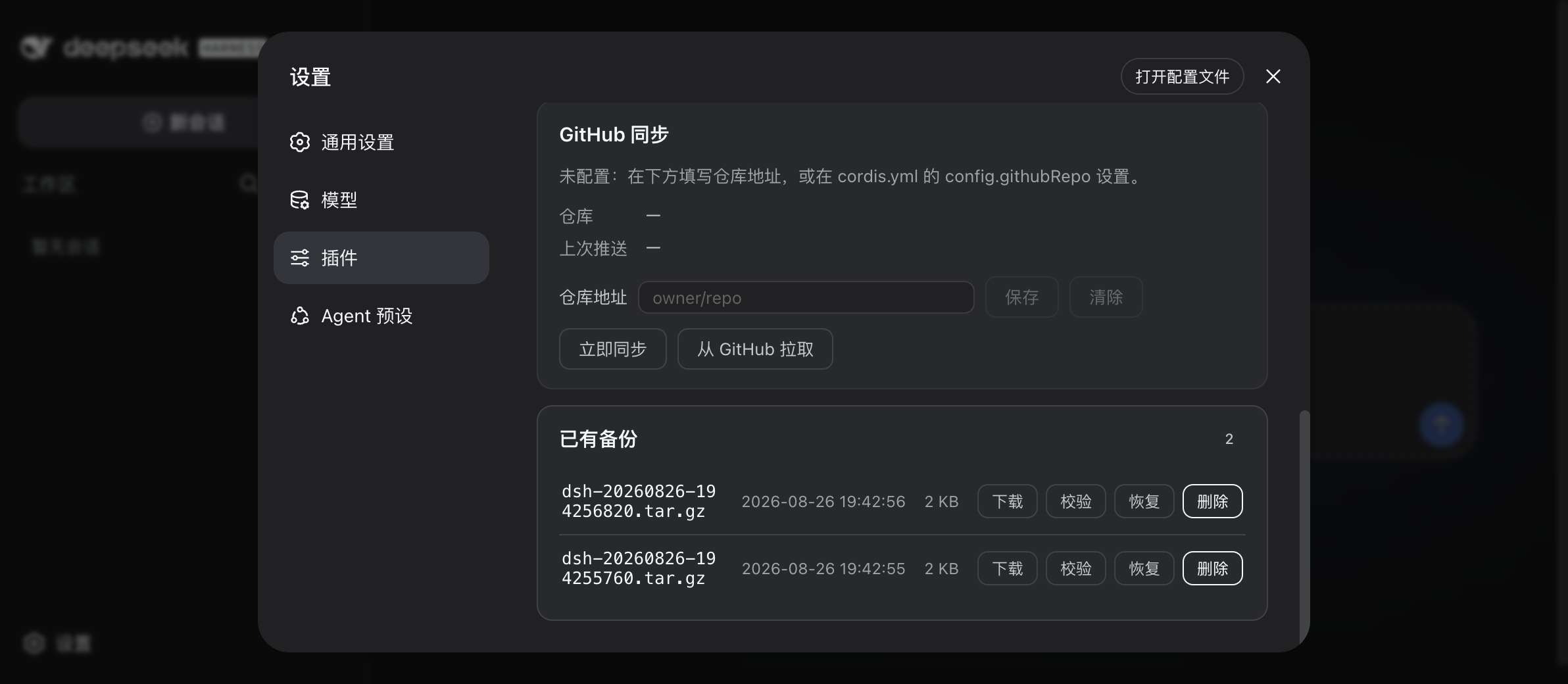
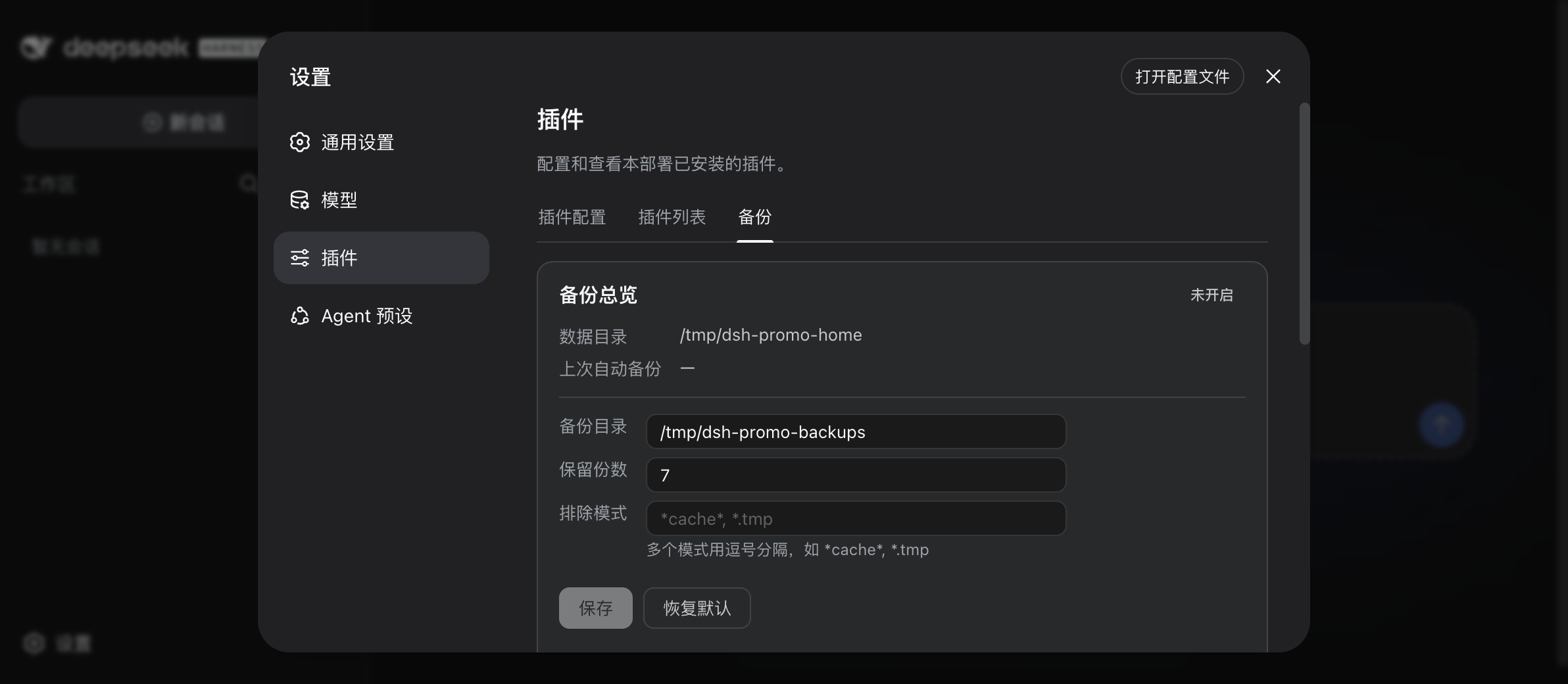
Prefer clicking? There's a visual panel in dsh web → Settings → Plugins → Backup: list, verify, restore, delete, edit settings — no restart.
Why you want this
| Fear | What dsh-backup does about it |
|---|---|
| "An upgrade broke my setup" | Auto-takes a dsh-pre-upgrade- snapshot the moment the host version changes — try the new release, roll back if it bites |
| "I deleted / broke something" | /backup restore latest --dry-run previews exactly what comes back; a failed restore auto-rolls-back and shows a result receipt |
| "DSH won't even boot anymore" | Every backup drops a zero-dependency rescue console (dsh-rescue / rescue.mjs, or double-click「点我恢复」) next to the archives — a web UI that restores outside of DSH |
| "My API keys will end up in a cloud backup" | Credentials are redacted from archives by default; plaintext only ever lives in a local vault on your machine |
| "My session logs got corrupted" | /backup doctor scans and repairs session logs from a known-good backup; corrupt files are quarantined before they rotate away |
| "Old sessions won't open after an upgrade" | /backup migrate-check statically predicts which sessions the new host will refuse (and under which rule) before you upgrade; the credential sentinel preserves pre-migration copies of legacy .credentials.yaml |
| "I got a new machine" | GitHub sync: /backup github pull fetches remote archives, restore --sync-deps reinstalls plugins |
| "Backups rot silently" | Every archive ships a sha256; /backup verify all checks integrity; daily/weekly tiered retention keeps useful history longer |
| "I'll forget to back up" | /backup auto 12 — every 12 hours, survives restarts, rotates old copies (default keep 7) |
Install
Requires macOS / Linux / Windows 10+ (ships tar) and DSH 0.1.1-rc.2+ (the 0.1.1 / 0.1.2 / 0.1.5 trains are all tested; verified up to 0.1.5-rc.2).
dsh plugin --profile web add @xiaoyuyu6420/dsh-backup
# or straight from GitHub:
dsh plugin --profile web add github:xiaoyuyu6420/dsh-backup
Restart dsh web afterwards — the plugin only takes effect after a restart.
The installer may print
✕ missing peer @deepseek-ai/...warnings. These are expected: the peer packages are provided by the DSH host at runtime. As long as the command ends withDone, the plugin is installed.
Quickstart
- Install (above) and restart
dsh web - Type
/backup - Done — the archive lands in
~/Desktop/dsh-backups/, timestamped, with a.sha256next to it
Want it on a schedule? /backup auto 12 (every 12 hours; off stops it, status checks it).
Command cheat sheet
| Task | Command |
|---|---|
| Back up now | /backup |
| Typed backup (selected types only) | /backup --types skills,sessions (types: credentials·mcp·skills·sessions·settings·profiles; --only works too) |
| Schedule (survives restarts) | /backup auto 12 · off · status |
| Restore (preview first) | /backup restore latest --dry-run |
| Restore for real | /backup restore latest |
| Typed restore (merge, other types untouched) | /backup restore <archive> --types skills |
| List backups | /backup list |
| Verify integrity | /backup verify [prefix|all] |
| Check & repair session logs | /backup doctor · --repair [prefix|latest] |
| Pre-upgrade migration precheck | /backup migrate-check |
| Rescue when DSH won't boot | double-click「点我恢复」in the backup dir, or dsh-rescue / node rescue.mjs |
| Delete / retention | /backup delete <prefix|latest> · /backup --keep N (default 7) |
Typed backup
Only need certain kinds of data? Use --types (or --only) to operate on a subset. Available types: credentials (API keys), mcp (MCP config), skills, sessions, settings, profiles.
- Back up:
/backup --types skills,sessionscreates adsh-t-subset archive; rotation is tracked separately from full backups - Restore:
/backup restore <archive> --types skillsmerges only skills back into your existing~/.dsh(preview with--dry-run; overwritten files are kept aside as.pre-merge-*). Everything else stays untouched. - Credentials caveat:
--types credentialsputs API keys into the archive in plaintext (full backups redact them). Such archives never go to GitHub sync — keep them local or copy them to a new machine yourself. - Guardrail: restoring a typed archive without
--typesis rejected (prevents accidental data loss); the rescue channel likewise won't list or fully restore them. - The Settings panel supports this too: check types under the backup button; typed archives get their own section.
New machine
Prerequisite: GitHub sync was configured on the old one (setup, Chinese).
- Install the plugin, set the same
githubRepo /backup github pull— fetch the remote backups/backup restore latest --sync-deps— restore and reinstall plugin dependencies- Restart
dsh
FAQ
Are my API keys / credentials inside the archive? No. Known credential files are redacted before archiving; the plaintext stays in a local vault that never leaves the machine. Restoring puts them back.
What exactly gets backed up?
Everything under ~/.dsh — sessions, settings, skills, plugin config — minus your exclude patterns and node_modules.
I messed up ~/.dsh and now dsh won't start. Am I out of options?
No — that's exactly what the rescue channel is for. Every backup writes rescue.mjs and a double-clickable launcher (点我恢复.command / .bat / .sh) into the backup directory. It runs on plain Node, no DSH required, and serves a local web UI to browse and restore archives.
Old sessions refuse to open after a host upgrade — what now?
Don't keep clicking them. Run /backup migrate-check: it statically scans all session logs and tells you which sessions the new host will refuse and under which rule (legacy subagent descriptor versions, plugin-injected historical events, ...), plus whether your filesystem supports hardlink publishing. Take a /backup snapshot before upgrading; broken sessions can be repaired from an earlier archive with /backup doctor --repair.
Windows support?
Yes — Windows 10+ with the bundled tar. The rescue launcher becomes a .bat file.
Where do backups go by default?
~/Desktop/dsh-backups/ — change it any time in the panel (Settings → Plugins → Backup) or via settings; takes effect immediately, no restart.
Feedback
Tried it? Tell us what broke, what's missing, what you liked — it directly shapes the roadmap:
What's new
- 0.13.1 — Two panel fixes, both from user reports: ① the panel tab silently disappears on host 0.1.6+ (#94, @jackovibe): since 0.1.6 the host requires a
create()lazy factory on strict codecs in client Remote contributions (older hosts only readschema); without it$mountthrows during validation with only a console log, so the tab is never registered. Fix:strictCodec()now provides bothschemaandcreate()sharing one zod instance;$mountwaits declaratively for theremoteservice (0.1.6 settles client modules by dependency graph); and a newBackupTabFallbackdegraded tab shows a visible hint plus command pointers if the mount ever fails — no more silent disappearance. peers/engines gain^0.1.6-alpha.1 || ^0.1.7-alpha.1(verified on real hosts 0.1.6-alpha.2 / 0.1.7-alpha.2 / 0.1.7-rc.1 / 0.1.7-rc.2). ② the "GitHub Token" save button errored (#97, @CheeseTJ): the clientpanelproxy never re-exportedsetGithubToken(that RPC landed in the host half in 0.12.0 and the omission lay dormant while no UI called it). Fix: wire it up, plus a new smoke-client assertion that the panel surface must mirror the contribution descriptors one-for-one. - 0.13.0 — Update awareness + one-command self-update: ①
/backup check-updateand a new "Plugin updates" card in the panel — checks the npm registry for a newer version (8s timeout, degrades silently offline, never blocks the plugin); when a newer version exists an "Update to x.y.z" button appears; theupdateChecksetting (default off) silently checks on panel open. ②/backup update [--profile <name>]— takes adsh-pre-upgrade-snapshot automatically before updating (roll back with/backup restore), then runs the officialdsh plugin --profile <name> update(pnpm semantics; the plugin never rewrites its own dependency files), and tells you to restart dsh web afterwards. Note: the host settles the plugin Loader tree at startup and plugins are pnpm dependencies of the profile, so true hot-swap (no restart) is not possible in the current host architecture — one-command update + restart is the best form it can take. - 0.12.2 — Fix a Windows data-safety hazard (#88, thanks @Liuyeyuyangy0 for the outstanding report): when
DSH_HOMEsits directly under a drive root (e.g.D:\dsh_data), the string-slice parent computation degrades to the bare drive letterD:, andtar -C D:fails on both bsdtar and GNU tar — worse, tar creates the-ftarget before writing, leaving a 29-byte empty shell that the panel lists as a normal backup (no.sha256/.meta.json; silently zero usable backups, and the restore / doctor repair / rescue channels are hit by the same bug). All 7 tar-Ccall sites (backup, typed & full restore, doctor point-repair, rescue snapshot/restore/repair) now receive a separator-completed parent;paths()normalizes trailing slashes offDSH_HOMElikeHOME(a trailing slash used to empty the tar positional and produce 0-byte archives); failed tar runs now delete the empty shell before rethrowing, so failures are visible. Smoke gains scenario 28 (four path-layout assertions + a trailing-slash real-backup e2e). Archive format, settings and RPC unchanged. - 0.12.1 — Fix client bundle leaking top-level
var module/var exportsas globals (#85, thanks @geyonder): the CJS shim now lives inside the__ModuleLoader__.loadfactory body instead of creatingwindow.module, which made Monaco's AMD loader (dsh-vscode-mode and friends) misdetect a Node environment and break sibling plugins on the same page. Client smoke suite gains a classic-script global-leak regression assertion (vm.runInContext). Client-half only; node-side behavior and archive format unchanged. - 0.12.0 — Migration safety net, round one, aimed at the community-wide "old sessions won't open after upgrade" wave (#6151/#6297/#6355): 1)
/backup migrate-checkstatically scans all session logs (v0/v1/v2/v3) before you upgrade and predicts which sessions will refuse to open and under which rule (descriptor v2, permission/preset origin, event types outside the frozen lists, custom source kinds, seq drift, filename/generation mismatch — rules baked from host 0.1.5-rc.2, with the coverage boundary stated in every report), plus a filesystem hardlink probe (the exFAT publish-failure scenario from #6358); 2) a credential sentinel — the legacy flat-layout.credentials.yamlgets atomically replaced by the host with an irreversible versioned form, so on detection it is preserved into the vault before the host touches it. 3) configure the GitHub sync token right in the Settings panel (or/backup github token <token>) — stored locally asgithub.token(0600) in the backup directory, never archived or synced, taking precedence over environment variables; re-enter after cross-machine restore. Also:engines.dshdeclaration (read by plugin-market compatibility cards). - 0.11.3 — Follow the dsh
0.1.5train: peerDependencies now include^0.1.5-rc.1(0.11.2 raised peer warnings on 0.1.5 hosts). Verified against host0.1.5-rc.2: real-host e2e 32/32; all six node-side peer packages are byte-identical between rc.1 and rc.2 (tarball diff) and the client train hasn't moved — zero adaptation surface this time; a cross-train in-place upgrade e2e (rc.1 host + 0.11.2 → rc.2 host + 0.11.3) passed 14/14 with settings and archives intact. Also fixed a latent bug in the upgrade e2e itself: the expected new version is now derived from the tarball instead of hardcoded. - 0.11.2 — doctor line-level SessionHeader validation aligned with the host
isHeaderLine(closes the known gap from 0.11.0):version/createdAt/delegationDepthtype + non-negative-safe-integer checks (including-0rejection), optionalseedLength/origin/agentPresetbranches, and retiredsandboxMode/approvalPolicyfields the host reader rejects — headers the host refuses to load are now flagged instead of reported healthy. Verified field-by-field against the compiled host source (both trains; the rc.1 checker is the strict superset) with an independent review verdict of ALIGN; 11 bad-header negative samples + repair round-trip added to the suite. - 0.11.1 — dsh
0.1.2-rc.1compatibility: adapts to the removal ofsettingsNamespacefrom@deepseek-ai/dsh-settings(settings now register under the plaindsh-backupnamespace — value-identical, so existing settings, backups and archives survive an in-place update), works behind the new forced web auth (303 + HttpOnly cookie), and widens peer ranges to^0.1.1-rc.2 || ^0.1.2-rc.1. Verified on both trains with real-host e2e (32/32 each) plus an in-place 0.11.0 → 0.11.1 upgrade test (settings preserved, old archives restorable). - 0.11.0 — doctor container-contract check: the first zstd frame must decode to exactly one header line, byte-precise (non-empty, first newline at the last byte — aligned with the host reader). Single-frame rewrites, stray blank lines in the first frame, a missing trailing newline and skippable frames are now flagged corrupt (previously reported healthy while the host refused to load them); the rescue console checks in sync. Found via a community audit on deepseek-harness #1047.
- 0.10.0 — typed backups: back up just what you need (
/backup --types skills,sessions) and merge-restore a subset (/backup restore <archive> --types skills); per-type archives rotate in their own bucket. Credential-type archives stay out of GitHub sync; cross-machine guardrails unchanged. - 0.9.1 — feedback entry point in the panel; README overhaul. UX hardening from a six-agent review: restore-confirm button made visible again (missing theme fallback), snapshot self-deletion during snapshot-restore fixed, node discovery for the double-click rescue launcher, friendlier error messages with concrete next steps.
- 0.9.0 —
/backup doctorsession-log health check with targeted repair; out-of-process rescue channel (dsh-rescue/ launcher in the backup dir) that works even when the host won't boot; restore auto-rollback with a result-oriented receipt; smart backup: pre-upgrade snapshots on host train changes, quarantine of corrupt session logs before they rotate away, tiered daily/weekly retention. - 0.8.0 — edit backup settings right in the panel (destination, retention, exclude patterns), saved instantly to
settings.yaml, no restart; stale edits get a conflict warning instead of silent overwrite. - 0.7.x — credential redaction with a local vault; cross-machine restore.
More
Retention policy, credential redaction internals, GitHub sync, restore safeguards, config reference, troubleshooting, and development notes — in the advanced guide (Chinese). Cross-runtime compatibility notes: compatibility.md.
Acknowledgements
- @beastrobin — the reserved-method-name root cause analysis in #1 that directly led to the v0.5.1 fix
- @mlosun — the thorough reproduction and root cause report in #2
- @Choi-Peng — triage help pointing affected users to the fix in #5
Support this project
If dsh-backup has been useful: ⭐ a star is the simplest way to say thanks — and it helps other DSH users find it. Questions or ideas? Drop them in the feedback thread.
License
MIT
Links
More in this category
yjh051108/dsh-routing-suite★ 7000
One repository, three parts: a runtime injector for DSH plugin packages (inject, hot-reload, unload, promote a dev staging tool to the front, route self-heal, plus a settings-page plugin manager that lists, unloads and drags folders in to internalize), a task-aware reasoning-mode router agent preset (router-standard / router-spec / router-react), and a graded two-level task protocol whose six tools (commit_star, lock_stage, revise_do, edit_plan, mark_task, redteam_verdict) pin task state to disk. The injector implementation ships in-tree, so the install carries its own behaviour rather than a dependency list.
strukto-ai/mirage#dsh★ 3663
Swaps the filesystem and bash providers for a mirage virtual workspace: file tools and shell commands run over mounted resources (RAM, S3, Redis, Slack, Gmail, Notion, Postgres) instead of the host disk, with per-mount read/write/exec modes, per-command sandbox routing (monty, pyodide, quickjs in process; docker, e2b, daytona remote), and installed CLIs (git, gh, slack, linear, ntn, gws, or one you register) as head words in the virtual terminal.
hust-open-atom-club/oh-dsh★ 325
Community distribution: TUI, desktop, and Web UI as one bundle with layered installation.
weijiafu14/pi2dsh★ 206
Pi Host ABI compatibility engine: after one install, unmodified Pi extensions from npm mount as native DSH plugins with `dsh plugin add <pi-package>`. Verified end to end on stock DSH with pi-mcp-adapter (full MCP manager: OAuth, resources, prompts, MCP Apps, elicitation, sampling), @tintinweb/pi-subagents, pi-code, pi-hermes-memory and pi-background-tasks; `pi2dsh inspect` reports a package's compatibility before installing.
lire1131/dsh-undo-savepoint★ 165
Undo/redo & rollback system for DSH: every config change is auto-snapshotted; undo/redo/restore to any version from the WebUI or the offline CLI/GUI tools (works even when DSH fails to boot).
Fishquito7/dsh-skill-mcp-panel★ 152
Manages DSH skills and MCP servers from the web settings: skill cards with hot enable/disable, workspace scopes, groups, batch migration and drag-and-drop import, plus stdio/HTTP MCP CRUD with connection tests, secret redaction and the unified dsh-panel CLI.
Community comments
Comments are public GitHub Discussions. Loading them connects to GitHub and Giscus; a GitHub account is required to post.