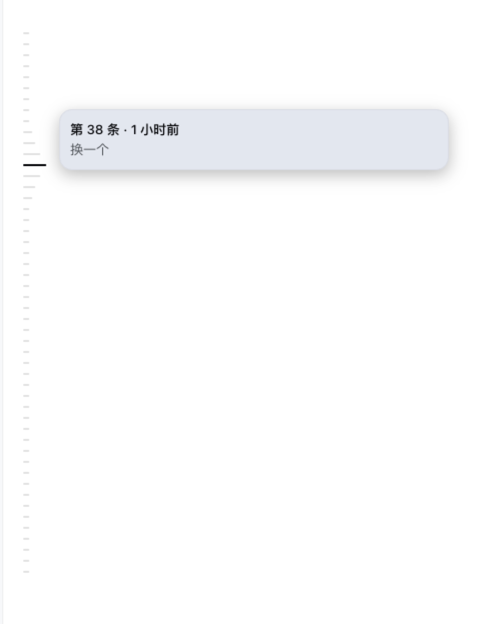
Codex-style left-side message navigation rail for the Web UI: one tick per user message, hover previews, and click-to-jump across the whole history.
Install
# from npm (prebuilt)
dsh plugin --profile web add dsh-message-rail
# from GitHub (first run asks for allowBuilds approval — follow the hint, retry)
dsh plugin --profile web add github:wx-yss/dsh-message-rail
Any plugin you install runs third-party code with your own permissions — it can read your files, use your credentials, and reach the network, and tool approvals don’t sandbox it. GitHub-sourced plugins also run build scripts at install time — pnpm blocks those until you allow them, so an install can stop with ERR_PNPM_GIT_DEP_PREPARE_NOT_ALLOWED or ERR_PNPM_IGNORED_BUILDS; dsh prints the exact key to add under allowBuilds in your profile’s pnpm-workspace.yaml, and the install works on the next run. Allowing a build is a trust decision: only install sources you trust, and pin a commit (github:owner/repo#sha).
README
This plugin publishes its README in Chinese only.
Codex 风格左侧消息导航轨道 —— 在 DeepSeek Harness Web UI 的长会话里快速定位历史提问。
Left-side message navigation rail for the DeepSeek Harness Web UI: jump to any past user message in long sessions, Codex-style.
交互灵感来自 Codex 的消息导航栏(inspired by Codex's message rail)。本插件与 OpenAI 无关联。
效果预览
会话左侧的消息导航轨道(悬停刻度显示预览卡,点击跳转到对应消息):
功能
- 等距刻度轨道:会话左侧一条 42px 轨道,每条用户消息一个刻度(固定 10px 间距);轨道默认高度 500px(约 50 条),屏幕不足时撑满
- 对话视图专用:仅在对话消息流挂载时显示刻度;切到轨迹页立即隐藏,切回对话页自动恢复
- 悬停预览:从默认刻度到悬停中心按 Codex 的五级宽度展开(6/10/14/20/26px),右侧浮出预览卡(序号 + 相对时间 + 消息文本)
- 点击跳转:目标已在视口时只高亮消息气泡,否则瞬时定位;普通消息居中,超高消息顶部留白;目标尚未进入右侧窗口时才逐页加载,找到后立即停止
- 独立全量索引:通过 DSH history API 在后台提取用户消息刻度,不把助手回复、工具调用和历史消息写入右侧 ChatView
- 轨道虚拟滚动:无论索引多少刻度,都只渲染最多 50 条的可见窗口 ±12 条缓冲;首尾还有更多刻度时以 40px 渐隐提示
- 稳定切换:索引期间先显示右侧已经加载的刻度,不发布中间分页;完整索引完成后一次性切换,避免刻度持续重排闪动
- 按需分页:点击未加载刻度时保护右侧当前阅读锚点,逐页寻找目标;后一次点击可取代前一次跳转,并立即清除旧消息高亮
- 加载反馈:根据刻度所在 history 分页预估剩余页数;预计超过 1 秒时立即提示,预估较快但实际超时则在 1 秒后补充提示,目标组件就绪后关闭
- 当前位置:视口 40% 线最近的消息刻度深色高亮,滚动即知读到哪
- 智能滚动:轨道钉在最新刻度,手动滚动后停止跟随;隐藏滚动条、滚轮可用
- 细节:少于 2 条用户消息自动隐藏;明暗主题自适应;
prefers-reduced-motion降级;键盘可悬停(focus 等价 hover)
兼容性
- DeepSeek Harness
>=0.1.0-rc.7;manifest 已对官方最新三个发行版逐项声明兼容 - Node.js
>=22.13.0 - 系统:macOS、Linux、Windows
- Profile:
web - 浏览器:Chrome / Edge / Safari / Firefox 最新版
安装
插件通过 DeepSeek Harness 的 dsh 命令安装。下面每个命令都给出两种等价写法:
- dsh 形式:适用于已全局安装 dsh(
npm install -g @deepseek-ai/dsh) - npx 形式:无需安装 dsh,临时调用,效果相同——推荐(dsh 尚在快速迭代,全局安装非必需)
从 npm 安装(推荐,免构建授权)
# dsh 形式
dsh plugin --profile web add dsh-message-rail

# npx 形式(无需安装 dsh)
npx @deepseek-ai/dsh plugin --profile web add dsh-message-rail
从 GitHub 安装
# dsh 形式
dsh plugin --profile web add github:wx-yss/dsh-message-rail

# npx 形式
npx @deepseek-ai/dsh plugin --profile web add github:wx-yss/dsh-message-rail
本地开发安装
git clone git@github.com:wx-yss/dsh-message-rail.git
cd dsh-message-rail
pnpm install
npx @deepseek-ai/dsh plugin --profile web add .
重启
安装后完整重启 dsh web:
# dsh 形式
dsh web

# npx 形式
npx @deepseek-ai/dsh web
使用
打开包含至少两条用户消息的会话,左侧即出现导航轨道:
- 悬停刻度 → 波纹展开 + 预览卡(序号 / 时间 / 文本)
- 点击刻度 → 跳转到对应消息
- 滚轮在轨道上滚动 → 浏览更早/更晚的刻度
- 滚动会话 → 当前位置刻度高亮
已知限制
- 后台索引通过独立 history API 每页读取 50 个表层消息边界;响应仍可能携带所属的 chunk、工具事件等原始记录,但不会进入右侧聊天状态或 DOM
- 索引页数上限为 400(约 2 万个表层消息);超过上限时保留右侧当前已加载刻度,不展示不完整的全量索引
- 点击非常早的刻度时,DSH 的
loadOlder()仍会把中间页面逐步加入右侧且不会自动卸载;这属于 DSH 聊天列表当前的累积渲染限制 - 剩余时间只估算历史分页和目标组件准备,不包含后续目标定位;当前按固定准备约 0.2 秒、每页约 0.45 秒校准,属于体验预估而非完成时间承诺
- 轨道索引用户消息(
kind === 'user'普通提问 与kind === 'steering'运行中插话),不包含助手回复、工具调用、命令与注入上下文(kind === 'context') - 轨道配色跟随 DSH 运行时主题(
--dsw-*设计令牌),不支持独立于 DSH 的配色偏好 - 轨道刻度为虚拟窗口渲染,键盘 Tab 可达(focus 等价悬停);DOM 锚点(
data-chat-anchor-key/data-conversation-scroll/data-chat-flow/data-time-hover-root/data-slot="conversation.view")为 DSH 内部契约,随 DSH 版本可能变化
文件结构
├── package.json         # dsh.client(Web 插件)+ dsh.bundle(profile patch)声明
├── cordis.patch.yml     # bundle patch:插入插件行
├── lib/
│   ├── index.js         # Host 半部:空 apply 占位
│   └── client.js        # Client 半部:独立索引 + 轨道 UI + 按需分页跳转
├── assets/              # README 效果截图
├── LICENSE              # MIT
└── README.md
实现要点
- 挂载:
shell.overlay声明会话级子 seatmessage-rail.rail(SessionProvider桥接,每会话一个实例) - 数据:当前窗口读取
useSession的chat.order+chat.nodes;完整刻度通过connection.api.sessions.history()(子 Agent 使用subagents.history())独立建立 - 索引:直接保留
surfaceOp === 'append'且source.kind === 'user'的user/message记录及其messageId、seq、时间和预览文本;中间分页不进入 React 状态 - 跳转加载:按
messageId判断目标是否已进入右侧;未加载时才调用session.loadOlder(),每页保护可见消息锚点并在命中目标后停止 - 进度:索引记录每条用户消息距最新页的
historyPage;结合右侧已加载深度估算剩余页数,预计超过一秒时立即显示,否则实际等待超过一秒再提示;目标组件就绪后立即关闭,下一帧再定位 - 跳转:
[data-conversation-scroll]+[data-chat-anchor-key]DOM 锚点;目标已可见时只描边闪烁,否则直接写入scrollTop瞬时定位,并在两帧内按最新容器几何有界校正 - 虚拟窗口:
floor(scrollTop / 10) - 12到ceil((scrollTop + 高度) / 10) + 12,绝对定位刻度
License
MIT
Links
More in this category
zhu1090093659/dsh-web#packages/dsh-task-board★ 8178
Task board for the dsh web GUI: a sidebar multi-column kanban whose cards run in real DSH agent sessions and can also be scheduled with cron expressions, executed host-side even with the browser closed.
zhu1090093659/dsh-web#packages/dsh-web-all★ 8178
Plugin and skin collection for the DSH Web UI: task board, Git graph, right-side panel, remote mobile UI, pet, live token stats, and a skin center.
omdsh-dev/DSH-better-sidebar★ 3903
Full sidebar workbench with file rendering and editing, terminal, Git, and subagents; third-party plugins can register new tabs.
ccch1mneyyy/dsh-TUI★ 3815
Claude Code-style full-screen terminal UI: pixel-whale header, live status line, and streaming thought expansion.
MeteorNOX/DeepSeek-Balance-Whale-Widget★ 3514
A fixed-corner whale widget for the DSH web GUI — balance, today's usage and per-turn cost with peak/off-peak pricing, editable balance-alert and daily-budget bubbles, a module-based custom bubble queue with A/B weighted choices and random lines or images, 30+ vendor templates (OpenAI, OpenRouter, Kimi, SiliconFlow, Ark, Zhipu, MiniMax and more) with per-model balance and subscription quota, plus task-end sound, imported audio, custom roles and a resource manager. Local-only, no telemetry.
Devin-AXIS/deepseek-design#deepseek-idesign★ 1711
Visual design studio for websites, app prototypes, posters, cards, reports, and magazines, with templates, direct element editing, selection-aware AI draft handoff, and export.
Community comments
Comments are public GitHub Discussions. Loading them connects to GitHub and Giscus; a GitHub account is required to post.