Drag-and-drop / paste / upload files and images; on non-multimodal models images are auto-described by a configured VLM.
Install
# from npm (prebuilt)
dsh plugin --profile web add @wszhoho/dsh-file-attachment
# from GitHub (first run asks for allowBuilds approval — follow the hint, retry)
dsh plugin --profile web add github:wszhoho/dsh-file-attachment
Any plugin you install runs third-party code with your own permissions — it can read your files, use your credentials, and reach the network, and tool approvals don’t sandbox it. GitHub-sourced plugins also run build scripts at install time — pnpm blocks those until you allow them, so an install can stop with ERR_PNPM_GIT_DEP_PREPARE_NOT_ALLOWED or ERR_PNPM_IGNORED_BUILDS; dsh prints the exact key to add under allowBuilds in your profile’s pnpm-workspace.yaml, and the install works on the next run. Allowing a build is a trust decision: only install sources you trust, and pin a commit (github:owner/repo#sha).
README
This plugin publishes its README in Chinese only.
文件附件插件 for DeepSeek Harness (DSH) Web GUI:拖拽 /
Ctrl+V粘贴 / 📎 按钮上传文件或图片,输入框内联缩略图,聊天区可点击放大,自动插入@绝对路径引用;非多模态模型可配置 VLM 生成图片描述。File attachment plugin for DSH web GUI: drag, paste, or upload files and images from the composer; inline thumbnails, clickable previews,
@absolute-pathreferences, and optional VLM-generated image descriptions.
Quick start
dsh plugin --profile web add @wszhoho/dsh-file-attachment
安装后重启 web GUI 即生效。
核心能力
- 三种入口:拖入、
Ctrl+V粘贴、接管 dsh 原生 📎 附件按钮(加号右侧、modes 左侧,可多选);PC 与移动端浏览器均适用。 - 统一落盘管线:图片与文档同走一条链路,保存到
<会话工作区>/.dsh-file-attachment/<日期>/<文件名>;同名冲突追加-N绝不覆盖;单文件上限 50MB。 @绝对路径引用:落盘后在光标处插入 chip,文本模型也能「看懂」附件。- 预览:输入框内联附件条——图片为缩略图、文档为类型图标 + 文件名,条目可移除并同步清除对应引用,发送后自动清空;聊天区图片渲染为可点击放大的缩略图(Lightbox),文件保持芯片样式。
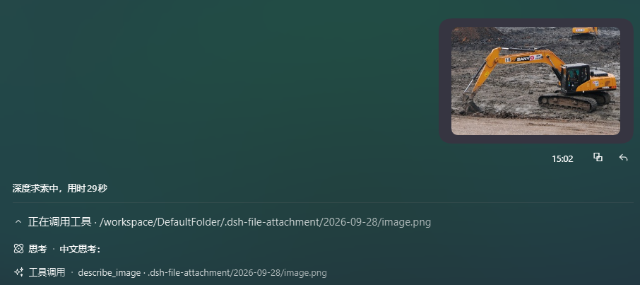
- VLM 识别:当前会话模型不支持多模态时,自动调用 OpenAI 兼容接口生成中文图片描述回填草稿(仅注入模型上下文,不进对话界面);agent 也可主动调用
describe_image工具识别已落盘图片(含历史消息中的@图片引用)。
界面
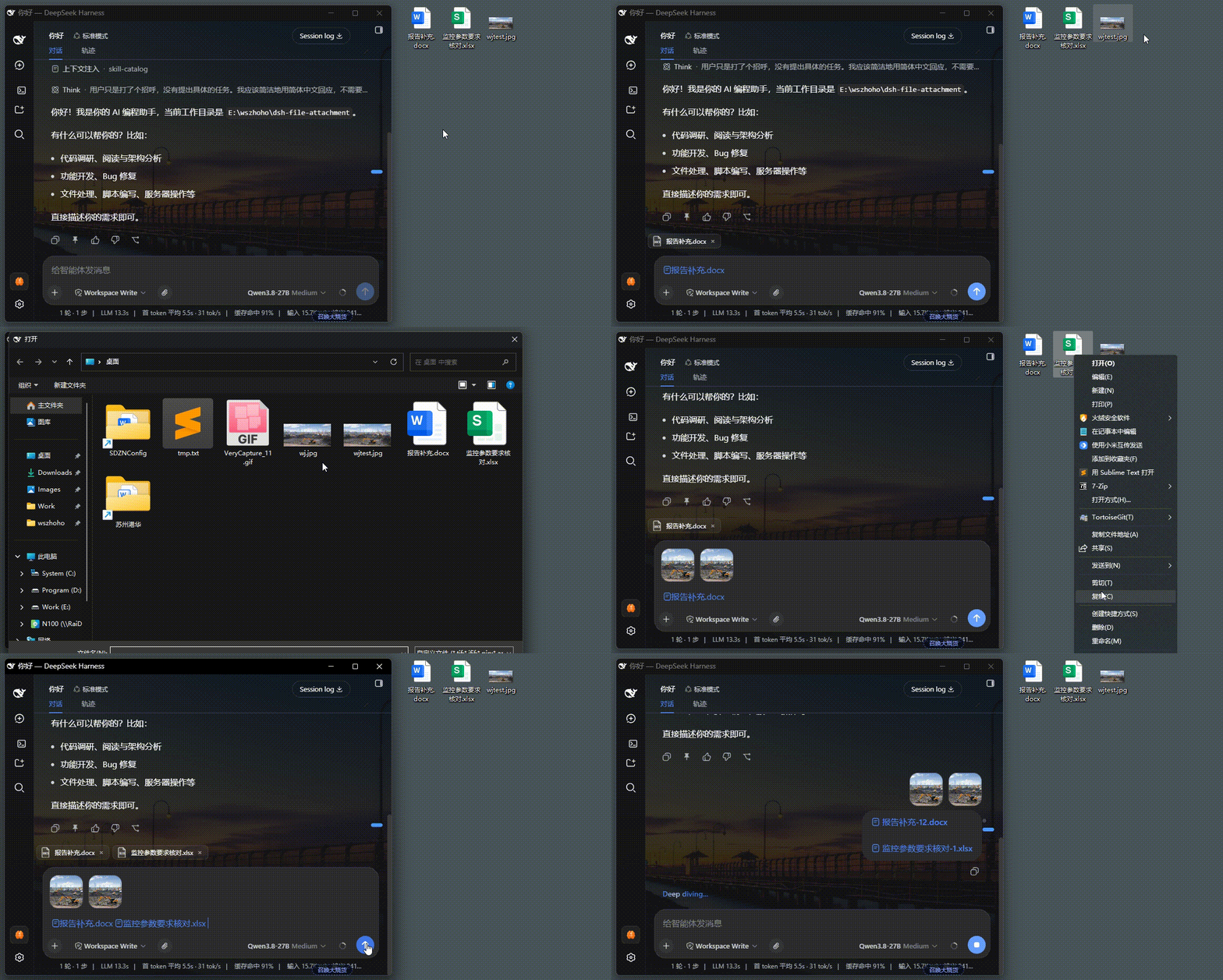
演示:拖入/粘贴 → 落盘并插入 @ 引用 → 输入框内联附件条待发送状态。
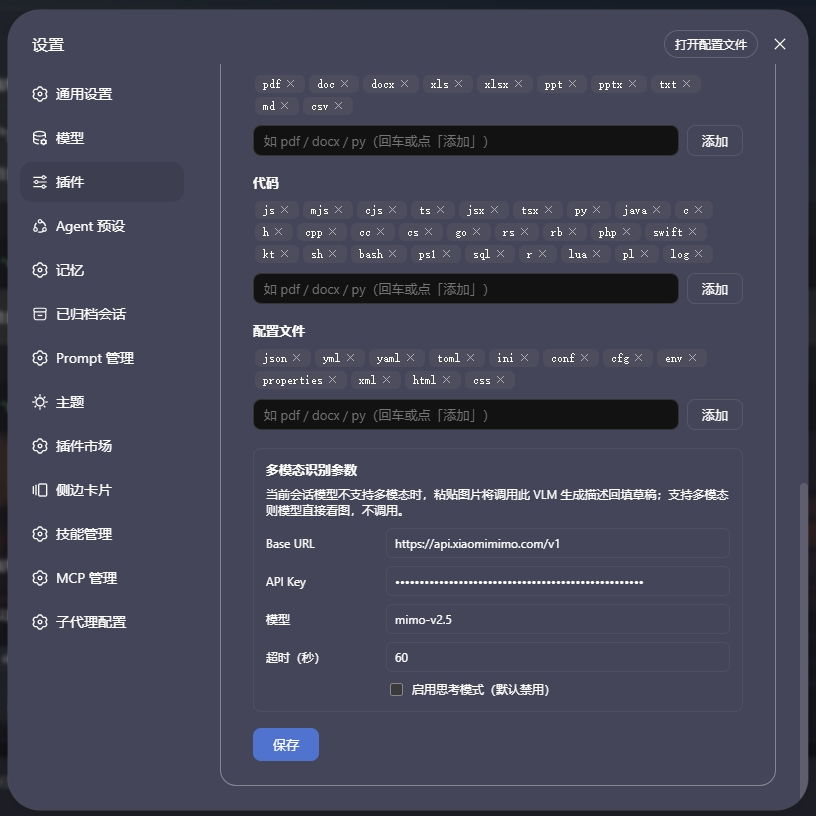
设置页(「设置 → 文件附件」):可上传类型按文档 / 代码 / 配置文件三类增删扩展名(小写不带点,图片恒可发送);VLM 参数 Base URL / API Key / 模型 / 思考模式开关(默认禁用)/ 超时时间(默认 60 秒),未填 API Key 时静默跳过。
行为一览
| 操作 | 行为 |
|---|---|
| 📎 按钮多选 / 拖入 / 粘贴文档、代码、配置文件 | 读全文 → base64 → 落盘 → 光标一次性插入全部 @ 引用;成功不提示,失败简短 toast |
| 一次多个文件 | 批量处理,一次性插入全部引用;部分失败仅提示「N 个已跳过」 |
| 拖入 / 粘贴图片 | 同一管线落盘 + 插引用;附件条缩略图预览,聊天区可点击放大 |
| 当前模型不支持多模态 | 自动调 VLM 生成中文描述回填草稿;agent 可用 describe_image 工具 |
| 拖入目录 | 拒绝,toast 提示「不支持拖入目录」 |
| 粘贴纯文本 | 不改写,完全原生行为 |
| 重复拖入同名文件(同一天内) | 追加 -1、-2 序号,绝不覆盖 |
点附件条 × 移除 |
移除条目并清除该文件路径的全部 @ 引用 chip,其他文件不受影响 |
| 单文件 > 50MB | 跳过并提示 |
存储细节
- 命名:
.dsh-file-attachment/YYYY-MM-DD/<清洗后文件名>(如.dsh-file-attachment/2026-02-11/说明.docx),同日同名在扩展名前追加-N。 - 根目录 = 当前会话工作区(回退顺序:
session.header.cwd→sandboxPolicy.workspaceRoot→process.cwd()),每个项目各自维护自己的.dsh-file-attachment/。 - 跨平台:保存路径用
path.join自适应分隔符;文件名清洗对 Windows / POSIX 均安全;Host 半经node:fs/promises直接写字节,无 shell 依赖。
安装
本仓库是标准 dsh 插件包(声明了 dsh.bundle.patch),已发布 npm 包 @wszhoho/dsh-file-attachment。dsh plugin add 的参数会转发给 profile 目录的 pnpm 执行,三种来源任选其一:
# 从 npm 安装(普通用户推荐)
dsh plugin --profile web add @wszhoho/dsh-file-attachment

# 本地源码安装(开发用,边改边验;相对路径等价 pnpm link,改完 lib/*.js 后重启 GUI 即生效)
cd <parent>
dsh plugin --profile web add ./dsh-file-attachment

# 从 GitHub 安装
dsh plugin --profile web add github:wszhoho/dsh-file-attachment
无论哪种来源,安装后都自动进入 profile 的 dsh.profile.bundles,无需手改 profile package.json;升级:dsh plugin --profile web update dsh-file-attachment。
架构
├── package.json          # dsh.client 声明 + bundle patch 指向
├── cordis.patch.yml      # bundle 补丁:插入本插件行
└── lib/
    ├── index.js          # Host 半:webServer 路由(/save /config /describe)+ describe_image 工具
    └── client.js         # Client 半:document 级 capture drop/paste 监听 + 📎 按钮接管 + 槽组件
- Host 半:前缀路由
/dsh-file-attachment——POST/save(base64 解码后用node:fs/promises写盘)、GET/POST/config(读写可上传类型与 VLM 配置)、POST/describe(调 VLM 返回中文描述与思考模式配置);另经tools.register注册describe_image工具。响应信封{ ok, value | error }。 - Client 半:shadow 原生附件条(
conversation.input.attachments)实现内联附件条;shadow 用户消息渲染器(conversation.chat.nodekeyeduser)把聊天区@图片路径渲染为缩略图(经宿主/api/file?path=读取落盘图片);capture 阶段拦截原生fileInputchange 事件接管 📎 按钮,文件进入插件统一管线;纯文本粘贴完全原生不改写。 - 通知与浮层:
shell.overlayframe-wide 浮动 toast(不参与文档流,4 秒自动消失);拖入任何文件时 capture 阶段拦截应用自带的图片 DropOverlay(其文案对文档是误导)。
开发说明
lib/*.js、package.json、cordis.patch.yml、README.md均为 UTF-8 无 BOM,编辑时保持原编码。- 纯 ESM 无构建,不依赖装饰器 / 远程反射。
- VLM 请求按 MiMo 官方格式发送
thinking: { type: "enabled"|"disabled" }(扁平thinkingType会被 API 忽略;mimo-v2.5 默认开启深度思考导致识别极慢——实测 206 秒 vs 关闭后 22~73 秒);超时后明确报错中止而非挂死会话;未填 API Key 时识别静默跳过,不影响落盘。 - 50MB 上限两侧一致(client 跳过 + host 校验)。
Star
如果这个插件帮到了你,欢迎到 GitHub 仓库 点个 ⭐ Star,感谢支持!
English
dsh-file-attachment is a DeepSeek Harness (DSH) web GUI plugin for attaching files and images to the chat composer via drag-and-drop, paste, or the native DSH paperclip button.
Key capabilities: unified storage pipeline under .dsh-file-attachment/; @absolute-path references so text-only models can use attachments; inline attachment previews plus clickable chat thumbnails with a lightbox; multi-file upload with same-name conflict handling and a 50MB guard; optional OpenAI-compatible VLM descriptions for non-multimodal models; works on desktop and mobile browsers.
Install:
dsh plugin --profile web add @wszhoho/dsh-file-attachment
For detailed behavior, settings, architecture, and development notes, see the Chinese documentation above.
License
MIT
Links
More in this category
zhu1090093659/dsh-web#packages/dsh-task-board★ 8978
Task board for the dsh web GUI: a sidebar multi-column kanban whose cards run in real DSH agent sessions and can also be scheduled with cron expressions, executed host-side even with the browser closed.
zhu1090093659/dsh-web#packages/dsh-web-all★ 8978
Plugin and skin collection for the DSH Web UI: task board, Git graph, right-side panel, remote mobile UI, pet, live token stats, and a skin center.
MeteorNOX/DeepSeek-Balance-Whale-Widget★ 5292
A fixed-corner whale widget for the DSH web GUI — balance, today's usage and per-turn cost with peak/off-peak pricing, editable balance-alert and daily-budget bubbles, a module-based custom bubble queue with A/B weighted choices and random lines or images, 30+ vendor templates (OpenAI, OpenRouter, Kimi, SiliconFlow, Ark, Zhipu, MiniMax and more) with per-model balance and subscription quota, plus task-end sound, imported audio, custom roles and a resource manager. Local-only, no telemetry.
ccch1mneyyy/dsh-TUI★ 4819
Claude Code-style full-screen terminal UI: pixel-whale header, live status line, and streaming thought expansion.
omdsh-dev/DSH-better-sidebar★ 4290
Full sidebar workbench with file rendering and editing, terminal, Git, and subagents; third-party plugins can register new tabs.
Devin-AXIS/deepseek-design#deepseek-idesign★ 1478
Visual design studio for websites, app prototypes, posters, cards, reports, and magazines, with templates, direct element editing, selection-aware AI draft handoff, and export.
Community comments
Comments are public GitHub Discussions. Loading them connects to GitHub and Giscus; a GitHub account is required to post.