Fifteen curated theme families with complete light and dark palettes that follow the native Light, Dark, and Follow system modes.
Install
# from GitHub (first run asks for allowBuilds approval — follow the hint, retry)
dsh plugin --profile web add github:wsxwj123/dsh-plugins#path:/packages/theme-gallery
GitHub-sourced plugins run build scripts on your machine at install time. Only install sources you trust, and pin a commit (github:owner/repo#sha).
README
A fast, curated Client Cordis theme gallery for the DeepSeek Harness Web GUI.
Preview
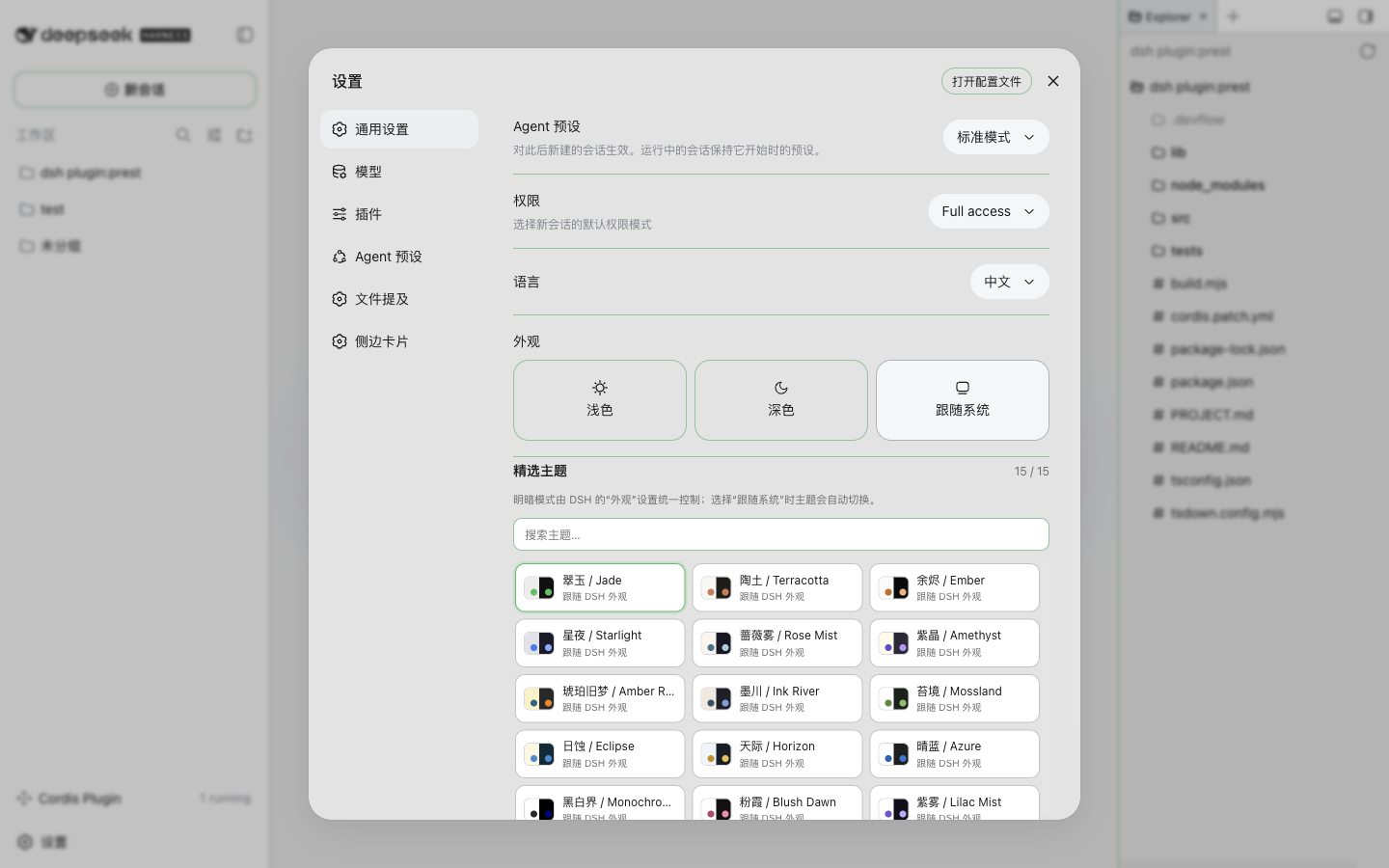
Themes
The public package contains 15 original, source-neutral theme families. Every family includes a complete light and dark palette:
| 中文名 | English name | Visual direction |
|---|---|---|
| 翠玉 | Jade | Neutral gray with emerald green |
| 陶土 | Terracotta | Warm parchment with terracotta orange |
| 余烬 | Ember | High-contrast black with peach orange |
| 星夜 | Starlight | Deep blue with luminous blue |
| 蔷薇雾 | Rose Mist | Muted violet with cyan |
| 紫晶 | Amethyst | Dark violet with purple |
| 琥珀旧梦 | Amber Retro | Retro cream and brown with orange |
| 墨川 | Ink River | Warm gray with indigo |
| 苔境 | Mossland | Natural green |
| 日蚀 | Eclipse | Cream and blue-black with cool blue |
| 天际 | Horizon | Airy blue-gray with gold |
| 晴蓝 | Azure | Clean contemporary blue |
| 黑白界 | Monochrome | Accessibility-focused high contrast |
| 粉霞 | Blush Dawn | White surfaces with soft rose accents |
| 紫雾 | Lilac Mist | White surfaces with gentle lilac accents |
Design approach
Editor themes often differ mainly in syntax-token colors. DSH is a conversational interface, so many editor palettes become visually indistinguishable after adaptation. This package keeps one polished representative per visual cluster instead of exposing dozens of near-identical dark-blue or white-and-blue themes.
Features
- One unified gallery with no upstream-product categories.
- Search across 15 curated families.
- Uses DSH's native Light / Dark / Follow system appearance preference without disabling or replacing it.
- Applies the selected family through one
overrideTokens()layer with complete{ light, dark }token pairs. - Maps each family to DSH surfaces, text, borders, semantic states, sidebars, and button aliases.
- Stores only the selected family locally; DSH owns the appearance mode.
- Removes themes, UI, listeners, and styles when the plugin stops.
- Ships all runtime data and build output; no external theme applications or absolute paths are required.
Install
Clone the repository and install the package into a DSH Web profile:
git clone <repository-url>
cd dsh-plugins
dsh plugin --profile web add "link:$PWD/packages/theme-gallery"
After installation, restart the existing dsh web process and refresh its current URL. Do not start a second replacement server.
After any profile install, verify that
~/.dsh/profiles/web/node_modules/@deepseek-aiwas not created as a physical directory. DSH core packages must resolve through the profile fallback symlinks to preserve Cordis/Tool Symbol identity.
Usage
- Open Settings.
- Open General.
- Two tracks are shown side by side under 精选外观 / Curated appearance:
- 主题 / Themes — the 15 curated source-neutral token families described above.
- 皮肤 / Skins — 9 complete dsh-web-ui skin replicas (see below).
- Use DSH's built-in Appearance control to choose Light, Dark, or Follow system.
The theme and skin tracks are mutually exclusive: activating one clears the other. Skins are
session-level try-on (a refresh returns to the default look); for a persistent skin keep using
the official skin center (dsh-skin use). No official skin-center configuration is modified.
Skins
Nine complete client bundles from @linxin666/dsh-skins
are embedded at build time and executed lazily on demand (no external/dynamic URL). Each skin is a
full replica of the upstream apply() — body attribute, injected CSS and chrome DOM — wrapped by a
thin engine that guarantees load → apply → mutual exclusion → full teardown on switch or plugin stop.
A per-skin accessibility layer (skins/<id>/a11y.css) applies only contrast fixes (WCAG AA) on
top of the skin styles: primary-button text on light/hover fills, and semi-transparent code blocks
entity-ized for stable text contrast. The accessibility layer never deletes upstream skin material.
| id | 中文名 | author (skin.json) | accent |
|---|---|---|---|
| qq98 | QQ2008 怀旧版 | dsh-web-ui | #2b7cd9 |
| ths | 同花顺风格 | dsh-web-ui | #e60012 |
| xp | Windows XP (Luna) | dsh-web-ui | #316ac5 |
| blue-fantasy | 蓝色幻想 | powerdog996(DreamSkin 社区)· dsh-web-ui 适配 | #4a5fa8 |
| dragon-heir | 龙的传人 | dsh-web-ui | #c3272b |
| minecraft | Minecraft 方块世界 | dsh-web-ui | #7cbd4b |
| whale-song | 鲸吟 | dsh-web-ui | #4d8fd4 |
| trading | 交易终端 | dsh-web-ui | #f23645 |
| miku | 初音未来 · 电子歌姬 | 涂山苏苏 | #2e9bff |
Attribution
The 15 source-neutral theme families described at the top are MIT-licensed original palette adaptations with no upstream syntax definitions to credit.
The 9 skin assets are third-party BSD-3-Clause works from the upstream repository
github.com/zhu1090093659/dsh-web-ui (aggregate @linxin666/dsh-skins), Copyright (c) 2026,
zhu1090093659. Per-skin authorship follows each skin.json author field:
dsh-web-ui (the aggregate), powerdog996 (blue-fantasy, DreamSkin community) and 涂山苏苏
(miku). Full per-skin license text lives in skins/<id>/LICENSE and the consolidated listing in
skins/NOTICE.md.
License
The package glue (theme engine, skin engine, accessibility layer, UI, build) is MIT. The bundled
skin assets are BSD 3-Clause — see skins/NOTICE.md and each skins/<id>/LICENSE.