Git worktree Session Targets with isolated task sessions, Ready for Review, reversible Local Preview, human-confirmed delivery, environment retention and recovery, and same-session iteration.
Install
# from npm (prebuilt)
dsh plugin --profile web add dsh-git-worktree
# from GitHub (first run asks for allowBuilds approval — follow the hint, retry)
dsh plugin --profile web add github:wloops/dsh-git-worktree
Any plugin you install runs third-party code with your own permissions — it can read your files, use your credentials, and reach the network, and tool approvals don’t sandbox it. GitHub-sourced plugins also run build scripts at install time — pnpm blocks those until you allow them, so an install can stop with ERR_PNPM_GIT_DEP_PREPARE_NOT_ALLOWED or ERR_PNPM_IGNORED_BUILDS; dsh prints the exact key to add under allowBuilds in your profile’s pnpm-workspace.yaml, and the install works on the next run. Allowing a build is a trust decision: only install sources you trust, and pin a commit (github:owner/repo#sha).
README

Let agents complete tasks in independent Git Worktrees, then review the changes before deciding whether to save them.
dsh-git-worktree is a Git Worktree plugin for DeepSeek Harness. It creates a separate Worktree (working directory) for every coding task, so the agent does not directly edit the project you are using. When the task is complete, you can preview the result and then save it, send it back for changes, or discard it.
This Git Worktree workflow originated in Domi, an open-source desktop coding workbench powered by the Pi Agent Runtime. This plugin is independently adapted for DeepSeek Harness and can be installed and used on its own.
中文 · Full usage guide · Architecture
Why use it?
When an agent edits the current project directly, its changes can mix with your unfinished work. Running multiple tasks at once can also make them interfere with one another. With this plugin:
- every task is edited and tested in its own Git Worktree (an independent working directory);
- multiple tasks can run at the same time without sharing one working directory;
- when the agent finishes, you can temporarily show the changes in the current project and inspect them;
- changes are saved only after confirmation, and conflicts never overwrite your work automatically.
Highlights
- Git Worktree isolation: every task gets its own working directory and its own agent conversation.
- Run multiple Worktrees: develop several tasks in parallel; to avoid mixing changes, review one task at a time per project.
- Preview before committing: inspect the real result in the current project without immediately creating a Git commit.
- Send it back safely: undo the current preview and ask the agent for more changes without disturbing unrelated local work.
- Save only this task: confirmation commits only the current task instead of pulling unrelated changes into it.
- Preserve progress on long tasks: save the current stage and keep developing; the stages still become one final delivery.
- Protect the working state: branch changes, conflicts, and interrupted operations stop safely and leave the state available for recovery.
- See related tasks together: current and historical Worktrees are grouped under their Host-provided project navigation owner; ambiguous tasks conservatively remain where they are.
- Inspect review details in one place: open a read-only view from the review bar for changed files, validation records, and version details without searching tool messages.
- Start safely from an empty repository: after explicit confirmation, an unborn repository can receive an empty initial commit that excludes user files before the isolated Worktree is created.
- Carry project Skills: the first Worktree and each next iteration receive one snapshot of
.dsh/skills,.agents/skills, and.claude/skills, while auxiliary files stay separate from Git delivery. - Continue in the same conversation: after delivery, begin another task without opening a new conversation.
The current version manages Git Worktrees within one project. It does not yet provide a global cross-project manager.
Workflow
flowchart LR
    A[Current project] -->|Create isolated task| B[Independent Git Worktree]
    B --> C[Agent edits and tests]
    C --> D[Review the result]
    D -->|Preview changes| E[Inspect them in the current project]
    E -->|Confirm and save| F[Create the task commit]
    F --> G[Continue in the same conversation]

    D -.->|Save current progress| H[Keep developing]
    E -.->|Undo this preview| I[Return for changes]
    D -.->|Skip preview| F
Which action should I choose?
| Goal | Action |
|---|---|
| Inspect the result in the current project | Preview changes |
| The preview looks correct | Confirm and save |
| Preserve progress during a long task | Save checkpoint and continue |
| Ask the agent for more edits | Continue editing or Undo this preview |
| Save without inspecting it first | Skip preview and save |
See the full usage guide for detailed actions, recovery scenarios, and commands.
Quick start
Requirements
- Node.js
^22.19.0 || >=24.0.0 - DeepSeek Harness:
0.1.2-rc.1is the development validation baseline;0.1.5-rc.1is user-reported working and partially verified in isolation. See the compatibility matrix and limitations; the newest Host is not mandatory. - Harness Web Client
- A Git Workspace
Before upgrading an existing Harness installation, handle Host data migration: 0.1.2-rc.1 removes the optional SQLite Session backend, so use an older Harness version to export that data first. Code Mode is now named PTC mode, while existing conversation records remain readable. Launch applications and install this plugin through a dsh Profile.
After upgrading Harness from an earlier release, if the web UI shows Failed to load plugins, choose a fixed version from the compatibility matrix and restart Harness; the example below uses 0.9.2. Releases through 0.7.2 depend on the discontinued dsh-client-runtime; 0.7.3 can also form a conversation / uiWorkspace activation cycle in the rc.1 Web Client.
dsh plugin --profile web add dsh-git-worktree@0.9.2
Install
dsh plugin --profile web add dsh-git-worktree
Or install a specific version:
dsh plugin --profile web add github:wloops/dsh-git-worktree#v0.9.2
Open a Git Workspace and enable Worktree when creating a Session. An existing Local Session can also let the model call worktree_create.
For the first run, complete one full create → Preview changes → Confirm and save → cleanup cycle.
If pnpm build approval blocks a Git-source install, or you need complete commands and troubleshooting, see Installation and troubleshooting.
Screenshots
Project grouping and task status
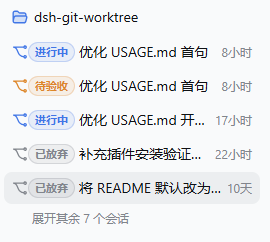
Prepare the review
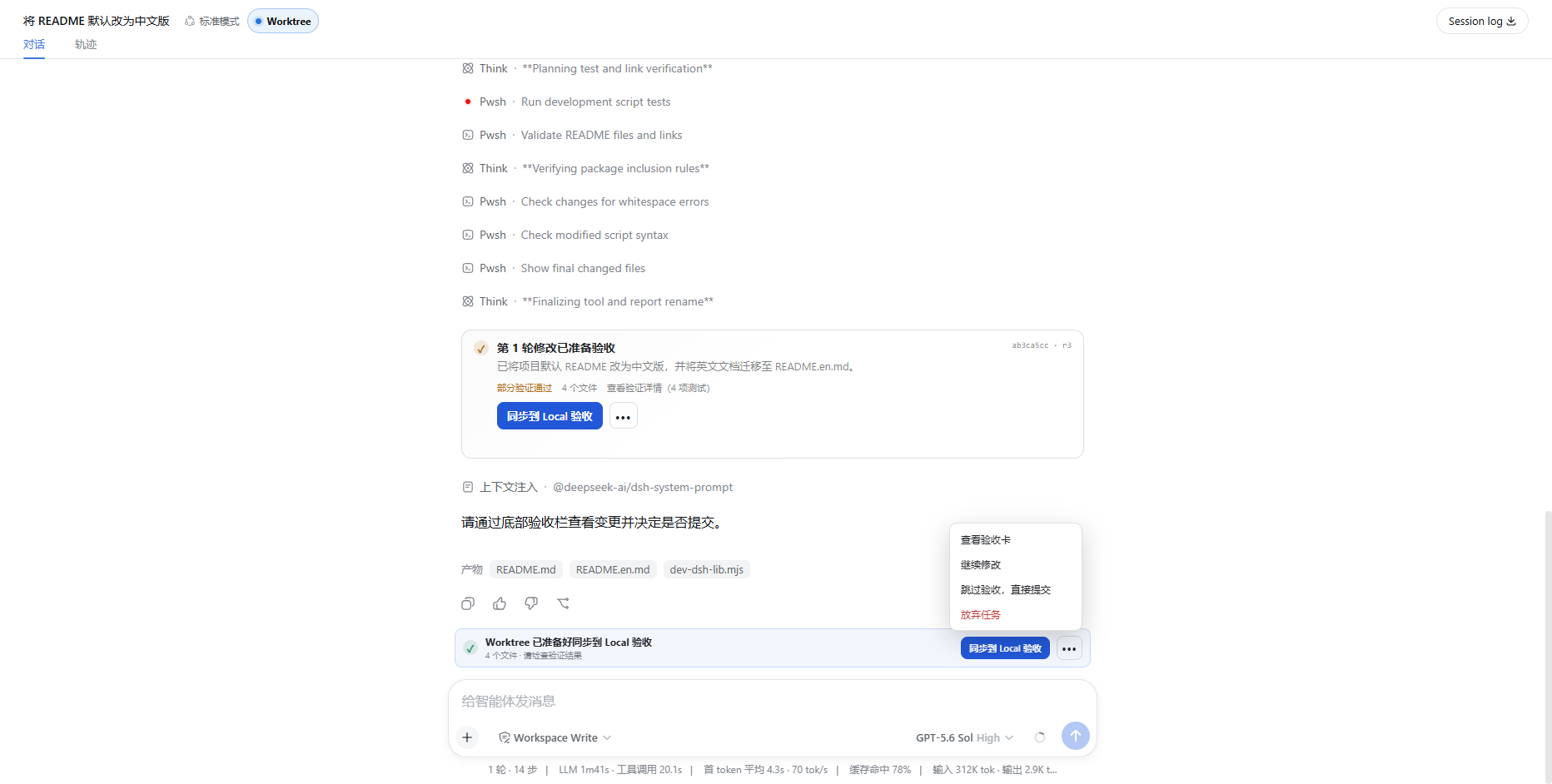
See the full usage guide for the complete flow.
Safety boundary
Before writing task changes back to the current project, the plugin checks again that the task version, project location, and file state still match the review. If you switched branches, changes conflict, or a previous operation was interrupted, it stops and preserves the working state instead of guessing and overwriting files.
Worktree separation is designed to prevent tasks from accidentally changing one another's files. It is not a system sandbox for running untrusted code.
For the detailed state checks and recovery rules, see:
Current limitations
- A task is grouped under its original project only when that relationship is clear. Uncertain tasks remain in their original location so they are never hidden.
- Isolated tasks can be renamed and archived, but a new task cannot yet be forked directly from the task conversation.
- Child agents share the parent task's working directory; a separate Worktree is not created for every child agent.
- Saved stage records cannot yet be edited, deleted, reordered, or rolled back to an arbitrary stage.
- The broader cross-project management, direct repair of the current project, dependency reuse, and collaboration handoff features in Domi are outside this plugin's current scope.
Local development
pnpm install
pnpm run typecheck
pnpm test
pnpm run build
pnpm run check:publish
Run the local end-to-end environment:
pnpm run dev:dsh
See the full usage guide for more development commands and the release checklist before publishing.
Documentation
- Full usage guide
- Worktree Console architecture
- Session Target porting notes
- UI development notes
- Release checklist
- Changelog
License
Language
The plugin follows DSH’s language selection without a separate switch. Explicitly select English in DSH to use English in the UI, tools, and /worktree messages. If automatic browser detection has not produced a saved DSH preference, tools and commands fall back to Chinese. See language transport and translation contributions.
Links
More in this category
zhu1090093659/dsh-web#packages/dsh-git-graph★ 8121
Git branch selector and Git graph for the dsh web GUI: switch branches and explore branch-lane and commit history from the conversation header.
Akimiya-z/codex-guard#dsh★ 138
Pre-submit pull-request hygiene checks inside DeepSeek Harness: scans the current diff for TODO leftovers, hardcoded secrets, and non-conventional commit subjects.
Cerbur/clutch-dsh#clutch-dsh-worktree★ 29
Adds a Worktree view to DSH Web UI that groups Sessions by Git worktree while keeping DSH as the source of truth.
lehhair/dsh-diff-viewer★ 27
PiUI-style diff viewer replacing the stock DiffBlock for write/edit tool calls.
DietCokewithSugar/dsh-user-experience★ 20
Finds potential UX issues in your project: automatically reviews React/TypeScript code, pinpoints each problem, and gives concrete suggestions.
DamonKoy/dsh-web-ui#dsh-git-graph★ 19
Git branch selector and Git graph in the conversation header of the dsh web GUI.
Community comments
Comments are public GitHub Discussions. Loading them connects to GitHub and Giscus; a GitHub account is required to post.