On-demand GitHub proxy for the Web UI: one-click git/SSH proxy toggle with connectivity tests.
Install
# from GitHub (first run asks for allowBuilds approval — follow the hint, retry)
dsh plugin --profile web add github:wjt0321/dsh-git-proxy
Any plugin you install runs third-party code with your own permissions — it can read your files, use your credentials, and reach the network, and tool approvals don’t sandbox it. GitHub-sourced plugins also run build scripts at install time — pnpm blocks those until you allow them, so an install can stop with ERR_PNPM_GIT_DEP_PREPARE_NOT_ALLOWED or ERR_PNPM_IGNORED_BUILDS; dsh prints the exact key to add under allowBuilds in your profile’s pnpm-workspace.yaml, and the install works on the next run. Allowing a build is a trust decision: only install sources you trust, and pin a commit (github:owner/repo#sha).
README
dsh-git-proxy
On-demand GitHub proxy for DeepSeek Harness. Toggle the git/SSH proxy for github.com from the Web UI settings, save your proxy address, and test connectivity before downloading.
Install
From the plugin market, or:
dsh plugin --profile web add github:wjt0321/dsh-git-proxy
Restart the Web UI, then open Settings → Git Proxy.
Usage
- Enter your proxy address (e.g.
127.0.0.1:10808) and click Save. - Click Enable proxy — it configures:
- git (https):
git config --global http.https://github.com.proxy http://<addr> - SSH (
git@github.com:): a plugin-ownedProxyCommandon theHost github.comblock of~/.ssh/config, using theconnecttool shipped with Git for Windows
- git (https):
- Use Test connectivity to verify the proxy port and the
github.com:443/github.com:22tunnels. - Click Disable proxy when downloads finish — both configurations are removed immediately.
Screenshots
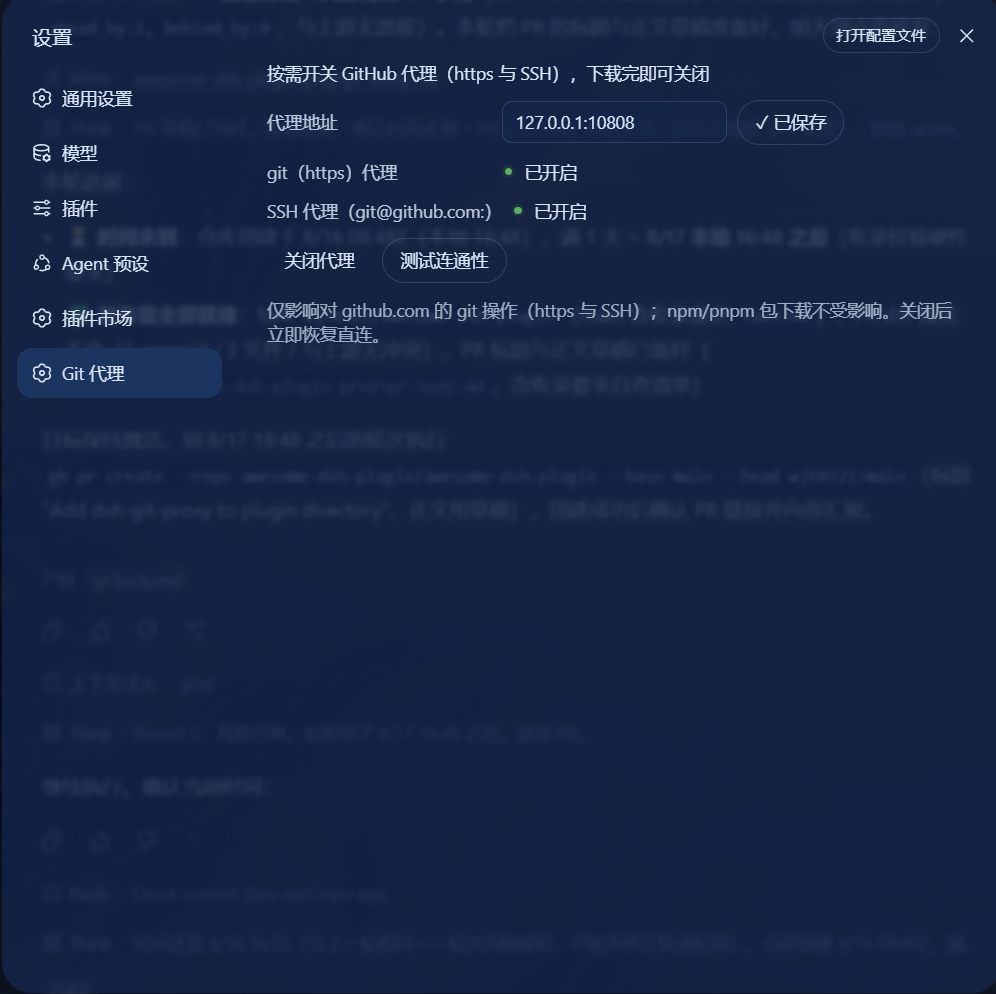
Enabled — git and SSH proxy are on.
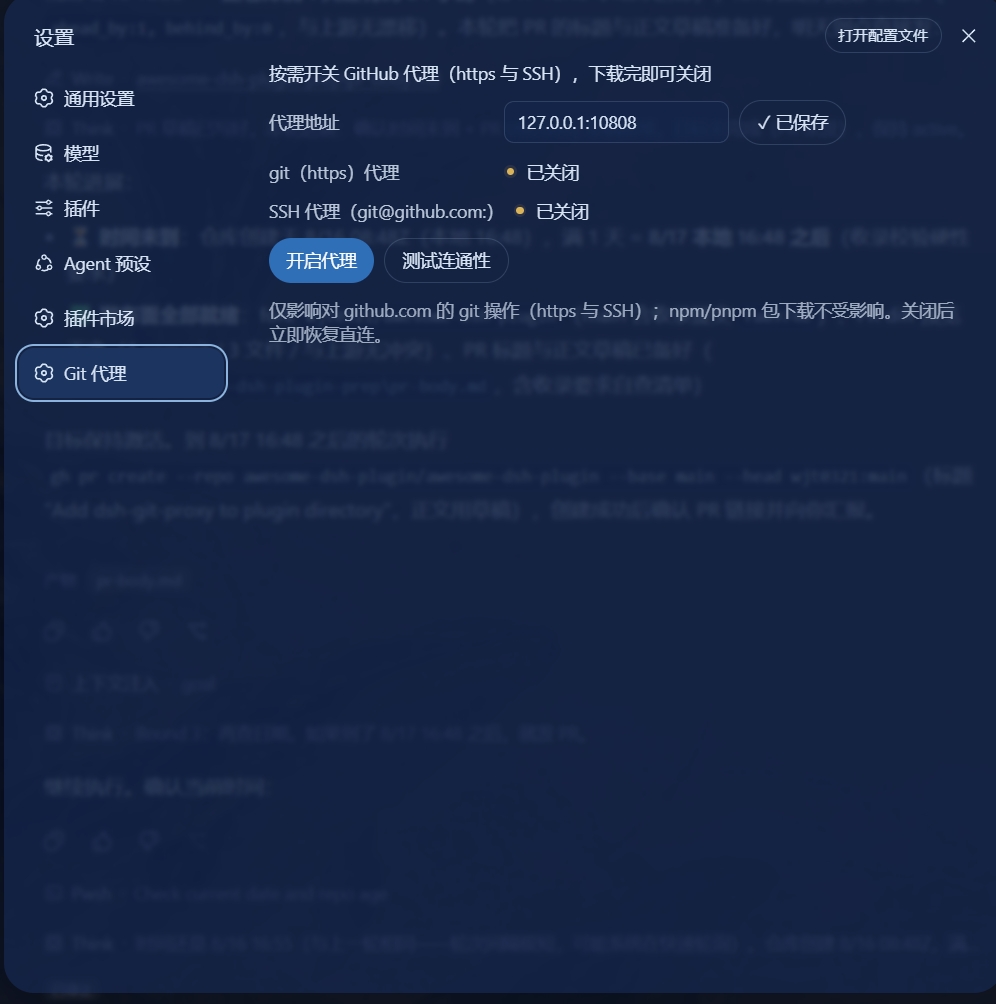
Disabled — clicking Disable proxy turns both off and restores direct connections.
Security
- Only
github.comgit operations are affected (https and SSH). npm/pnpm package downloads are untouched. - The proxy address is validated (host characters + port range) and stored per profile at
<profile>/git-proxy.json. ~/.ssh/configedits are conservative: only plugin-ownedProxyCommandlines (the quoted-connect format this plugin writes) are ever replaced or removed — a pre-existing userProxyCommandline is kept and the plugin line is inserted before it (ssh_config is first-match-wins). Everything else in the file survives byte-for-byte; configs containingMatchsections or multi-hostgithub.comlines are left untouched (the UI reports this).- Mutating routes accept only same-origin POSTs.
Known limitations
- SSH proxying requires the
connecttool (ships with Git for Windows). Without it the SSH part is reported unavailable; https still works. - Authenticated proxies (user/password) are not supported.
- IPv6 proxy addresses are not supported.
- If the proxy software is off while the proxy is enabled, git operations fail until you disable it (the test button warns beforehand).
- Any user
ProxyCommandline that happens to match the plugin's format (quoted path +-H+%h %p) is treated as plugin-owned. - Editing a CRLF ssh config normalizes line endings to LF.
Development
pnpm install
pnpm test        # vitest suites
pnpm typecheck
pnpm build       # tsc host + tsdown client bundle (lib/client.js)
The client bundle is a __ModuleLoader__ factory (id dsh-git-proxy) served by client-modules via the exports["./client"] subpath.
License
MIT
Links
More in this category
Tencent/WeKnora#dsh-weknora★ 31531
Four read-only tools over a WeKnora knowledge base: list knowledge bases, hybrid passage search, reassemble one document's chunks in order, and WeKnora's own cited RAG or ReAct-agent answer with a resumable session id.
superdesigndev/treg★ 3949
Tool catalog for agents: search ~2,600 external endpoints (SEO and SERP, backlinks, social, people and company enrichment, ad libraries, scraping) by the task you want done, read each one's parameters and per-call price, then call it with the credential injected server-side. Ships the skill plus an MCP row that stays disabled until TREG_TOKEN is set.
TencentCloudBase/CloudBase-AI-Toolkit#dsh-plugin★ 1130
Tencent CloudBase backend for DeepSeek Harness — scaffold and deploy full-stack apps from chat, render query results as table cards with paging, sorting and CSV export, preview a deployment on its domain, and call the CloudBase MCP toolset (`mcp__cloudbase__*`) with device-code login.
gitroomhq/postiz-agent#dsh-postiz★ 499
Connects DeepSeek Harness to Postiz over MCP: list connected social media channels, fetch per-platform posting rules, and schedule, draft, or publish posts to X, LinkedIn, Instagram, Facebook, Threads, TikTok, YouTube, Reddit, Bluesky, Mastodon, Discord, Slack, Telegram and more; adds a postiz workflow skill.
EthanYoQ/Invoice-Downloader#dsh-invoice-downloader★ 477
Local IMAP invoice download, OCR, archive, and Excel reimbursement summaries for DeepSeek Harness.
anysearch-team/anysearch-dsh★ 441
AnySearch-powered real-time web and vertical search provider for DeepSeek Harness.
Community comments
Comments are public GitHub Discussions. Loading them connects to GitHub and Giscus; a GitHub account is required to post.