SSH remote ops for DSH: pair servers over SSH or a one-time-code remote-hostd, then run commands, manage background jobs, and read or write remote files with reviewable changes (host_pair/host_bash/host_jobs/host_read_file/host_write_file/host_review_changes).
Install
# from GitHub (first run asks for allowBuilds approval — follow the hint, retry)
dsh plugin --profile web add github:weisiren000/dsh-remote-ssh-ops
Any plugin you install runs third-party code with your own permissions — it can read your files, use your credentials, and reach the network, and tool approvals don’t sandbox it. GitHub-sourced plugins also run build scripts at install time — pnpm blocks those until you allow them, so an install can stop with ERR_PNPM_GIT_DEP_PREPARE_NOT_ALLOWED or ERR_PNPM_IGNORED_BUILDS; dsh prints the exact key to add under allowBuilds in your profile’s pnpm-workspace.yaml, and the install works on the next run. Allowing a build is a trust decision: only install sources you trust, and pin a commit (github:owner/repo#sha).
README
This plugin publishes its README in Chinese only.
dsh-remote-ssh-ops 是 DeepSeek Harness 的 SSH 远程运维插件。它为 DSH 增加 SSH 直连、remote-hostd 配对、远程命令执行、远程文件读写、任务管理和远程工作台。
插件不会替代 DSH 的本地工具:检查当前本地工作区时,应使用 DSH 自带的本地工具;只有用户明确要求远程、服务器或指定主机操作时,才使用 host_* 工具。
工作方式
- SSH 直连:在 DSH 设置中填写服务器、端口、用户名和首次登录密码。首次连接确认 SSH 指纹后,插件保存本机专用密钥,后续不再保存或使用密码。
- 高级配对:远端运行
remote-hostd,本地输入地址和一次性配对码。适合已经部署 hostd 的机器。 - 远程工作台:会话标题栏的“服务器”入口用于浏览远程文件、运行远程命令和审阅远程文件变更。
界面预览
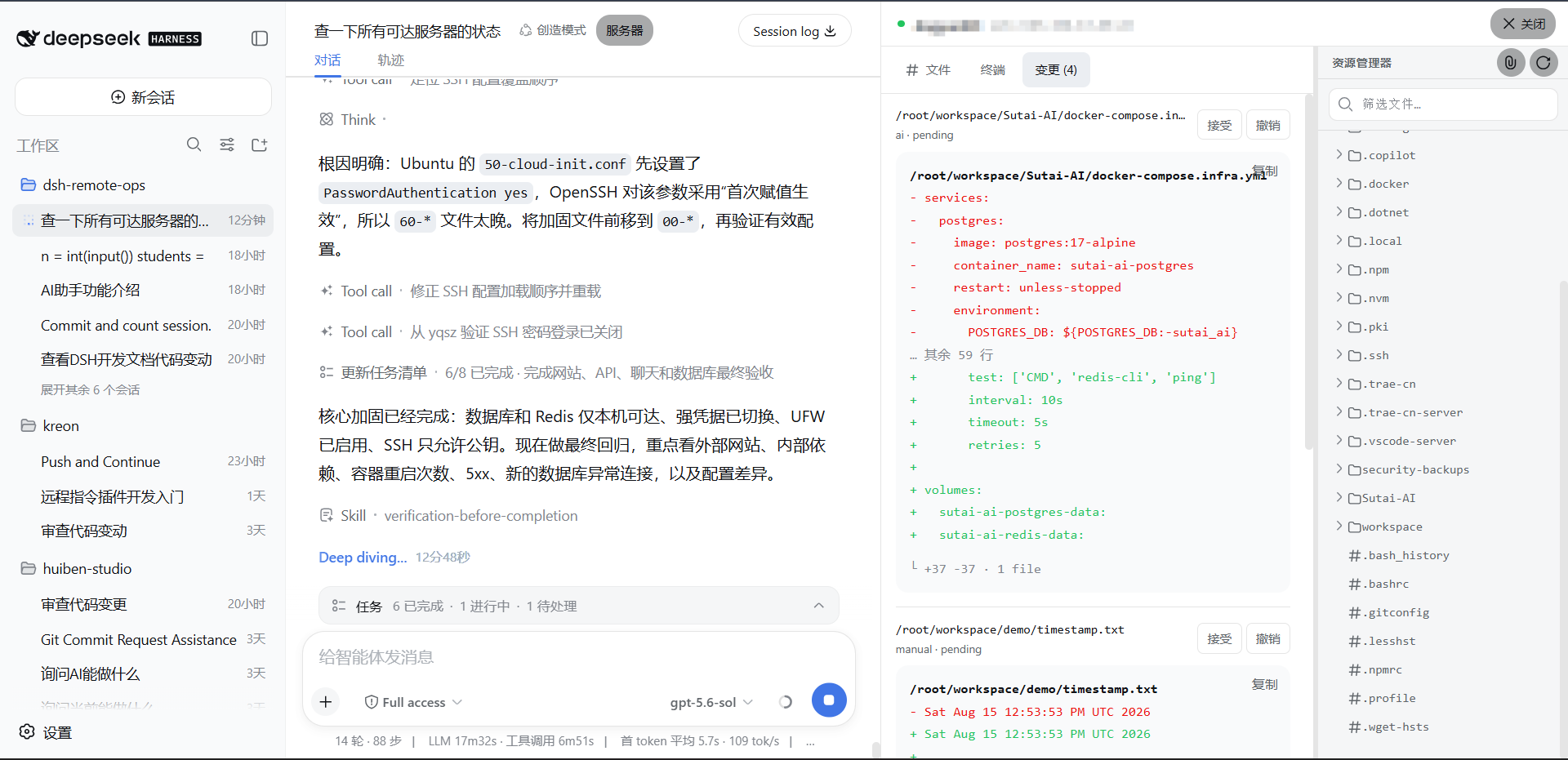
安装
从 GitHub 安装(推荐)
安装当前稳定版本:
dsh plugin --profile web add github:weisiren000/dsh-remote-ssh-ops#v0.0.11
DSH 会自动把插件安装到 Web profile,并将 dsh-remote-ssh-ops 注册到 dsh.profile.bundles。不需要克隆仓库、手动安装依赖、构建客户端或修改 profile 的 package.json。
如果系统没有全局 dsh 命令,可以通过 npx 执行:
npx @deepseek-ai/dsh plugin --profile web add github:weisiren000/dsh-remote-ssh-ops#v0.0.11
安装命令需要本机可以使用 Git 和 pnpm。使用 npx 时还需要 Node.js。
启动或重启 DSH Web
关闭旧的 DSH Web 进程,然后重新启动:
dsh web
使用 npx 的启动方式:
npx @deepseek-ai/dsh web
启动后进入“设置 → 插件 → 远程主机”。看到远程主机面板,说明插件已加载。
升级
发布新版本后,重新执行安装命令并替换 TAG:
dsh plugin --profile web add github:weisiren000/dsh-remote-ssh-ops#vX.Y.Z
随后重启 DSH Web。
卸载
dsh plugin --profile web remove dsh-remote-ssh-ops
没有全局 dsh 命令时:
npx @deepseek-ai/dsh plugin --profile web remove dsh-remote-ssh-ops
连接远程机器
SSH 直连(推荐)
在远程主机面板填写服务器、SSH 端口、用户名和首次登录密码,点击“连接主机”。首次连接显示服务器指纹时,只有确认指纹属于你的服务器才继续。
高级配对
在远端启动 remote-hostd,复制终端打印的一次性配对码,然后在面板切换到“高级配对”并填写地址和配对码。
验证安装
Invoke-WebRequest 'http://127.0.0.1:3080/remote-ssh-ops/v1/hosts' | Select-Object StatusCode
预期状态码为 200。然后在对话中明确说“列出远程主机”或“在指定服务器执行命令”验证 host_* 工具;检查本地代码时不要用远程请求作为验证。
远端安装 remote-hostd
remote-hostd 只在使用“高级配对”时需要。它把自己的工作目录作为远程工作区,因此启动前应先切换到要开放的项目目录。
本机回环监听(已有反向代理或只允许本机访问):
cd /path/to/remote-project
node /path/to/dsh-remote-ssh-ops/src/hostd/cli.js --listen 127.0.0.1:7680
直接对局域网或公网提供服务时必须使用 TLS:
cd /path/to/remote-project
node /path/to/dsh-remote-ssh-ops/src/hostd/cli.js \
  --listen 0.0.0.0:7680 \
  --tls-cert /path/to/fullchain.pem \
  --tls-key /path/to/privkey.pem
只有在临时隔离网络中,才使用不安全的明文监听:
node /path/to/dsh-remote-ssh-ops/src/hostd/cli.js --listen 0.0.0.0:7680 --allow-insecure
终端会打印监听地址和配对码。不要把配对码提交到代码仓库或写入公开日志。
模型工具
host_pair:配对一个远程主机。host_list:列出已配对主机和在线状态。host_use:切换当前远程目标。host_bash:在远程主机执行前台或后台命令。host_jobs/host_job_log:查询远程任务和日志。host_list_files/host_read_file:浏览、读取远程文件。host_write_file:按版本校验写入远程文件并创建待审阅变更。host_review_changes:查看或处理远程文件变更。
所有远程工具都是显式远程能力。用户没有明确指定远程操作时,Agent 不应调用它们。
Links
More in this category
Tencent/WeKnora#dsh-weknora★ 31531
Four read-only tools over a WeKnora knowledge base: list knowledge bases, hybrid passage search, reassemble one document's chunks in order, and WeKnora's own cited RAG or ReAct-agent answer with a resumable session id.
superdesigndev/treg★ 3949
Tool catalog for agents: search ~2,600 external endpoints (SEO and SERP, backlinks, social, people and company enrichment, ad libraries, scraping) by the task you want done, read each one's parameters and per-call price, then call it with the credential injected server-side. Ships the skill plus an MCP row that stays disabled until TREG_TOKEN is set.
TencentCloudBase/CloudBase-AI-Toolkit#dsh-plugin★ 1130
Tencent CloudBase backend for DeepSeek Harness — scaffold and deploy full-stack apps from chat, render query results as table cards with paging, sorting and CSV export, preview a deployment on its domain, and call the CloudBase MCP toolset (`mcp__cloudbase__*`) with device-code login.
gitroomhq/postiz-agent#dsh-postiz★ 499
Connects DeepSeek Harness to Postiz over MCP: list connected social media channels, fetch per-platform posting rules, and schedule, draft, or publish posts to X, LinkedIn, Instagram, Facebook, Threads, TikTok, YouTube, Reddit, Bluesky, Mastodon, Discord, Slack, Telegram and more; adds a postiz workflow skill.
EthanYoQ/Invoice-Downloader#dsh-invoice-downloader★ 477
Local IMAP invoice download, OCR, archive, and Excel reimbursement summaries for DeepSeek Harness.
anysearch-team/anysearch-dsh★ 441
AnySearch-powered real-time web and vertical search provider for DeepSeek Harness.
Community comments
Comments are public GitHub Discussions. Loading them connects to GitHub and Giscus; a GitHub account is required to post.