Adds a non-uniform conversation density map(chat history markers) to the right of the DSH chat area: one tick per turn, with tick length and spacing reflecting message size, clickable to jump to a turn and expanding on hover when crowded.
Install
# from GitHub (first run asks for allowBuilds approval — follow the hint, retry)
dsh plugin --profile web add github:weien666/dsh-conversation-density-map
Any plugin you install runs third-party code with your own permissions — it can read your files, use your credentials, and reach the network, and tool approvals don’t sandbox it. GitHub-sourced plugins also run build scripts at install time — pnpm blocks those until you allow them, so an install can stop with ERR_PNPM_GIT_DEP_PREPARE_NOT_ALLOWED or ERR_PNPM_IGNORED_BUILDS; dsh prints the exact key to add under allowBuilds in your profile’s pnpm-workspace.yaml, and the install works on the next run. Allowing a build is a trust decision: only install sources you trust, and pin a commit (github:owner/repo#sha).
README
Special Announcement: The latest version of Deepseek Harness already includes a built-in sidebar, therefore this plugin will no longer be updated. Thank you for your support!
安装:dsh plugin --profile web add github:weien666/dsh-conversation-density-map
Pure frontend, zero dependencies, no build step — the actual plugin consists of only 3 source files.
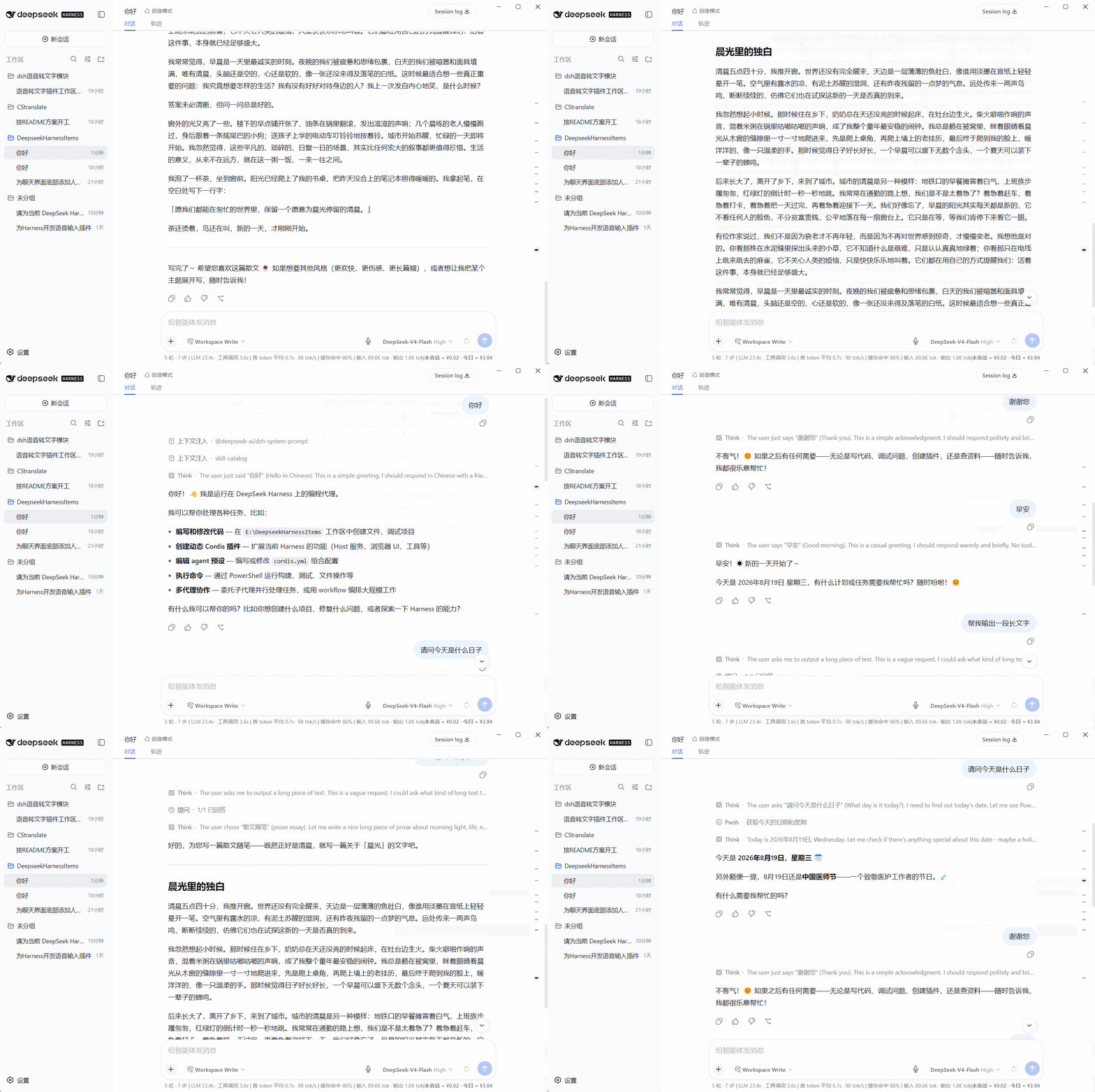
Features
- One tick per turn: each conversation turn occupies exactly one tick; AI replies (including tool calls and multi-part text) are never fragmented, forming a clean
user → AI → user → AIalternation; - Density at a glance: longer replies map to longer ticks, while short messages form dense clusters of short ticks, letting you quickly tell which parts of the conversation carry more content and which are fragmented;
- Window-adaptive layout:
- Regular window: ticks keep a uniform horizontal length to stay clean;
- Maximized window: tick horizontal length visually reflects message size and length;
- Smart hover spreading: when the conversation is long and ticks are dense, moving the mouse toward the right edge automatically spreads the ticks vertically so they are easier to click; with only a few turns, hovering does not move anything;
- Hover preview: hover over any tick to see a preview (turn number / approximate character count / beginning of the content);
- Current-position tracking: the turn you are currently reading is automatically highlighted as you scroll;
- Theme-aware: colors are taken from the Harness theme variables, automatically adapting to light and dark modes.
Demo
Project Structure
dsh-conversation-density-map/
│
├── client.js          ← Plugin core: browser half (conversation density map implementation)
├── index.js           ← Plugin core: host half (empty implementation)
├── package.json       ← Plugin core: declares dsh.client / dsh.bundle
├── cordis.patch.yml   ← bundle patch (applied automatically by `dsh plugin` on install; no manual insert needed)
│
├── docs/              ← demo GIFs (for repository display only; not downloaded during installation)
│
├── README.md
├── LICENSE
└── .gitignore
Download & Installation
Static DSH plugins are installed in two steps: "place the plugin files into the DSH profile" + "register it so it takes effect" — no
npm installrequired. The steps below use Windows as an example. The plugin core consists of the 3 source files at the repository root (client.js / index.js / package.json) plus cordis.patch.yml.
Method A (recommended): one-line install (bundle mode, requires pnpm)
dsh plugin --profile web add github:weien666/dsh-conversation-density-map
The install automatically appends the plugin to dsh.profile.bundles and applies the built-in patch (cordis.patch.yml) — no manual insert needed. Only the source files are installed; the GIFs in docs/ are not downloaded. After installing, restart DSH (dsh web restart) and hard-refresh the browser (Ctrl+Shift+R) to activate.
Method B: download the plugin ZIP from Releases
Open the Releases page of this repository and download the latest
dsh-conversation-density-map-vX.Y.Z.zip— it contains only the 3 source files, no GIF clutter;Extract it to any directory, e.g.
D:\plugins\dsh-conversation-density-map(the folder containing the 3 source files after extraction is the "plugin directory");Create a junction under the
node_modulesdirectory of the DSH config directory, pointing to it:mklink /J "C:\Users\<YourUsername>\.dsh\profiles\web\node_modules\dsh-conversation-density-map" "D:\plugins\dsh-conversation-density-map"Edit
C:\Users\<YourUsername>\.dsh\profiles\web\cordis.patch.ymland append at the end:- insert: - id: conversation-density-map name: dsh-conversation-density-mapRestart DSH (or refresh the web page with
Ctrl+F5) → done.
Method C: download the entire repository via Code
- On the repository page → Code → Download ZIP (downloads the full repository, including source, docs, and GIFs);
- After extracting, use the 3 source files at the repository root (client.js / index.js / package.json);
- Follow steps 3–5 of Method B: point the junction at that directory (or copy the 3 files directly into
node_modules\dsh-conversation-density-map\), then add the registration lines.
Uninstallation
If installed via Method A (one-line command):
dsh plugin --profile web remove dsh-conversation-density-map
Automatically removes the dependency and removes it from dsh.profile.bundles (the insert comes from the in-package patch, so no manual deletion is needed).
If installed via Method B / C (manual): reverse the steps:
- Delete the two
insertlines in the profile'scordis.patch.yml; - Delete the junction (or delete the folder inside
node_modules); - Delete the extracted plugin directory.
All plugin effects are managed through the DSH lifecycle; no styles or listeners are left behind after uninstallation.
Compatibility
- Built for the DeepSeek Harness Web client (currently based on the
0.1.xDOM structure:data-chat-flow/data-chat-anchor-key/data-conversation-scroll); - No third-party libraries; uses only native browser APIs (IntersectionObserver / ResizeObserver / MutationObserver / DOM);
- If a DSH upgrade changes the chat-area DOM structure, minor adaptation may be required.
Usage Tips
- Click any tick: smoothly scroll to the start of that turn;
- Move the mouse near the right edge: ticks spread out (hover spreading);
- Hover over a tick: shows a content preview.
License
Links
More in this category
zhu1090093659/dsh-web#packages/dsh-task-board★ 8334
Task board for the dsh web GUI: a sidebar multi-column kanban whose cards run in real DSH agent sessions and can also be scheduled with cron expressions, executed host-side even with the browser closed.
zhu1090093659/dsh-web#packages/dsh-web-all★ 8334
Plugin and skin collection for the DSH Web UI: task board, Git graph, right-side panel, remote mobile UI, pet, live token stats, and a skin center.
ccch1mneyyy/dsh-TUI★ 3989
Claude Code-style full-screen terminal UI: pixel-whale header, live status line, and streaming thought expansion.
omdsh-dev/DSH-better-sidebar★ 3981
Full sidebar workbench with file rendering and editing, terminal, Git, and subagents; third-party plugins can register new tabs.
MeteorNOX/DeepSeek-Balance-Whale-Widget★ 3944
A fixed-corner whale widget for the DSH web GUI — balance, today's usage and per-turn cost with peak/off-peak pricing, editable balance-alert and daily-budget bubbles, a module-based custom bubble queue with A/B weighted choices and random lines or images, 30+ vendor templates (OpenAI, OpenRouter, Kimi, SiliconFlow, Ark, Zhipu, MiniMax and more) with per-model balance and subscription quota, plus task-end sound, imported audio, custom roles and a resource manager. Local-only, no telemetry.
Devin-AXIS/deepseek-design#deepseek-idesign★ 1412
Visual design studio for websites, app prototypes, posters, cards, reports, and magazines, with templates, direct element editing, selection-aware AI draft handoff, and export.
Community comments
Comments are public GitHub Discussions. Loading them connects to GitHub and Giscus; a GitHub account is required to post.