Android client implementation for DeepSeek Harness: bridges local dsh web to the OneBox app with QR scan-to-pair and an end-to-end encrypted cloud relay tunnel.
Install
# from npm (prebuilt)
dsh plugin --profile web add onebox-dsh-bridge
# from a prebuilt release tarball
dsh plugin --profile web add "https://github.com/wangzhishou/onebox-dsh-bridge/releases/latest/download/onebox-dsh-bridge.tgz"
# from GitHub (first run asks for allowBuilds approval — follow the hint, retry)
dsh plugin --profile web add github:wangzhishou/onebox-dsh-bridge
Any plugin you install runs third-party code with your own permissions — it can read your files, use your credentials, and reach the network, and tool approvals don’t sandbox it. GitHub-sourced plugins also run build scripts at install time — pnpm blocks those until you allow them, so an install can stop with ERR_PNPM_GIT_DEP_PREPARE_NOT_ALLOWED or ERR_PNPM_IGNORED_BUILDS; dsh prints the exact key to add under allowBuilds in your profile’s pnpm-workspace.yaml, and the install works on the next run. Allowing a build is a trust decision: only install sources you trust, and pin a commit (github:owner/repo#sha).
README
English | 简体中文
A DeepSeek Harness (dsh) plugin that bridges your local dsh web to the OneBox cloud relay, so the OneBox Android app can reach your computer's AI agent over the public internet — scan-to-pair, token management and tunnel frame multiplexing, all inside the plugin. Your agent is online as soon as dsh web starts.
Built for the open-source OneBox (万宝盒) Android app. The plugin page also includes the app download info, so anyone running DSH can pair their phone in a minute.
How it works
OneBox App ⇅ https://api.wanbaohe.com/dsh/* (CN relay) or https://api.oneboxable.com/dsh/* (international relay)
                 ⇅ outbound WSS (control tunnel, JSON frame multiplexing)
         onebox-dsh-bridge (this plugin)
                 ⇅ loopback
         local dsh web (127.0.0.1:3080)
- Mounts a
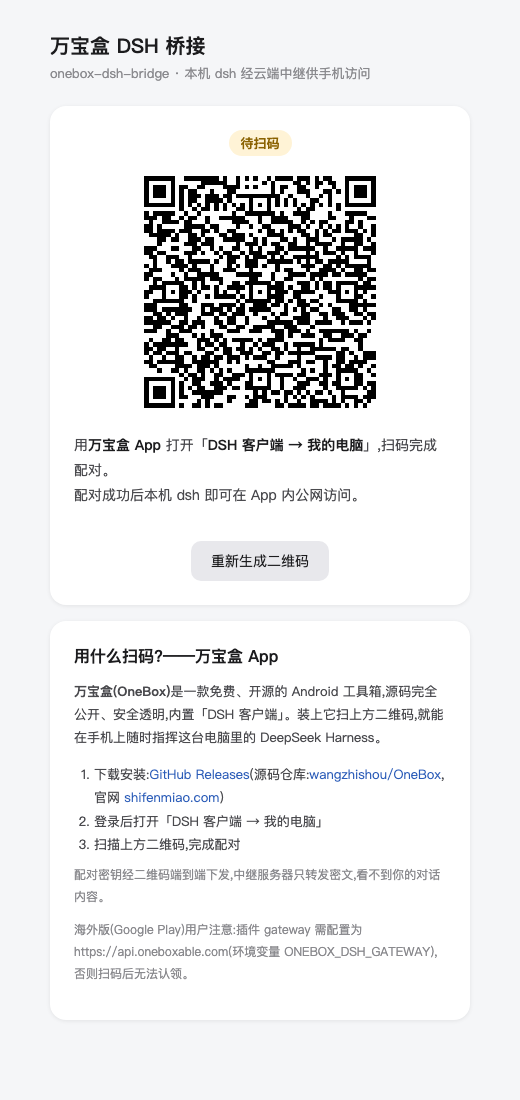
/onebox-bridgepage in the dsh web GUI (self-contained HTML, zero external deps) showing the pairing QR code and online status - Pairing:
POST /dsh/pair-sessions→ a ≥128-bit secret is generated locally and encoded into the QR (oneboxdsh://pair?v=1&g=…&p=…&s=…) → pollsGET /dsh/pair-sessions/:id/status?s=…every 2s; once the app scans and claims, the plugin receives its device token - Goes online via outbound WSS
/dsh/agent?token=…; tunnel frames:http→ localPOST /api/<method>answered byhttp-resp;ws-open/ws-frame/ws-closebridge the local/api/events.mux|hoststreams - Control WS drop → all local bridges closed, exponential-backoff reconnect (1s→30s); token 401 (revoked/expired) → local token deleted, back to scan-to-pair state
- End-to-end encryption: the pairing key travels only inside the QR code, never through the server; all app ↔ computer traffic is AES-256-GCM encrypted — the relay forwards ciphertext only
Install
With the dsh CLI installed:
dsh plugin --profile web add onebox-dsh-bridge
Running dsh from a source checkout (prefix commands with pnpm dsh, from the deepseek-harness repo root):
pnpm dsh plugin --profile web add onebox-dsh-bridge
The package declares dsh.bundle, so add automatically merges the plugin row into the profile's composition layer. Restart dsh web to take effect.
Compatibility: the bridge itself is protocol-agnostic — it forwards /api/<method> over HTTP and tunnels WebSocket frames verbatim, so it does not hard-code DSH endpoint names. Verified against dsh 0.1.5-rc.2 (npm next) for the pairing page, status API, QR pair-session creation, and the tunnelled /api/remote.mux WebSocket. Older releases (0.1.0-rc.7 / 0.1.0-rc.8, which used /api/events.mux and /api/events.host) still tunnel fine, but the app requires dsh 0.1.2 or newer — see the compatibility note in the OneBox DSH client. The plugin must live in the web profile (it injects the webServer service that only the web composition provides).
dsh 0.1.5 and browser authentication
Since dsh 0.1.5 every /api request — including the /api/remote.mux WebSocket upgrade — goes through the
connection browser-trust fence and browser authentication: loopback is not exempt, Authorization: Bearer is
not recognised, and --trusted-host only widens the Host fence (403), not the auth one (401). The plugin therefore
mints the local session cookie through ctx.connection.authenticatedUrl (lib/session-cookie.js), attaches it to
every tunneled HTTP call and WS upgrade, and re-mints once on 401.
Local integration testing (LAN, no relay needed)
To try the Android app against your machine without deploying the relay, run the LAN proxy — it injects the same
session cookie and rewrites Host, so the app's "direct connect" mode works on a phone in the same LAN:
# 1) start dsh web and copy the ?token=… from the URL it prints
# 2) from this repo:
node tools/lan-proxy.mjs --token <token> --port 3081
# 3) in the app: DSH Client → direct connect → http://<your-LAN-IP>:3081
It exposes your local dsh /api (browser-session privileges) to the LAN, so use it only on a network you trust
and stop it (Ctrl-C) when done.
Installing straight from GitHub also works:
dsh plugin --profile web add github:wangzhishou/onebox-dsh-bridge
Usage
- Open
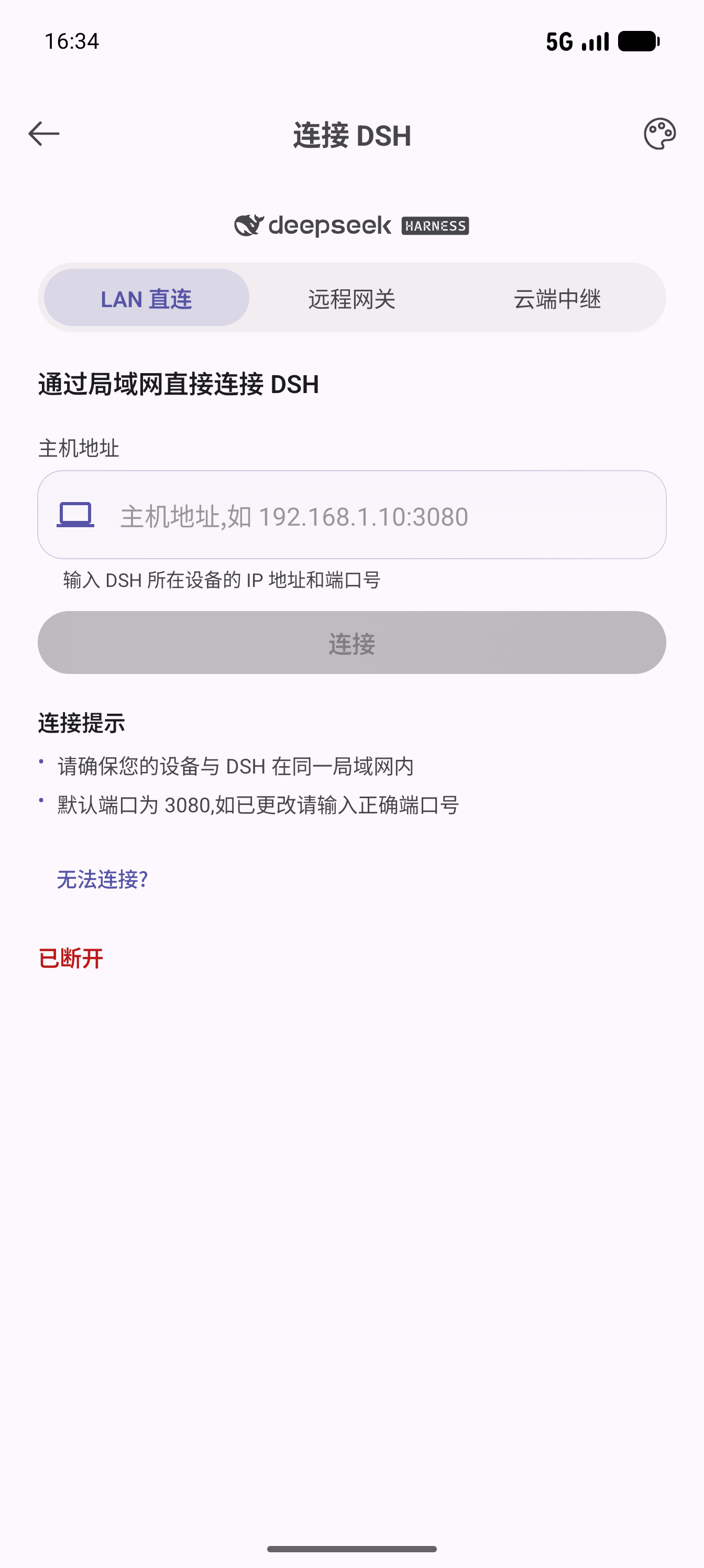
http://127.0.0.1:3080/onebox-bridgein dsh web (adjust the port to your deployment) - In the OneBox app, open DSH Client → My Computers and scan the QR code matching your app channel (one per gateway: mainland China / international)
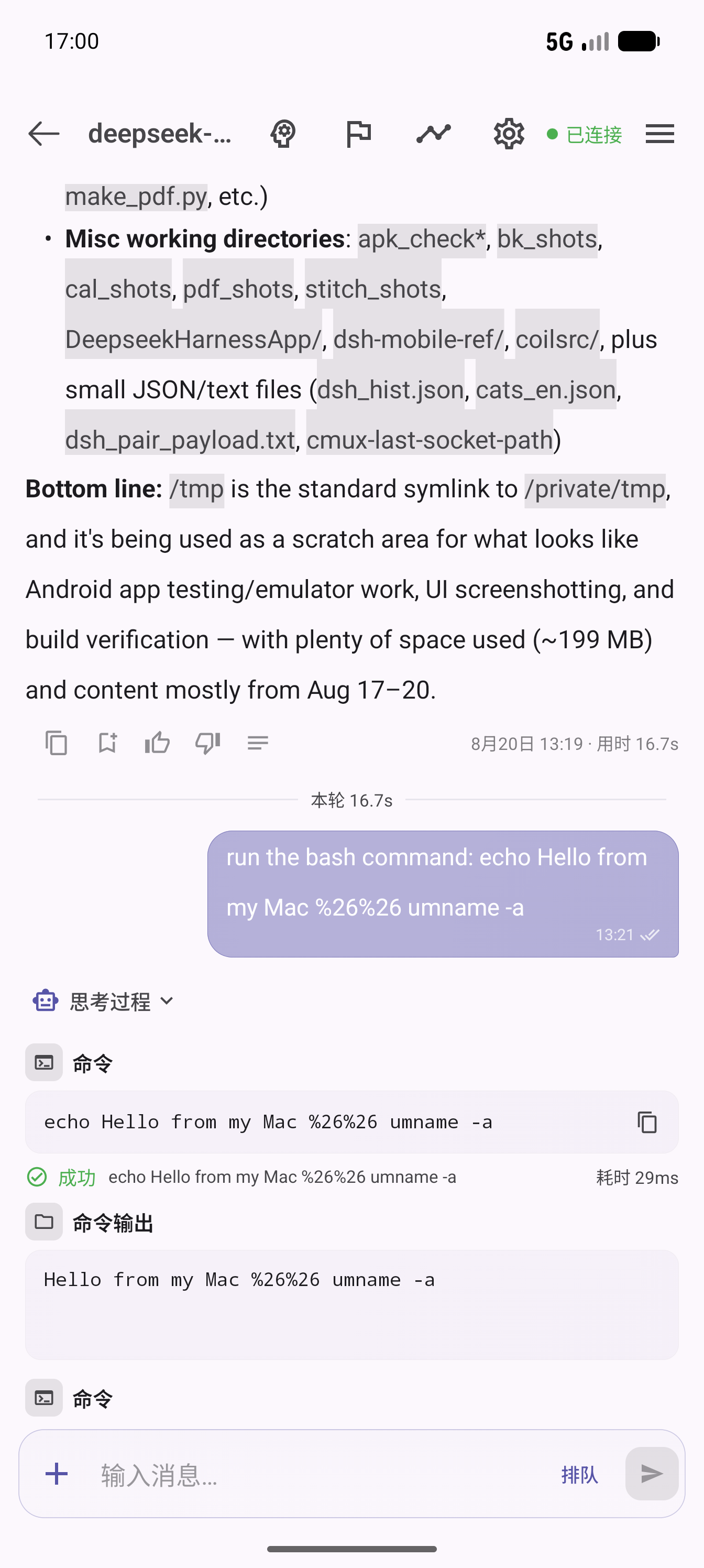
- Once the page shows Online, pick the device in the app and start chatting with your agent
Page buttons: Regenerate QR code (invalidates the old session and creates a new pairing session; codes expire after 10 minutes and are rebuilt automatically) and Unbind & re-pair (deletes the local token, back to waiting-for-scan).
Get the OneBox app
The plugin is the computer-side half; the phone-side half is the free, open-source OneBox Android app:
- Source code: github.com/wangzhishou/OneBox (Apache-2.0)
- International: Google Play · Official site
- 中国用户: 万宝盒官网 · 小米 / 应用宝 / OPPO / vivo / 华为应用商店搜索「万宝盒」
Screenshots
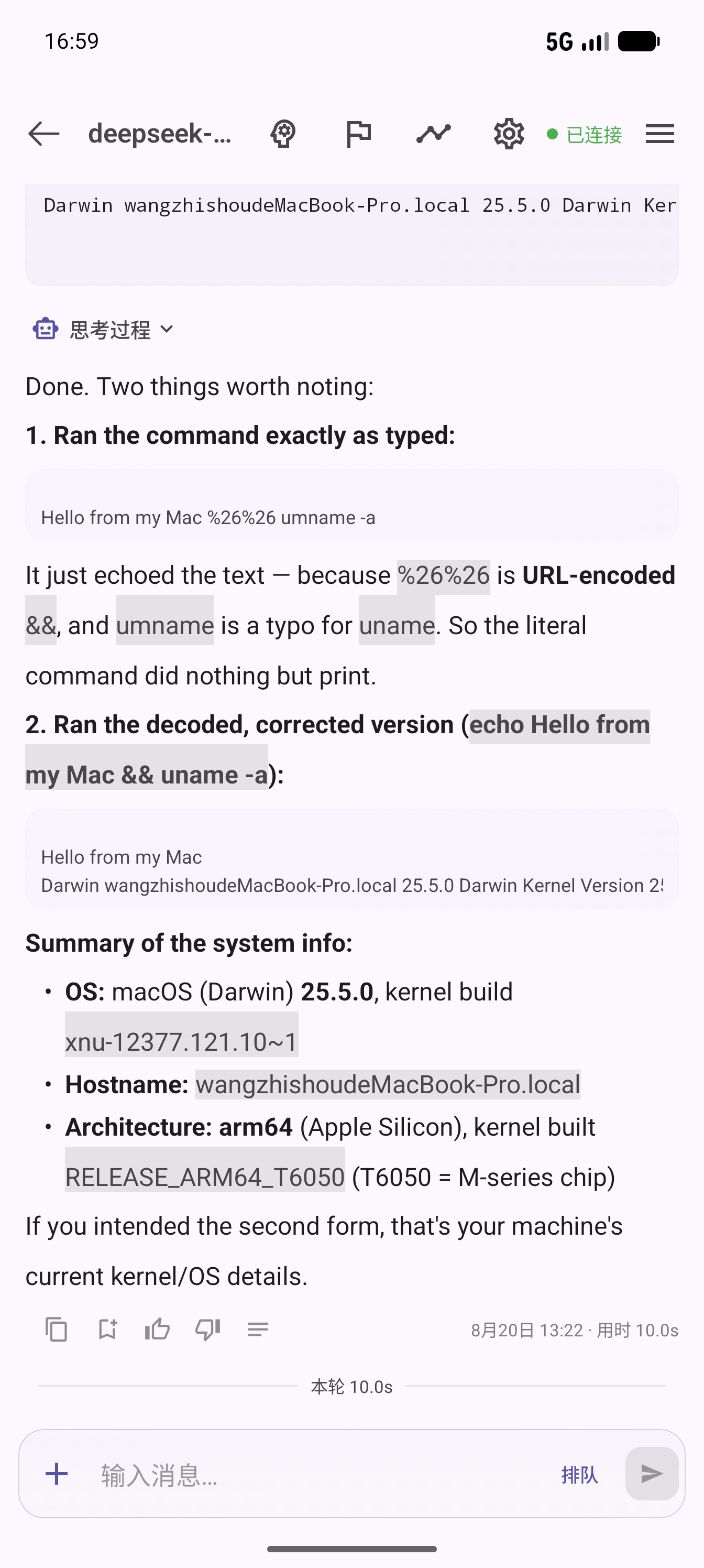
| Plugin pairing page | App connect page | App chat control | Feedback & stats |
|---|---|---|---|
 |
 |
 |
 |
Configuration
All optional. Priority: environment variable > plugin config > default.
| Key | Env var | Default | Description |
|---|---|---|---|
gateways |
ONEBOX_DSH_GATEWAYS (comma-separated) |
https://api.wanbaohe.com + https://api.oneboxable.com |
OneBox gateways. Both deployments are paired at once by default — the page shows one QR per gateway, labeled by app channel, and the first one scanned wins. The app JWT is only valid on its own deployment, so dual pairing saves users from configuring anything |
gateway |
ONEBOX_DSH_GATEWAY |
— | Single-gateway override (equivalent to a one-element gateways list) |
upstream |
ONEBOX_DSH_UPSTREAM |
127.0.0.1:3080 |
Local dsh address (host:port) |
deviceName |
— | system hostname | Device name reported to the app during pairing |
dataDir |
ONEBOX_DSH_DATA_DIR |
~/.dsh/profiles/web/onebox-dsh-bridge |
Token storage directory (token.json, mode 0600; old tokens are invalidated automatically when their gateway leaves the configured list) |
To change config, override the whole row in the profile's ~/.dsh/profiles/web/cordis.patch.yml (a patch replaces the entire config value — list every key):
- id: onebox-dsh-bridge
  name: 'onebox-dsh-bridge'
  config:
    gateways:
      - https://api.wanbaohe.com
      - https://api.oneboxable.com
    upstream: 127.0.0.1:3080
    deviceName: My Mac
Uninstall
dsh plugin --profile web remove onebox-dsh-bridge
Optionally delete the credentials directory ~/.dsh/profiles/web/onebox-dsh-bridge/; paired devices can be revoked in the app under My Computers.
Notes
- The
/onebox-bridgepage, like dsh web itself, has no extra auth (loopback-only by default); the QR code contains the pairing secret — never expose dsh web directly to the public internet - Runtime dependencies: just
ws+qrcode
Links
More in this category
zhu1090093659/dsh-web#packages/dsh-remote-web-ui★ 8370
Remote control of a dsh web workspace from phone or PC: QR-code pairing through a token-gated channel, SSE real-time sync, and separate mobile and full desktop GUI modes.
zhu1090093659/dsh-web#packages/dsh-ssh★ 8370
SSH ops panel for DSH: web terminal, SFTP transfer with progress, local port forwarding, and one-command cluster execution across hosts; agents share the same host config.
saya-ch/dsh-mobile★ 371
Access DeepSeek Harness from the Android app or a mobile browser with secure LAN and remote connections, persistent device pairing, and a customizable mobile interface.
ZSeven-W/dsh-ios★ 312
A live iOS Simulator or USB-connected iPhone inside the conversation: 22 agent tools for booting, building, driving the UI by accessibility identity or OCR text, list-row actions and SwiftUI preview hot reload, plus a streaming sidebar panel you can tap and drag on.
liguobao/ds-harness-remote★ 266
Multi-device remote access for DeepSeek Harness: continue an active session from your phone, tablet, browser, or another computer over an end-to-end encrypted channel (Noise IK + adaptive relay/WebRTC transport), with device authorization, ApiProxy-only remote capabilities, and read-only file preview via dsh-file-viewer — no shell, remote desktop, or write access.
wenbin-wb/dsh-bridge★ 184
Remote and mobile access for DeepSeek Harness: provides LAN QR code connection, Cloudflare/custom tunnels, WeChat, QQ, Feishu, Telegram bot integration, and security authentication.
Community comments
Comments are public GitHub Discussions. Loading them connects to GitHub and Giscus; a GitHub account is required to post.