Turn navigation for the DSH Web UI.
Install
# from GitHub (first run asks for allowBuilds approval — follow the hint, retry)
dsh plugin --profile web add github:vibeinging/dsh-turn-navigator
Any plugin you install runs third-party code with your own permissions — it can read your files, use your credentials, and reach the network, and tool approvals don’t sandbox it. GitHub-sourced plugins also run build scripts at install time — pnpm blocks those until you allow them, so an install can stop with ERR_PNPM_GIT_DEP_PREPARE_NOT_ALLOWED or ERR_PNPM_IGNORED_BUILDS; dsh prints the exact key to add under allowBuilds in your profile’s pnpm-workspace.yaml, and the install works on the next run. Allowing a build is a trust decision: only install sources you trust, and pin a commit (github:owner/repo#sha).
README
English | 中文
A compact turn navigator for long DSH Web conversations. It follows the conversation scroll, previews a user turn on hover, and jumps to that turn on click. It stays hidden until the conversation contains at least three user turns.
Preview
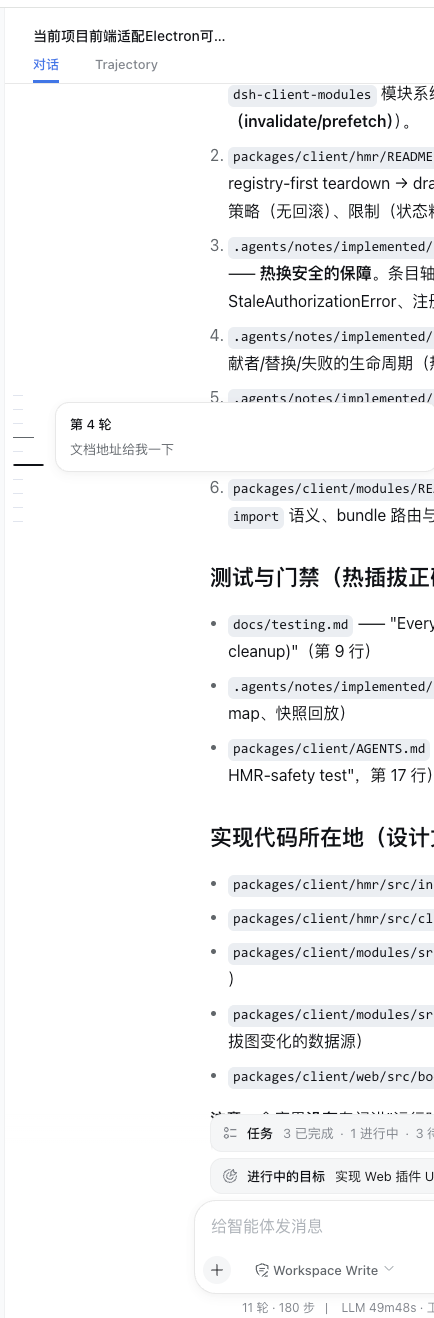
It supports keyboard focus, light and dark themes, and reduced-motion preferences. When needed, it loads only enough older history to decide whether the navigator should appear without moving the reader's current position.
Installation
The plugin is private and not published. Its private repository is dsh-external/dsh-turn-navigator, but the repository remains empty until the first reviewed push. Use the local installation path until a reviewed commit is available, then start Web:
dsh plugin --profile web add -w "/path/to/dsh-turn-navigator"
dsh web
After the first reviewed commit is pushed, install that exact private revision with:
dsh plugin --profile web add -w github:dsh-external/dsh-turn-navigator#<reviewed-commit>
The checked-in lib/ output installs without rebuilding. A compatible DSH Web version is required. To remove the plugin:
dsh plugin --profile web remove -w @deepseek-ai/dsh-turn-navigator
Required DSH Web slot
This plugin registers into conversation.chat.navigator; it does not own or render that slot. A compatible DSH Web build must ship the same contract in both the host runtime and the official private client SDK declarations. A plugin-local type augmentation is not a substitute: it could make TypeScript pass while a host that does not render the slot silently shows no navigator.
Add the slot in the owning @deepseek-ai/dsh-client-ui-conversation package at these points:
- In the slot contract, declare a session-scoped single slot whose owner supplies anchored older-history loading, and include it in the chat view's
PropsRenderSlotsunion:
export interface TurnNavigatorOwnerProps {
  loadOlder: () => void
}

interface SlotMap {
  'conversation.chat.navigator': {
    kind: 'single'
    scope: 'session'
    owner: TurnNavigatorOwnerProps
  }
}
- In the chat view registration, claim the child slot with the same kind and scope:
children: {
  'conversation.chat.navigator': { kind: 'single', scope: 'session' },
}
- In the chat view component, render the slot beside the transcript scroll container and pass the callback that preserves the current reading row while older history is prepended:
{renderSlot('conversation.chat.navigator', { loadOlder: loadOlderAnchored })}
- Cover declaration and disposal, render dispatch, and anchored older-history loading in the host package tests, then publish a matching private SDK version for
@deepseek-ai/dsh-client-ui-conversationand its aligned client peers. A source-only host change does not unblock an external plugin that develops only against official registry packages.
Development and verification
The project .npmrc selects the private @deepseek-ai/* scope; pnpm 11 reads its ${NPM_TOKEN} authentication mapping from the trusted user-level ~/.npmrc. The SDK packages are pinned to the reviewed 0.0.1-rc.2 set. Set NPM_TOKEN, install without lifecycle scripts, then run the checks:
pnpm install --ignore-scripts
pnpm run check
Do not link a DSH source checkout into this directory. Use pnpm run watch beside dsh web --dev for live browser changes. See compat/ for the isolated assembled Web fixture.
Model Experience
None. The plugin only renders existing conversation data in the browser.
KV Cache effect
None.
Known Limitations and Deferred Work
- The private
0.0.1-rc.2SDK does not yet declare the requiredconversation.chat.navigatorslot, so the full development check remains blocked until a matching official SDK release. Do not add a local type shim; the installation target must provide the real slot. - Only loaded history receives markers; earlier turns appear after older history is loaded.
- Previews show text only.
Links
More in this category
zhu1090093659/dsh-web#packages/dsh-task-board★ 8076
Task board for the dsh web GUI: a sidebar multi-column kanban whose cards run in real DSH agent sessions and can also be scheduled with cron expressions, executed host-side even with the browser closed.
zhu1090093659/dsh-web#packages/dsh-web-all★ 8076
Plugin and skin collection for the DSH Web UI: task board, Git graph, right-side panel, remote mobile UI, pet, live token stats, and a skin center.
omdsh-dev/DSH-better-sidebar★ 3828
Full sidebar workbench with file rendering and editing, terminal, Git, and subagents; third-party plugins can register new tabs.
ccch1mneyyy/dsh-TUI★ 3661
Claude Code-style full-screen terminal UI: pixel-whale header, live status line, and streaming thought expansion.
MeteorNOX/DeepSeek-Balance-Whale-Widget★ 3277
A fixed-corner whale widget for the DSH web GUI — balance, today's usage and per-turn cost with peak/off-peak pricing, editable balance-alert and daily-budget bubbles, a module-based custom bubble queue with A/B weighted choices and random lines or images, 30+ vendor templates (OpenAI, OpenRouter, Kimi, SiliconFlow, Ark, Zhipu, MiniMax and more) with per-model balance and subscription quota, plus task-end sound, imported audio, custom roles and a resource manager. Local-only, no telemetry.
Devin-AXIS/deepseek-design#deepseek-idesign★ 1628
Visual design studio for websites, app prototypes, posters, cards, reports, and magazines, with templates, direct element editing, selection-aware AI draft handoff, and export.
Community comments
Comments are public GitHub Discussions. Loading them connects to GitHub and Giscus; a GitHub account is required to post.