Daily and weekly AI journals generated from your local DSH session logs, grouped by goal with deliverables and unfinished todos.
Install
# from npm (prebuilt)
dsh plugin --profile web add dsh-ai-journal
# from a prebuilt release tarball
dsh plugin --profile web add "https://github.com/vc1235-ui/dsh-ai-journal/releases/download/v0.1.2/dsh-ai-journal-0.1.2.tgz"
# from GitHub (first run asks for allowBuilds approval — follow the hint, retry)
dsh plugin --profile web add github:vc1235-ui/dsh-ai-journal
Any plugin you install runs third-party code with your own permissions — it can read your files, use your credentials, and reach the network, and tool approvals don’t sandbox it. GitHub-sourced plugins also run build scripts at install time — pnpm blocks those until you allow them, so an install can stop with ERR_PNPM_GIT_DEP_PREPARE_NOT_ALLOWED or ERR_PNPM_IGNORED_BUILDS; dsh prints the exact key to add under allowBuilds in your profile’s pnpm-workspace.yaml, and the install works on the next run. Allowing a build is a trust decision: only install sources you trust, and pin a commit (github:owner/repo#sha).
README
This plugin publishes its README in Chinese only.

用你本机的 DSH 会话日志,自动生成每日 / 每周 AI 日报:今天/本周做了什么、归属哪个目标、结果和交付物是什么、还有哪些没完成。在 DSH 左侧栏提供入口,面板按「目标 → 行动 → 结果 → 待办」分块展示,顶部是图形化摘要。
数据只来自本机 DSH 的会话日志,不联网、不上传。唯一落盘的是你点「这不是待办」后产生的忽略列表。
English: dsh-ai-journal turns your local DeepSeek Harness session logs into a daily/weekly report panel in the DSH Web sidebar — activities grouped by goal/project, results with deliverable links, all unfinished todos with one-click "open a new chat with a suggested prompt", plus a graphical summary. Local-only: no network, no uploads.
面板内容
- 概览:KPI 大数字(会话 / 轮次 / 我的输入 / 工具调用 / 交付物 / 完成待办)+ 范围、时区、更新时间。
- 图形化摘要:待办完成率环、目标/项目分布堆叠条、周报额外有 7 天轮次柱状图(柱 hover 显示数值)。
- 按目标分块(没有目标的会话按项目归组):
- 行动:窗口内的人类输入摘要,按时间排序;
- 结果:完成项、交付物(可点击,在宿主桌面打开原文件)、完成的待办;
- 待办:该块所有未完成事项(
pending+in_progress)+ 进行中/受阻的目标,每条右侧有「新开对话」,预填针对性的提示词。
- 待跟进(可选):从会话里人类输入的措辞(「后续再聊」「待回复」「待确认」等)启发式识别出可能被口头遗留的事项,单独成区、明确标注不确定;每条可以「新开对话」或点「这不是待办」忽略(可撤销)。
- 日报 / 周报切换,日期前后翻页,手动刷新。
截图
会话标题、项目名与具体内容已做模糊打码。
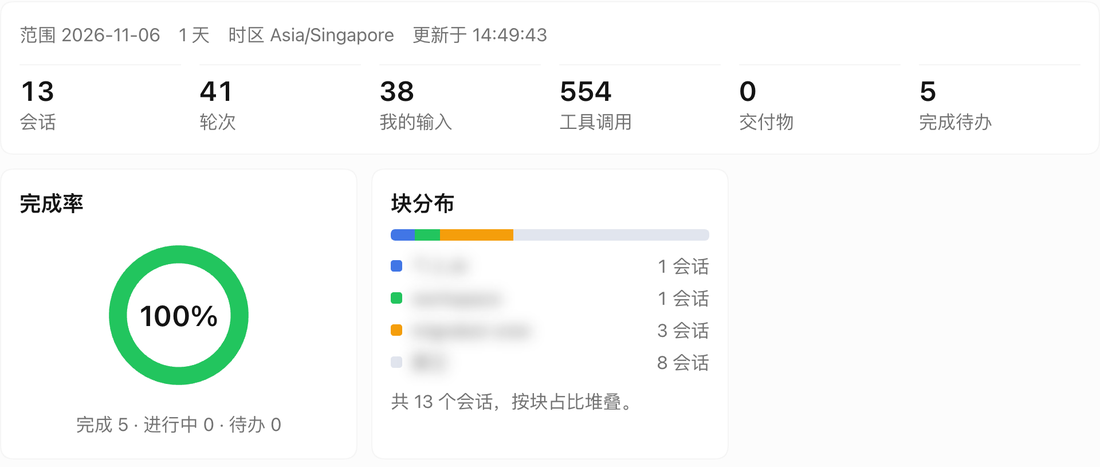


安装
需要 DSH Web(验证版本 0.2.1-rc.5)与可用的会话查询服务。
# 从 npm(推荐,发布后可用)
dsh plugin --profile web add dsh-ai-journal

# 或直接从 GitHub 安装
dsh plugin --profile web add https://github.com/vc1235-ui/dsh-ai-journal

# 或本地路径
dsh plugin --profile web add /path/to/dsh-ai-journal
安装后在 DSH 里启用插件并重启(或等 HMR 生效),左侧栏会出现「AI 日报」入口。
统计口径
- 窗口:日报 = 请求时区当天
00:00起;周报 = 当周周一00:00起,7 天。 - 做了什么:窗口内有活动的会话(
blank、subagent 会话除外)与窗口内的人类输入;没有人类输入时回退到窗口前最后一次输入。 - 归属目标:会话最新
goal/change的 objective;没有目标按项目(cwd)归组。 - 未完成:会话最新
todo/write快照里的pending/in_progress,加上active/blocked的目标。 - 交付物:会话事件
deliverables/presented里的文件;点击走宿主认证的POST /api/present.open,在桌面打开。 - 待跟进:只扫窗口内人类输入,命中固定措辞集合,每会话 ≤4 条、整份 ≤12 条、同句去重;不判断是否真的未完成,因此界面标注「可能不准确」。
- 自动触发:定时任务 / 脚本 / 机器人触发的会话(标题或输入带
[…自动触发…]等标记,或工作目录在~/.dsh/migrated-cron/、~/.dsh/bot/)整体不计入,包括「待跟进」。 - 结果为空时不编造内容。精确数字由程序从会话事件统计,不经过模型改写。
隐私与安全
- Host 接口先过宿主认证:每个请求交给
connection.requestRejection(request)(Host/Origin fence + 浏览器登录 cookie),未登录 401、跨站 403、认证服务缺失时 fail closed;再由接口自身拒绝非 GET 405; - 会话内容只在内存里聚合,不落盘、不联网、不上传;
- 唯一写接口是「这不是待办」:
POST /ai-journal/api/followups,只把key / 会话 id / 截断文案 / 时间写到$DSH_HOME/ai-journal/followups-dismissed.json(最多 5000 条); - 不读取飞书 Bot、IM、记忆插件等任何其它插件的存储或配置(Bot 会话在本机只是普通 DSH 会话,因此无需 bot 依赖)。
兼容性
- 不依赖任何第三方插件,只用 DSH 核心服务:
sessionController/sessionQuery(数据)、webServer(路由)、slots/uiWorkspace/workspaces(前端); - 缺会话服务时接口返回 503、面板显示中文提示,不会崩溃;
- 依赖的事件:
todo/write、goal/change、deliverables/presented、user/message;未知事件一律忽略; - 界面不声明字体与绝对字号(KPI 数字用相对
em),跟随 DSH 全局字号与主题; - 交付物打开依赖 DSH Web 自带的
/api/present.open(@deepseek-ai/dsh-web-app内置),缺失时点击提示失败,报告其余部分正常。
开发
node --check index.js && node --check client.js
node --test test/journal.test.mjs      # 聚合层 22 项
node --test test/dismissed.test.mjs    # 忽略存储 3 项
node test/client.test.cjs              # 面板渲染 80 项(vm + mock)
目录:index.js(Host 路由与取数)、lib/journal.js(纯聚合)、lib/dismissed.js(忽略记录)、lib/auth.js(宿主认证 fence)、client.js(浏览器面板)、API-CONTRACT.md(接口契约)、test/(离线测试)。
真实接口自检(需运行中的 Web,认证用启动时打印的 ?token=):
node scripts/verify.mjs --url http://127.0.0.1:3080 --token <launch-token>
市场收录
- npm:
dsh-ai-journal@0.1.2✅ - 开放插件市场(dshopen.org):已收录 ✅(#283 复核通过后关闭)
- DSH 社区插件市场(awesome-dsh-plugin):已提交 PR(#13427)⏳,合并后补
awesome-dsh-plugin.com徽章
完整流程见 PUBLISHING.md。
License
Links
More in this category
zhu1090093659/dsh-web#packages/dsh-task-board★ 10290
Task board for the dsh web GUI: a sidebar multi-column kanban whose cards run in real DSH agent sessions and can also be scheduled with cron expressions, executed host-side even with the browser closed.
zhu1090093659/dsh-web#packages/dsh-web-all★ 10290
Plugin and skin collection for the DSH Web UI: task board, Git graph, right-side panel, remote mobile UI, pet, live token stats, and a skin center.
ccch1mneyyy/dsh-TUI★ 7336
Claude Code-style full-screen terminal UI: pixel-whale header, live status line, and streaming thought expansion.
MeteorNOX/DeepSeek-Balance-Whale-Widget★ 7093
A fixed-corner whale widget for the DSH web GUI — balance, today's usage and per-turn cost with peak/off-peak pricing, editable balance-alert and daily-budget bubbles, a module-based custom bubble queue with A/B weighted choices and random lines or images, 30+ vendor templates (OpenAI, OpenRouter, Kimi, SiliconFlow, Ark, Zhipu, MiniMax and more) with per-model balance and subscription quota, plus task-end sound, imported audio, custom roles and a resource manager. Local-only, no telemetry.
omdsh-dev/DSH-better-sidebar★ 5036
Full sidebar workbench with file rendering and editing, terminal, Git, and subagents; third-party plugins can register new tabs.
Devin-AXIS/deepseek-design#deepseek-idesign★ 1792
Visual design studio for websites, app prototypes, posters, cards, reports, and magazines, with templates, direct element editing, selection-aware AI draft handoff, and export.
Community comments
Comments are public GitHub Discussions. Loading them connects to GitHub and Giscus; a GitHub account is required to post.