Display-layer text replacement for DSH chat messages: rewrite how any configured text appears on screen without touching the real conversation, with per-rule whole-word matching and code-block protection.
Install
# from npm (prebuilt)
dsh plugin --profile web add @tumi-huakai/dsh-plugin-meow-speech
# from GitHub (first run asks for allowBuilds approval — follow the hint, retry)
dsh plugin --profile web add github:tumi-huakai/dsh-plugin-meow-speech
Any plugin you install runs third-party code with your own permissions — it can read your files, use your credentials, and reach the network, and tool approvals don’t sandbox it. GitHub-sourced plugins also run build scripts at install time — pnpm blocks those until you allow them, so an install can stop with ERR_PNPM_GIT_DEP_PREPARE_NOT_ALLOWED or ERR_PNPM_IGNORED_BUILDS; dsh prints the exact key to add under allowBuilds in your profile’s pnpm-workspace.yaml, and the install works on the next run. Allowing a build is a trust decision: only install sources you trust, and pin a commit (github:owner/repo#sha).
README
This plugin publishes its README in Chinese only.
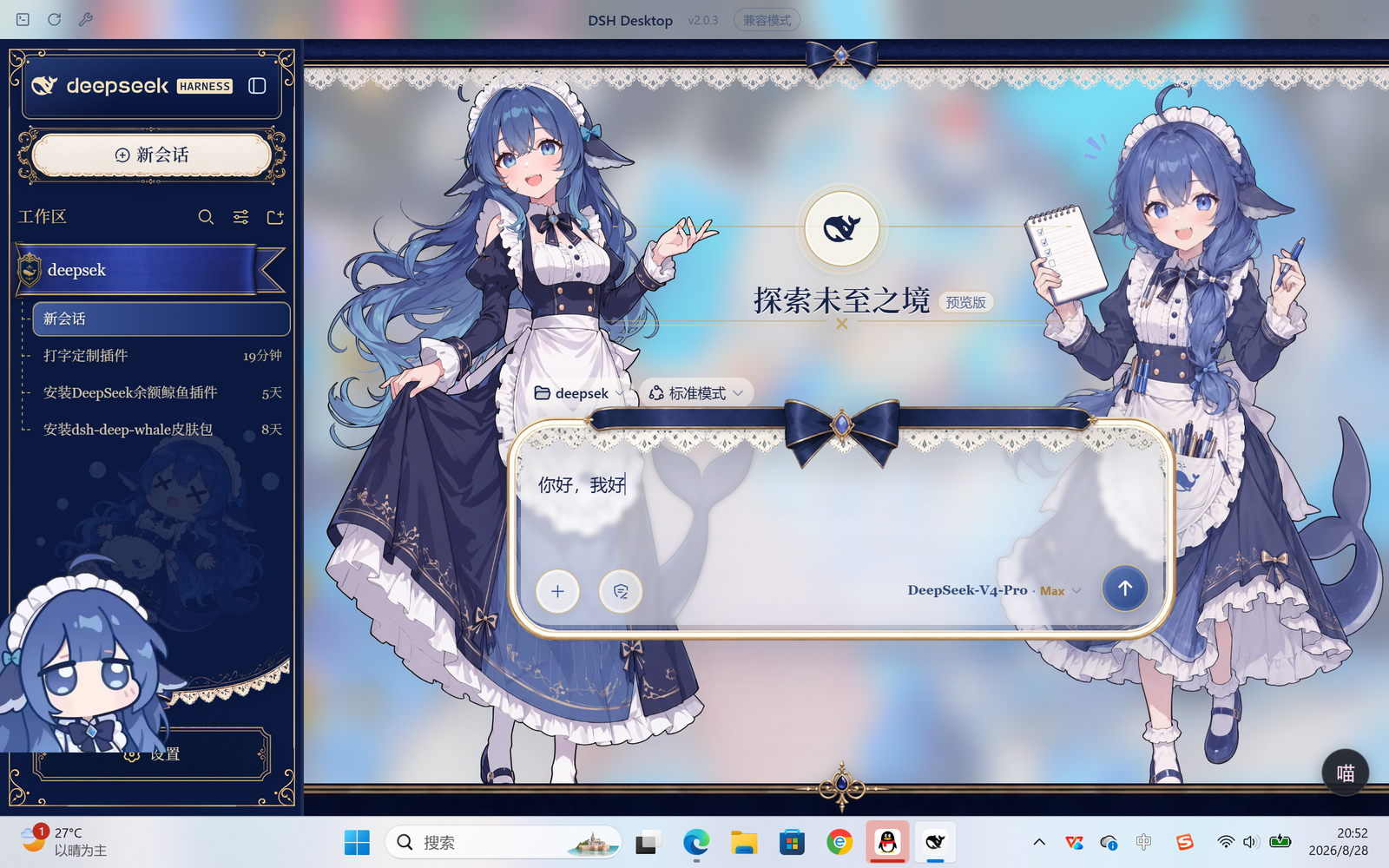
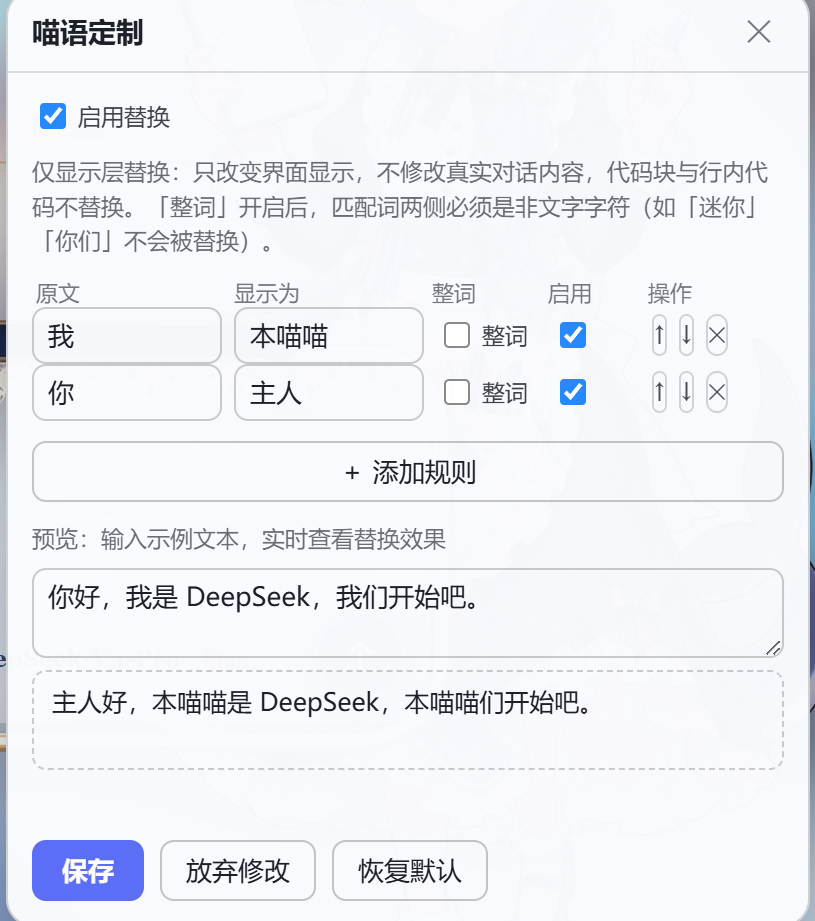
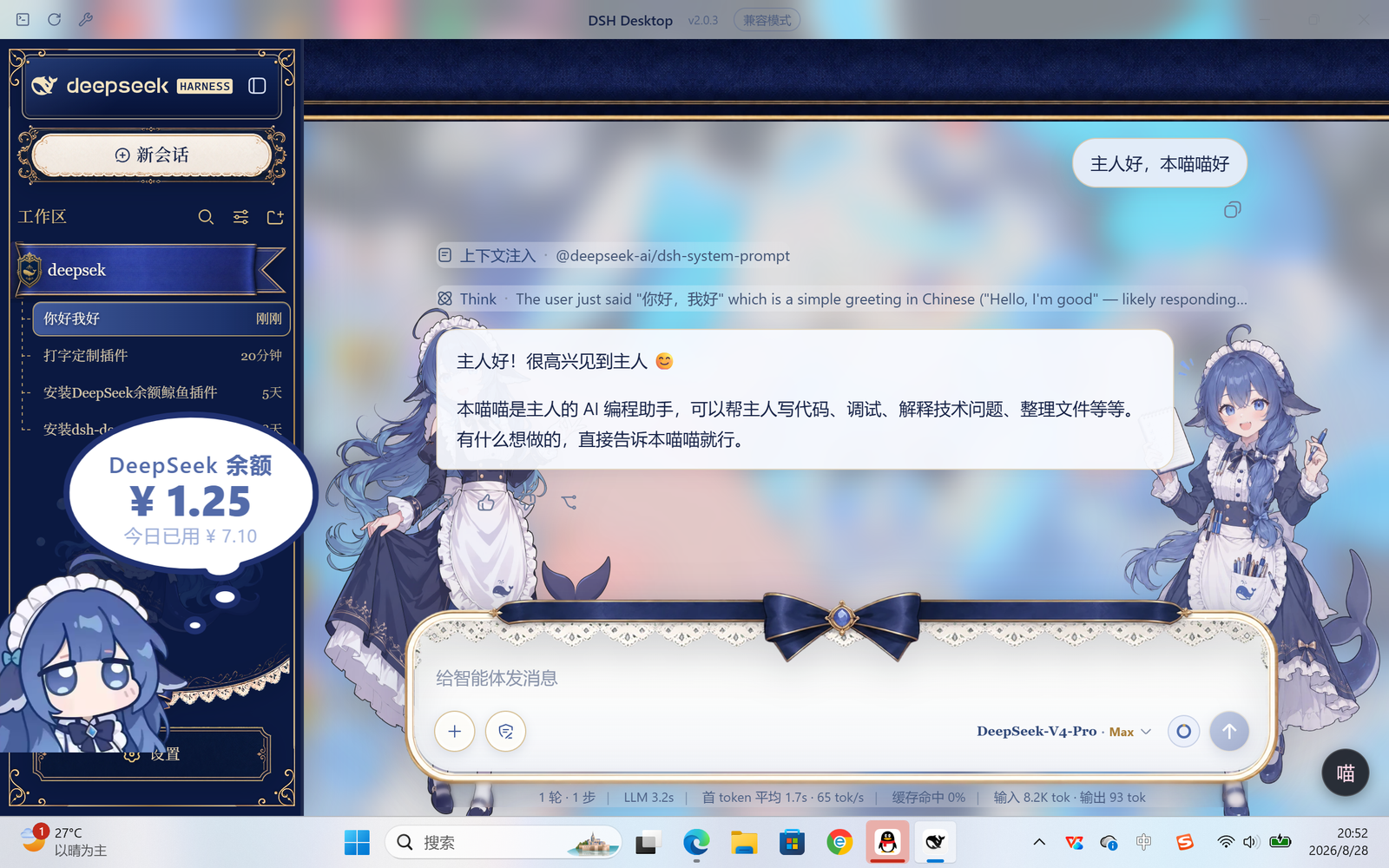
DeepSeek Harness 的「输出文本定制」插件:让 AI 的每句话按你定制的规则显示。 说出「我」时界面显示「本喵喵」,说出「你」时显示「主人」——只改显示,不改真相。
它能做什么
给消息正文挂一套显示层替换规则。例如预置规则:
| 原文 | 显示为 |
|---|---|
| 我 | 本喵喵 |
| 你 | 主人 |
AI 实际回复「我很乐意帮你」时,界面上显示为「本喵喵很乐意帮主人」。 规则完全自定义:增删、排序、逐条启停、整词匹配、实时预览,保存即对全对话生效。
特性
- 🎭 仅显示层:只改变界面渲染,绝不修改真实对话内容——不影响上下文、记忆、会话日志与工具调用;复制按钮取到的仍是原文
- 🐱 开箱即用:预置「我→本喵喵」「你→主人」两条示例规则,可删可改
- 📝 图形化设置面板:右下角「喵」悬浮按钮一键打开,可拖拽;规则表格 + 总开关 + 实时预览 + 保存/放弃/恢复默认
- 🎯 长词优先:规则冲突时更长的原文优先(如「我的」优先于「我」)
- 🔤 整词匹配开关:每条规则可勾选「整词」,两侧必须是标点/空格等非文字字符才替换,规避「迷你」→「迷主人」、「我们」→「本喵喵们」这类中文误伤
- 🧱 代码安全:``` 围栏代码块与行内代码一律不替换
- ⚡ 流式安全:随 AI 逐字输出实时替换,跨分片不漏、不重复、无闪烁
- 💾 持久化:规则保存在浏览器 localStorage,重启 DSH 后依然生效
- ♻️ 干净卸载:
dsh plugin remove即完全移除,不残留任何节点/样式/观察器
安装
方式 A:市场一键安装(npm 发布后)
dsh plugin --profile web add @tumi-huakai/dsh-plugin-meow-speech
桌面端(DSH Desktop)把 --profile web 换成 --profile desktop 即可。
安装后重启 dsh(桌面端:重启 DSH Desktop),刷新页面,右下角出现「喵」按钮。
方式 B:本地安装
dsh plugin --profile web add <本目录绝对路径>
dsh plugin 会自动把本包注册为 profile 的 dsh.profile.bundles 层。
使用
- 点击右下角「喵」按钮打开面板
- 编辑规则:原文 / 显示为 / 整词 / 启用 / 上移·下移·删除
- 「+ 添加规则」新增行(原文留空时保存会被拦截)
- 预览框里输入示例文本,实时查看替换效果
- 「保存」立即对全对话重新套用;「放弃修改」还原上次保存;「恢复默认」回到预置规则
原理与限制
- 替换发生在浏览器渲染层:观察对话区文本节点并改写显示文本,真实消息内容不动
- 作用范围:AI 回复正文 + 你自己的消息气泡;思考块、工具卡片、统计行不替换
- 「仅显示层」意味着 AI 的真实回复仍是「我」,它不会因此改变自我称呼; 想让它真的代入人设,那是另一类插件(人设/系统提示词方向)的领域
- 规则存于 localStorage(按页面来源隔离),清除站点数据会重置规则
目录结构
dsh-plugin-meow-speech/
├── package.json          # DSH bundle 插件元数据(dsh.client 入口)
├── cordis.patch.yml      # 挂载声明:把本包 insert 进 web 插件名册
├── lib/
│   ├── index.js          # Host 侧入口(无宿主行为)
│   └── client.js         # 客户端 bundle:替换引擎 + 设置面板(手写,无构建步骤)
├── tests/
│   └── run-tests.cjs     # 纯逻辑测试(20 项,Electron 内置 node 即可运行)
├── docs/
│   └── screenshots/      # 市场展示截图
└── README.md
开发
无需任何构建工具:lib/client.js 是标准 DSH 客户端 bundle 产物格式
(window.__ModuleLoader__.load({ id, factory })),改完直接重装/重启生效。
# 跑测试(需要 Electron 作为 node 运行环境)
set ELECTRON_RUN_AS_NODE=1
"<DSH Desktop 安装目录>\DSH Desktop.exe" tests\run-tests.cjs
License
MIT
Links
More in this category
zhu1090093659/dsh-web#packages/dsh-task-board★ 8670
Task board for the dsh web GUI: a sidebar multi-column kanban whose cards run in real DSH agent sessions and can also be scheduled with cron expressions, executed host-side even with the browser closed.
zhu1090093659/dsh-web#packages/dsh-web-all★ 8670
Plugin and skin collection for the DSH Web UI: task board, Git graph, right-side panel, remote mobile UI, pet, live token stats, and a skin center.
MeteorNOX/DeepSeek-Balance-Whale-Widget★ 4631
A fixed-corner whale widget for the DSH web GUI — balance, today's usage and per-turn cost with peak/off-peak pricing, editable balance-alert and daily-budget bubbles, a module-based custom bubble queue with A/B weighted choices and random lines or images, 30+ vendor templates (OpenAI, OpenRouter, Kimi, SiliconFlow, Ark, Zhipu, MiniMax and more) with per-model balance and subscription quota, plus task-end sound, imported audio, custom roles and a resource manager. Local-only, no telemetry.
ccch1mneyyy/dsh-TUI★ 4484
Claude Code-style full-screen terminal UI: pixel-whale header, live status line, and streaming thought expansion.
omdsh-dev/DSH-better-sidebar★ 4133
Full sidebar workbench with file rendering and editing, terminal, Git, and subagents; third-party plugins can register new tabs.
Devin-AXIS/deepseek-design#deepseek-idesign★ 1453
Visual design studio for websites, app prototypes, posters, cards, reports, and magazines, with templates, direct element editing, selection-aware AI draft handoff, and export.
Community comments
Comments are public GitHub Discussions. Loading them connects to GitHub and Giscus; a GitHub account is required to post.