Conversation Flow observability for DeepSeek Harness swarms, with topology, routed-message inspection, HITL pauses, Live follow, and child-session navigation.
Install
# from GitHub (first run asks for allowBuilds approval — follow the hint, retry)
dsh plugin --profile web add github:stephenlzc/dsh-swarm-panel#path:/dsh-swarm-plugin
Any plugin you install runs third-party code with your own permissions — it can read your files, use your credentials, and reach the network, and tool approvals don’t sandbox it. GitHub-sourced plugins also run build scripts at install time — pnpm blocks those until you allow them, so an install can stop with ERR_PNPM_GIT_DEP_PREPARE_NOT_ALLOWED or ERR_PNPM_IGNORED_BUILDS; dsh prints the exact key to add under allowBuilds in your profile’s pnpm-workspace.yaml, and the install works on the next run. Allowing a build is a trust decision: only install sources you trust, and pin a commit (github:owner/repo#sha).
README
[English] | 中文
DSH Agent Swarm: AI-driven multi-agent orchestration with dynamic communication topology, cold resume, and layered human-in-the-loop.
Overview
dsh-swarm-panel enables a single Orchestrator Agent to autonomously spawn, coordinate, and communicate with child agents, choosing the communication topology (parent-child or peer-to-peer) on a per-message basis. The Orchestrator is a real LLM Agent — it decides which roles to spawn, which model each role uses, and how roles exchange information.
Quick Start
Add the plugin to your cordis.yml (the deployment ships the tool surface to every root Orchestrator agent), then point the Orchestrator at the bundled code-review squad example. The workspace:* row below is for a Harness source checkout; end users should install the package with dsh plugin as shown in Installation.
# cordis.yml (overlay onto your base profile, or copy into $DSH_HOME/profiles/<name>/)
plugins:
  dsh-swarm-panel: workspace:*
# Run the bundled code-review squad from a DeepSeek Harness checkout
pnpm dsh --profile headless --patch ../dsh-swarm-panel/dsh-swarm-plugin/examples/coding-squad/cordis.yml \
  "review the pending PR"
The 14 tools are auto-installed on root agents only. Children get no swarm surface — the orchestrator drives every cross-role message, checkpoint, and HITL ask. The example requires DEEPSEEK_API_KEY via the standard credentials path.
Installation
# From a GitHub Release (works today, no npm publication needed).
# Download the asset first: adding the release URL directly fails pnpm's
# integrity check (ERR_PNPM_MISSING_TARBALL_INTEGRITY).
curl -sSL -o /tmp/dsh-swarm-panel-1.0.1.tgz \
  https://github.com/stephenlzc/dsh-swarm-panel/releases/download/v1.0.1/dsh-swarm-panel-1.0.1.tgz

# The desktop app's launcher is not on PATH; adjust the path if needed, and
# replace `dswarm` with any profile name you like — never use `desktop`.
DSH="/Applications/DeepSeek Harness.app/Contents/Resources/runtime/cli/bin/dsh"
"$DSH" plugin --profile dswarm add /tmp/dsh-swarm-panel-1.0.1.tgz

# After the npm release, with `dsh` on PATH
dsh plugin --profile web add dsh-swarm-panel

# Or for local development from this checkout
dsh plugin --profile web add file:./dsh-swarm-plugin
Configuration
All knobs are deployment choices written to cordis.yml under the plugin row's
config: block. They all default to safe values, so an empty config: {}
activates the plugin with the documented defaults.
# cordis.yml row config
plugins:
  dsh-swarm-panel:
    $: workspace:* # source-checkout development only
    config:
      enabled: true # master switch: false disables every projection, tool, and effect
      provider: spawn
      humanInputMode: TERMINATE
      checkpoint: { frequency: auto }
      chat: { speakerSelection: round_robin, transcriptWindow: 10 }
      memory: { maxEntries: 200, queryLimit: 5 }
enabled(defaulttrue): whenfalse,applyshort-circuits without registering theswarmprojection, theswarm/*event vocabulary, or any per-agent effect. The host side leaves no detectable footprint, and the client side omits theSwarms: Nheader badge and the Conversation Flow tab. Use this to keep the plugin installed while turning the panel off for a specific profile. To skip the entry entirely, set the loader-leveldisabled: trueon thecordis.ymlrow.
Web UI
With the plugin installed in the web profile, ask the Orchestrator to create a swarm and spawn a role, for example: Create a swarm named default and spawn one planner role. Open the Conversation Flow tab next to Chat and Trajectory. That page is the swarm canvas the plugin owns (the Workspaces sidebar, Chat/Trajectory tabs, and Session log chrome stay with the host):
- Topology strip of role icon cards with parent/child and Active / Idle·Waiting / Completed / Error (Error is its own color, not exited grey).
- Time-grid swimlanes with vertical lane lines; compact cards sit in the sender column; routes are elbow polylines (solid
parent → child, dashedpeer ↔ peer). There is no destination-capsule substitute. - Time column shows clock time plus a
UTC±Noffset label. - Stacked message inspector (From/To, Route, Status, Content preview, Copy ID, Open session). Tags, token usage, and View in Trajectory are omitted because they are not on the
swarmprojection. - Footer: visible/total, First, Last, Duration, Live, Auto-scroll. Export is not implemented (no export data source).
- Pending HITL in the Human lane is clickable and opens the original swarm session.
- ArrowUp / ArrowDown / Escape apply only while the flow collection is focused.
The header Swarms: N badge is only a count. Click a role card or lane to open its child session.
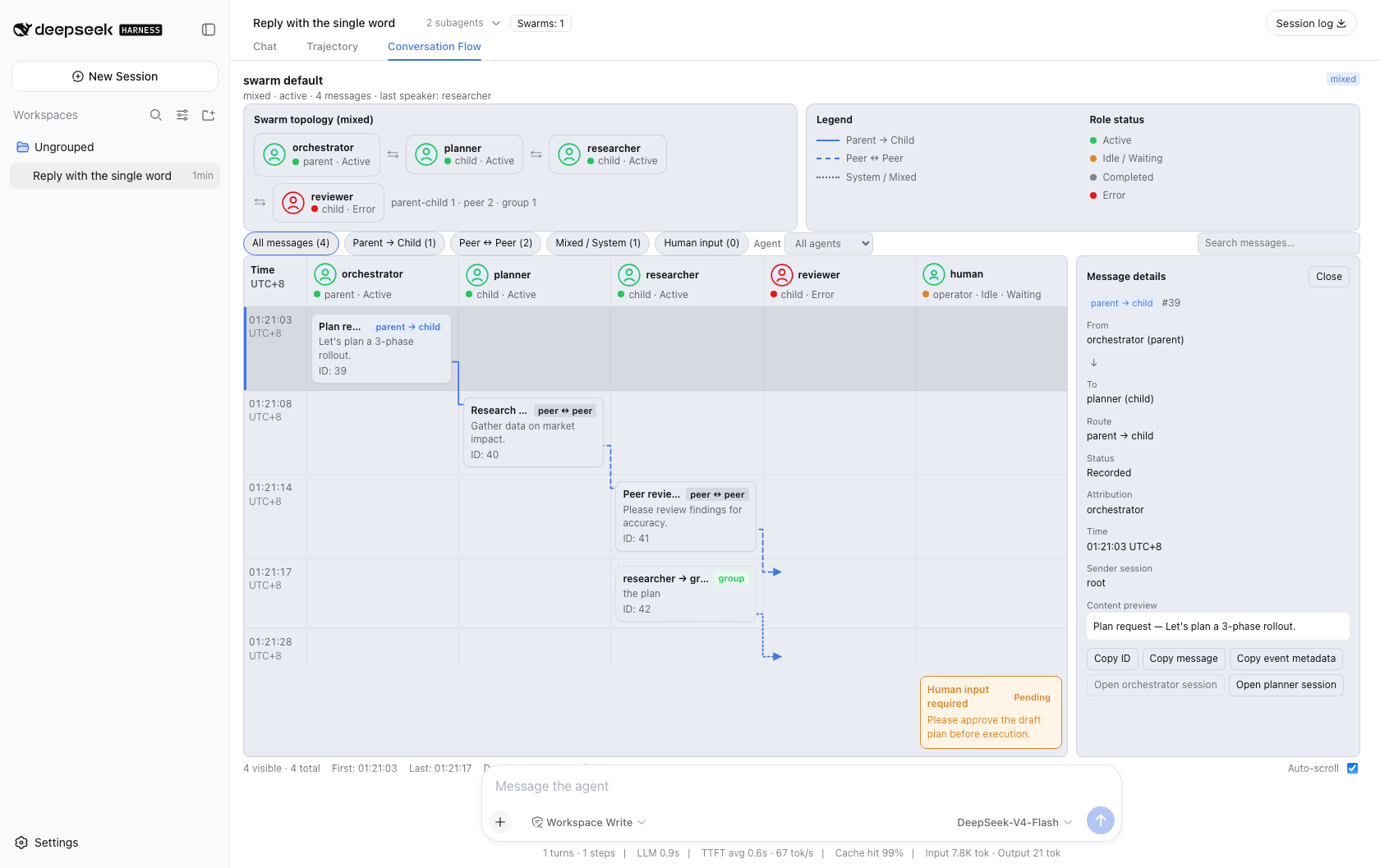
Additional host-composed gallery evidence is available in the repository root:
swarm-panel-host-desktop.png: full desktop shell with topology, routes, inspector, and HITL.swarm-panel-host-narrow.png: 390×844 responsive layout.swarm-panel-host.png: selected-message inspector state.


The images use a deterministic replay fixture. They are UI evidence, not proof of a live model response.
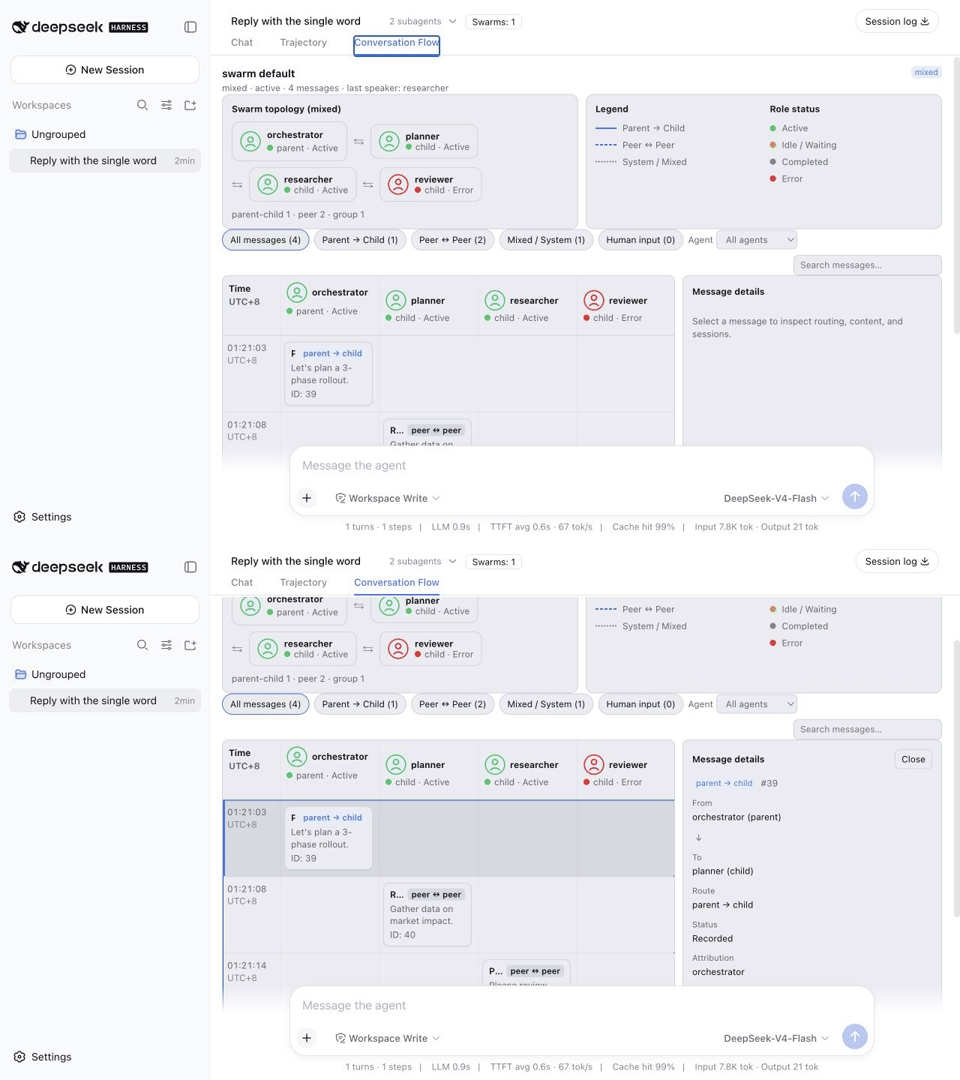
The short tour moves through the desktop overview, message inspector, and 390×844 responsive layout. It is assembled from redacted replay screenshots and contains no API credential.
Tool Reference
| Tool | Description |
|---|---|
swarm_spawn |
Spawn a named child agent role |
swarm_send_to |
Send a message between roles with attribution control |
swarm_set_topology |
Set communication topology (parent-child / peer / mixed) |
swarm_list_children |
List all active roles |
swarm_interrupt |
Interrupt one or all roles |
swarm_terminate |
Terminate the entire swarm |
swarm_ask_user |
Request human input (HITL) |
swarm_start_chat |
Start the group chat engine (topic, speaker selection, stop conditions) |
swarm_next_turn |
Advance the chat one or more turns; speaker steers under auto selection |
swarm_set_context |
Write a swarm-level context variable |
swarm_get_context |
Read context variables (one key or all) |
swarm_checkpoint |
Save a checkpoint for cold resume |
swarm_memory_write |
Remember a swarm-level fact (decision, finding, constraint) |
swarm_memory_query |
Query memories by free text (lexical scoring, tag-boosted) |
Group Chat Engine
swarm_start_chat starts a host-side turn engine over the swarm's roles; swarm_next_turn advances it. Every turn the engine picks a speaker, delivers a prompt carrying the topic, the shared context variables, and the recent transcript, awaits the role's reply from its durable child session, and logs it as a swarm/role-message addressed to group. All engine state lives in the event log, so a cold resume continues exactly from the last speaker.
Speaker selection (per-swarm via swarm_start_chat, default via cordis.yml chat.speakerSelection):
round_robin(default): spawn order, wrapping; continues fromlastSpeakerafter a resume.random: uniform pick excluding the previous speaker.auto: the Orchestrator decides each turn by passingspeakertoswarm_next_turn.manual: the engine asks the operator who speaks next (requires human input enabled).
Stop conditions: maxTurns / maxRounds (a round = every active role speaking once), terminationMessage substring in a reply, and swarm_terminate. Under humanInputMode: TERMINATE the operator confirms an automatic stop; under ALWAYS the operator is asked after every completed round.
# cordis.yml row config
config:
  chat:
    speakerSelection: round_robin
    maxTurns: 50
    transcriptWindow: 10 # recent group messages per turn prompt
Context variables are swarm-level key-value state: written with swarm_set_context (attributed via by), read with swarm_get_context, injected into every turn prompt, included in checkpoints, and rebuilt by the resume fold.
Lightweight Memory
swarm_memory_write records swarm-level facts (decisions, findings, constraints) as swarm/memory-written events; swarm_memory_query retrieves them by free text. Scoring is lexical — lowercase token overlap, exact tag hits weigh double, ties favor the later write — with no embedding dependency. Memories live only in the durable log: a cold resume re-folds them with no special casing, and write ids (mem-<n>) never collide across a restart. The fold view is capped at the latest memory.maxEntries entries (the log itself is never truncated).
# cordis.yml row config
config:
  memory:
    maxEntries: 200 # fold view cap
    queryLimit: 5   # default swarm_memory_query limit
Architecture
src/runtime.ts:SwarmRuntime— per-orchestrator lifecycle, child management, relay routing, checkpoint snapshotssrc/domain.ts: Pure event-folding logic — all state from session eventssrc/resume.ts: Cold resume — fold-based runtime hydration, child re-establishment, history replaysrc/tools.ts: Orchestrator tool definitionssrc/types.ts: Session event types (swarm/role-spawned,swarm/role-message, etc.)src/panel-model.ts:swarmprojection — panel wire model + incremental reducersrc/memory.ts: Lightweight memory retrieval — lexical scoring over folded entriessrc/client/: Browser half — session-header swarm panel (no JSX, inline styles)src/index.ts: Function plugin entry (name+apply)
Session Events
| Event | Purpose |
|---|---|
swarm/created |
Swarm was created |
swarm/role-spawned |
Child agent spawned (records the role's model and system prompt) |
swarm/role-message |
Message sent between roles |
swarm/role-exited |
Role settled / interrupted / errored |
swarm/topology-changed |
Topology mode changed |
swarm/destroyed |
Swarm terminated |
swarm/checkpoint |
State snapshot saved (roles, topology, message count, last speaker) |
swarm/resumed |
Cold resume completed; names the recovery point and each role's outcome |
swarm/hitl-requested |
Orchestrator asked the operator a question and is waiting |
swarm/hitl-resolved |
A pending question settled (answered with the answer text, or cancelled) |
swarm/chat-started |
Group chat engine started (topic, speaker selection, stop conditions) |
swarm/chat-ended |
Engine stopped, with the reason |
swarm/context-updated |
A context variable was written |
swarm/memory-written |
A memory entry was written (id, text, tags, attribution) |
Human-in-the-Loop
swarm_ask_user pauses the Orchestrator's tool call until the operator answers through the host's user-questions provider (ctx.userQuestions; the plugin declares it in inject). The question is logged as swarm/hitl-requested before the wait starts, and exactly one swarm/hitl-resolved records how it settled. With routeTo, the answer is also delivered to a role as a message attributed to human.
Interaction semantics: interrupting roles never cancels a pending ask (HITL is swarm-level); swarm_terminate cancels it with outcome cancelled. After a cold resume, an unanswered question reappears in swarm_list_children's pendingHitl projection — no live waiter survives a restart, so the Orchestrator should re-ask; request ids (hitl-<n>) never collide with the crashed request.
# cordis.yml row config
config:
  humanInputMode: TERMINATE # ALWAYS | TERMINATE | NEVER
ALWAYS/TERMINATE:swarm_ask_useris enabled (the M3 turn engine consumes the distinction).NEVER:swarm_ask_userfails withunavailableand nothing is logged.
Checkpoint & Cold Resume
Every swarm fact lives in the orchestrator's durable session log, so a swarm survives a host restart. When a session is resumed (ctx.agents.resume), the plugin:
- Rebuilds each
SwarmRuntimesynchronously from the event fold — role map, topology, termination. - Re-establishes every running role in the background: a role whose durable child session survived is cold-resumed through the host subagent relay with its history intact; a role whose child session was lost is re-spawned from its recorded definition and its inbound
swarm/role-messagehistory is replayed in order. - Appends one
swarm/resumedfact naming the latest checkpoint and each role's outcome (resumed/respawned).
Checkpoints are markers over the log — resume always re-folds the complete log. Save them with the swarm_checkpoint tool, or automatically per the configured cadence:
# cordis.yml row config
config:
  checkpoint:
    frequency: auto # auto | manual | per_turn
auto(default): snapshot at the next idle boundary after a structural change (spawn, exit, topology, terminate).per_turn: also snapshot message-only progress after every turn.manual: only when the Orchestrator callsswarm_checkpoint.
Note: the plugin registers its
swarm/*event vocabulary with the session persistence read path while loaded. Uninstalling the plugin makes swarm sessions read as written-by-a-newer-harness, which the loader refuses by design.
Observability & Web Panel
When the host composes the session-projection seam (ctx.sessionProjections), the plugin registers a swarm projection unit that folds every swarm/* event into a per-session panel model (Record<swarmId, SwarmPanelSwarm> | null): roster and topology mode, every routed swarm/role-message with per-message parent/peer attribution, the group transcript, pending HITL requests, context variables, chat engine state, and the latest checkpoint/resume markers. The fold is incremental — unrelated events return the same state reference, so the change feed fires only when the panel value actually moves.
The browser half ships as dsh-swarm-panel/client (discovered through the package.json dsh.client declaration): a Conversation Flow conversation.view tab plus a header swarm-count badge — no RPC, no client-side store, and no new model request. The tab is always listed next to Chat and Trajectory; the badge stays hidden until the session has at least one swarm. Auto-scroll / Live only follows the viewport. Empty copy covers no swarm, waiting projection, projection error, no messages, no matches, terminated, and pending HITL. Each role lane opens the role's child session (ctx.uiWorkspace.openSession); opening a persisted child cold-resumes it host-side, which is how the panel triggers recovery.
Known Limitations / Roadmap
- A2A / ACP external protocol bridge: not delivered (M5 scope control); the event model leaves room for it.
- Nested sub-swarm: not delivered — the single-level "root agent is the orchestrator" assumption is deliberate; the trade-off is documented in PLAN.md (M7 design note).
- Memory consumption: memories are written/queried by the Orchestrator only; roles do not write directly, and turn prompts do not inject memories yet.
- Panel copy is English-only (no locale namespace).
- The real-API cold-resume e2e (
tests/cold-resume.e2e.ts) runs only whenDEEPSEEK_API_KEYis set; the resident mock-adapter equivalent lives intests/chat.spec.ts.
Compatibility and development
The current package targets the DeepSeek Harness 0.2.x release line (0.2.0-rc.2 and compatible releases — the runtime shipped by the current desktop app) and Node.js 22.19+ or 24+. Runtime consumers install the published package through the Harness profile; source-level typecheck and tests require a matching Harness workspace at tag dsh-v0.2.0-rc.2 because only development dependencies use workspace:* packages. That workspace must list plugins/* under packages: in pnpm-workspace.yaml (0.2.0 no longer ships that glob). Runtime peer ranges in package.json resolve to the public Harness packages. Release history lives in the changelog; the current release is 1.0.1.
From the plugin directory in a matching Harness workspace:
CI=true pnpm typecheck
CI=true pnpm test
pnpm build
npm pack --dry-run --json
The release checklist in the repository root distinguishes these keyless gates from the real-API cold-resume test and the external npm installation check.
Milestones
- M0: Current state audit + data model extension
- M1: Cross-session cold resume / checkpoint
- M2: Human-in-the-Loop (simple via
ask_user, complex via GUI panel) - M3: Open group chat (speaker selection, context variables, termination conditions)
- M4: Observability + GUI panel (right dock tab)
- M5: Advanced (nested swarm, memory, A2A/ACP)
License
MIT
Links
More in this category
zhu1090093659/dsh-web#packages/dsh-task-board★ 8978
Task board for the dsh web GUI: a sidebar multi-column kanban whose cards run in real DSH agent sessions and can also be scheduled with cron expressions, executed host-side even with the browser closed.
zhu1090093659/dsh-web#packages/dsh-web-all★ 8978
Plugin and skin collection for the DSH Web UI: task board, Git graph, right-side panel, remote mobile UI, pet, live token stats, and a skin center.
MeteorNOX/DeepSeek-Balance-Whale-Widget★ 5292
A fixed-corner whale widget for the DSH web GUI — balance, today's usage and per-turn cost with peak/off-peak pricing, editable balance-alert and daily-budget bubbles, a module-based custom bubble queue with A/B weighted choices and random lines or images, 30+ vendor templates (OpenAI, OpenRouter, Kimi, SiliconFlow, Ark, Zhipu, MiniMax and more) with per-model balance and subscription quota, plus task-end sound, imported audio, custom roles and a resource manager. Local-only, no telemetry.
ccch1mneyyy/dsh-TUI★ 4819
Claude Code-style full-screen terminal UI: pixel-whale header, live status line, and streaming thought expansion.
omdsh-dev/DSH-better-sidebar★ 4290
Full sidebar workbench with file rendering and editing, terminal, Git, and subagents; third-party plugins can register new tabs.
Devin-AXIS/deepseek-design#deepseek-idesign★ 1478
Visual design studio for websites, app prototypes, posters, cards, reports, and magazines, with templates, direct element editing, selection-aware AI draft handoff, and export.
Community comments
Comments are public GitHub Discussions. Loading them connects to GitHub and Giscus; a GitHub account is required to post.